KO
|
EN
gitlite — search
Search
#javascript
#python
#hacktoberfest
#react
#ai
#typescript
#llm
#go
#golang
#android
#machine-learning
#rust
#deep-learning
#linux
lingolive-hackathon
★ 9
Open GitHub ↗
No description available.
Download README (.md)
Explore Similar Repositories
Market-Basket-Optimization-Using-Apriori-Algorithm
:
No description available.
hle-gpqa-error-claims
:
No description available.
SongGen-Mac
:
A specialized fork of SongGeneration Studio, engineered to run on Macs with any M series Apple Silicon chips.
confluence-to-bookstack-wizard
:
Interactive wizard for migrating Confluence spaces to BookStack - use either web ui or tui.
PSP-Home-Assistant-Controller
:
PSP Home Assistant Controller Homebrew App
// repository documentation
Was this content helpful?
★ 0
(0 ratings)
Select Rating:
★
★
★
★
★
Submit Feedback
Recent Feedback
×
Download README
Do you want to download the
README.md
file for
lingolive-hackathon
?
Download (.md)
# LingoLive 🌍 **The Borderless Collaboration Workspace for Global Teams.** LingoLive is a real-time collaboration platform that eliminates language barriers in remote work. It combines instant chat translation, voice synthesis, and developer tools into a single, seamless workspace. Built for the **Lingo.dev Hackathon**. --- ## 🎥 Video Demo [](https://www.loom.com/share/da70d47439c24380a0249e8a302c4ac9) *(Click the image to watch the demo)* --- ## 🛠 Features ### 1. Real-Time Multilingual Chat 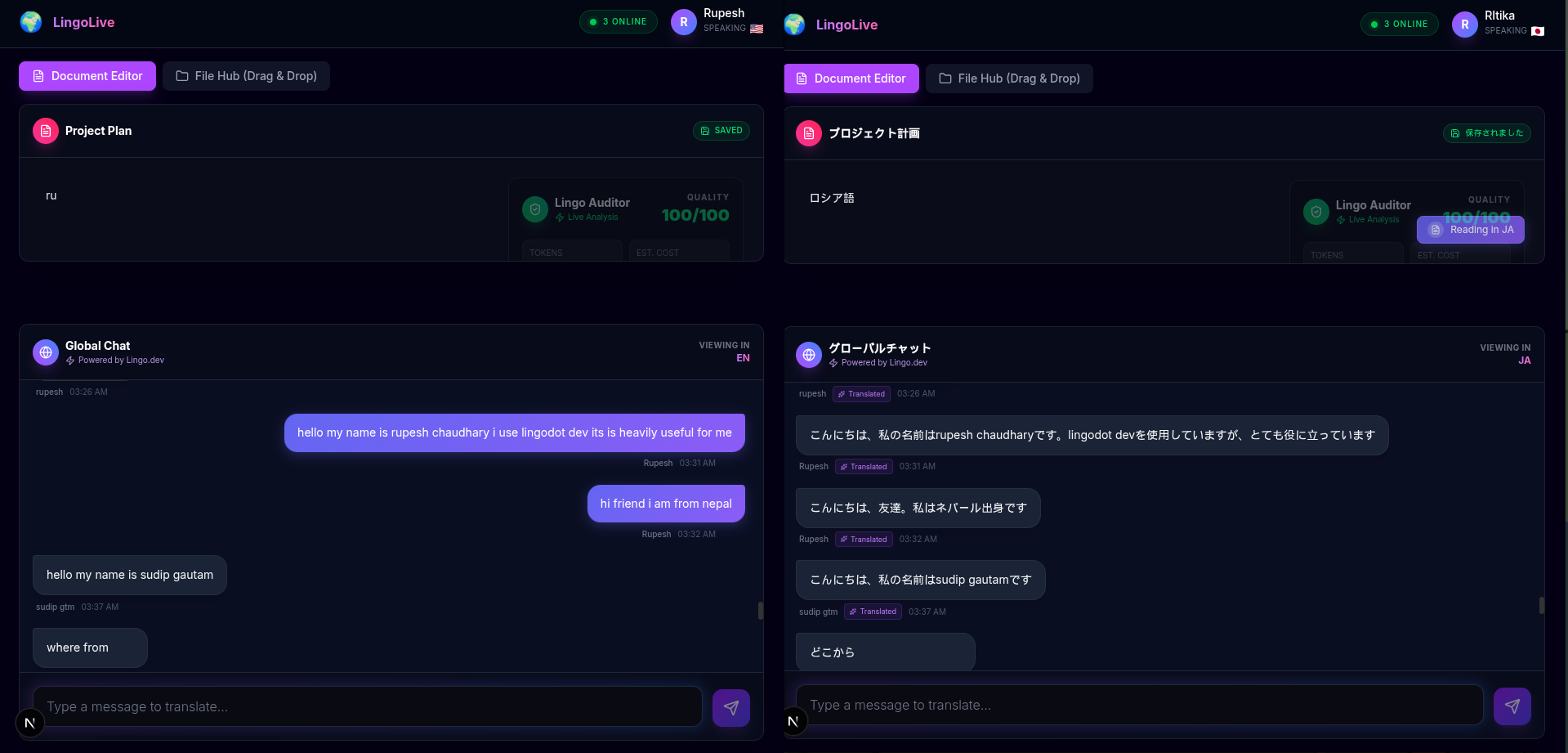 - **Zero-Latency Experience:** Messages appear instantly (Optimistic UI) while translation happens in the background. - **Context-Aware:** Uses the Lingo Engine to understand context (e.g., distinguishing "Bank" as a financial institution vs. a river bank). - **Cross-Language Support:** Users see messages in their preferred language (English, Spanish, French, German, Japanese, Nepali). ### 2. Native Text-to-Speech (TTS) - **"Listen" to any Message:** Integrated browser-native Speech Synthesis. - **Language Auto-Detection:** Automatically selects the correct voice pack (e.g., `ja-JP` for Japanese) to ensure accurate pronunciation. - **Accessibility:** Makes global communication accessible to everyone. ### 3. Developer File Hub (Drag & Drop) 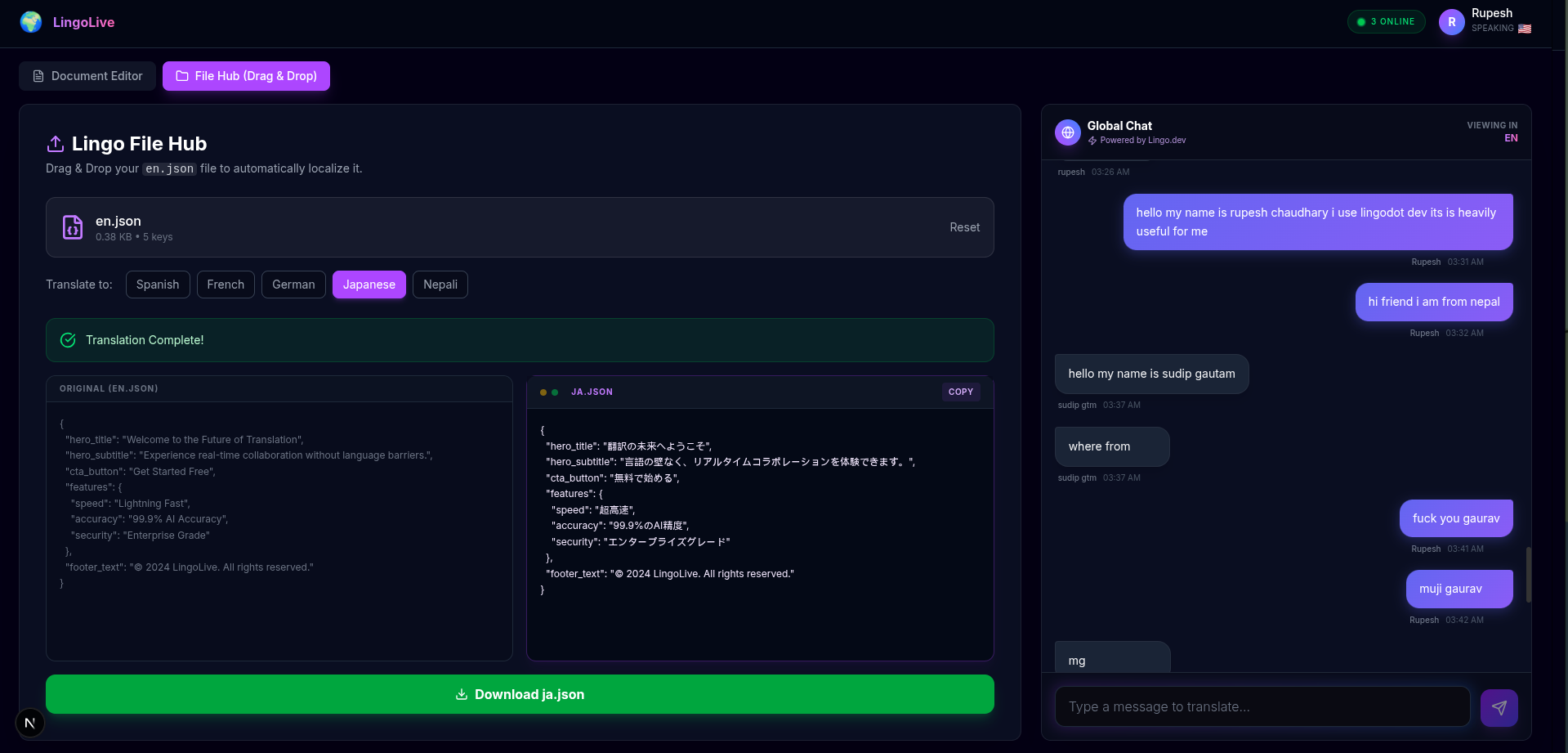 - **JSON Localization Automator:** Solves the pain of manual software localization. - **Visual Split-View:** Compare original `en.json` vs translated `es.json` side-by-side. - **Recursive Parsing:** Smartly handles nested JSON objects preventing crashes on complex config files. - **One-Click Download:** Get production-ready localized files in seconds. ### 4. Lingo Auditor (CLI & MCP) - **Intelligent Code Scanning:** A custom script (`audit-cli.js`) that scans the codebase for hardcoded strings and brand violations. - **CI/CD Integration:** Runs automatically in GitHub Actions to prevent non-localized code from hitting production. - **MCP Architecture:** Built with Model Context Protocol principles for future AI agent integration. --- ## 💻 Tech Stack - **Framework:** Next.js 14+ (App Router) - **Styling:** Tailwind CSS + Framer Motion (Glassmorphism Design) - **Backend/Realtime:** Supabase (PostgreSQL + Realtime Channels) - **Lingo.dev Ecosystem:** - **SDK:** `lingo.dev/sdk` (Real-time Context & Translation) - **CLI:** Custom `audit-cli.js` (Built with Node.js) - **MCP:** Model Context Protocol Server (`scripts/mcp-server.js`) - **GitHub Actions:** Automated CI pipeline (`.github/workflows/lingo.yml`) - **CI/CD:** GitHub Actions (Automated Audits) --- ## 🚀 Getting Started ### 1. Clone the repository ```bash git clone https://github.com/Rupe88/lingolive-hackathon.git cd lingolive-hackathon ``` ### 2. Install Dependencies ```bash npm install ``` ### 3. Environment Setup Create a `.env.local` file in the root directory: ```env NEXT_PUBLIC_LINGO_API_KEY=your_lingo_key NEXT_PUBLIC_SUPABASE_URL=your_supabase_url NEXT_PUBLIC_SUPABASE_ANON_KEY=your_supabase_anon_key ``` ### 4. Run Locally ```bash npm run dev ``` Open [http://localhost:3000](http://localhost:3000) in your browser. --- ## 🧪 How to Demo 1. **Login:** Enter your name and select a language (e.g., "Japanese"). 2. **Chat:** Type a message in English. See it appear in Japanese for the receiver. Click the "Speaker" icon to hear it. 3. **File Hub:** - Go to the **File Hub** tab. - Drag & Drop the provided `demo-assets/en.json` file. - Click **Start Localization**. - See the real-time split view comparison and download the result. --- --- ## 🎉 Fun Fact During testing, **8 of my college friends** joined the same LingoLive room. We spent hours chatting, shouting random words, and testing the limits of the translation engine (even with some *colorful* language 😂). It proved that language barriers can't stop a good time! --- ## 📄 License MIT License. Created by Rupesh for the Lingo.dev Hackathon 2026.
