KO
|
EN
gitlite — search
Search
#python
#php
#typescript
#javascript
#machine-learning
#flutter
#image-processing
#react
#backend
#frontend
#html5
#java
PixelPlurk.css
★ 30
Open GitHub ↗
像素風格噗浪佈景
Download README (.md)
Explore Similar Repositories
amazon-managed-grafana-migrator
:
CLI migration utility to migrate Grafana content to Amazon Managed Grafana
picasso
:
Cross-chain IBC Hub
cobol-fundamentals-training
:
No description available.
nolimitGPT
:
SaaS AI Chatbot and Image Generation using OpenAI, Node.js, Express, MongoDB & Stripe.
authelia-proxmox-SSO
:
Automated install for Authelia running in a container e.g. on Proxmox
// repository documentation
Was this content helpful?
★ 0
(0 ratings)
Select Rating:
★
★
★
★
★
Submit Feedback
Recent Feedback
×
Download README
Do you want to download the
README.md
file for
PixelPlurk.css
?
Download (.md)
 # PixelPlurk.css 像素風格噗浪佈景! 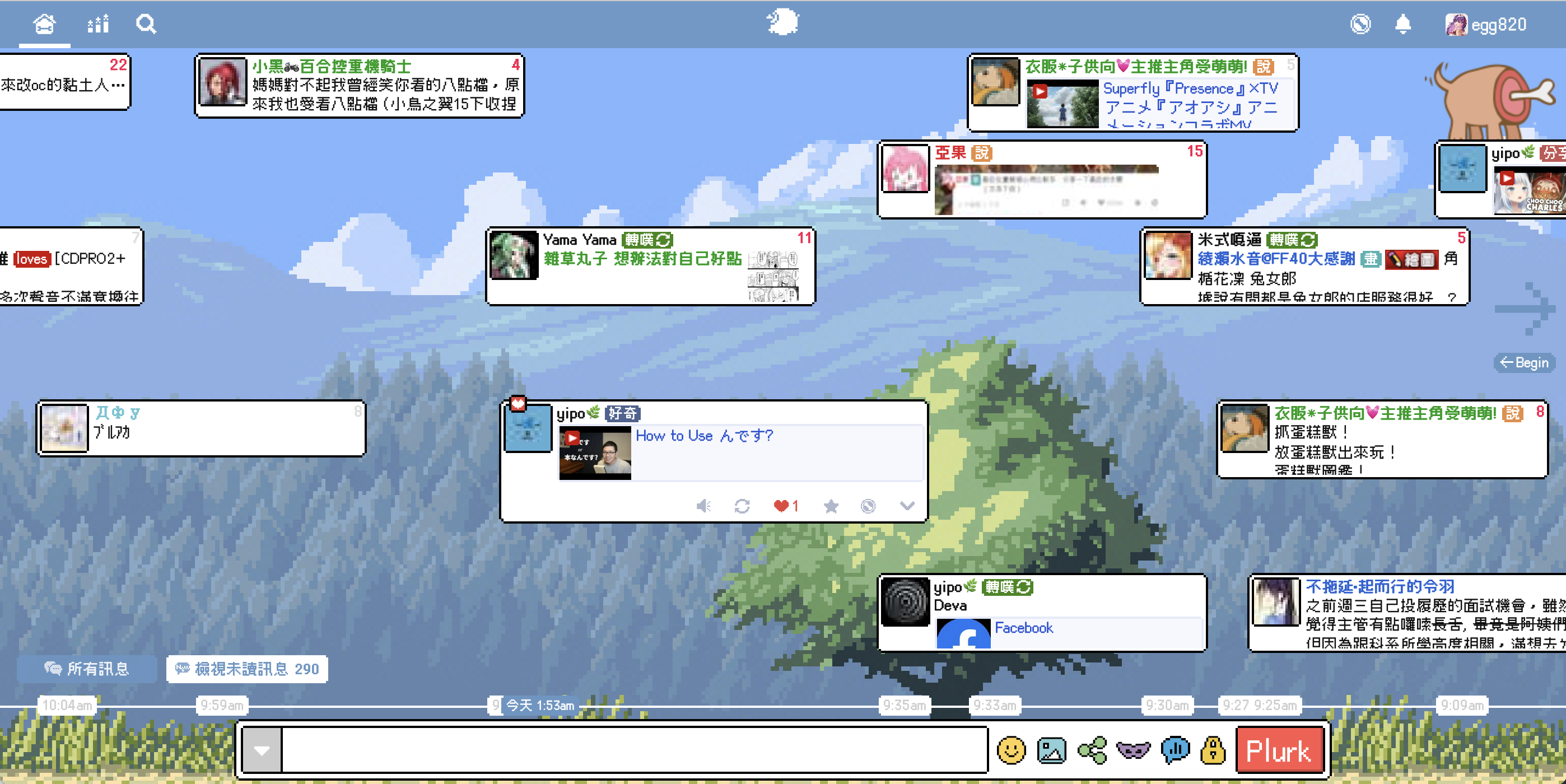 - 製作:[欸個](https://www.plurk.com/egg820/invite) - 排版建議、字型技術支援:[千秋](https://www.plurk.com/akira02/invite) ## 安裝 複製[本體CSS](https://github.com/maid-cat/PixelPlurk.css/blob/main/PixelPlurk.css),貼到 `自訂佈景` -> `自訂佈景風格` 欄位 #### 關於更新 更新版本時,可以繼續使用自己的 `/* 參數設定 */` 區塊,但請留意區塊內是否有增加新的變數,並複製到自己的參數設定中。 - 2024-04-17: ~~新增了 `/* 頂端列參數(僅 Chrome 有效)*/` 區塊,如有修改`--pixel-size`變數,需一併修改這個區塊的數值。~~ 不再需要,已移除 - 2023-04-16: 新增了 `--timeline-avatar-size` 變數 - 2023-11-25: 因應Firefox新版的改動更新了區塊語法。 如果想延用之前的設定,需將開頭的 ``` /* 參數設定 */ :is(url({)), html, :is(url(})) { ``` 更改為 ``` /* 參數設定 */ '{:is('{'), html /*}'*/ { ``` ## 特色 ### 細節 對河道、噗文、頂端列、浮動視窗、主控面板、發噗介面等,都盡可能做了完整的處理 <img src="https://images.plurk.com/2D3D03XRbHLObfoyscy5TY.png" width="40%"></img> <img src="https://images.plurk.com/32vQTHQKEe8Sm22EWTk2wh.png" width="40%"></img> <img src="https://images.plurk.com/RG7wHrSuAlW06ss0gZyc0.png" width="40%"></img> <img src="https://images.plurk.com/4TSdsZTyyjp6I1ZqMARGcY.png" width="50%"></img> ### 自訂色彩 可以依喜歡的風格,自由選擇背景色與邊線色彩 <img src="https://images.plurk.com/6zoMTZdw7DHQOzGYa0GT2C.png" width="40%"></img> <img src="https://images.plurk.com/1vaULZXh8vqCCeKOEenF2C.png" width="40%"></img> <img src="https://images.plurk.com/sbU5O7sslqxiNcmfiKZyZ.png" width="40%"></img> <img src="https://images.plurk.com/1koyae3ZxNNbyrFVQC9cKr.jpg" width="40%"></img> ## 自訂 本體 CSS 中的 `/* 參數設定 */` 區塊提供了數個設定選項,方便調整樣式: ### 邊線顏色 預設為黑色邊線,可以修改 `--pixel-color` 的數值來指定想要的顏色。例如: ``` --pixel-color: #009487; ``` ### 噗文底色 預設為白色,可以修改 `--plurk-background-color` 的數值來指定想要的底色: ``` --plurk-background-color: 色碼; ``` 有將底色更改為深色的話,為了避免文字變得不好閱讀,可以配合以下語法,將噗文及黑色暱稱的字色更改為淺色: ```css /* 噗文字色 */ :is(url({)), .text_holder, :is(url(})) { color: white; } /* 暱稱預設字色 */ :is(url({)), .name, :is(url(})) { color: #eee; } ``` ### 河道背景圖 可以修改 `--timeline-background-image` 來指定背景圖的網址: ``` --timeline-background-image: url(圖片網址); ``` ### 河道頭像尺寸 可以修改 `--timeline-avatar-size` 來指定河道上噗文頭像的尺寸。 預設值為 `40px`,想恢復為噗浪原始大小的話,可以修改成 `20px`: ``` --timeline-avatar-size: 20px; ``` ### 主控台背景色 可以加入以下語法來做設定: ```css /* 主控台背景色 */ .segment-content { background-color: 色碼; } ``` 如果是使用噗浪的經典佈景的話,可以再加入以下這段,去除主控台外圍的背景: ```css /* 去除主控台外圍背景 */ #plurk-dashboard { background: none; border: none; } ``` 也可以使用疾患大的[噗浪語法產生器](https://www.plurk.com/p/o6zwul)來做更詳細的設定。 ## 特別感謝 - [NES.css](https://nostalgic-css.github.io/NES.css/): 像素風語法參考 - [俐方體11號/Cubic 11](https://github.com/ACh-K/Cubic-11): 像素風字型 - [CSS-Tricks](https://css-tricks.com/cut-corners-using-css-mask-and-clip-path-properties/): `conic-gradient` 語法 #### 預覽圖使用的圖片素材 - [Country Side Platfformer](https://ansimuz.itch.io/country-side-platfformer) - [Post-apocalyptic background](https://pashasmith.itch.io/post-apocalyptic-background) - [Mountain Dusk Parallax background](https://ansimuz.itch.io/mountain-dusk-parallax-background) - [Free Pixel Art Winter Forest](https://edermunizz.itch.io/free-pixel-art-winter-forest) - [Free backgrounds (Pixel)](https://commodorette.itch.io/free-backgrounds)
