KO
|
EN
gitlite — search
Search
#python
#java
#python3
#arduino
#golang
#machine-learning
#rust
#html
#flask
#javascript
#seismology
#nodejs
alfred-string-multitool
★ 15
Open GitHub ↗
No description available.
Download README (.md)
Explore Similar Repositories
Second
:
No description available.
Apple-Calculator
:
No description available.
flat-learning
:
No description available.
cycript-wrapper
:
No description available.
FastBase64
:
Fast base 64 encoding/decoding using AVX extension
// repository documentation
Was this content helpful?
★ 0
(0 ratings)
Select Rating:
★
★
★
★
★
Submit Feedback
Recent Feedback
×
Download README
Do you want to download the
README.md
file for
alfred-string-multitool
?
Download (.md)
 # String Multitool [Alfred](https://www.alfredapp.com/) workflow with handy string transforming tools. ## Usage Use keyword `string` (or custom keyword) to init String Multitool. Provide string as an argument and select needed transformation from list. ## Chaining transformations You can also chain transformations by providing transformation commands after `/` char. For example: ``` Some string THat we need to use as variable Name! /lc ``` `/lc` command **l**owercases the string and then **c**amelcases it yielding the result: ``` someStringThatWeNeedToUseAsVariableName ``` ## No-arg commands (lowercased) ### Lowercase `/l` Lowercase all chars. `SAY HELLO TO MY LITTLE FRIEND! /l` → `say hello to my little friend!` ### Uppercase `/u` Uppercase all chars. `Can you hear me, Major Tom? /u` → `CAN YOU HEAR ME, MAJOR TOM?` ### Pascalcase `/p` Convert string to pascalcase and remove all non-word and non-digit chars. `The quick brown fox jumps over the lazy dog /p` → `TheQuickBrownFoxJumpsOverTheLazyDog` ### Camelcase `/c` Convert string to camelcase and remove all non-word and non-digit chars. `is error state! /c` → `isErrorState` ### Snakecase `/s` Convert string to snakecase and remove all non-word and non-digit chars. `is error state! /s` → `is_error_state` ### Trim `/t` Remove space-like chars from start and end of the string. ` Well, something is happening... /t` → `Well, something is happening...` ### Capitalize `/a` Capitalize first char of each word. `The quick brown fox jumps over the lazy dog /a` → `The Quick Brown Fox Jumps Over The Lazy Dog` ### Encode URI `/e` Encode URI by replacing certain characters with UTF-8 escape sequences. `https://mozilla.org/?x=шеллы /e` → `https://mozilla.org/?x=%D1%88%D0%B5%D0%BB%D0%BB%D1%8B` See [`encodeURI` on MDN](https://developer.mozilla.org/en-US/docs/Web/JavaScript/Reference/Global_Objects/encodeURI) ### Decode URI `/d` Inverse of `/e`. `https://mozilla.org/?x=%D1%88%D0%B5%D0%BB%D0%BB%D1%8B /d` → `https://mozilla.org/?x=шеллы` See [`decodeURI` on MDN](https://developer.mozilla.org/en-US/docs/Web/JavaScript/Reference/Global_Objects/decodeURI) ### Reverse `/r` Reverse string. ## Commands with args (uppercased) ### Slugify `/S '<replacement>'` Remove all non-word and non-digit chars and merge words with specified *replacement* string. If no *replacement* argument is provided, Slugify uses `-` char as an argument. `http://foo.bar/baz/brrr /S '+'` → `http+foo+bar+baz+brrr` ### Replace `/R '<substring>' '<replacement>'` Replace all *substring* occurences with *replacement* string. If no *replacement* argument is provided, Replace uses empty string as an argument. `I'm Will, Will's son /R 'Will' 'Bill'` → `I'm Bill, Bill's son` ### Format JSON `/J '<indent>'` Prettify your JSON and format it with custom indentation. *indent* argument takes either number of spaces or 't' for tab indentation. If no argument is provided, 2 spaces used as a default value. `{"name":"George", "occupation":"dentist"} /J '4'` ↓ ``` { "name": "George", "occupation": "dentist" } ``` 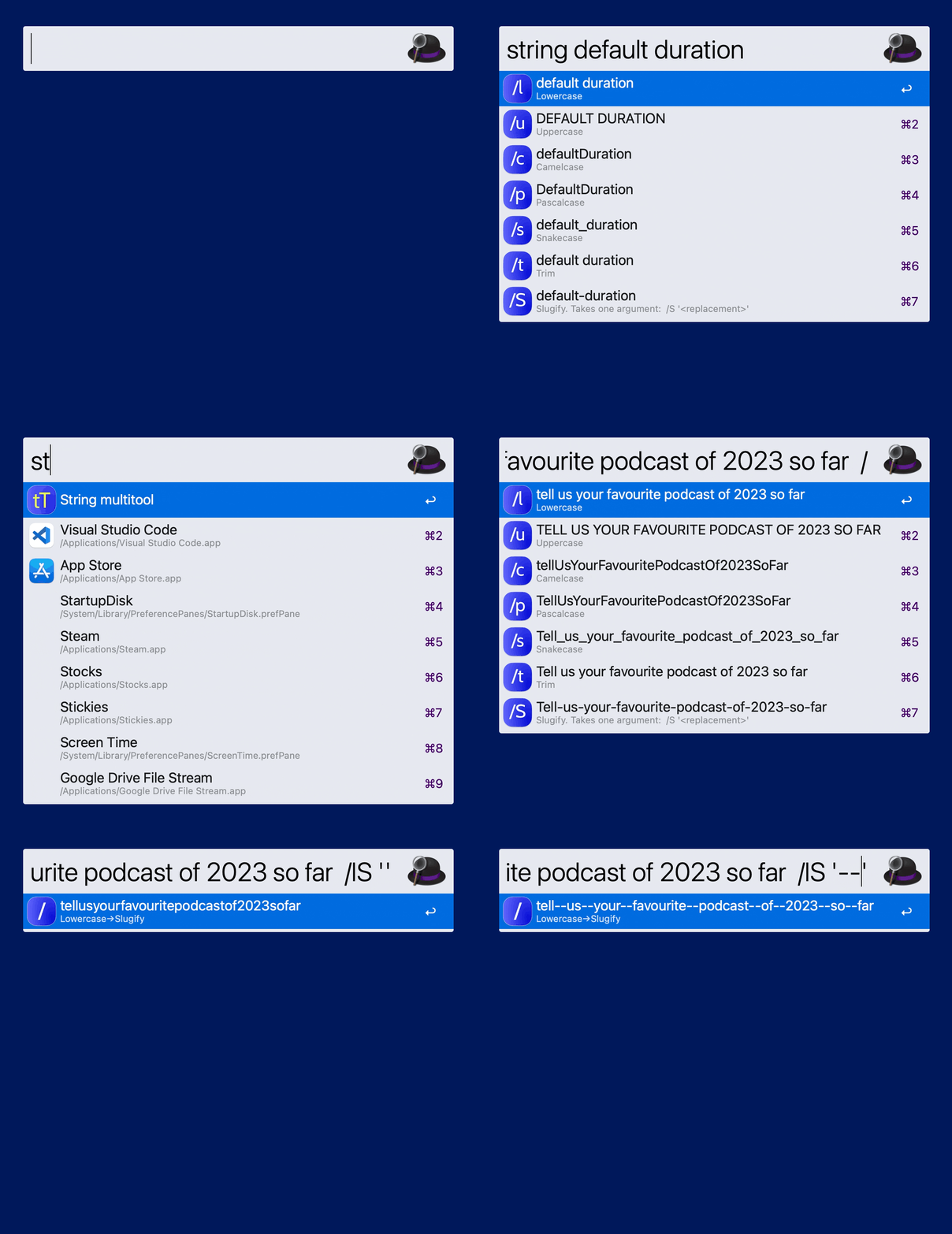 ## Check out other workflows ### [Timer](https://github.com/colomolo/alfred-timer) Set up short timers with natural language as input or use presets with custom durations. ### [Bookmark Vault](https://github.com/colomolo/alfred-bookmarks) Helps you organize your bookmarks and one-line notes as lists in Markdown format. --- <a href='https://ko-fi.com/I2I0W98PT' target='_blank'><img height='36' style='border:0px;height:36px;' src='https://storage.ko-fi.com/cdn/kofi3.png?v=3' border='0' alt='Buy Me a Coffee at ko-fi.com' /></a>
