KO
|
EN
gitlite — search
Search
#javascript
#python
#hacktoberfest
#react
#ai
#typescript
#llm
#go
#golang
#android
#machine-learning
#rust
#deep-learning
#linux
webglgears
★ 11
Open GitHub ↗
'glxgears' demo rewritten as a web app
Download README (.md)
Explore Similar Repositories
acidcam-cli
:
Command line tool for classic Acid Cam filters for Unix
NodeUML
:
UML tool for Unity3d (aka Unity)
DL
:
TensorFlow,DCGAN,VAE,LSTM,CNN,Acoustic Scene Classification
wifi-ap-positioning
:
An indoor positioning system running on WiFi access points.
L
:
Simple set notation in Kotlin
// repository documentation
Was this content helpful?
★ 0
(0 ratings)
Select Rating:
★
★
★
★
★
Submit Feedback
Recent Feedback
×
Download README
Do you want to download the
README.md
file for
webglgears
?
Download (.md)
# WebGL Gears 'glxgears' demo rewritten as an web app [Youtube video](https://www.youtube.com/watch?v=FhlCLcw2qb0) 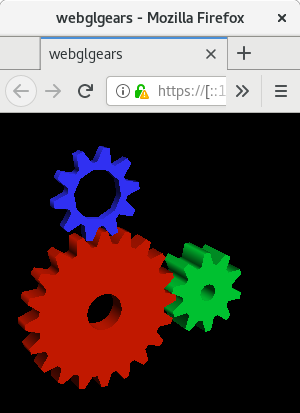 ## What? This is a WebGL 1.0 port of the infamous demo 'glxgears'. Although glxgears now remains as a relic, some people still use it today on some occasion to show off their windowing system or driver implementation. As you might have guessed, glxgears should not be used as a benchmark tool. I started this as a small artistic project in the hopes that someone would put this on their blogs as a decorative widget. OpenGL has gone through a lot for the last few decades. The way that OpenGL is used to implement glxgears got quite old. Therefore, it is important to stress that this project must not be regarded as a WebGL reference. There were many things to get around to implement glxgears with WebGL. The result should look the same whilst it is implemented not in the same way. I'm aware that there's a GLES2 port of Gears from which I could have easily port, but the gears do not look the same as good old glxgears in that version. ## How? Visit [github.io page](https://dxdxdt.github.io/webglgears/index.html) that I uploaded on my github.io. Or you could clone the repo and open `index.html` in your browser. Follow instructions there. ## Use as a Widget You can iframe the app, `webglgears.html`: ``` <iframe width='300' height='300' src="https://dxdxdt.github.io/webglgears/webglgears.html"> </iframe> ``` Or you could upload the entire project to your server. Files required to use `WebGLGears` class are: * `js/gl-matrix-min.js`: Can be linked externally. [Visit their](http://glmatrix.net/) site for more info. * `js/webglgears-min.js`
