KO
|
EN
gitlite — search
Search
#rust
#llm
#claude
#typescript
#ai
#mcp
#python
#mcp-server
#nodejs
#nextjs
#ai-agents
#claude-code
MNIST-CNN-99.5
★ 48
Open GitHub ↗
No description available.
Download README (.md)
Explore Similar Repositories
Borderlands-Commander
:
A mod for Borderlands 2 & The Pre-Sequel that provides a number of useful functions
workshop-net-core-iniciantes
:
Repositório responsável pelo workshop para aprender os principais conceitos de desenvolvimento em .NET CORE & EF
ps4ren
:
PS4REN - PS4 Remote Play Enabler
MangaViewAndroid
:
뉴토끼 / 마나토끼 앱
Xweibo
:
💊 删除所有微博痕迹
// repository documentation
Was this content helpful?
★ 0
(0 ratings)
Select Rating:
★
★
★
★
★
Submit Feedback
Recent Feedback
×
Download README
Do you want to download the
README.md
file for
MNIST-CNN-99.5
?
Download (.md)
# MNIST-CNN-99.5 I created this C program to learn CNNs and compete in Kaggle's MNIST digit classifier [competition](https://www.kaggle.com/c/digit-recognizer). This program loads Kaggle's 42000 training digit images, displays them, builds and trains a convolutional neural network, displays validation accuracy progress plots, and classifies Kaggle's 28000 test digit images. It applies data augmentation to create new training images and achieves an impressive accuracy of 99.5% placing in the top 10%. I posted a detailed report [here](https://www.kaggle.com/cdeotte/mnist-cnn-coded-in-c-0-995/). Next using TensorFlow (and the power of GPUs!) I created an ensemble of CNNs that scores 99.75% [here](https://www.kaggle.com/cdeotte/25-million-images-0-99757-mnist) placing in the top 5%. To compile this program, you must download the file `webgui.c` from [here](https://ccom.ucsd.edu/~cdeotte/webgui/webgui.tar.gz). That library creates the graphic user interface (GUI). Compile everything with the single command `gcc CNN.c webgui.c -lm -lpthread -O3`. Also download the Kaggle MNIST images [here](https://www.kaggle.com/c/digit-recognizer/data), and place `train.csv` and `test.csv` in the directory with your executable. # How to run Upon running the compiled program, your terminal window will say `webgui: Listening on port 15000 for web browser...`. Open a web browser and enter the address `localhost:15000`, and you will see the interface. (Note that you can also run this program on a remote server and enter that server's IP address followed by `:15000`) Next hit the buttons: `Load`, `Display`, `Init-Net`, `Data Augment`, `Train-Net`, and you will see the following: 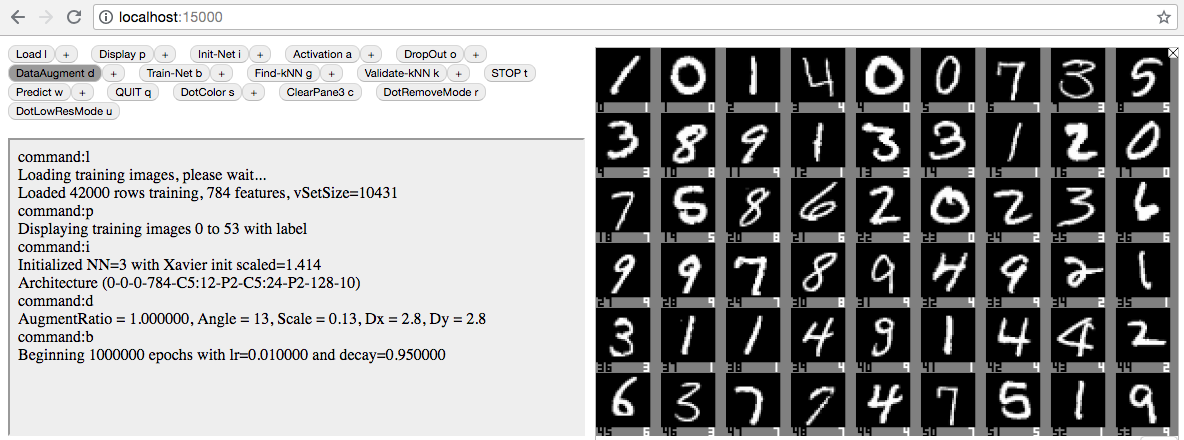 # Now be patient :-) Let the CNN train. Unfortunately I didn't implement GPU or minibatches yet, so each epoch takes a slow 4 minutes. Be patient and let it train for 75 epochs and you will see the net achieve 99.5% accuracy! 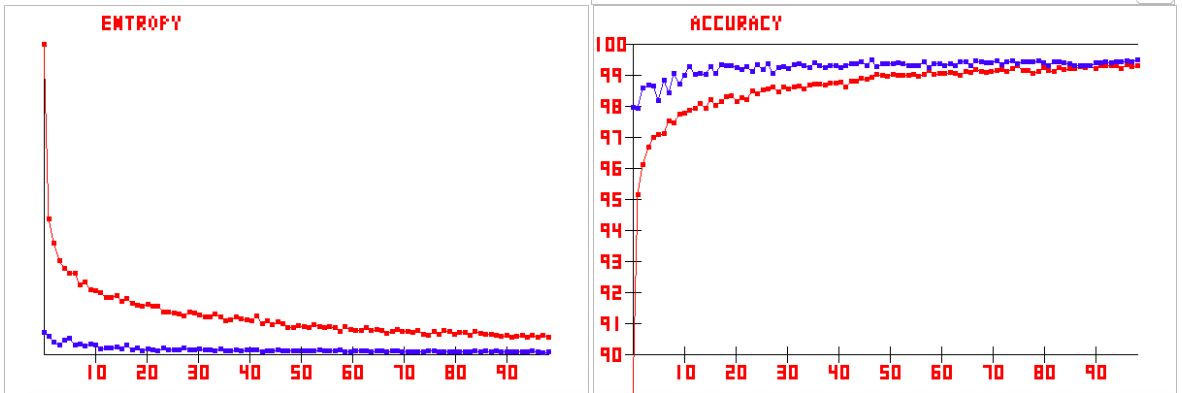 # Make predictions for Kaggle To make predictions for Kaggle, click the `+` sign next to the `Load` button and set `trainSet = 0` and select `dataFile = test.csv`. Then click `Load`. Next click `Predict` which writes `Submit.csv` to your hard drive. Upload that file to Kaggle and celebrate!  To obtain 99.75%, you must train 15 CNNs using architecture 784-C3:32-C3:32-P2-C3:64-C3:64-P2-128-10 with data augmentation 0.1 for 30 epochs and ensemble them. (Each CNN achieves 99.65% by itself.) This takes a long time without GPUs, therefore it is preferable to execute the TensorFlow code posted [here](https://github.com/cdeotte/MNIST-CNN-99.75) or [here](https://www.kaggle.com/cdeotte/25-million-images-0-99757-mnist).
