KO
|
EN
gitlite — search
Search
#javascript
#python
#hacktoberfest
#react
#ai
#typescript
#llm
#go
#golang
#android
#machine-learning
#rust
#deep-learning
#linux
sobasic
★ 19
Open GitHub ↗
No description available.
Download README (.md)
Explore Similar Repositories
leftright
:
How fast is your left / right hand?
tabulens
:
🔍📃 LLM-powered PDF Table Extractor
knotgym
:
[NeurIPS DB 2025] A gym environment for visual spatial reasoning - knot so simple :)
emby-tools
:
Emby 周边工具集:数据统计、海报生成、批量重命名、每日推荐。Vue3 + Node.js + Docker 全栈解决方案。
swift_ios_ollama_client_v3
:
No description available.
// repository documentation
Was this content helpful?
★ 0
(0 ratings)
Select Rating:
★
★
★
★
★
Submit Feedback
Recent Feedback
×
Download README
Do you want to download the
README.md
file for
sobasic
?
Download (.md)
# So Basic - Astro Blog Template Howdy! Before you read anything below, you can check out the ✨ [Live Demo](https://sobasic.netlify.app/) ✨ [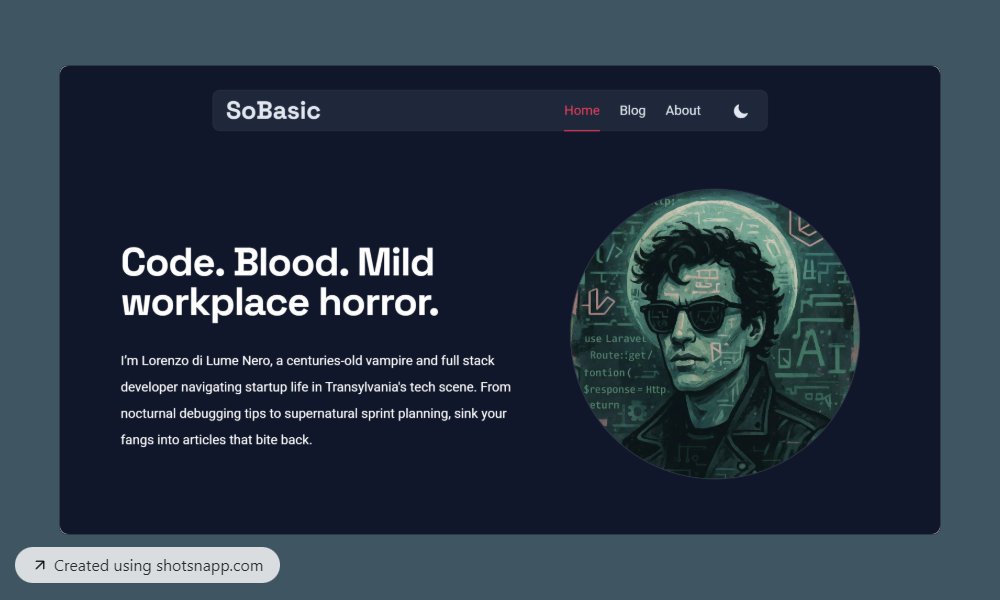](https://sobasic.netlify.app/) [](https://stackblitz.com/github/lukeska/sobasic) [](https://codesandbox.io/p/sandbox/github/lukeska/sobasic) [](https://codespaces.new/lukeska/sobasic?devcontainer_path=.devcontainer/devcontainer.json) ## 📦 Installation ### Astro installation ```sh npm create astro@latest -- --template lukeska/sobasic ``` ### Manual installation #### 1. Clone the repo ```sh git clone https://github.com/lukeska/sobasic.git my-project # or git clone https://github.com/lukeska/sobasic.git . ``` The . will clone it to the current directory so make sure you are inside your project folder first. #### 2. Install dependencies ```sh npm install ``` #### 3. Start the development server ```sh npm run dev ``` ## 🚀 Project Structure Inside of your Astro project, you'll see the following folders and files: ```text / ├── public/ │ └── favicon.svg ├── src/ │ ├── components/ │ ├── content/ │ │ └── blog/ │ ├── images/ │ ├── layouts/ │ ├── pages/ │ │ └── index.astro │ └── styles/ ├── astro.config.mjs └── package.json ``` Astro looks for `.astro` or `.md` files in the `src/pages/` directory. Each page is exposed as a route based on its file name. There's nothing special about `src/components/`, but that's where we like to put any Astro/React/Vue/Svelte/Preact components. Any static assets, like images, can be placed in the `public/` directory. ## 📰 Add your own content ### Add or change existing pages Feel free to change any of the content on the existing files in folder `src/pages/`. In this folder you can add any `.astro` file. Make sure to use `<BaseLayout> to ensure any new page looks like the rest of the site. ```html --- import BaseLayout from "../layouts/BaseLayout.astro"; --- <BaseLayout> <!-- your content here --> </BaseLayout> ``` ### Add new articles to the blog Articles for the blog can be added as `.md` or `.mdx` files inside `src/content/blog/`. Hero images for the articles can be added to `src/images/` Make sure to add the following data at the top of your file: ```html --- title: 'This is my title' description: 'This is my description' pubDate: '2025-01-02' heroImage: '../../images/article-image.jpg' featured: true --- ``` - title is the title and meta title for the article - description is used as short text in list of articles and as meta description - pubDate is the publication date, used to sort articles in lists - heroImage is optional and references an image inside `src/images/` - featured is optional. Values can be `true` or `false`. It defines if an article is visible in the `FeaturedArticles.astro` component. ### Change links in the main navigation Links in the main navigation can be changed in `src/components/Header.astro` by altering this variable: ```javascript const navItems = [ { href: "/", text: "Home", active: currentPath === "/" }, { href: "/blog", text: "Blog", active: currentPath.startsWith("/blog") }, { href: "/about", text: "About", active: currentPath.startsWith("/about") }, ]; ``` ## 🎨 Customization The primary color of this theme can be easily changed in `src/styles/global.css`. You can assign any Tailwind color to the various `color-primary-*` variables. ```css @theme { --color-primary-50: var(--color-purple-50); --color-primary-100: var(--color-purple-100); --color-primary-200: var(--color-purple-200); --color-primary-300: var(--color-purple-300); --color-primary-400: var(--color-purple-400); --color-primary-500: var(--color-purple-500); --color-primary-600: var(--color-purple-600); --color-primary-700: var(--color-purple-700); --color-primary-800: var(--color-purple-800); --color-primary-900: var(--color-purple-900); --color-primary-950: var(--color-purple-950); ... } ``` ## 👀 Want to learn more? Feel free to check [Astro's documentation](https://github.com/withastro/astro) or jump into Astro's [Discord server](https://astro.build/chat). ## Images credits Photos by <a href="https://unsplash.com/@josepmartins?utm_content=creditCopyText&utm_medium=referral&utm_source=unsplash">Josep Martins</a> on <a href="https://unsplash.com/photos/white-smoke-0-c5T6meRuk?utm_content=creditCopyText&utm_medium=referral&utm_source=unsplash">Unsplash</a>
