KO
|
EN
gitlite — search
Search
#hacktoberfest
#javascript
#python
#machine-learning
#css
#html
#typescript
#home-assistant
#deep-learning
#portfolio
#hacktoberfest2021
#vuejs
SparkML
★ 71
Open GitHub ↗
Spark ML with pyspark
Download README (.md)
Explore Similar Repositories
customer_churn_prediction
:
零售电商客户流失模型,基于tensorflow,xgboost4j-spark,spark-ml实现LR,FM,GBDT,RF,进行模型效果对比,离线/在线部署方式总结
mlflow-spark-summit-2019
:
MLFlow Spark Summit 2019 Presentation
US-Stock-Prediction-Using-ML-And-Spark
:
Predict stock price based on financial news feeds
spark-training
:
Repository used for Spark Trainings
ai-models-serialization
:
AI模型序列化总结
// repository documentation
Was this content helpful?
★ 0
(0 ratings)
Select Rating:
★
★
★
★
★
Submit Feedback
Recent Feedback
×
Download README
Do you want to download the
README.md
file for
SparkML
?
Download (.md)
# SparkML Take your first steps with Spark ML and pyspark. Gain understanding of Spark ML with unique hands-on experience with the Spark ML First steps course! # Getting started: Make sure you have docker installed on your device. 1. Run docker 2. Run the next command: `docker run -it -p 8888:8888 jupyter/pyspark-notebook:spark-2` This will download the image of juypter notebook with Apache Spark 2.4.5 version You will get similar response back: ```bash Executing the command: jupyter notebook [I 15:49:48.293 NotebookApp] Writing notebook server cookie secret to /home/jovyan/.local/share/jupyter/runtime/notebook_cookie_secret [I 15:49:48.887 NotebookApp] JupyterLab extension loaded from /opt/conda/lib/python3.7/site-packages/jupyterlab [I 15:49:48.888 NotebookApp] JupyterLab application directory is /opt/conda/share/jupyter/lab [I 15:49:48.891 NotebookApp] Serving notebooks from local directory: /home/jovyan [I 15:49:48.891 NotebookApp] The Jupyter Notebook is running at: [I 15:49:48.891 NotebookApp] http://0a3437183fee:8888/?token=43143a485357351ef522a1840f8c8c141a1be2bcf5f9b4de [I 15:49:48.892 NotebookApp] or http://127.0.0.1:8888/?token=43143a485357351ef522a1840f8c8c141a1be2bcf5f9b4de [I 15:49:48.892 NotebookApp] Use Control-C to stop this server and shut down all kernels (twice to skip confirmation). [C 15:49:48.896 NotebookApp] To access the notebook, open this file in a browser: file:///home/jovyan/.local/share/jupyter/runtime/nbserver-8-open.html Or copy and paste one of these URLs: http://0a3437183fee:8888/?token=43143a485357351ef522a1840f8c8c141a1be2bcf5f9b4de or http://127.0.0.1:8888/?token=43143a485357351ef522a1840f8c8c141a1be2bcf5f9b4de ``` **Getting an error about AMD?** You can leverage this image: `docker run -p 8888:8888 sakuraiyuta/pyspark-notebook` Note! with this image, you are running Spark 3.1.1 that has slightly different Spark API support. You will need to search the web for exceptions when those show up. We will be working on a 3.1.1 tutorial version soon. Thank you, and apologies for any inconvenience. 3. Copy the **LAST** url with the `token=` , it will looks something like this, but you will have your own token: ```bash http://127.0.0.1:8888/?token=43143a485357351ef522a1840f8c8c141a1be2bcf5f9b4de ``` past it in your browser. This will be your jupyter work environment for the course. 4. Clone this repo or download the zipped files - `notebook.zip` and `detecting-twitter-bot-data.zip` 5. Extracte the files(unzip) and upload the `Exercise`, `Solution` and `detecting-twitter-bot-data` files into Jupyter using the upload button. Use the upload button like in the photo: 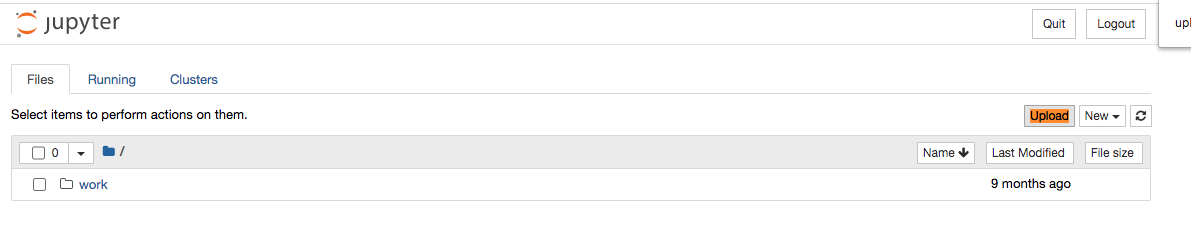 6. Follow instructions and write your findings in chat! # Notes: Exercise folder containes the exercise chapters. Solution folder containes the solution for the exercise. It's recommend to have both in your Jupyter environment before course starts. # License: This exercise is part of the O'Reilly Online Course: Spark ML First Steps produced and delivered by Adi Polak. If you would like to use it outside of the online course scope, like sharing with you colleagues, etc. Please contact Adi Polak on [Twitter](https://twitter.com/AdiPolak).
