KO
|
EN
gitlite — search
Search
#typescript
#ai-agents
#deepseek-harness
#dsh-plugin
#open-source
#ai
#cli
#dsh
#claude-code
#codex
#developer-tools
#react
taggingJS
★ 924
Open GitHub ↗
jQuery plugin to tagging like a charm!
Download README (.md)
Explore Similar Repositories
django-react-tyadmin
:
支持Python3.9,Django4! 类似 xadmin 的基于Model 快速生成前后台管理增删改查,筛选,搜索的后台管理自动化工具。Antd 界面好看现代化!前后端分离!无损二次开发!由Django Restful Framework 和 Ant Design Pro V4 驱动
production-grade-agentic-system
:
Core 7 layers of production grade agentic system
webpack-obfuscator
:
javascript-obfuscator plugin for Webpack
asyncio
:
asyncio is a c++20 library to write concurrent code using the async/await syntax.
binance
:
Node.js & JavaScript SDK for Binance REST APIs & WebSockets, with TypeScript & browser support, integration tests, beautification & more.
// repository documentation
Was this content helpful?
★ 0
(0 ratings)
Select Rating:
★
★
★
★
★
Submit Feedback
Recent Feedback
×
Download README
Do you want to download the
README.md
file for
taggingJS
?
Download (.md)
# taggingJS # [](https://travis-ci.org/sniperwolf/taggingJS) ## jQuery plugin to tagging like a charm! ## **taggingJS** is a jQuery plugin to create an high customizable front-end tag system. It is like `5 kb` and [support major browsers](#browser-support) in the world! Actual version is [`1.3.3`](https://github.com/sniperwolf/taggingJS/releases/tag/v1.3.3). 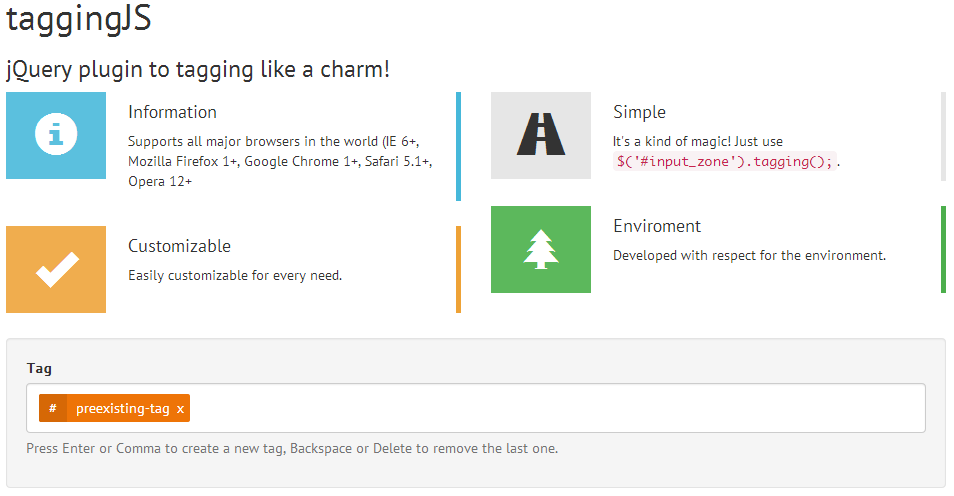 ## Getting Started ## You can find a working example in [Codepen.io](http://codepen.io/sniperwolf/pen/geFxq/) or in the project's [GitHub page](http://sniperwolf.github.io/taggingJS/). ### Simplest ### 1. **Download** the `tagging.min.js` file from this repository; 2. **Include** `<script src="path/to/tagging.min.js"></script>` to the bottom of your page; 3. *Optional* - Include the basic CSS tag style `<link href="tag-basic-style.css" rel="stylesheet">` to the `<head>` of your page; 4. **Add** to your page something like `<div data-tags-input-name="tag" id="tagBox">preexisting-tag</div>`; 5. **Add** to your main JavaScript file `$("#tagBox").tagging();`; The `data-tags-input-name="tag"` is the `name` attribute used by each input inside the `tagBox`. ### Manipulate tags with methods ### Here there are some **common pattern** to manipulate tags inside the tag box: **N.B.**: `$tag_box` is the tag box object. To get it: ```js var t, $tag_box; // We call taggingJS init on all "#tag" divs t = $( "#tag" ).tagging(); // This is the $tag_box object of the first captured div $tag_box = t[0]; ``` #### Get all tags (object) ```js // To get all tags inside tag box as an array of String $tag_box.tagging( "getTags" ); >>> ["preexisting-tag", "another-tag"] // To get all tags inside tag box as an array of jQuery Object $tag_box.tagging( "getTagsObj" ); >>> [x.fn.x.init[1], x.fn.x.init[1]] ``` #### Add new tags ```js // To add a tag with "A new tag added via JS" as text $tag_box.tagging( "add", "A new tag added via JS" ); >>> true // To add two tag, one with "tag 1" and the other with "tag 2" as text $tag_box.tagging( "add", ["tag 1", "tag 2"] ); >>> ["tag 1", "tag 2"] ``` #### Remove a tag ```js // To remove a tag with text "A new tag added via JS" as text $tag_box.tagging( "remove", "A new tag added via JS" ); >>> $_obj // To remove two tag, one with "tag 1" and the other with "tag 2" as text $tag_box.tagging( "remove", ["tag 1", "tag 2"] ); >>> [$_obj] // Suppose that $tag is the jQuerify object of a tag inside the tag box, you can also do $tag_box.tagging( "remove", $tag] ); >>> $_obj ``` #### Remove all tags ```js // To remove all tags $tag_box.tagging( "removeAll" ); // or $tag_box.tagging( "reset" ); ``` #### Get Special Keys ```js // To get special Keys without distinctions $tag_box.tagging( "getSpecialKeys" ); >>> Object {comma: 188, enter: 13, spacebar: 32, del: 46, backspace: 8} // To get special Keys with distinctions $tag_box.tagging( "getSpecialKeysD" ); >>> Object {add: Object, remove: Object} ``` #### Add or Remove a Special Key ```js // To add the "left arrow" as a special key to add a new tag $tag_box.tagging( "addSpecialKeys", [ "add", { left_arrow: 37 } ] ); // To add the "right arrow" as a special key to remove a tag $tag_box.tagging( "addSpecialKeys", [ "remove", { right_arrow: 39 } ] ); // To remove the "right arrow" as a special key $tag_box.tagging( "removeSpecialKeys", ["remove", 39] ); ``` #### Disable taggingJS ```js // To disable taggingJS $tag_box.tagging( "destroy" ); ``` #### Empty the `type_zone` ```js // To disable taggingJS $tag_box.tagging( "emptyInput" ); ``` #### Get or Set the value of `type_zone` ```js // To set "value" as value of the input $tag_box.tagging( "valInput", "value" ); // To get the value of the input $tag_box.tagging( "valInput" ); ``` #### Trigger Focus event the `type_zone` ```js // To Trigger Focus event the input $tag_box.tagging( "focusInput" ); ``` #### Detect when a Tag is Added or Removed ```js // Execute callback when a tag is added $tag_box.on( "add:after", function ( el, text, tagging ) { console.log( "Added tag: ", text ); }); // Execute callback when a tag is removed $tag_box.on( "remove:after", function ( el, text, tagging ) { console.log( "Removed tag: ", text ); }); ``` Please, see all [Available Methods](#available-methods). ### Customize ### There are **several ways** to customize the default behavior of taggingJS: 1. Use a JavaScript `custom_options` object to customize the global taggingJS behavior (see [First Way](#first-way---global-object)); 2. Use `data` attributes in the `tagBox` HTML Markup (see [Second Way](#second-way---data-attributes)); 3. Use a combination of the first two way (see [Third Way](#third-way---mixed-way)); **N.B.**: Be careful! `data` attributes have an higher priority than the `custom_options` object, because each `data` attribute overwrite the global behavior. In other words, the global settings work for all tags box captured, unless in these are specified `data` attributes (*which may change the behavior*). #### First Way - Global Object #### 1. **Create a custom options** `object`, like this `my_custom_options` (see [Available Options](#available-options)): ```js var my_custom_options = { "no-duplicate": true, "no-duplicate-callback": window.alert, "no-duplicate-text": "Duplicate tags", "type-zone-class": "type-zone", "tag-box-class": "tagging", "forbidden-chars": [",", ".", "_", "?"] }; ``` 2. **Create a tag box** (or multiple tag box) like this: ```html <div id="tagBox">preexisting-tag</div> ``` 3. **Add** to your main JavaScript file: ```js $("#tagBox").tagging( my_custom_options ); ``` In this way, we customize the **global behavior** of taggingJS for **all tag box** caught with selector. #### Second Way - Data Attributes #### 1. **Create a tag box** with some `data` attributes, like this (see [Available Options](#available-options)): ```html <div data-no-duplicate="true" data-pre-tags-separator="\n" data-no-duplicate-text="Duplicate tags" data-type-zone-class="type-zone" data-tag-box-class="tagging" data-edit-on-delete="true" id="tagBox">preexisting-tag</div> ``` 2. **Add** to your main JavaScript file: ```js $("#tagBox").tagging(); ``` **N.B.**: Use data method with `no-duplicate-callback` and `forbidden-chars` can cause some problems. Avoid it. #### Third Way - Mixed Way #### In this way, we **mix** data attributes and options object to customize taggingJS behavior for each tag box. 1. **Create a tag box** with some `data` attributes, like this: ```html <div class="tag-box" data-no-duplicate="true" data-tags-input-name="tag" id="tagBox1">preexisting-tag</div> ``` 2. **Create *another* tag box** with no `data` attributes: ```html <div id="tagBox1" class="tag-box">preexisting-tag</div> ``` 3. **Create a custom options** `object`, like this `my_custom_options` (see [Available Options](#available-options)): ```js var my_custom_options = { "no-duplicate": false, "tags-input-name": "taggone", "edit-on-delete": false, }; ``` 4. **Add** to your main JavaScript file ```js $(".tag-box").tagging( my_custom_options ); ``` Now you may see that: * The `#tagBox1` has a behavior that overwrite some `my_custom_options` options: - Does not accept duplicate tag (*for the respective `data` attribute*); - For each tag, it has `tag` as input name (*for the respective `data` attribute*); - On delete, the tag is completely removed (*for the `my_custom_options`*); * The `#tagBox2` has a behavior dictated only by `my_custom_options`: - Accept duplicate tag (*for the `my_custom_options`*); - For each tag, it has `tag` as input name (*for the `my_custom_options`*); - On delete, the tag is completely removed (*for the `my_custom_options`*); ## Available Options ## Below there are the **available options to customize taggingJS** with `type`, a little description and the default value: | Option | Type | Default | Description | | ------ | ---- | ------- | ----------- | | **case-sensitive** | `Boolean` | `false` | If `false`, all text is treated like lowercase. | | **close-char** | `String` | `"×"` | Single Tag close character. | | **close-class** | `String` | `"tag-i"` | Single Tag close class. | | **edit-on-delete** | `Boolean` | `true` | `true` to edit tag that has just been removed from tag box. | | **forbidden-chars** | `Array` | `["," , ".", "_", "?"]` | Array of forbidden characters. | | **forbidden-chars-callback** | `Function` | `window.alert` | Function to call when is detected a forbidden character. | | **forbidden-chars-text** | `String` | `"Forbidden character:"` | Basic text passed to `forbidden-chars-callback`. | | **forbidden-words** | `Array` | `[]` | Array of forbidden words. | | **forbidden-words-callback** | `Function` | `window.alert` | Function to call when is detected a forbidden words. | | **forbidden-words-text** | `String` | `"Forbidden word:"` | Basic text passed to `forbidden-words-callback`. | | **no-backspace** | `Boolean` | `false` | Backspace key remove last tag by default, `true` to avoid that. | | **no-comma** | `Boolean` | `false` | Comma `","` key add a new tag by default, `true` to avoid that. | | **no-del** | `Boolean` | `false` | Del key remove last tag by default, `true` to avoid that. | | **no-duplicate** | `Boolean` | `true` | If `true`, there will be no duplicate tag's name in the tag box. | | **no-duplicate-callback** | `Function` | `window.alert` | Function to call when is detected a duplicate tag. | | **no-duplicate-text** | `String` | `"Duplicate tag:"` | Basic text passed to `no-duplicate-callback`. | | **no-enter** | `Boolean` | `false` | Enter key add a new tag by default, `true` to avoid that. | | **no-spacebar** | `Boolean` | `false` | Spacebar key add a new tag by default. `true` to avoid that.| | **pre-tags-separator** | `String` | `", "` | This is used to `split` the initial text and add `preexistint-tag`. By default, you must put new tags using a comma and a space (`", "`). | | **tag-box-class** | `String` | `"tagging"` | Class of the tag box. | | **tag-box-editable-class** | `String` | `"editable"` | Class of the tag box when editable, used together with tags-limit option for css targeting. | | **tag-char** | `String` | `"#"` | Single Tag char. | | **tag-class** | `String` | `"tag"` | Single Tag class. | | **tag-on-blur** | `Boolean` | `true` | If `true`, clicking away from the `$type_zone` will add a new tag. | | **tags-input-name** | `String` | `"tag"` | Name to use as `name=""` in single tags' input. By default, all tags being passed as array like `tag[]`. | | **tags-limit** | `Integer` | `0` | Limit the number of tags that can be added, zero for no limit. | | **type-zone-class** | `String` | `"type-zone"` | Class of the type-zone. | ## Available Methods ## Below there are the **available methods of taggingJS** with a little description, the argument that it can take and the return `type`: | Method | Description | Argument | Return | | ------ | ----------- | -------- | ------ | | **add( `text` or `[text]` )** | Add a new tag. | A `String` (or an `Array` of `String`) to add as tag, if `null` we get the content of tag box `type_zone`. | `Boolean` or `Funtion` | | **add:after( `function` )** | Execute the function after add a Tag. | Depends on the `function` used as callback. | `Generic` | | **addSpecialKeys( `[ "type", obj ]` )** | Add a special keys to add or remove a tag. | `Array` - Where `"type"` is `"add"` or `"remove"`, `obj` is like `{ key_name: key_code }` (it can be also an `Array` of `obj`). | A `String` for error or `Object` Actually `"type"_key` (`add_key` or `remove_key`). | | **destroy()** | Remove `type_zone`, all tags and other things. | `void` | `Boolean` | | **emptyInput()** | Empty tag box's `type_zone`. | `void` | `$_obj` - The jQuerified `type_zone` itself. | | **focusInput()** | Trigger focus on tag box's `type_zone`. | `void` | `$_obj` - The jQuerified `type_zone` itself. | | **getDataOptions()** | Get Data attributes custom options. | `void` | `Object` - tag box data attributes custom options. | | **getSpecialKeys()** | Return all special keys inside an object (without distinction) | `void` | `Object` - All tags as member of strings. | | **getSpecialKeysD()** | Return all special keys inside an object (with distinction) | `void` | An `Object` with an `add` and `remove` properties. | | **getTagsObj()** | Return all tags as object | `void` | `Array` - All tags as member of objects. | | **init()** | Init method to bootstrap all things | `void` | `$_obj` - The jQuerify tag box. | | **refresh( `text` )** | Remove and insert all tag | A `String` with all tags separated by `pre-tags-separator` option value (if `null`, we call `getTags` method) | `Boolean` | | **remove( `text` or `$_obj` )** | Remove last tag or the specified ones in tag box's `type_zone`. | A `String` or `$_obj` (or an `Array` of them) of the tag to remove. | A `String` with error message or `$_obj` of the removed tag. | | **remove:after( `function` )** | Execute the function after remove a Tag. | Depends on the `function` used as callback. | `Generic` | | **removeAll()** | Alias of reset | `void` | `Array` - All removed tags. | | **removeSpecialKeys( `[ "type", obj ]` )** | Remove a special key . | `Array` - Where `"type"` is `"add"` or `"remove"`, `obj` is like `{ key_name: key_code }` (it can be also an `Array` of `obj`). | `Object` - Actually `"type"_key` (`add_key` or `remove_key`). | | **reset()** | Remove all tags from tag box's `type_zone` | `void` | `Array` - All removed tags. | | **valInput( `text` )** | Get or set the tag box `type_zone`'s value | A `String` to put as tag box `type_zone`'s value. | The value `String` or `$_obj` of tag box's `type_zone`. | You can find example [here](#manipulate-tags). ## Contribute ## ### Set Up nodeJS and Grunt ### 1. Fork the repository; 2. Open a shell in project's directory; 3. Type `npm install` (make sure you have installed [nodeJS](http://nodejs.org)); 4. Type `grunt` to execute the default script (without minification), `grunt dist` to also minify the script (make sure you have installed [Grunt](http://gruntjs.com)). ### JavaScript Style Guide ### I follow the [jQuery's JavaScript style guide](https://contribute.jquery.org/style-guide/js/), please follow it you too :D Also take a look to [IdiomaticJS](https://github.com/rwaldron/idiomatic.js/) (**Principles of Writing Consistent, Idiomatic JavaScript**). ## Requirements ## - **jQuery** (`1.5.X` or more, also `2.X` works); ## Browser Support ## Supports all major browsers in the world (`IE 6+`, `Mozilla Firefox 1+`, `Google Chrome 1+`, `Safari 5.1+`). ## License ## (C) Fabrizio Fallico 2014, released under the [MIT license](LICENSE.md). ## Changelog (v1.3.X) ## ### 1.3.3 - [Oct 24, 2014] * Now you can add tags clicking away from the `$type_zone` (see [Available Options](#available-options)). * Fix [#22](https://github.com/sniperwolf/taggingJS/issues/22), Fix [#24](https://github.com/sniperwolf/taggingJS/issues/24), Fix [#26](https://github.com/sniperwolf/taggingJS/issues/26), Fix [#28](https://github.com/sniperwolf/taggingJS/issues/28) issues. ### 1.3.1 - [Apr 28, 2014] * Radically changed the architecture of the plugin. Now we are more flexible to changes and pull requests. * Added basic methods. * Now you can add (and remove) custom special keys to add or remove tags (see [Available Methods](#available-methods)). * Fix [#6](https://github.com/sniperwolf/taggingJS/issues/6), [#8](https://github.com/sniperwolf/taggingJS/issues/8), [#16](https://github.com/sniperwolf/taggingJS/issues/16), [#17](https://github.com/sniperwolf/taggingJS/issues/17), [#19](https://github.com/sniperwolf/taggingJS/issues/19) issues.
