KO
|
EN
gitlite — search
Search
#ios
#swift
#react
#python
#javascript
#translation
#android
#laravel
#game
#php
#blog
#screenshot
ldap-explorer
★ 38
Open GitHub ↗
LDAP client for VS Code
Download README (.md)
Explore Similar Repositories
qn-oss
:
QuickNode Open Source
DPA
:
[CVPR 2024] Dual Prototype Attention for Unsupervised Video Object Segmentation
hoobank-landingpage
:
Modern UI/UX Landing Page using React.js & Tailwind CSS
ggcache
:
FAST AF F
acoustic-model-new
:
No description available.
// repository documentation
Was this content helpful?
★ 0
(0 ratings)
Select Rating:
★
★
★
★
★
Submit Feedback
Recent Feedback
×
Download README
Do you want to download the
README.md
file for
ldap-explorer
?
Download (.md)
# [LDAP Explorer](https://marketplace.visualstudio.com/items?itemName=fengtan.ldap-explorer) [](https://github.com/fengtan/ldap-explorer/actions/workflows/build.yml) [LDAP](https://en.wikipedia.org/wiki/Lightweight_Directory_Access_Protocol) client for [VS Code](https://code.visualstudio.com/). 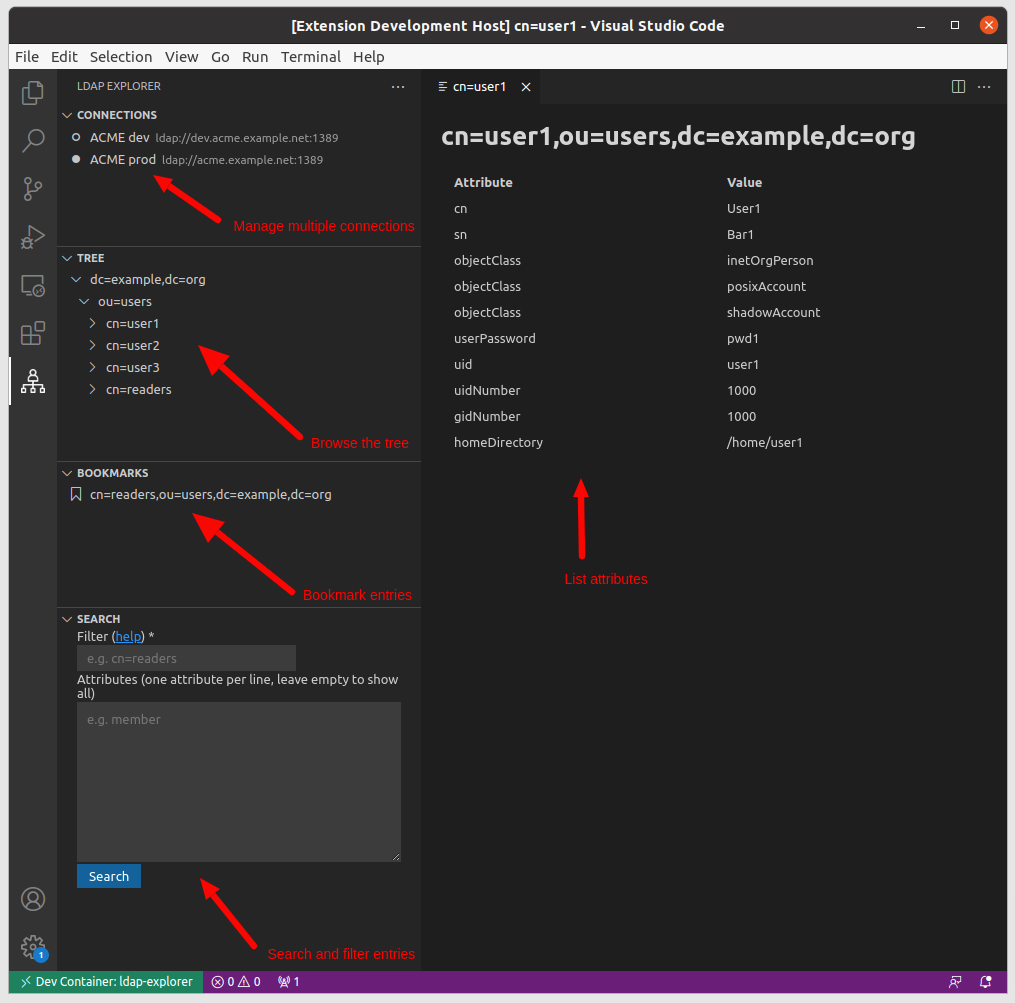 ## Features * **Browse the tree** - Explore how the [DIT](https://en.wikipedia.org/wiki/Directory_information_tree) is structured and discover LDAP entries in an intuitive interface * **List attributes** - Find out about LDAP attributes without writing search filters * **Search and filter** - Conveniently search for LDAP entries directly from VS Code * **Export LDAP entries as CSV** - Share and analyze LDAP results using a standard CSV format * **Manage bookmarks** - Bookmark LDAP entries you often need to check or located in awkward places * **Support for multiple connections** - Manage multiple LDAP connections, such as a test and a production connections * **Support for environment variables** - Easy integration with containers * **Secure credentials** - Bind passwords may be stored encrypted in secret storage, or not stored at all and requested at connection time ## Demo See [this animation](screenshots/anim.gif) for a demo. ## Installation * Open VS Code * Open the [extension view](https://code.visualstudio.com/docs/editor/extension-marketplace) by hitting `Ctrl+Shift+X` (or `Cmd+Shift+X`) and install [LDAP Explorer](https://marketplace.visualstudio.com/items?itemName=fengtan.ldap-explorer) * Alternatively, hit `Ctrl+P` (or `Cmd+P`) and type `ext install fengtan.ldap-explorer` ## Usage ### Connecting to an LDAP server 1. Open the **LDAP Explorer** view from the [activity bar](https://code.visualstudio.com/docs/getstarted/userinterface) 2. Under panel **Connections**, click the button **Add new connection** 3. Fill in the connection settings (leave **Bind DN** and **Bind Password** empty to bind as anonymous) 4. Under panel **Connections**, click on the connection to activate it 5. Now you may browse the tree, manage bookmarks and run search queries from the **Tree**, **Bookmarks** and **Search** panels, respectively ### TLS A fieldset **TLS options** shows up if: - The connection's protocol is set to **ldaps** ; or - The connection's protocol is set to **ldap** and the checkbox **StartTLS** is checked If your server's certificate is self-signed then you may want to list your root Certificate Authority in the view **Trusted CA Certificates**. If your server is multi-homed then you may want to set the connection's **Server Name Indication (SNI)** field to the host being connected to (it should be a host name, not an IP address). Leave this field empty if the certificate matches the host name. The [opensslutils](https://marketplace.visualstudio.com/items?itemName=ffaraone.opensslutils) extension comes with a handy command to inspect the contents of a certificate, for instance if you need to confirm that the certificate's Common Name (CN) matches the host name. As a last resort uncheck **Verify certificate** to skip any certificate verification (not recommended). 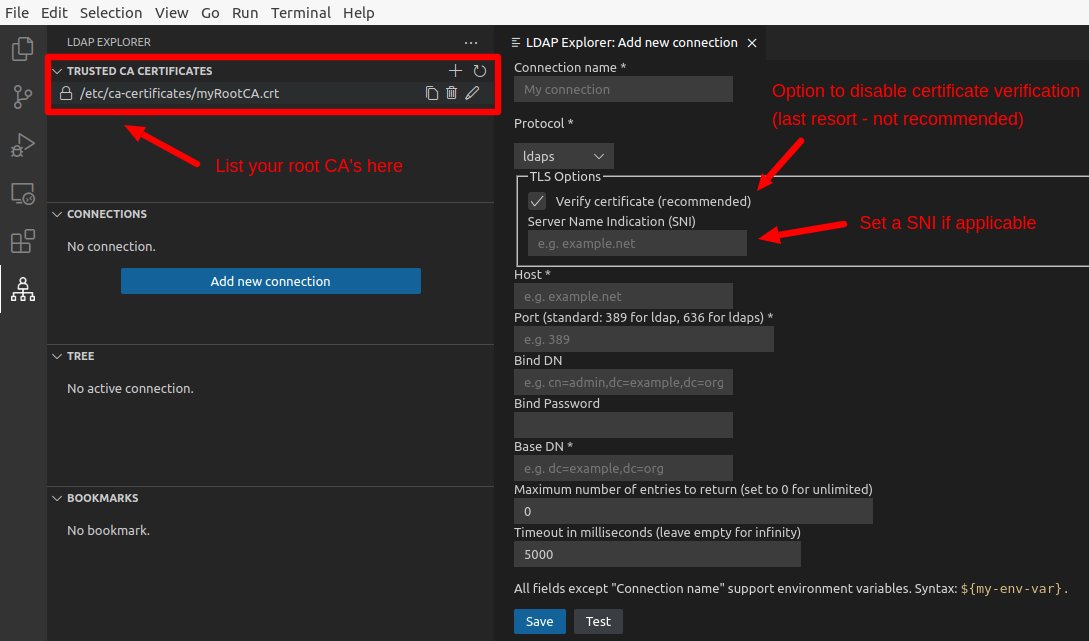 ### CSV export When listing LDAP entries, a button labeled **Export CSV** is provided at the bottom of the page and allows to export the contents as CSV: 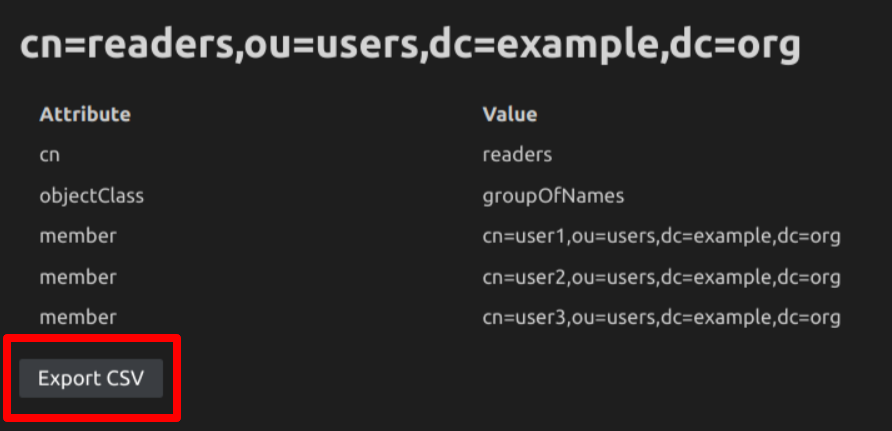 ## Commands This extension contributes the following commands: * **LDAP Explorer: Add new Connection** * **LDAP Explorer: Edit Connection** * **LDAP Explorer: Delete Connection** * **LDAP Explorer: Set active Connection** - An active connection is required for the Tree, Bookmarks and Search views to be functional * **LDAP Explorer: Set no active Connection** - Clears currently active connection, if any * **LDAP Explorer: Refresh** - Refreshes the Trusted CA Certificates, Connections, Tree and Bookmarks views * **LDAP Explorer: Show Attributes** - Lists attributes of a given LDAP entry * **LDAP Explorer: Reveal in Tree** - Shows a given LDAP entry in the Tree view * **LDAP Explorer: Add to Bookmarks** - The LDAP entry will be added to the Bookmarks view * **LDAP Explorer: Remove from Bookmarks** - The LDAP entry will be removed from the Bookmarks view * **LDAP Explorer: Add new CA certificate** * **LDAP Explorer: Edit CA certificate** * **LDAP Explorer: Delete CA certificate** ## Configuration This extension contributes the following settings: * **ldap-explorer.binary-attributes** (`["caCertificate", "jpegPhoto", "krbExtraData", "msExchArchiveGUID", "msExchBlockedSendersHash", "msExchMailboxGuid", "msExchSafeSendersHash", "networkAddress", "objectGUID", "objectSid", "userCertificate", "userSMIMECertificate"]`) Name of binary attributes (case insentitive). They will be represented as Base64 strings. * **ldap-explorer.binary-decode** (`true`) If `true` then the `objectGUID` and `objectSid` binary attributes will be decoded and represented as text values regardless of whether they are listed in `ldap-explorer.binary-attributes`. - `objectGUID` will be represented as UUID text. - `objectSid` will be represented as Microsoft Active Directory security identifier (SID) text. * **ldap-explorer.cacerts** (`[]`) List of trusted root certificates. Example: ```json { "ldap-explorer.cacerts": [ "/etc/ca-certificates/myRootCA.crt" ] } ``` * **ldap-explorer.connections** (`[]`) List of LDAP connections. Example: ```json { "ldap-explorer.connections": [ { "name": "ACME prod", "protocol": "ldap", "starttls": "false", "verifycert": "true", "sni": "", "host": "acme.example.net", "port": "389", "binddn": "cn=admin,dc=example,dc=org", "pwdmode": "settings", "bindpwd": "foobar", // Only applicable if "pwdmode" is "settings" "basedn": "dc=example,dc=org", "limit": "0", "paged": "true", "connectTimeout": "5000", "timeout": "5000", "bookmarks": [ "cn=readers,ou=users,dc=example,dc=org" ] } ] } ``` Supported values for `pwdmode`: - `secret` will read the bind password from [secret storage](https://code.visualstudio.com/api/references/vscode-api#SecretStorage) (encrypted) - `ask` will ask for the bind password at connection time - `settings` will read the bind password as plaint text from [settings](https://code.visualstudio.com/docs/editor/settings) (connection attribute `bindpwd`) * **ldap-explorer.show-tree-item-icons** (`false`) If set to `true`, LDAP entries in the Tree view will be rendered with an icon based on their entity type: - `dc`, `c`, `o` or `ou`: [organization icon](https://raw.githubusercontent.com/microsoft/vscode-codicons/main/src/icons/organization.svg) - `cn`: [person icon](https://raw.githubusercontent.com/microsoft/vscode-codicons/main/src/icons/person.svg) - otherwise: [primitive square icon](https://raw.githubusercontent.com/microsoft/vscode-codicons/main/src/icons/primitive-square.svg) | `ldap-explorer.show-tree-item-icons: false` | `ldap-explorer.show-tree-item-icons: true` | |---------------------------------------------|--------------------------------------------| |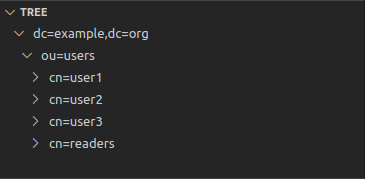 | 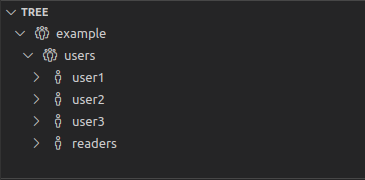 | * **ldap-explorer.sort-attributes** (`false`) If set to `false`, LDAP attributes will be displayed in the order received from the LDAP server. If set to `true`, they will be ordered alphabetically by name. ## Known limitations No support for - [LDAP aliases](https://ldapwiki.com/wiki/Alias) - [not supported by ldapjs](https://github.com/ldapjs/node-ldapjs/blob/master/docs/index.md#whats-not-in-the-box) - [SASL](https://en.wikipedia.org/wiki/Simple_Authentication_and_Security_Layer) / [GSSAPI](https://en.wikipedia.org/wiki/Generic_Security_Services_Application_Program_Interface) binding - [not supported by ldapjs](https://github.com/ldapjs/node-ldapjs/issues/85) ## Recommended extensions * [LDIF syntax](https://marketplace.visualstudio.com/items?itemName=jtavin.ldif) if you work with [LDIF](https://en.wikipedia.org/wiki/LDAP_Data_Interchange_Format) files * [opensslutils](https://marketplace.visualstudio.com/items?itemName=ffaraone.opensslutils) if you need to troubleshoot TLS connections (LDAPS or StartTLS) ## Alternative tools * [Apache Directory Studio](https://directory.apache.org/studio/) is a fully-featured LDAP client based on [Eclipse RCP](https://wiki.eclipse.org/Rich_Client_Platform) - [JXplorer](http://jxplorer.org/) is a cross-platform LDAP browser and editor with many features - [ldapsearch](https://linux.die.net/man/1/) is a command-line tool for *nix systems * [dsquery](https://learn.microsoft.com/en-us/previous-versions/windows/it-pro/windows-server-2012-r2-and-2012/cc754232(v=ws.11)) is a command-line tool for Windows - [LEX](http://www.ldapexplorer.com/) is a Windows-only desktop client that requires a paying license (a free trial is offered) - [Many others](https://en.wikipedia.org/wiki/List_of_LDAP_software) ## Contributing See [CONTRIBUTING.md](https://github.com/fengtan/ldap-explorer/blob/master/CONTRIBUTING.md). ## Changelog See [CHANGELOG.md](https://github.com/fengtan/ldap-explorer/blob/master/CHANGELOG.md). ## Credits This extension is powered by [ldapjs](https://github.com/ldapjs/node-ldapjs). [Main icon](https://www.flaticon.com/free-icon/hierarchy_4987367) by [Freepik](https://www.freepik.com/) from [Flaticon](https://www.flaticon.com/) is licensed by [CC 3.0 BY](https://creativecommons.org/licenses/by/3.0/).
