KO
|
EN
gitlite — search
Search
#typescript
#ai-agents
#ai
#dsh-plugin
#deepseek-harness
#open-source
#cli
#claude-code
#codex
#developer-tools
#react
#windows
docker-dokuwiki
★ 44
Open GitHub ↗
DokuWiki Docker image
Download README (.md)
Explore Similar Repositories
docker-dokuwiki
:
Docker container image with dokuwiki and nginx
obsidian2dokuwiki
:
bash script to convert obsidian vaults to dokuwiki websites
dokuwiki-plugin-markdowku
:
Markdowku - markdown syntax plugin for DokuWiki
dokuJClient
:
Java xmlrpc client for Dokuwiki
dokuwiki-template-readthedokus
:
"Read the Docs" flavored DokuWiki template
// repository documentation
Was this content helpful?
★ 0
(0 ratings)
Select Rating:
★
★
★
★
★
Submit Feedback
Recent Feedback
×
Download README
Do you want to download the
README.md
file for
docker-dokuwiki
?
Download (.md)
<p align="center"><a href="https://github.com/crazy-max/docker-dokuwiki" target="_blank"><img height="128" src="https://raw.githubusercontent.com/crazy-max/docker-dokuwiki/master/.github/docker-dokuwiki.jpg"></a></p> <p align="center"> <a href="https://hub.docker.com/r/crazymax/dokuwiki/tags?page=1&ordering=last_updated"><img src="https://img.shields.io/github/v/tag/crazy-max/docker-dokuwiki?label=version&style=flat-square" alt="Latest Version"></a> <a href="https://github.com/crazy-max/docker-dokuwiki/actions?workflow=build"><img src="https://img.shields.io/github/actions/workflow/status/crazy-max/docker-dokuwiki/build.yml?branch=master&&label=build&logo=github&style=flat-square" alt="Build Status"></a> <a href="https://hub.docker.com/r/crazymax/dokuwiki/"><img src="https://img.shields.io/docker/stars/crazymax/dokuwiki.svg?style=flat-square&logo=docker" alt="Docker Stars"></a> <a href="https://hub.docker.com/r/crazymax/dokuwiki/"><img src="https://img.shields.io/docker/pulls/crazymax/dokuwiki.svg?style=flat-square&logo=docker" alt="Docker Pulls"></a> <br /><a href="https://github.com/sponsors/crazy-max"><img src="https://img.shields.io/badge/sponsor-crazy--max-181717.svg?logo=github&style=flat-square" alt="Become a sponsor"></a> <a href="https://www.paypal.me/crazyws"><img src="https://img.shields.io/badge/donate-paypal-00457c.svg?logo=paypal&style=flat-square" alt="Donate Paypal"></a> </p> ## ⚠️ Abandoned project This project is not maintained anymore and is abandoned. Feel free to fork and make your own changes if needed. ## About Docker image for [DokuWiki](https://www.dokuwiki.org/dokuwiki), a simple to use and highly versatile Open Source wiki software that doesn't require a database. > [!TIP] > Want to be notified of new releases? Check out 🔔 [Diun (Docker Image Update Notifier)](https://github.com/crazy-max/diun) > project! ___ * [Features](#features) * [Build locally](#build-locally) * [Image](#image) * [Environment variables](#environment-variables) * [Volumes](#volumes) * [Ports](#ports) * [Usage](#usage) * [Docker Compose](#docker-compose) * [Command line](#command-line) * [Upgrade](#upgrade) * [Notes](#notes) * [Sending mails with SMTP](#sending-mails-with-smtp) * [Contributing](#contributing) * [License](#license) ## Features * Run as non-root user * Multi-platform image * [msmtpd SMTP relay](https://github.com/crazy-max/docker-msmtpd) image to send emails * [Traefik](https://github.com/containous/traefik-library-image) as reverse proxy and creation/renewal of Let's Encrypt certificates (see [this template](examples/traefik)) ## Build locally ```shell git clone https://github.com/crazy-max/docker-dokuwiki.git cd docker-dokuwiki # Build image and output to docker (default) docker buildx bake # Build multi-platform image docker buildx bake image-all ``` ## Image | Registry | Image | |-----------------------------------------------------------------------------------------------------|------------------------------| | [Docker Hub](https://hub.docker.com/r/crazymax/dokuwiki/) | `crazymax/dokuwiki` | | [GitHub Container Registry](https://github.com/users/crazy-max/packages/container/package/dokuwiki) | `ghcr.io/crazy-max/dokuwiki` | Following platforms for this image are available: ``` $ docker buildx imagetools inspect crazymax/dokuwiki --format "{{json .Manifest}}" | \ jq -r '.manifests[] | select(.platform.os != null and .platform.os != "unknown") | .platform | "\(.os)/\(.architecture)\(if .variant then "/" + .variant else "" end)"' linux/amd64 linux/arm/v6 linux/arm/v7 linux/arm64 linux/ppc64le linux/riscv64 linux/s390x ``` ## Environment variables * `TZ`: The timezone assigned to the container (default `UTC`) * `PUID`: Dokuwiki user id (default `1500`) * `PGID`: Dokuwiki group id (default `1500`) * `MEMORY_LIMIT`: PHP memory limit (default `256M`) * `UPLOAD_MAX_SIZE`: Upload max size (default `16M`) * `CLEAR_ENV`: Clear environment in FPM workers (default `yes`) * `OPCACHE_MEM_SIZE`: PHP OpCache memory consumption (default `128`) * `LISTEN_IPV6`: Enable IPv6 for Nginx (default `true`) * `REAL_IP_FROM`: Trusted addresses that are known to send correct replacement addresses (default `0.0.0.0/32`) * `REAL_IP_HEADER`: Request header field whose value will be used to replace the client address (default `X-Forwarded-For`) * `LOG_IP_VAR`: Use another variable to retrieve the remote IP address for access [log_format](http://nginx.org/en/docs/http/ngx_http_log_module.html#log_format) on Nginx. (default `remote_addr`) * `DOKUWIKI_RUN_INDEXER`: Run DokuWiki indexer on startup (default `true`) ## Volumes * `/data`: Contains configuration, plugins, templates and data > :warning: Note that the volume should be owned by the user/group with the > specified `PUID` and `PGID`. If you don't give the volume correct permissions, > the container may not start. ## Ports * `8000`: HTTP port ## Usage ### Docker Compose Docker compose is the recommended way to run this image. Copy the content of folder [examples/compose](examples/compose) in `/var/dokuwiki/` on your host for example. Edit the compose and env files with your preferences and run the following commands: ```bash docker compose up -d docker compose logs -f ``` ### Command line You can also use the following minimal command : ```bash docker run -d -p 8000:8000 --name dokuwiki \ -v $(pwd)/data:/data \ crazymax/dokuwiki:latest ``` ## Upgrade Recreate the container whenever I push an update: ```bash docker compose pull docker compose up -d ``` ## Notes ### Sending mails with SMTP A Dokuwiki [SMTP Plugin](https://www.dokuwiki.org/plugin:smtp) is available to send emails over external SMTP servers. When the plugin is installed you have to configure it: 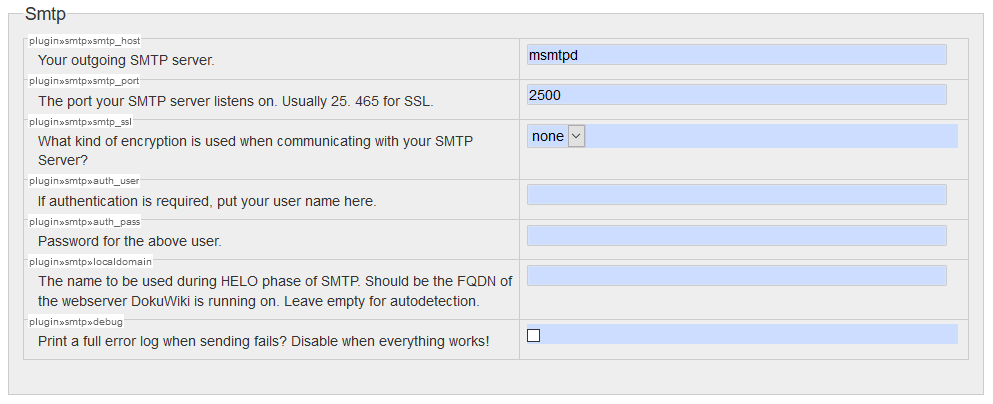 Here we use our `msmtpd` service published on port `2500` declared in our [`compose.yml`](examples/compose/compose.yml). ## Contributing Want to contribute? Awesome! The most basic way to show your support is to star the project, or to raise issues. You can also support this project by [**becoming a sponsor on GitHub**](https://github.com/sponsors/crazy-max) or by making a [PayPal donation](https://www.paypal.me/crazyws) to ensure this journey continues indefinitely! Thanks again for your support, it is much appreciated! :pray: ## License MIT. See `LICENSE` for more details.
