KO
|
EN
gitlite — search
Search
#typescript
#ai-agents
#ai
#dsh-plugin
#deepseek-harness
#open-source
#cli
#claude-code
#codex
#developer-tools
#react
#windows
imagine
★ 82
Open GitHub ↗
A pandoc-filter for images
Download README (.md)
Explore Similar Repositories
prolink-go
:
golang library to interface with Pioneers PRO DJ Link network
examples-orms
:
Sample uses of CockroachDB with popular ORMs
graphql-python-subscriptions
:
A port of apollographql subscriptions for python, using gevent websockets and redis
neo4j_sips
:
Elixir driver for the Neo4j graph database server
combo-tree
:
ComboTree is a jQuery Plugin which is a combobox item with tree structured data list and multi/single selection options and more.
// repository documentation
Was this content helpful?
★ 0
(0 ratings)
Select Rating:
★
★
★
★
★
Submit Feedback
Recent Feedback
×
Download README
Do you want to download the
README.md
file for
imagine
?
Download (.md)
``` \\\/// / _ _ \ (| (.)(.) |) .--------------------.OOOo--()--oOOO.-------------------. | | | ____ _ | | / _/____ ___ ____ _ ____ _ (_)____ ___ | | / / / __ `__ \ / __ `// __ `// // __ \ / _ \ | | _/ / / / / / / // /_/ // /_/ // // / / // __/ | | /___//_/ /_/ /_/ \__,_/ \__, //_//_/ /_/ \___/ | | /____/ | | | '-------------------.oooO-------------------------------' ( ) Oooo. \ ( ( ) \_) ) / (_/ ``` ## A pandoc filter to process codeblocks into images and/or ascii art Imagine is a pandoc filter that will turn codeblocks tagged with certain classes into images or ascii art. The following are currently supported: actdiag, asy, asymptote, blockdiag, boxes, circo, ctioga2, ditaa, dot, fdp, figlet, flydraw, gle, gnuplot, graph, graphviz, gri, imagine, mermaid, mscgen, neato, nwdiag, octave, packetdiag, pic, pic2plot, plantuml, plot, ploticus, protocol, pyxplot, rackdiag, seqdiag, sfdp, shebang, twopi ## Examples ### [Mscgen](http://www.mcternan.me.uk/mscgen/) 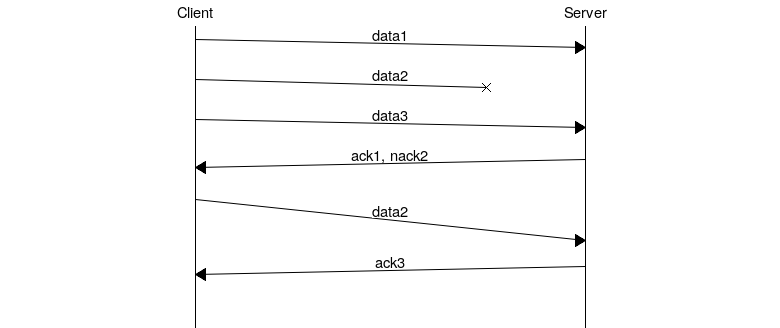 ```{.mscgen im_out="img,fcb" im_fmt="png"} msc { hscale="1.3", arcgradient = "8"; a [label="Client"],b [label="Server"]; a=>b [label="data1"]; a-xb [label="data2"]; a=>b [label="data3"]; a<=b [label="ack1, nack2"]; a=>b [label="data2", arcskip="1"]; |||; a<=b [label="ack3"]; |||; } ``` ### [Mermaid](https://github.com/mermaidjs/mermaid.cli) 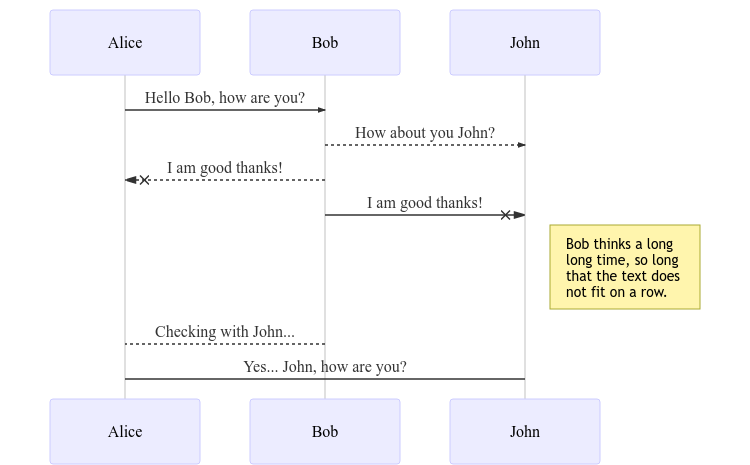 ```{.mermaid im_opt="-H 300" im_fmt="png" im_out="img,fcb"} sequenceDiagram Alice ->> Bob: Hello Bob, how are you? Bob-->>John: How about you John? Bob--x Alice: I am good thanks! Bob-x John: I am good thanks! Note right of John: Bob thinks a long<br/>long time, so long<br/>that the text does<br/>not fit on a row. Bob-->Alice: Checking with John... Alice->John: Yes... John, how are you? ``` ### [Gnuplot](http://www.gnuplot.info) 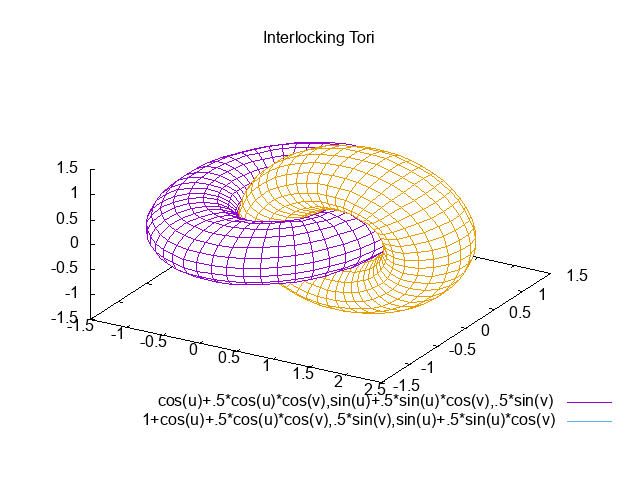 ```{.gnuplot im_fmt="png" im_out="img,fcb"} set terminal png set dummy u,v set key bmargin center horizontal Right noreverse enhanced autotitles nobox set parametric set view 50, 30, 1, 1 set isosamples 50, 20 set hidden3d back offset 1 trianglepattern 3 undefined 1 altdiagonal bentover set ticslevel 0 set title "Interlocking Tori" set urange [ -3.14159 : 3.14159 ] noreverse nowriteback set vrange [ -3.14159 : 3.14159 ] noreverse nowriteback splot cos(u)+.5*cos(u)*cos(v),sin(u)+.5*sin(u)*cos(v),.5*sin(v) with lines,\ 1+cos(u)+.5*cos(u)*cos(v),.5*sin(v),sin(u)+.5*sin(u)*cos(v) with lines ``` ### [Shebang](http://www.google.com/search?q=linux+shebang) using Python & Pygal 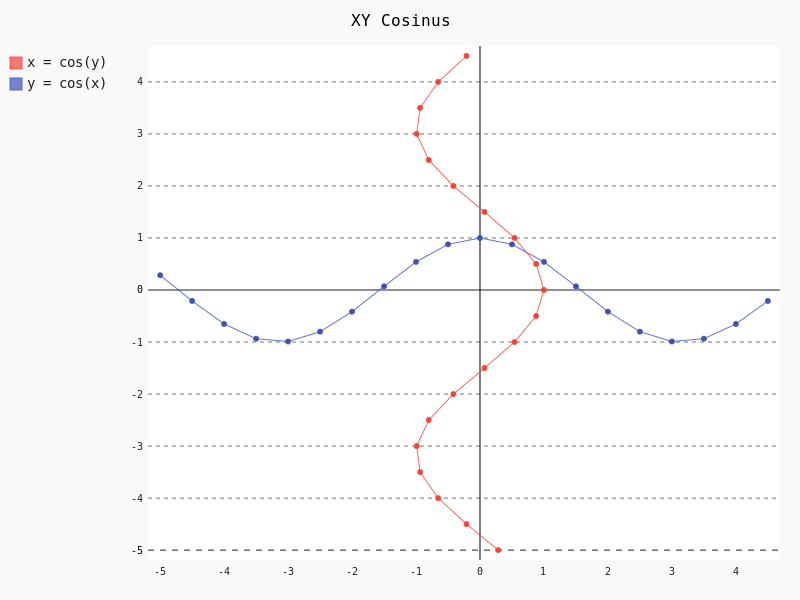 ```{.shebang im_fmt="png" im_out="img,fcb"} #!/usr/bin/env python3 import sys import pygal from math import cos xy_chart = pygal.XY() xy_chart.title = 'XY Cosinus' xy_chart.add('x = cos(y)', [(cos(x / 10.), x / 10.) for x in range(-50, 50, 5)]) xy_chart.add('y = cos(x)', [(x / 10., cos(x / 10.)) for x in range(-50, 50, 5)]) xy_chart.render_to_png(sys.argv[-1]) ``` ### [boxes](http://boxes.thomasjensen.com) /* _\|/_ (o o) +----oOO-{_}-OOo------------------------------+ | #!/bin/bash | | # I seem to have got myself boxed in! | | cat $0 | boxes -d peek -p h4 | +--------------------------------------------*/ ```{.shebang im_out="stdout,fcb"} #!/bin/bash # I seem to have got myself boxed in! cat $0 | boxes -d peek -p h4 ``` More examples on [github](https://github.com/hertogp/imagine/tree/master/examples), which also includes formats other than `png`. ## Documentation Imagine A pandoc filter to turn fenced codeblocks into graphics or ascii art by wrapping some external command line utilities, such as: actdiag, asy, asymptote, blockdiag, boxes, circo, ctioga2, ditaa, dot, fdp, figlet, flydraw, gle, gnuplot, graph, graphviz, gri, imagine, mermaid, mscgen, neato, nwdiag, octave, packetdiag, pic, pic2plot, plantuml, plot, ploticus, protocol, pyxplot, rackdiag, seqdiag, sfdp, shebang, twopi Installation % sudo -H pip install pandoc-imagine or simply save `pandoc_imagine.py` anywhere along python's sys.path Dependencies % sudo -H pip install pandocfilters six and one (or more) of the packages that provide above utilities. Pandoc usage % pandoc --filter pandoc-imagine document.md -o document.pdf Markdown usage ```cmd code ``` Alternate, longer form: ```{.cmd im_opt=".." ...} code ``` which will run `cmd` (if known) to proces the `code` into an image and replaces the fenced code block with an Image in a paragraph of its own or any ascii art in its own CodeBlock. If the command fails, the original fenced code block is retained unchanged. Usually, only errors are printed to stderr but you can get more info by setting the `im_log` option (see below). If the command succeeds but produces no image, a line reporting the missing image is included in the output document. Imagine options Imagine's behaviour can be influenced by setting these options: - im_opt="" or any cli-options to pass in on the command line. Some classes already provide some defaults (as required by the command). - im_out="img", or ordered csv-list of keywords indicating what to produce: - img an image-link in a paragraph - ocb the original codeblock but without imagine's class or options - fcb an anonymous codeblock containing the original codeblock - stdout an anonymous codeblock containing captured stdout (if any) - stderr an anonymous codeblock containing captured stderr (if any) Some workers ignore 'img' by necessity since they donot produce graphical data that can be linked to, e.g. `figlet` or `protocol`, while others the 'stdout' will ignored because that's where they produce their graphical data. - im_prg=None, or a cli-cmd name to override class-to-command map. Normally, the class on the code block maps directly to a command line tool to use. For example, ```gri .. ``` maps gri to `gri`, but that can be changed by `{.gri im_prg="gri2"} to use `gri2` instead of `gri`. - im_fmt="png", or another output format of your choosing depending on the command line tool used. Some tools donot derive their output image format from an intended output file name extension, but instead require it to be set in the tool's codeblock containing its instructions. Be sure the code in the codeblock matches `im_fmt` or pandoc may have trouble assembling the final document. - im_dir="pd", or antoher absolute or relative (to the working directory) path in which input/output files are to be stored during processing. Note that an "-images" is still tacked onto the end of the path though. - im_log=0, which defaults to printing only errors caught during processing. Set it to -1 to completely silence Imagine, or as high as 4 for debug level output if somethings goes wrong and you need more information on what is going on. Option values are resolved in order of most to least specific: 1. {.klass im_xyz=".."} codeblock specific 2. imagine.klass.im_xyz: .. metadata, klass specific 3. imagine.im_xyz: .. metadata, imagine specific 4. class variable hardcoded default Notes: - filenames are based on a hash of the codeblock + its attributes - uses subdir `{im_dir}-images` to store any input/output files - there's no clean up of files stored there - if an output filename exists, it is not regenerated but simply linked to. - `packetdiag`'s underlying library seems to have some problems. Some commands follow a slightly different pattern: - 'img' directive is ignored by commands that only produce ascii - ctioga2 defaults to pdf instead of png - flydraw produces a gif, not png - gle also creates a .gle subdir inside the images-dir - gri produces a ps, which is `convert`ed to png - imagine reads its code as help-topics, returns codeblocks with help-info - plot reads its codeblock as the relative path to the file to process - pyxplot will have `set terminal` & `set output` prepended to its `code` - shebang runs its codeblock as a script with <fname>.{im_fmt} as its argument. - use {.shebang im_out="stdout"} for text instead of an png Merge `Image`'s into a single `Para`. Based on a feature request (https://github.com/hertogp/imagine/issues/16) by pbsds (https://github.com/pbsds), `pandoc-imagine` has been extended to better cooperate with pandoc-crossref (https://github.com/lierdakil/pandoc-crossref#pandoc-crossref-filter-), whose subfigure grids (https://lierdakil.github.io/pandoc-crossref/#subfigure-grid) facility requires that consecutive image links be located inside a single paragraph. This means that 'Div's, when assigned the 'pandoc-imagine' specific class `im_merge`, will have their block-level elements processed individually. Any consecutive `Image`-links are collected into a single `Para`, other elements are included in the `Div` contents as-is. See Examples/inline.md and Examples/inline.pdf. Security Imagine just hands the fenced codeblocks to plotting tools to process or simply runs them as system scripts, as-is. Shebang's are inherently unsafe and most of the plotting tools implement their own 'little' languages, which can create beautiful images, but can also cause harm. There is no way to check for 'side effects' in advance, so make sure to check the fenced codeblocks before running them through the filter. Imagine class The imagine class puts documentation of topics at your fingertips, like so: ```imagine klass ``` Use `imagine` as klass to get the module's docstring (ie this text) and/or one or more of the commands you're interested in, each on a separate line. Thanks for feedback: amietn, chdemko, heyrict, priiduonu, K4zuki, pbsds ## Individual Classes ``` Asy sudo-apt-get install asymptote See http://asymptote.sourceforge.net/ Runs asy -o <fname>.{im_fmt} {im_opt} <fname>.asy Wraps: - 'asy' -> asy - 'asymptote' -> asy BlockDiag sudo pip install blockdiag nwdiag actdiag seqdiag http://blockdiag.com/ Runs {im_prg} {im_opt} -T {im_fmt} <fname>.{im_fmt} -o <fname>.{im_prg} Wraps: - 'blockdiag' -> blockdiag - 'seqdiag' -> seqdiag - 'rackdiag' -> rackdiag - 'nwdiag' -> nwdiag - 'packetdiag' -> packetdiag - 'actdiag' -> actdiag Boxes sudo apt-get install boxes http://boxes.thomasjensen.com Runs boxes {im_opt} <fname>.boxes Wraps: - 'boxes' -> boxes Ctioga2 sudo apt-get install ctioga2 http://ctioga2.sourceforge.net Runs ctioga2 {im_opt} -f <fname>.ctioga2 Wraps: - 'ctioga2' -> ctioga2 Ditaa sudo apt-get install ditaa http://ditaa.sourceforge.net Runs ditaa <fname>.ditaa <fname>.{im_fmt} {im_opt} Wraps: - 'ditaa' -> ditaa Figlet sudo apt-get install figlet http://www.figlet.org Runs figlet {im_opt} < code-text Wraps: - 'figlet' -> figlet Flydraw sudo apt-get install flydraw http://manpages.ubuntu.com/manpages/precise/man1/flydraw.1.html notes: - graphic data is printed to stdout - so 'stdout' in im_out option is silently ignored Runs flydraw {im_opt} < code-text Wraps: - 'flydraw' -> flydraw Gle sudo apt-get install gle-graphics http://glx.sourceforge.net Runs gle {im_opt} -verbosity 0 -output <fname>.{im_fmt} <fname>.gle Wraps: - 'gle' -> gle GnuPlot sudo apt-get install gnuplot http://www.gnuplot.info notes: - graphic data is printed to stdout - so 'stdout' in im_out option is silently ignored Runs gnuplot {im_opt} <fname>.gnuplot > <fname>.{im_fmt} Wraps: - 'gnuplot' -> gnuplot Graph sudo apt-get install plotutils https://www.gnu.org/software/plotutils notes: - graphic data is printed to stdout - so 'stdout' in im_out option is silently ignored Runs graph -T png {im_opt} <fname>.graph Wraps: - 'graph' -> graph Graphviz sudo apt-get install graphviz http://graphviz.org Runs {im_prg} {im_opt} -T{im_fmt} <fname>.{im_prg} <fname>.{im_fmt} Wraps: - 'dot' -> dot - 'neato' -> neato - 'twopi' -> twopi - 'circo' -> circo - 'fdp' -> fdp - 'sfdp' -> sfdp - 'graphviz' -> dot Gri sudo apt-get install gri imagemagick http://gri.sourceforge.net Notes - insists on creating a <fname>.ps in current working directory - requires `convert` from imagemagick - ImageMagick's security policy might need massaging Runs gri {im_opt} -c 0 -b <fname>.gri Wraps: - 'gri' -> gri Imagine pip install pandoc-imagine https://github.com/hertogp/imagine Runs returns documentation in a CodeBlock Wraps: - 'imagine' -> imagine Mermaid sudo npm install mermaid.cli https://github.com/mermaidjs/mermaid.cli Runs mmdc -i <fname>.mermaid -o <fname>.<fmt> {im_opt} Wraps: - 'mermaid' -> mmdc MscGen sudo apt-get install mscgen http://www.mcternan.me.uk/mscgen Runs mscgen -T {im_fmt} -o <fname>.{im_fmt} <fname>.mscgen Wraps: - 'mscgen' -> mscgen Octave sudo apt-get install octave https://www.gnu.org/software/octave Runs octage --no-gui -q {im_opt} <fname>.octave <fname>.{im_fmt} Wraps: - 'octave' -> octave Pic2Plot sudo apt-get install plotutils https://www.gnu.org/software/plotutils notes: - graphic data is printed to stdout - so 'stdout' in im_out option is silently ignored Runs pic2plot -T png {im_opt} <fname>.pic2plot Wraps: - 'pic2plot' -> pic2plot - 'pic' -> pic2plot PlantUml sudo apt-get install plantuml http://plantuml.com Runs plantuml -t{im_fmt} <fname>.plantuml {im_opt} Wraps: - 'plantuml' -> plantuml Plot sudo apt-get install plotutils https://www.gnu.org/software/plotutils notes: - graphic data is printed to stdout - so 'stdout' in im_out option is silently ignored Runs plot -T {im_fmt} {im_opt} <code-text-as-filename> Wraps: - 'plot' -> plot Ploticus sudo apt-get install ploticus http://ploticus.sourceforge.net/doc/welcome.html Runs ploticus -{im_fmt} -o <fname>.{im_fmt} {im_opt} <fname>.ploticus Wraps: - 'ploticus' -> ploticus Protocol cd ~/installs/git-repos git clone https://github.com/luismartingarcia/protocol.git python setup install https://github.com/luismartingarcia/protocol.git Runs protocol {im_opt} code-text Wraps: - 'protocol' -> protocol PyxPlot sudo apt-get install pyxplot http://pyxplot.org.uk Runs pyxplot {im_opt} <fname>.pyxplot Wraps: - 'pyxplot' -> pyxplot SheBang http://www.google.com/search?q=shebang+line Runs <fname>.shebang {im_opt} <fname>.{im_fmt} Wraps: - 'shebang' -> shebang ```
