KO
|
EN
gitlite — search
Search
#python
#java
#python3
#arduino
#golang
#machine-learning
#rust
#html
#flask
#javascript
#seismology
#nodejs
jenkins-modern-themes
★ 24
Open GitHub ↗
No description available.
Download README (.md)
Explore Similar Repositories
qb-lapraces
:
Race Track Creation For QB-Core
rotarydisplay
:
No description available.
zpack
:
VSCode Pro - Frontend Developers (ZPack)
Firefox-Elegant-NordTheme
:
No description available.
Kinematic-bicycle-model---Open-loop-steering-rate
:
Simulation and animation of a kinematic bicycle model with open loop steering rate making left and right turns.
// repository documentation
Was this content helpful?
★ 0
(0 ratings)
Select Rating:
★
★
★
★
★
Submit Feedback
Recent Feedback
×
Download README
Do you want to download the
README.md
file for
jenkins-modern-themes
?
Download (.md)
 Beautify your Jenkins with the Material Design theme! Website: https://jorg3lucas.github.io/jenkins-modern-themes So you love **Jenkins** but hate its ugly user interface and icons... Me too! Introducing **Jenkins Modern Themes**. You can turn your favorite frog CI tool into a handsome prince in few steps! Install this Jenkins Theme! ## Features * Just one small css file (35K) * Embed minified SVG images * Multiple ways to install ## Screenshots [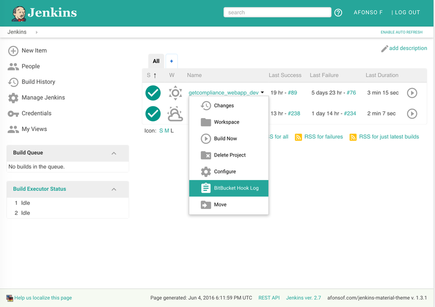](https://raw.githubusercontent.com/Jorg3Lucas/jenkins-modern-themes/main/images/screenshot-jenkins-main-large.png) [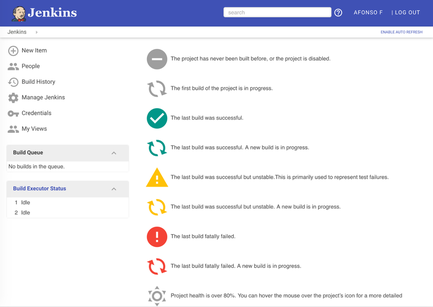](https://raw.githubusercontent.com/Jorg3Lucas/jenkins-modern-themes/main/images/screenshot-jenkins-legend-large.png) [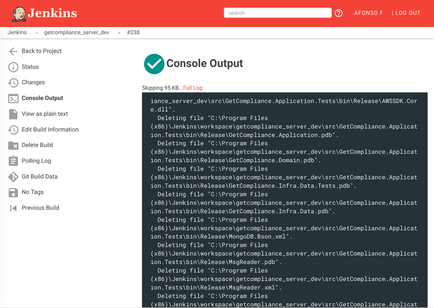](https://raw.githubusercontent.com/Jorg3Lucas/jenkins-modern-themes/main/images/screenshot-jenkins-console-large.png) [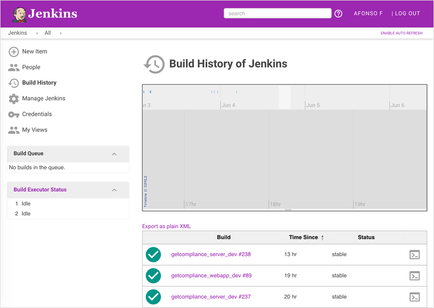](https://raw.githubusercontent.com/Jorg3Lucas/jenkins-modern-themes/main/images/screenshot-jenkins-history-large.png) ## Installation ### Using this GitHub page (recommended) (auto-updated) 1. Choose your color:  2. Replace `{{your-color-name}}` in the URL by the chosen color: `https://raw.githack.com/Jorg3Lucas/jenkins-modern-themes/main/dist/modern-{{your-color-name}}.css` 3. Install [Jenkins Simple Theme Plugin][simple] 4. Click `Manage Jenkins` 5. Click `Configure System` and scroll down to `Theme` 6. Set the CSS field to the generated URL. 7. Click `Save` ### Using your Jenkins Hosting 1. Follow the step 1 and 2 of the previous method 2. Download the generated URL 3. Upload the downloaded file to your web server 4. Follow the steps 3 to 7 of the previous method using your uploaded file as URL in step 6 ### Using Stylish (only you will be able to see the awesome theme) 1. Follow the step 1 and 2 of the previous method 1. Copy the content of the file downloaded file 1. Install the [Stylish Chrome extension][stylish] 1. Go to Stylish options and click in `Write new style` 1. Paste the theme css in the code box 1. Click in `Specify` and set your jenkins domain 1. Click in `Save` 1. Go to your Jenkins website and enable the theme in the Stylish Chrome toolbar icon ## Development CSS file are minified and compressed with Grunt. If you have Node & yarn installed, you can build everything with: ``` yarn install yarn test ``` This will generate the following file: - dist/modern-light.css ## Compatibility - Jenkins 2.222 and above If you are experiencing issues please let me know! Also, feel free to contribute! ## Thanks to - [Jenkins Material Theme][afonsof-repo] for the Jenkins Themes based on repo - [Simple Theme Plugin][simple] for the Simple Theme plugin - [Google][google] for the the material design inspiration and the icons - [Material Design Icons][material-design-icons] for some extra icons - [Stylish][stylish] for making the test of new versions easy - [canon-jenkins][canon-jenkins] for the base theme - [@Heldroe][heldroe] for Firefox and Microsoft support - [@bootstraponline][bootstraponline] for Jenkins native plugin [afonsof-repo]: https://github.com/afonsof/jenkins-material-themes [simple]: https://wiki.jenkins-ci.org/display/JENKINS/Simple+Theme+Plugin [google]: https://www.google.com/design/spec/material-design/introduction.html [material-design-icons]: https://materialdesignicons.com/ [stylish]: https://chrome.google.com/webstore/detail/stylish/fjnbnpbmkenffdnngjfgmeleoegfcffe [canon-jenkins]: https://github.com/rackerlabs/canon-jenkins [heldroe]: https://github.com/Heldroe [generator]: https://jorg3lucas.github.io/jenkins-modern-themes [bootstraponline]: https://github.com/bootstraponline
