KO
|
EN
gitlite — search
Search
#typescript
#ai-agents
#ai
#dsh-plugin
#deepseek-harness
#open-source
#cli
#claude-code
#codex
#developer-tools
#react
#windows
k8s-install
★ 67
Open GitHub ↗
kubernetes集群安装脚本
Download README (.md)
Explore Similar Repositories
bagusindrayana.github.io
:
Portofolio Bagus Indrayana
next-purescript-example
:
Simple example app using Next.js with Purescript
gameboy-audio-dumper
:
dump gameboy ROMs and Saves over audio
ddl2plantuml
:
Convert DDL Sql to PlantUML format ER diagram
lightweight-charts-docs-cn
:
轻量图表(TradingView) 中文开发文档
// repository documentation
Was this content helpful?
★ 0
(0 ratings)
Select Rating:
★
★
★
★
★
Submit Feedback
Recent Feedback
×
Download README
Do you want to download the
README.md
file for
k8s-install
?
Download (.md)
### **安装案例:** 系统:Centos<br/> 可以多台Master,多台Node (注意Master不能低于3台!)<br/> 此案例使用三台Master两台Node,用户名root,密码均为123456 ``` master 192.168.20.183 master 192.168.20.96 master 192.168.20.171 node 192.168.20.172 node 192.168.20.54 ``` #### 安装Master集群<br/> 下载项目: ``` git clone https://github.com/zdwork/k8s-install.git cd k8s-install ``` 修改 conf/master-install.conf<br/> 内容如下: ``` #!/bin/bash #User-defined information export node=3 #Master数量!! export node_ip="192.168.20.183 192.168.20.96 192.168.20.171" #服务器的ip,以空格分割 export node_name="master-01 master-02 master-03" #主机名 自定义,以空格分割 export node_pass="123456 123456 123456" #每台服务器的root密码,以空格分割 export apiserver_vip="192.168.20.240"#高可用IP 注意此ip要没有被占用 export apiserver_vip_port="4443" export flaneld_interface="ens33" #你的网卡 export vip_interface="ens33" #你的网卡 export haproxy_name="admin" export haproxy_pass="123456" export haproxy_status_port="8000" ``` **安装:**<br/> 脚本在master-01上执行<br/> ``` ./install.sh ``` 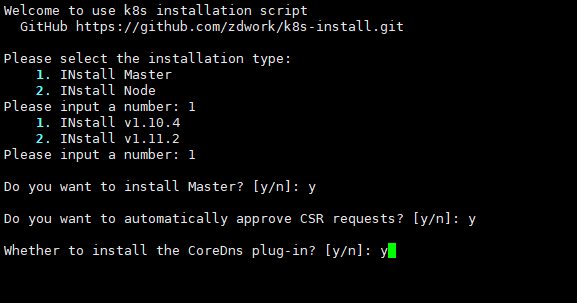 **脚本执行完后会打打印出如下信息:** ``` ---------------- etcd -------------------------------- 192.168.20.183::master-01 Active: active (running) since 三 2018-11-28 16:03:46 CST; 1h 44min ago 192.168.20.96::master-02 Active: active (running) since 三 2018-11-28 16:03:47 CST; 1h 44min ago 192.168.20.171::master-03 Active: active (running) since 三 2018-11-28 16:04:07 CST; 1h 43min ago ---------------- kube-apiserver ----------------------- 192.168.20.183::master-01 Active: active (running) since 三 2018-11-28 16:07:07 CST; 1h 40min ago 192.168.20.96::master-02 Active: active (running) since 三 2018-11-28 16:07:20 CST; 1h 40min ago 192.168.20.171::master-03 Active: active (running) since 三 2018-11-28 16:07:32 CST; 1h 40min ago ---------------- kube-scheduler ------------------------ 192.168.20.183::master-01 Active: active (running) since 三 2018-11-28 16:08:26 CST; 1h 39min ago 192.168.20.96::master-02 Active: active (running) since 三 2018-11-28 16:08:26 CST; 1h 39min ago 192.168.20.171::master-03 Active: active (running) since 三 2018-11-28 16:08:26 CST; 1h 39min ago ---------------- kube-controller_manager ---------------- 192.168.20.183::master-01 Active: active (running) since 三 2018-11-28 16:07:59 CST; 1h 40min ago 192.168.20.96::master-02 Active: active (running) since 三 2018-11-28 16:09:08 CST; 1h 38min ago 192.168.20.171::master-03 Active: active (running) since 三 2018-11-28 16:08:02 CST; 1h 40min ago ---------------- keepalived ------------------------------ 192.168.20.183::master-01 Active: active (running) since 三 2018-11-28 16:06:31 CST; 1h 41min ago 192.168.20.96::master-02 Active: active (running) since 三 2018-11-28 16:06:33 CST; 1h 41min ago 192.168.20.171::master-03 Active: active (running) since 三 2018-11-28 16:06:34 CST; 1h 41min ago ---------------- haproxy --------------------------------- 192.168.20.183::master-01 Active: active (running) since 三 2018-11-28 16:05:03 CST; 1h 43min ago 192.168.20.96::master-02 Active: active (running) since 三 2018-11-28 16:05:20 CST; 1h 42min ago 192.168.20.171::master-03 Active: active (running) since 三 2018-11-28 16:05:34 CST; 1h 42min ago ---------------- flanneld -------------------------------- 192.168.20.183::master-01 Active: active (running) since 三 2018-11-28 16:04:39 CST; 1h 43min ago 192.168.20.96::master-02 Active: active (running) since 三 2018-11-28 16:04:41 CST; 1h 43min ago 192.168.20.171::master-03 Active: active (running) since 三 2018-11-28 16:04:43 CST; 1h 43min ago ################ Current cluster state #################### NAME STATUS MESSAGE ERROR scheduler Healthy ok controller-manager Healthy ok etcd-1 Healthy {"health":"true"} etcd-2 Healthy {"health":"true"} etcd-0 Healthy {"health":"true"} ``` #### 安装Node<br/> 修改 conf/node-install.conf<br/> 内容如下: ``` #!/bin/bash #User-defined information export node=2 #Node数量!! export node_ip="192.168.20.172 192.168.20.54" export node_name="node-1 node-2" export node_pass="123456 123456" export flaneld_interface="ens33" ``` **安装:** ``` ./install.sh ``` 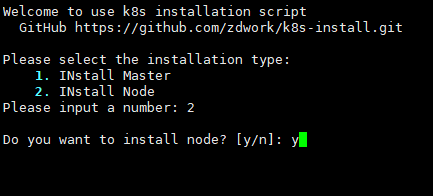 **脚本执行完后会打打印出如下信息:** ``` ---------------- flanneld -------------------------------- 192.168.20.172::node-1 Active: active (running) since 三 2018-11-28 18:28:34 CST; 26s ago 192.168.20.54::node-2 Active: active (running) since 三 2018-11-28 18:28:37 CST; 25s ago ---------------- docker -------------------------------- 192.168.20.172::node-1 Active: active (running) since 三 2018-11-28 18:28:38 CST; 24s ago 192.168.20.54::node-2 Active: active (running) since 三 2018-11-28 18:28:42 CST; 21s ago ---------------- kubelet -------------------------------- 192.168.20.172::node-1 Active: active (running) since 三 2018-11-28 18:28:52 CST; 11s ago 192.168.20.54::node-2 Active: active (running) since 三 2018-11-28 18:28:54 CST; 10s ago ---------------- kube-proxy -------------------------------- 192.168.20.172::node-1 Active: active (running) since 三 2018-11-28 18:28:59 CST; 5s ago 192.168.20.54::node-2 Active: active (running) since 三 2018-11-28 18:29:00 CST; 5s ago ``` **测试:** ``` [root@localhost k8s-install]# bash [root@master-01 k8s-install]# source /etc/profile [root@master-01 k8s-install]# kubectl get nodes NAME STATUS ROLES AGE VERSION node-1 Ready <none> 35s v1.10.4 node-2 Ready <none> 34s v1.10.4 [root@master-01 k8s-install]# ``` 安装完后最好重启下所有服务器 <br/> <br/> **以后会持续更新将新增加以下功能:** - 支持多系统安装 - 多版本可选 - 更多扩展插件 - 使用脚本可自动化管理集群 **因为时间紧迫许多判断条件没有添加以后会陆续完善希望与大家积极提交**<br/> QQ群:895769263
