KO
|
EN
gitlite — search
Search
#python
#javascript
#react
#golang
#android
#html
#video
#go
#ios
#rust
#hacktoberfest
#css
tuna
★ 64
Open GitHub ↗
Tuna, the ROS GNSS USV
Download README (.md)
Explore Similar Repositories
navigation2_ignition_gazebo_example
:
Minimal example for using Navigation 2 with Gazebo Sim
navigation2_ignition_gazebo_turtlebot3
:
Using Nav2 for navigating a simulated Turtlebot 3 in the Ignition Gazebo simulator.
sim_wayp_plan_tools
:
Gazebo Fortress ROS 2 simulation for the waypoint and planner tools
// repository documentation
Was this content helpful?
★ 0
(0 ratings)
Select Rating:
★
★
★
★
★
Submit Feedback
Recent Feedback
×
Download README
Do you want to download the
README.md
file for
tuna
?
Download (.md)
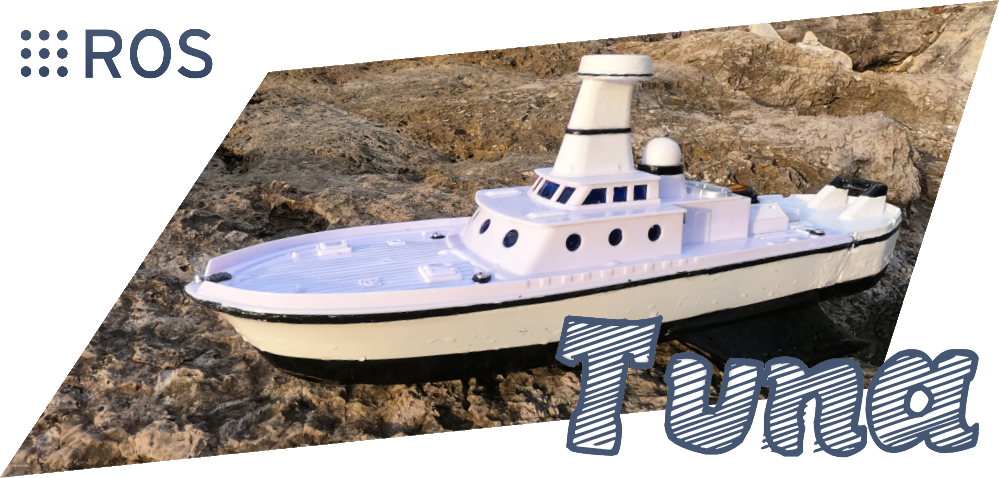 [](https://opensource.org/licenses/MIT) # About Tuna is an open-electronics and open-software GNSS platform for ROS, based on the Pi 4. It uses diff drive control for locomotion with [diff_drive_simple](https://github.com/MoffKalast/diff_drive_simple), a standard percision GNSS receiver for absolute localization with [navsat_simple](https://github.com/MoffKalast/navsat_simple), and an IMU for rotational data. If you see the overreaching theme there, I'm trying to keep everything as simple as possible. In the current iteration it uses [Vizanti](https://github.com/MoffKalast/vizanti) as the mission planner and [line_planner](https://github.com/MoffKalast/line_planner) as its local planner. You can find more specific info below or in the related videos. List of videos about construction and testing: | Video | Description | | ----------- | ----------- | | [](https://www.youtube.com/watch?v=CoFgflu3uPA) | Hardware setup and general software stack info, initial testing with ROS Mobile and navsat_transform_node. | | [](https://www.youtube.com/watch?v=l3ynv3hPWGs) | Practical navigation experiments with proprietary EZ-Map and gps_common. Simulation in Ignition Gazebo. | | [](https://www.youtube.com/watch?v=NZO6q_YMRwI) | Open source navigation and interface with Vizanti, developing the more accurate line_planner. Survey pattern tests. | # Circuit Diagram 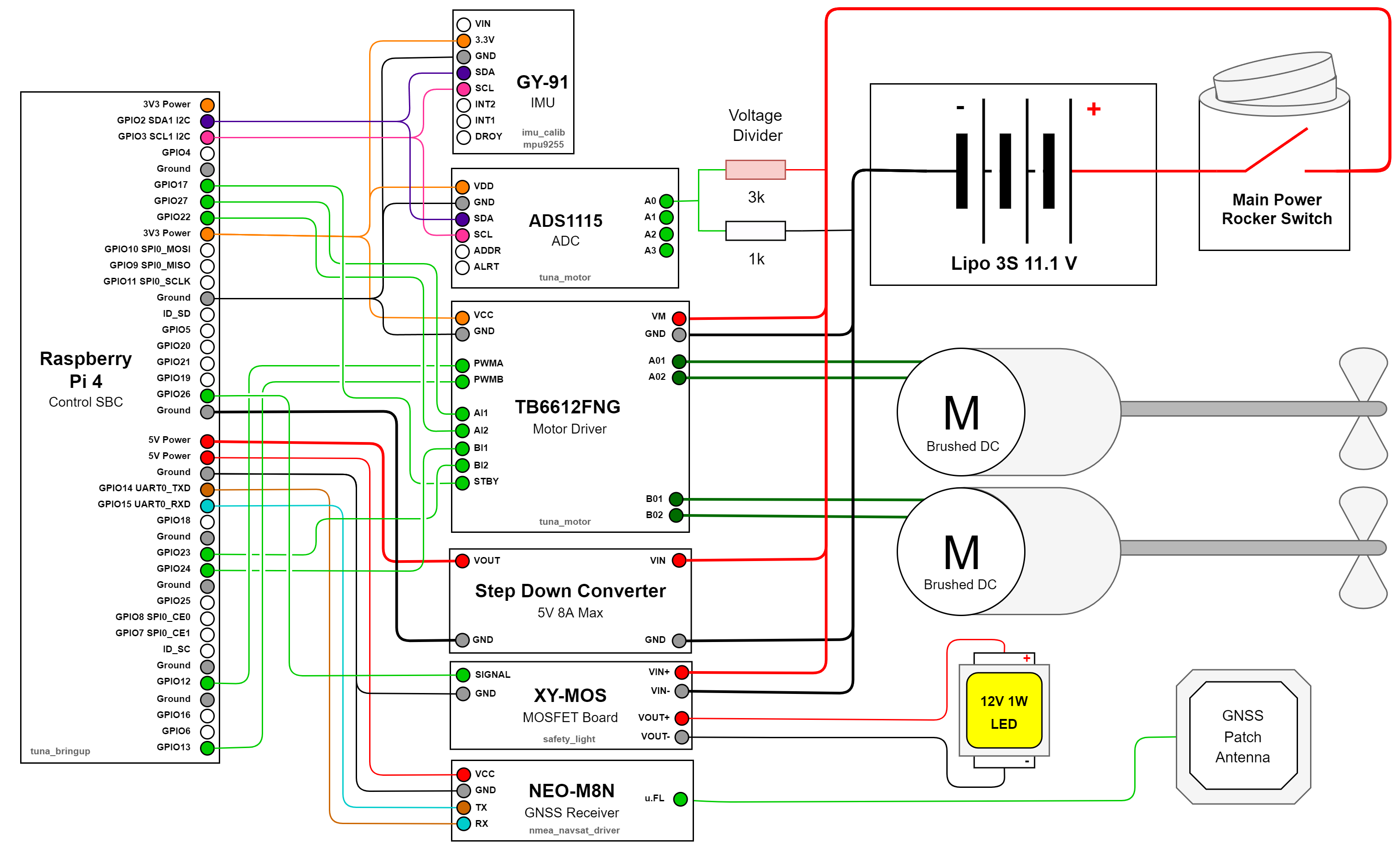 # Node Graph 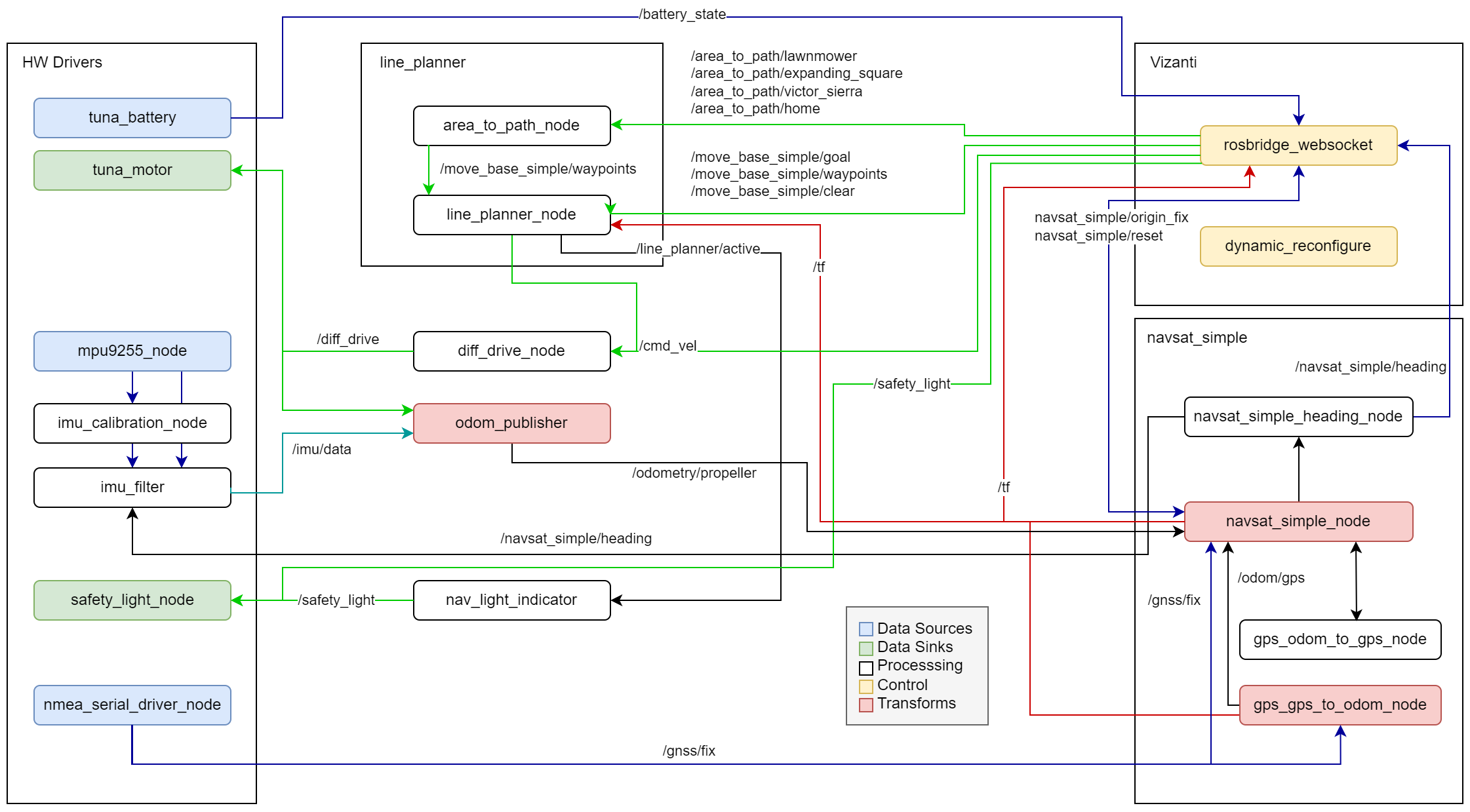 # Installation ## Running in Gazebo Fortress 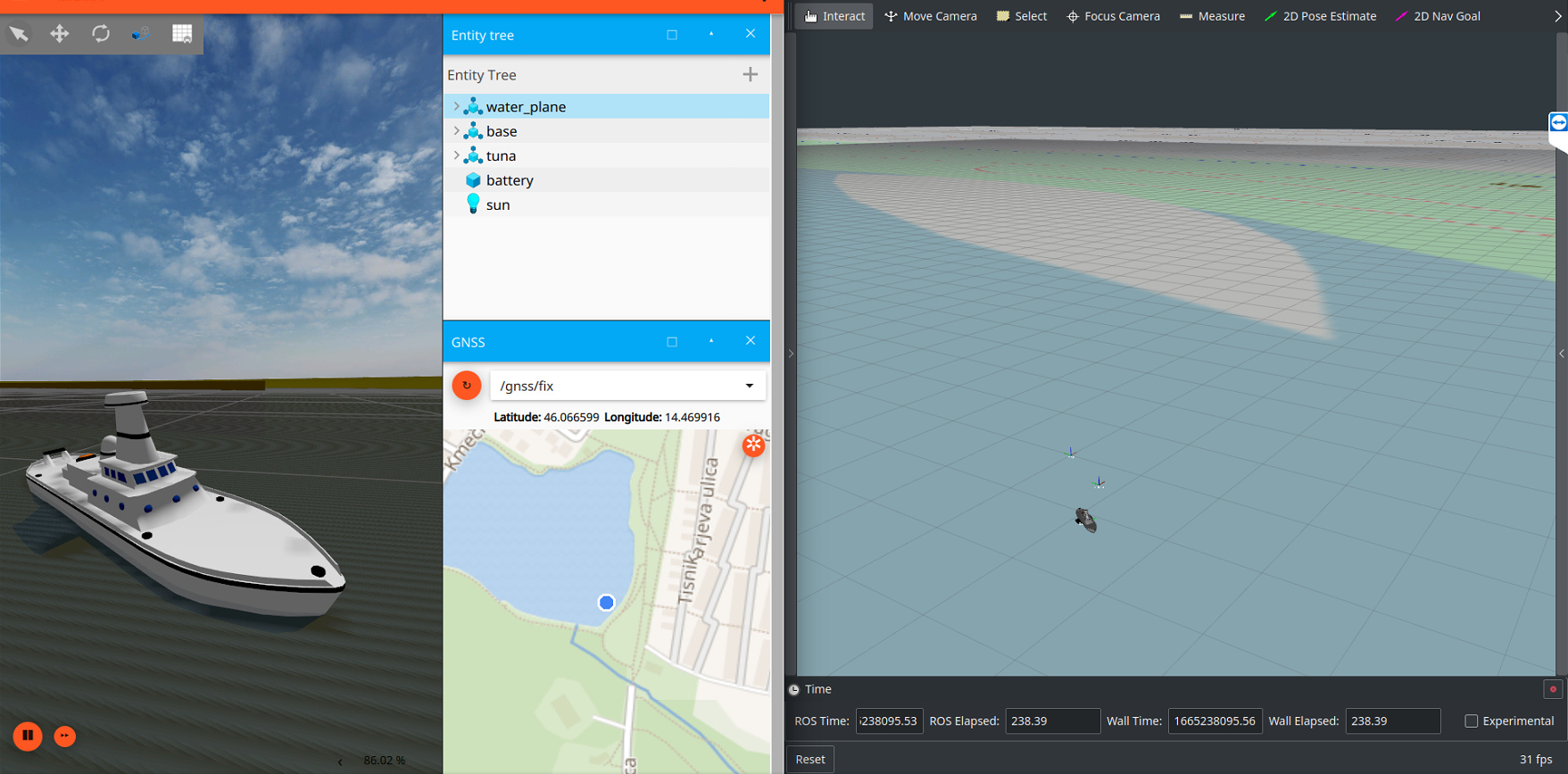 Base requirements: - [ROS Noetic](http://wiki.ros.org/noetic/Installation/Ubuntu) - [Gazebo Ignition (version Fortress)](https://gazebosim.org/docs/fortress/install_ubuntu) - [ros_ign bridge for Noetic](https://github.com/gazebosim/ros_gz/tree/noetic#from-source) Clone repos: ```bash cd ~/catkin_ws/src git clone https://github.com/MoffKalast/tuna.git # Diff drive controller git clone https://github.com/MoffKalast/diff_drive_simple.git # Localization fusion git clone https://github.com/MoffKalast/navsat_simple.git # Goal planner git clone https://github.com/MoffKalast/line_planner.git # Optional, for RViz Viewing git clone https://github.com/nobleo/rviz_satellite.git # ign bridge setup, skip if already installed export IGNITION_VERSION=fortress git clone https://github.com/osrf/ros_ign.git -b noetic cd ~/catkin_ws rosdep install --from-paths src --ignore-src --rosdistro=noetic -y catkin_make ``` Run: ```bash # Run the sim roscd tuna_gazebo ign gazebo water_world.sdf -r # Run bridge and navigation nodes roslaunch tuna_gazebo ign.launch # Visualize roslaunch tuna_viz rviz.launch # Turn on currnent/wind simulation rosrun tuna_gazebo wave_generator.py ``` <br> ## Running with Vizanti 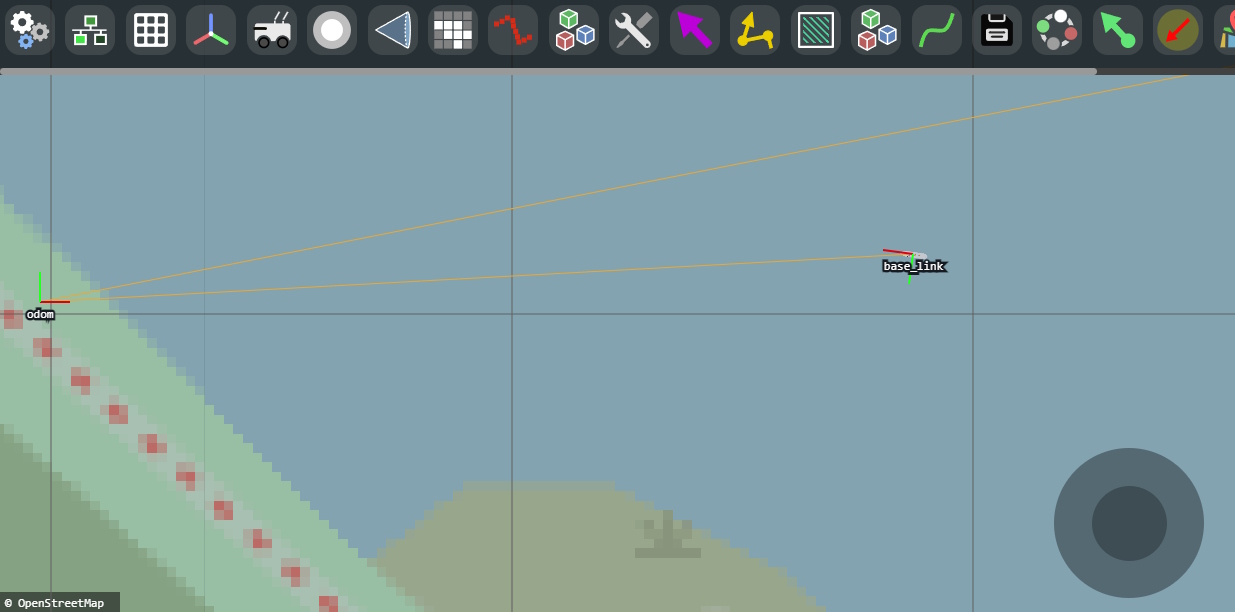 Install: ```bash cd ~/catkin_ws/src https://github.com/MoffKalast/vizanti.git cd .. rosdep install --from-paths src --ignore-src --rosdistro=noetic -y catkin_make ``` Run: ```bash roslaunch vizanti server.launch ``` Then view http://localhost:5000 <br> ## Running on a Raspberry Pi Clone hw drivers: ```bash cd ~/catkin_ws/src git clone https://github.com/dpkoch/imu_calib.git git clone https://github.com/MoffKalast/onewiretemp.git git clone https://github.com/MoffKalast/safety_light.git git clone https://github.com/MoffKalast/mpu9255.git cd ~/catkin_ws rosdep install --from-paths src --ignore-src --rosdistro=noetic -y catkin_make ``` To run this on a Pi 4, start with a [20.04 Ubuntu Pi image](https://learn.ubiquityrobotics.com/noetic_pi_image_downloads), install everything as listed above, plus [pigpio](https://abyz.me.uk/rpi/pigpio/download.html). Fix services to set up correct ROS params and autorun at boot: ```bash cd ~/catkin_ws/src/tuna/tuna_bringup/config_scripts sudo cp roscore.service /etc/systemd/system/roscore.service sudo cp magni-base /usr/sbin/magni-base sudo cp roscore /usr/sbin/roscore sudo cp env.sh /etc/ubiquity/env.sh sudo cp ros_setup.bash /etc/ubiquity/ros_setup.bash sudo cp ros_setup.sh /etc/ubiquity/ros_setup.sh ``` Changes to `/boot/config.txt` for i2c, uart, and LED power saving: ```bash # disable rainbow splash screen for faster booting disable_splash=1 # Set up UART and disable BT dtoverlay=disable-bt dtoverlay=uart0 # Set up I2C dtoverlay=i2c-gpio,i2c_gpio_sda=2,i2c_gpio_scl=3,bus=1 core_freq=250 # Disable the PWR LED dtparam=pwr_led_trigger=none dtparam=pwr_led_activelow=off # Disable the Activity LED dtparam=act_led_trigger=none dtparam=act_led_activelow=off # Disable ethernet port LEDs dtparam=eth_led0=4 dtparam=eth_led1=4 ``` ### Enable Kernel Interfaces For the `safety_light` to have the correct kernel interface access create `/etc/udev/rules.d/99-gpio.rules` with the following contents (if it doesn't already exist): ```bash SUBSYSTEM=="bcm2835-gpiomem", KERNEL=="gpiomem", GROUP="gpio", MODE="0660" SUBSYSTEM=="gpio", KERNEL=="gpiochip*", ACTION=="add", RUN+="/bin/sh -c 'chown root:gpio /sys/class/gpio/export /sys/class/gpio/unexport ; chmod 220 /sys/class/gpio/export /sys/class/gpio/unexport'" SUBSYSTEM=="gpio", KERNEL=="gpio*", ACTION=="add", RUN+="/bin/chown root:gpio /sys%p/active_low /sys%p/edge /sys%p/direction /sys%p/value", RUN+="/bin/chmod 660 /sys%p/active_low /sys%p/edge /sys%p/direction /sys%p/value" ``` ### Run This launch file will also launch automatically at boot via the magni-base service. ```bash roslaunch tuna_bringup core.launch ```
