KO
|
EN
gitlite — search
Search
#javascript
#python
#hacktoberfest
#react
#ai
#typescript
#llm
#go
#golang
#android
#machine-learning
#rust
#deep-learning
#linux
paper
★ 10
Open GitHub ↗
No description available.
Download README (.md)
Explore Similar Repositories
Awesome-Segmention-Model
:
A unified semantic segmentation model manager integrating 14 state-of-the-art architectures (U-Net, DeepLab, ENet, PSPNet, HRNet, SegNet, RefineNet, FCN, SegFormer, SETR, UperNet, OCRNet, Mask2Former, SegNeXt).
retroMaid
:
ROM collections management and Scraping metadata for Batocera emulators
plugin.video.filteredmovies
:
更适合中国宝宝使用的kodi电影剧集筛选页面和一些常用功能的接口实现
pi-extensions
:
Custom pi-coding-agent extensions
JS-Application
:
No description available.
// repository documentation
Was this content helpful?
★ 0
(0 ratings)
Select Rating:
★
★
★
★
★
Submit Feedback
Recent Feedback
×
Download README
Do you want to download the
README.md
file for
paper
?
Download (.md)
# PaperCLI A command-line tool for searching academic papers using LLM-powered query understanding and ranking. ## Features - **Multi-source search**: PubMed, OpenAlex, Google Scholar (via SerpAPI), arXiv, Zotero (personal library) - **LLM-powered query understanding**: Automatically extracts intent, expands synonyms, and translates queries - **Platform-specific query generation**: Generate optimized search queries for PubMed, Google Scholar, or Web of Science - **PDF text extraction**: Extract text from PDFs using Doc2X API with page-level JSONL output - **DOI-based PDF download**: Fetch open-access PDFs via Unpaywall and PubMed Central (PMC) - **Article highlight slides**: Generate visual summary slides from article text using Gemini (multiple styles) - **Smart ranking**: Coarse lexical ranking followed by LLM-based relevance scoring - **Evidence extraction**: Returns the most relevant quote from each paper - **Configurable models**: Use different LLM models for intent extraction vs evaluation - **Caching**: SQLite-based caching to avoid redundant API calls ## SKILL PaperCLI skill files are stored in `skill/`. Install them into Cursor as either a personal or project skill. ```bash # Personal skill (available across projects) mkdir -p ~/.cursor/skills cp -r skill ~/.cursor/skills/paper-cli # Project skill (only for this repo) mkdir -p .cursor/skills cp -r skill .cursor/skills/paper-cli ``` If you are using Claude-Code or Codex, replace `.cursor` with `.claude` or `.codex` in the above installation paths as appropriate. ## Installation **Requirements**: Python 3.12+ It is recommended to use [uv](https://docs.astral.sh/uv/) for installation and virtual environment management: ```bash # Install uv (if not already installed) curl -LsSf https://astral.sh/uv/install.sh | sh # Create and activate a Python 3.12 virtual environment uv venv --python 3.12 source .venv/bin/activate # Linux/macOS # Or .venv\Scripts\activate # Windows # Install PaperCLI from GitHub uv pip install git+https://github.com/xuzhougeng/paper.git ``` ## Configuration Set the following environment variables: ```bash # Required: LLM API key (OpenAI or compatible) export LLM_API_KEY="sk-..." # Optional: Model configuration (defaults shown) export PAPERCLI_REASONING_MODEL="gpt-4o-mini" # For reasoning tasks (query rewriting, segmentation) export PAPERCLI_INSTINCT_MODEL="gpt-4o" # For instinct tasks (evaluation, reranking, review) # Optional: Required for Google Scholar search export SERPAPI_API_KEY="your-serpapi-key" # Optional: Required for PDF extraction (paper extract command) export DOC2X_API_KEY="sk-..." # Get from https://open.noedgeai.com # Optional: Required for PDF download by DOI (paper fetch-pdf command) export UNPAYWALL_EMAIL="your@email.com" # Required for Unpaywall API export NCBI_API_KEY="your-ncbi-key" # Optional, improves PMC rate limits # Optional: Required for slide generation (paper slide command) export GEMINI_API_KEY="your-gemini-key" # Get from Google AI Studio # Optional: Required for Zotero library search export ZOTERO_API_KEY="your-zotero-key" # Get from https://www.zotero.org/settings/keys export ZOTERO_USER_ID="12345678" # Your Zotero user ID (numeric) ``` 建议: PAPERCLI_REASONING_MODEL建议模型不能弱于gpt-4o, 最好是gpt-5等具有推理能力模型,这样子可以生成更好的检索词。 注: `paper find`需要配置OpenAI的API Key, `paper slide`命令需要用到谷歌的AI Studio的API Key. 如果无法使用官方API,可以使用第三方中转商,例如我用的是[CloseAI](https://referer.shadowai.xyz/r/12432),配置方法如下: ```bash export LLM_BASE_URL="https://api.openai-proxy.org/v1" # for OpenAI export GEMINI_BASE_URL="https://api.openai-proxy.org/google/v1beta" # for Google ``` Or create a `~/.papercli.toml` configuration file: ```toml [llm] api_key = "sk-..." # Required: OpenAI or compatible API key base_url = "https://api.openai.com/v1" reasoning_model = "gpt-4o-mini" # Default: gpt-4o-mini (for reasoning tasks: query rewriting, segmentation) instinct_model = "gpt-4o" # Default: gpt-4o (for instinct tasks: evaluation, reranking, review) [cache] path = "~/.cache/papercli.sqlite" enabled = true [doc2x] api_key = "sk-..." # Optional: for PDF extraction # base_url = "https://v2.doc2x.noedgeai.com" # Default [unpaywall] email = "your@email.com" # Required for PDF download by DOI [api_keys] serpapi_key = "..." # Optional: required for Google Scholar search ncbi_api_key = "..." # Optional: improves PMC rate limits [gemini] api_key = "..." # Optional: for slide generation # base_url = "https://api.openai-proxy.org/google/v1beta" # Default proxy # text_model = "gemini-3-flash-preview" # For highlight extraction # image_model = "gemini-3-pro-image-preview" # For slide image generation [zotero] api_key = "..." # Optional: for Zotero library search user_id = "..." # Your Zotero user ID (numeric) # base_url = "https://api.zotero.org" # Default # qmode = "titleCreatorYear" # Query mode: titleCreatorYear or everything # item_type = "-attachment" # Item type filter (- prefix excludes) ``` ## Usage ### Basic search ```bash paper find "CRISPR gene editing for cancer therapy" ``` ### With options ```bash # Return top 10 results in JSON format paper find "machine learning for drug discovery" --top-n 10 --format json # Search only PubMed and OpenAlex paper find "protein folding prediction" --sources pubmed,openalex # Use specific models paper find "neural networks" --reasoning-model gpt-4o-mini --instinct-model gpt-4o # Show all retrieved papers (skip LLM ranking) paper find "CRISPR therapy" --show-all # Verbose output paper find "single cell RNA sequencing" --verbose ``` ### Output formats - `table` (default): Rich formatted table - `json`: JSON output for programmatic use - `md`: Markdown format #### How it works 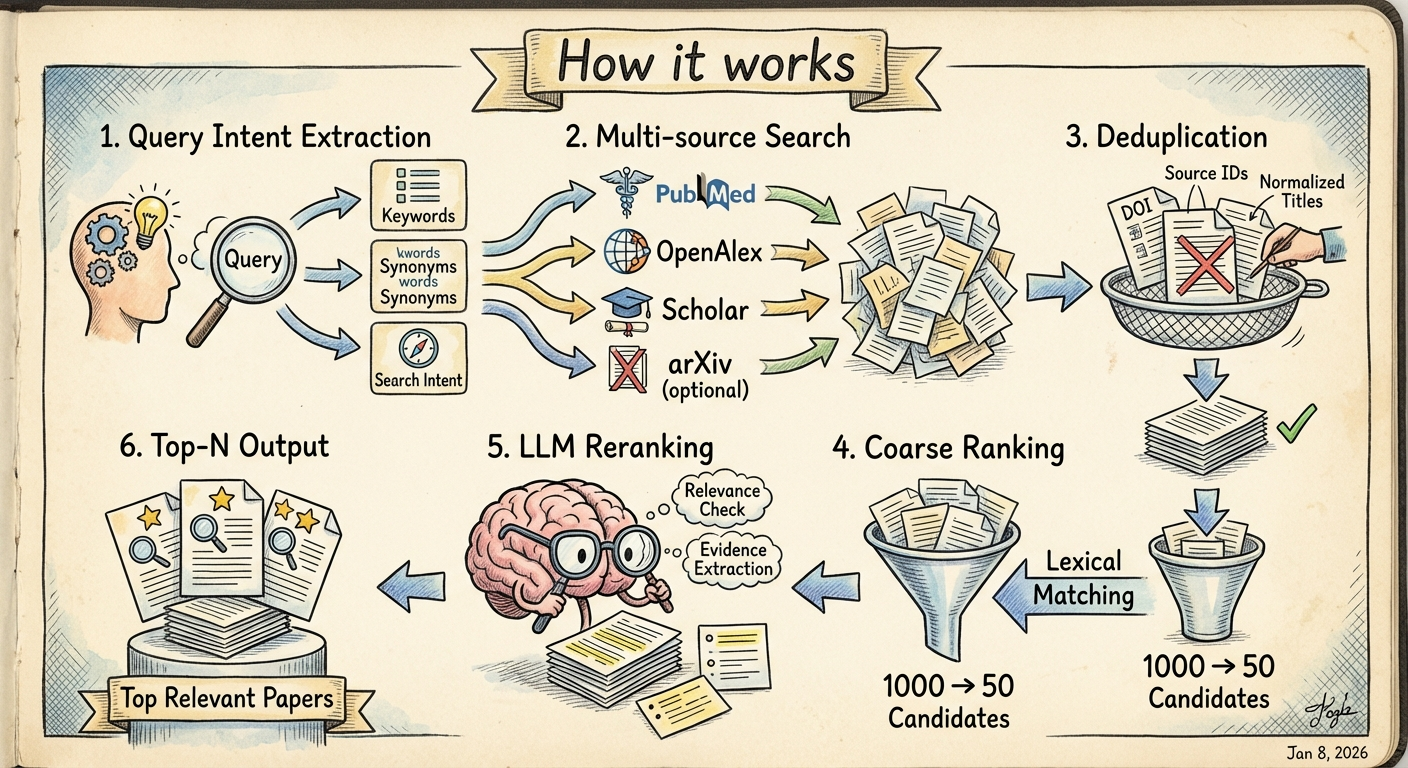 1. **Query Intent Extraction**: LLM analyzes your query to extract keywords, synonyms, and search intent 2. **Multi-source Search**: Searches PubMed, OpenAlex, Scholar, arXiv, and optionally Zotero in parallel 3. **Deduplication**: Removes duplicate papers using DOI, source IDs, and normalized titles 4. **Coarse Ranking**: Uses lexical matching to reduce candidates to a manageable number 5. **LLM Reranking**: Each candidate is evaluated by LLM for relevance, with evidence extraction 6. **Top-N Output**: Returns the most relevant papers with supporting evidence ### Generate platform-specific search queries Use `gen-query` to generate an optimized search query for a specific database platform without actually searching. This is useful when you want to run the search manually or refine the query. ```bash # Generate a PubMed search query (default) paper gen-query "CRISPR gene editing for cancer therapy" # Generate a Google Scholar search query paper gen-query "single cell RNA velocity" --platform scholar # Generate a Web of Science search query paper gen-query "machine learning drug discovery" --platform wos # Output as Markdown (easy to copy to notes) paper gen-query "protein structure prediction" --platform pubmed --format md # Output as JSON (for programmatic use) paper gen-query "neural networks" --platform scholar --format json ``` Supported platforms: - `pubmed` (default): PubMed/MEDLINE - uses Boolean operators, field tags like `[Title/Abstract]`, `[MeSH Terms]` - `scholar`: Google Scholar - optimized for shorter, keyword-focused queries - `wos`: Web of Science - uses `TS=`, `TI=` field tags and `NEAR/x` proximity operators Platform aliases: `google_scholar` → `scholar`, `web_of_science` / `world_of_knowledge` → `wos` ### Extract text from PDF[Experimental Feature] Use `extract` to parse a PDF file using [Doc2X](https://doc2x.noedgeai.com/) and output page-level JSONL. Each line contains one page with extracted text. ```bash # Extract to stdout (pipe to file or other tools) paper extract paper.pdf # Extract to a file paper extract paper.pdf --out result.jsonl # Download images to local directory (replaces CDN URLs with local paths) paper extract paper.pdf --image-dir ./images --out result.jsonl # Include raw page data (for debugging or further processing) paper extract paper.pdf --include-raw --out result.jsonl # With verbose output paper extract paper.pdf --verbose ``` Output JSONL format (one JSON object per line): ```json {"doc2x_uid": "...", "source_path": "/path/to/paper.pdf", "page_index": 0, "page_no": 1, "text": "..."} {"doc2x_uid": "...", "source_path": "/path/to/paper.pdf", "page_index": 1, "page_no": 2, "text": "..."} ``` Options: - `--out PATH`: Write output to file instead of stdout - `--image-dir PATH`: Download images to this directory and replace CDN URLs with local paths - `--poll-interval FLOAT`: Seconds between status polls (default: 2.0) - `--timeout FLOAT`: Maximum wait time in seconds (default: 900) - `--include-raw/--no-include-raw`: Include raw page data in output - `--verbose/-V`: Show detailed progress - `--quiet/-q`: Suppress progress output ### Structure `result.jsonl` for database ingestion `paper structure` performs a **second-pass parse** on the page-level JSONL produced by `paper extract`, and outputs a single structured JSON object with fields like title/abstract/methods/results and main vs supplementary figures/tables. ```bash # Turn result.jsonl into a single structured JSON document paper structure result.jsonl --out structured.json # Or output a Markdown report for easier reading paper structure result.jsonl --out structured.md # (equivalent) paper structure result.jsonl --format md --out structured.md ``` **Markdown output with YAML front matter**: When using `--format md`, the output includes a YAML front matter block at the beginning with metadata fields (title, author, abstract, keywords, journal, date, doi) extracted via best-effort heuristics. This makes the output compatible with static site generators (Hugo, Jekyll) and note-taking tools like Obsidian. ```yaml --- title: "Paper Title" author: - John Smith - Jane Doe abstract: | This is the abstract text... keywords: - machine learning - bioinformatics journal: Nature Methods date: 2024-03-15 doi: 10.1234/example doc2x_uid: "..." source_path: "/path/to/paper.pdf" page_count: 12 --- ``` ### Download PDF by DOI Use `fetch-pdf` to download open-access PDFs using a DOI. The command first queries [Unpaywall](https://unpaywall.org/) for direct PDF links, then falls back to [PubMed Central (PMC)](https://pmc.ncbi.nlm.nih.gov/) if needed. ```bash # Download PDF to current directory paper fetch-pdf 10.1038/nature12373 # Specify output directory paper fetch-pdf "10.1038/s41586-023-06291-2" --out-dir ./pdfs # Custom filename paper fetch-pdf 10.1038/nature12373 --out-dir ./pdfs --filename paper.pdf # Only show PDF URL without downloading paper fetch-pdf 10.1000/xyz123 --no-download # Output metadata as JSON paper fetch-pdf 10.1038/nature12373 --no-download --format json # Skip Unpaywall, use PMC only paper fetch-pdf 10.1038/nature12373 --skip-unpaywall # Skip PMC fallback, use Unpaywall only paper fetch-pdf 10.1038/nature12373 --skip-pmc ``` Options: - `--out-dir PATH`: Directory to save PDF (default: current directory) - `--filename NAME`: Output filename (default: `{doi_safe}.pdf`) - `--no-download`: Only show PDF URL, don't download - `--skip-unpaywall`: Skip Unpaywall lookup (use PMC only) - `--skip-pmc`: Skip PMC fallback (use Unpaywall only) - `--format`: Output format for metadata: `table` (default) or `json` - `--verbose/-V`: Show detailed progress - `--quiet/-q`: Suppress progress output **Note**: Requires `UNPAYWALL_EMAIL` environment variable or `[unpaywall] email` in config file. If you get **HTTP 403 Forbidden** when downloading an OA PDF, the host may be blocking automated downloads (anti-bot). You can try overriding the default User-Agent: ```bash export PAPERCLI_PDF_USER_AGENT="Mozilla/5.0 (X11; Linux x86_64) AppleWebKit/537.36 (KHTML, like Gecko) Chrome/120.0.0.0 Safari/537.36" paper fetch-pdf 10.1101/2025.03.04.641200 ``` ### Generate article highlight slides Use `slide` to generate a visual summary slide from article text. The command extracts key highlights using Gemini and generates a styled single-page PNG image. ```bash # Generate a hand-drawn style slide from a text file paper slide --in article.txt --style handdrawn --out slide.png # Use minimal style with custom output paper slide --in paper.txt --style minimal --out summary.png # Pipe text from stdin cat article.txt | paper slide --style academic # Customize number of bullet points and image size paper slide --in text.txt --bullets 3 --image-size 2K --style dark # Show extracted highlights in terminal paper slide --in article.txt --style colorful --show-highlights ``` Supported styles: - `handdrawn`: Hand-drawn sketch style with marker strokes (default) - `minimal`: Ultra-minimalist clean design - `academic`: Professional academic poster style - `dark`: Dark futuristic tech theme - `colorful`: Vibrant and energetic design Options: - `--in PATH`: Input text file (reads from stdin if not provided) - `--out PATH`: Output PNG file path (default: `slide.png`) - `--style STYLE`: Visual style preset - `--bullets N`: Number of bullet points 1-8 (default: 5) - `--aspect-ratio`: Image aspect ratio: `16:9`, `4:3`, `1:1` (default: `16:9`) - `--image-size`: Image size: `1K`, `2K`, `4K` (default: `1K`) - `--show-highlights`: Print extracted highlights to terminal - `--verbose/-V`: Show detailed progress - `--quiet/-q`: Suppress progress output **Note**: Requires `GEMINI_API_KEY` environment variable or `[gemini] api_key` in config file. ### Review and critique papers Use `paper review` to analyze academic papers. The `critique` subcommand generates LLM-based peer reviews, while `lint` performs deterministic checks for common issues. #### Peer review (LLM-based) Generate a structured peer review for biology/biomedical papers: ```bash # Generate a review from a text file paper review critique --in manuscript.txt # Output as JSON (for programmatic use) paper review critique --in paper.md --format json --out review.json # Pipe text from stdin cat abstract.txt | paper review critique --out feedback.md # Use a specific model paper review critique --in draft.txt --model gpt-4o ``` The review covers: - Summary of the paper's contribution - Strengths and weaknesses - Major concerns (experimental design, statistics, controls) - Questions for authors - Suggested experiments - Reproducibility and data availability - Ethics and compliance (if applicable) - Writing and clarity - Overall recommendation (accept/minor revision/major revision/reject) #### Lint checks (deterministic) Run deterministic lint checks on paper text: ```bash # Run all lint rules paper review lint --in manuscript.md # Output as JSON paper review lint --in paper.txt --format json --out lint.json # Run specific rules only paper review lint --in draft.md --rules figure-table-ref,units-format # Exclude specific rules cat text.txt | paper review lint --exclude punctuation-mixed ``` Available rules: - `figure-table-ref`: Check for inconsistent Fig./Figure and Tab./Table references - `units-format`: Check number-unit spacing and percentage formatting - `term-consistency`: Check for inconsistent biology terms (RNA-seq, CRISPR-Cas9, etc.) - `punctuation-mixed`: Check for Chinese/English punctuation mixing - `case-title`: Check for inconsistent heading case style Options: - `--in PATH`: Input text file (reads from stdin if not provided) - `--out PATH`: Output report path (default: stdout for lint, `review.md` for critique) - `--format`: Output format: `md` (default) or `json` - `--rules`: Comma-separated list of rules to run (lint only) - `--exclude`: Comma-separated list of rules to exclude (lint only) - `--model`: Model for review (critique only, defaults to instinct_model) - `--verbose/-V`: Show detailed progress - `--quiet/-q`: Suppress progress output ## License MIT
