KO
|
EN
gitlite — search
Search
#typescript
#ai-agents
#deepseek-harness
#dsh-plugin
#open-source
#ai
#claude-code
#cli
#windows
#codex
#developer-tools
#dsh
StepOrient
★ 70
Open GitHub ↗
计步和方向传感器组合, 实现记录人行走的轨迹
Download README (.md)
Explore Similar Repositories
Wallet-Monitoring-TG-bot
:
Wallet Monitoring Telegram Notification System.
arg.js
:
🇦🇷 🛠 NPM library. Validation of Argentinian bank account numbers, IDs and phone numbers
build-supercollider
:
A dead simple script that builds and installs Supercollider
FMoviesPlus.bundle
:
Plex Media Server plug-in designed for FMovies, G2G, Primewire and more.
mulan
:
No description available.
// repository documentation
Was this content helpful?
★ 0
(0 ratings)
Select Rating:
★
★
★
★
★
Submit Feedback
Recent Feedback
×
Download README
Do you want to download the
README.md
file for
StepOrient
?
Download (.md)
注:我将很多AS项目配置都删了,导入项目后有可能gradle插件版本与Android studio不匹配, 记得在build.gradle修改gradle插件版本,与Android studio版本匹配 dependencies { classpath 'com.android.tools.build:gradle:2.3.1' } 一般情况,Android studio版本与gradle插件版本一致, 例如Android studio版本2.3,gradle插件版本2.3.0(必须是3位) Android studio版本2.3.1,gradle插件版本2.3.1 Android studio版本2.3.2,gradle插件版本2.3.2 # 利用Android计步和方向传感传感器组合使用,可以在地图上记录人行走的轨迹图 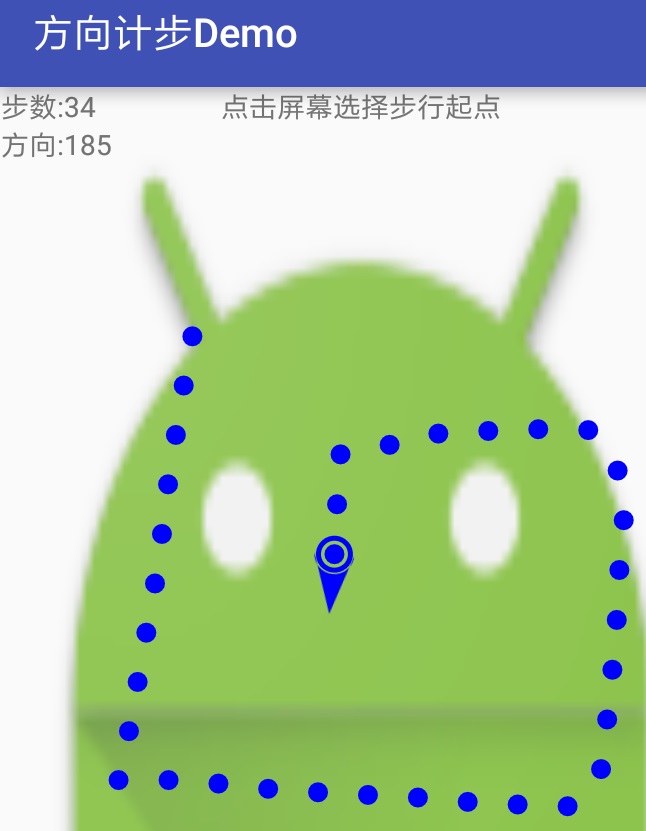 ## step包(计步功能): StepSensorBase.java 计步传感器抽象类,计步公用方法和变量 StepSensorAcceleration.java 加速度传感器实现计步功能 StepSensorPedometer.java 直接使用内置计步传感器实现计步功能 ## orient包(方向功能): OrientSensor.java 方向功能 ## SensorUtil.java 传感器工具方法,主要是修正方向算法(即转动停止后的方向,才作为行走轨迹的方向) ## 使用实例 ```java public class MainActivity extends AppCompatActivity implements StepSensorBase.StepCallBack, OrientSensor.OrientCallBack { private TextView mStepText; private TextView mOrientText; private StepView mStepView; private StepSensorBase mStepSensor; // 计步传感器 private OrientSensor mOrientSensor; // 方向传感器 private int mStepLen = 50; // 步长 @Override public void Step(int stepNum) { // 计步回调 mStepText.setText("步数:" + stepNum); mStepView.autoAddPoint(mStepLen); } @Override public void Orient(int orient) { // 方向回调 mOrientText.setText("方向:" + orient); // 获取手机转动停止后的方向 // orient = SensorUtil.getInstance().getRotateEndOrient(orient); mStepView.autoDrawArrow(orient); } @Override protected void onCreate(Bundle savedInstanceState) { super.onCreate(savedInstanceState); SensorUtil.getInstance().printAllSensor(this); // 打印所有可用传感器 setContentView(R.layout.activity_main); mStepText = (TextView) findViewById(R.id.step_text); mOrientText = (TextView) findViewById(R.id.orient_text); mStepView = (StepView) findViewById(R.id.step_surfaceView); // 注册计步监听 // mStepSensor = new StepSensorPedometer(this, this); // if (!mStepSensor.registerStep()) { mStepSensor = new StepSensorAcceleration(this, this); if (!mStepSensor.registerStep()) { Toast.makeText(this, "计步功能不可用!", Toast.LENGTH_SHORT).show(); } // } // 注册方向监听 mOrientSensor = new OrientSensor(this, this); if (!mOrientSensor.registerOrient()) { Toast.makeText(this, "方向功能不可用!", Toast.LENGTH_SHORT).show(); } } @Override protected void onDestroy() { super.onDestroy(); // 注销传感器监听 mStepSensor.unregisterStep(); mOrientSensor.unregisterOrient(); } } ```
