KO
|
EN
gitlite — search
Search
#python
#java
#python3
#arduino
#golang
#machine-learning
#rust
#html
#flask
#javascript
#seismology
#nodejs
AndroidPerformanceStudio
★ 25
Open GitHub ↗
Android performace studio.
Download README (.md)
Explore Similar Repositories
TrueNAS-Tricks
:
Prevent constant waking of TrueNAS HDDs for smartctl tasks, and other TrueNAS stuff
luci-app-oxidns
:
luci-app-oxidns is the LuCI management app for OxiDNS on OpenWrt
stabledaw.pinokio
:
No description available.
Bespok3d-desktop
:
Besok3d is an app store and package manager for Klipper 3D printers. Install plugins, adapters, and features with one tap. No terminal, no custom firmware.
virtual-cell-tutorial
:
No description available.
// repository documentation
Was this content helpful?
★ 0
(0 ratings)
Select Rating:
★
★
★
★
★
Submit Feedback
Recent Feedback
×
Download README
Do you want to download the
README.md
file for
AndroidPerformanceStudio
?
Download (.md)
# AndroidPerfermanceStudio [中文文档](README.zh-CN.md) AndroidPerfermanceStudio is a Compose Desktop workstation for inspecting and correlating Android performance data. It brings layout, CPU, system trace, memory, frame, startup, battery, network, GPU, and benchmark workflows into one application while keeping each analyzer as an isolated feature module. > The product name and package names intentionally retain the existing `AndroidPerfermanceStudio` spelling for compatibility. ## Highlights - One desktop shell with English, Simplified Chinese, light, dark, and system settings. - Local-first workflows that operate through ADB and imported artifacts. - A full native-release pipeline for macOS (DMG/PKG), Windows (MSI/EXE), and Linux (DEB/RPM). - Cross-tool handoffs for correlation—for example, opening a trace produced by GPU or benchmark analysis in Trace Analyzer. ## Screenshots ### Home 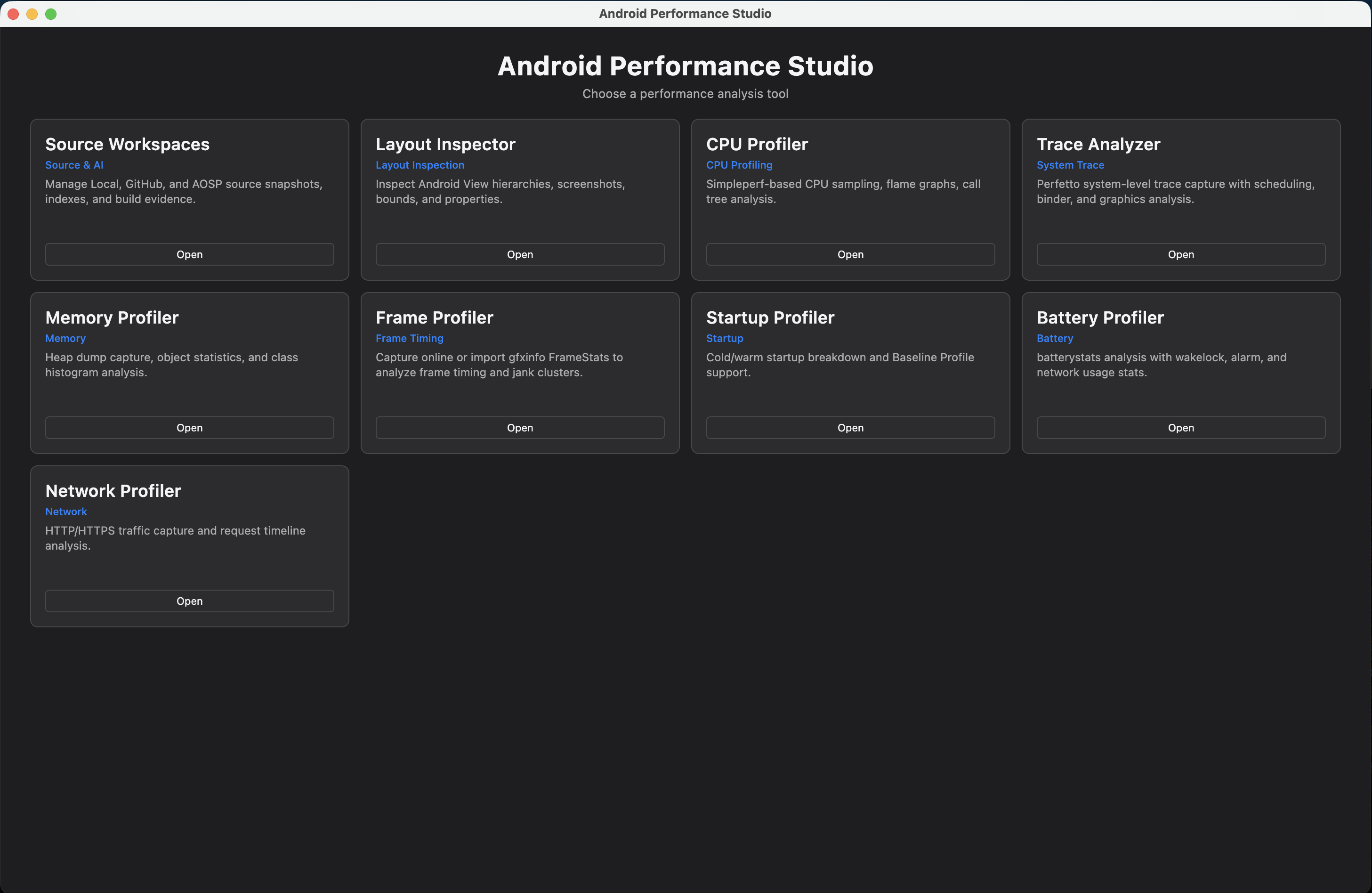 ### Layout Inspector 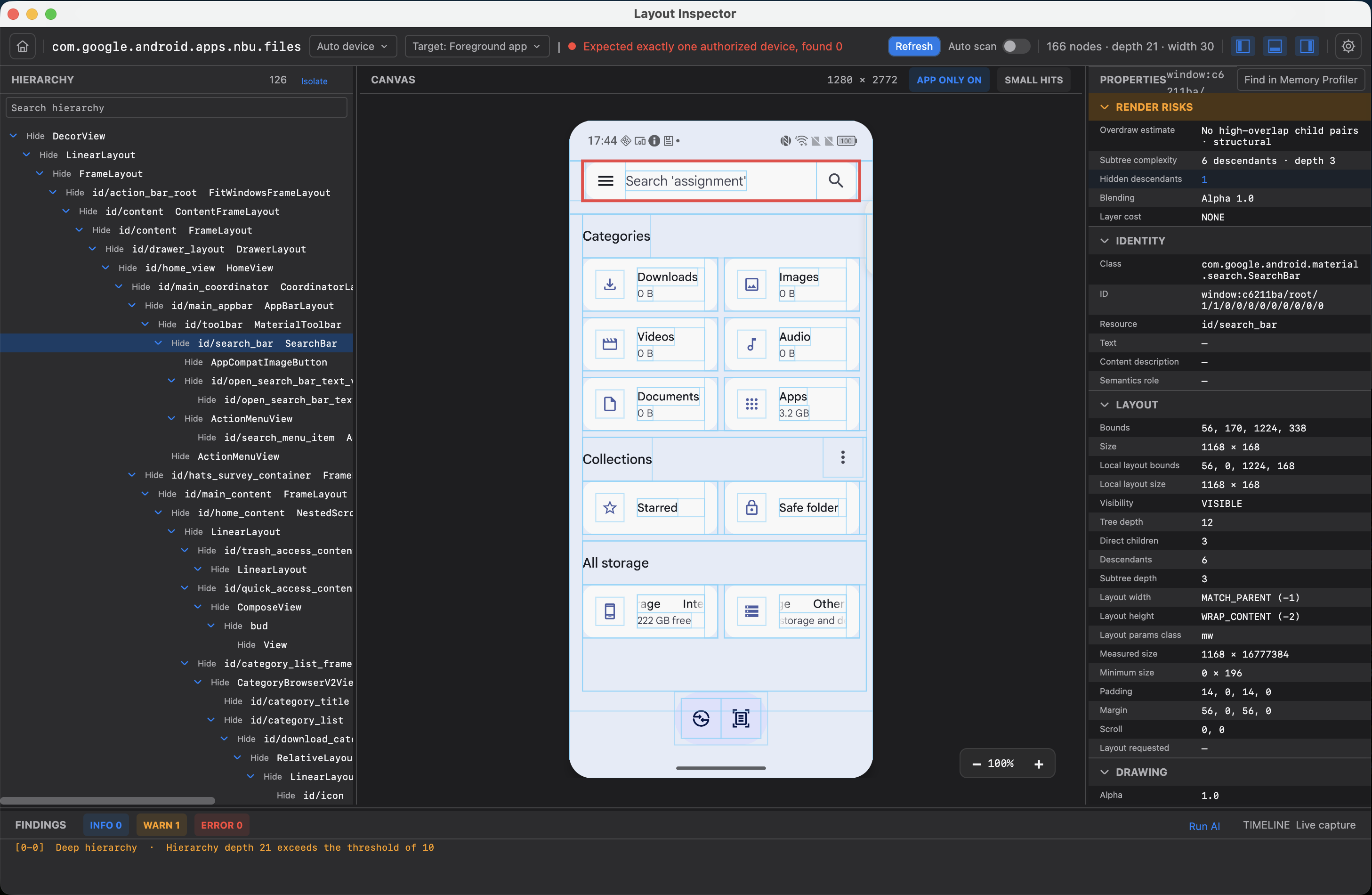 ### CPU Profiler 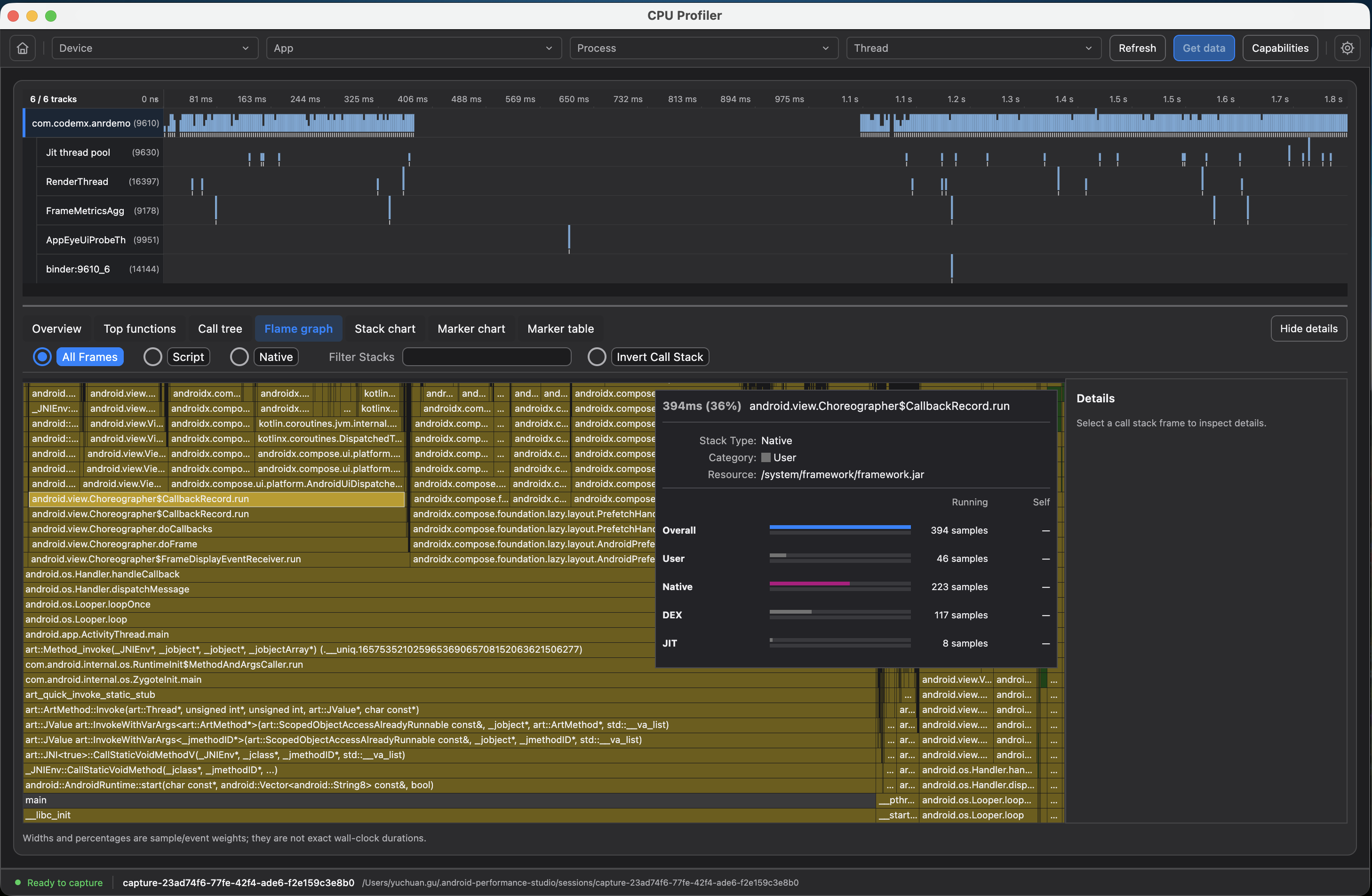 ### Trace Analyzer 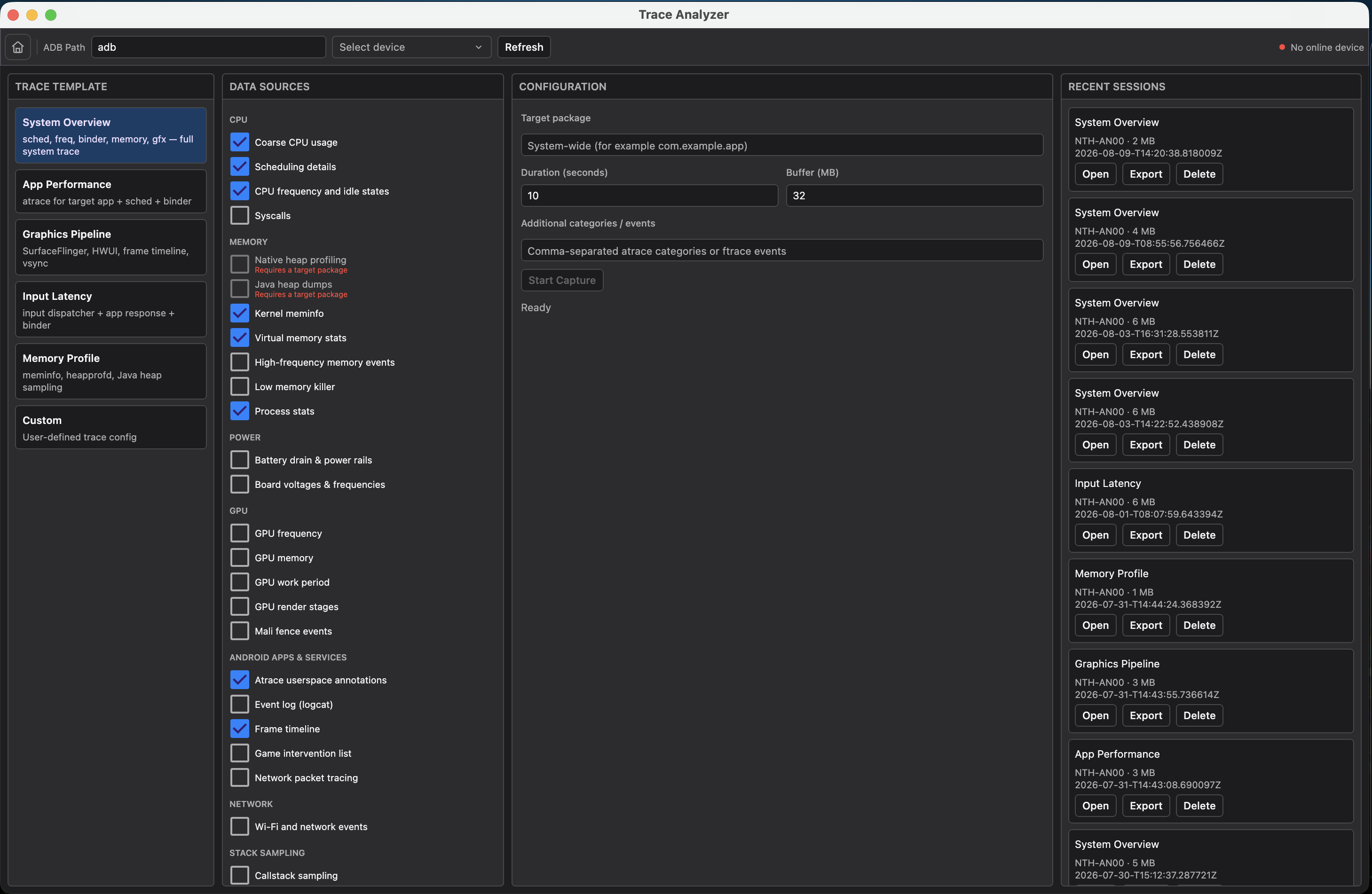 ## Features | Tool | What it does | | --- | --- | | **Layout Inspector** | Captures Android View hierarchies and screenshots, presents hierarchy/canvas/properties panes, highlights bounds and findings, and supports capture archive import/export. A debug-only Android agent offers higher-fidelity capture; UI Automator and screenshots provide a fallback for other foreground apps. | | **CPU Profiler** | Uses `simpleperf` to collect CPU samples and explore them with flame graphs and call-tree analysis. | | **Trace Analyzer** | Captures and imports Perfetto system traces, provides scheduling, Binder, and graphics analysis, keeps recent sessions, and exports the original trace file. The packaged UI uses the pinned Perfetto distribution and trace processor. | | **Memory Profiler** | Captures or imports HPROF heap dumps, then analyzes object statistics and class histograms; raw HPROF and analysis output can be exported. | | **Frame Profiler** | Captures live frame data or imports `gfxinfo` FrameStats, identifies frame-timing and jank clusters, and exports CSV/JSON reports. A selected frame can be opened in Layout Inspector for correlation. | | **Startup Profiler** | Measures and breaks down cold and warm startup, with Baseline Profile support and import/exportable results. | | **Battery Profiler** | Runs `batterystats`-based experiments and reports wakelock, alarm, and network usage. It can export JSON, CSV, and raw evidence, and generate Battery Historian input. | | **Network Profiler** | Captures HTTP/HTTPS request activity from the Android agent or imports HAR files, then presents request timelines and details. | | **GPU Inspector** | Discovers and launches Android GPU Inspector (AGI), indexes and validates GPU artifacts, and can hand trace artifacts to Trace Analyzer. | | **Benchmark Regression** | Imports AndroidX Benchmark JSON, compares a baseline with current results, flags regressions, and produces reports suited to CI. | ## Quick start ### Prerequisites - macOS 13+, Windows 10 22H2/11, or Ubuntu 22.04/24.04 - JDK 21 - Git - Android SDK Platform Tools / `adb` for device capture workflows - Node.js 24 and Yarn Classic 1.x when building the bundled Firefox Profiler assets - `curl`, `unzip`, and Python 3 for the bundled Perfetto assets and trace processor ### Clone and prepare bundled profiler assets ```bash git clone --recurse-submodules https://github.com/yuchuangu85/AndroidPerformanceStudio.git cd AndroidPerformanceStudio npm install --global yarn@1 ./scripts/firefox-profiler.sh all ./scripts/build-perfetto-ui.sh download PERFETTO_TOOLS_DIR="$PWD/build/perfetto-tools" ./scripts/install-trace-processor.sh ``` If the repository was cloned without submodules, initialize them before running the scripts: ```bash git submodule update --init --depth 1 --recursive ``` ### Run the desktop application ```bash cd desktop-viewer ./gradlew :desktop-app:run ``` Open **Settings** from the operating-system application menu to set the Android SDK path, language, theme, or view the dynamically resolved application version. ## Build and test Run the complete desktop test suite: ```bash ./desktop-viewer/gradlew -p desktop-viewer test --no-daemon ``` Create a native package for the current host operating system: ```bash ./desktop-viewer/gradlew -p desktop-viewer :desktop-app:createDistributable --no-daemon ``` Platform-specific packaging tasks are available for the release formats. Native installers must be built on a matching host operating system and CPU architecture: ```bash # macOS Apple Silicon (arm64) ./desktop-viewer/gradlew -p desktop-viewer :desktop-app:packageDmg :desktop-app:packagePkg -Ptarget.arch=arm64 --no-daemon # macOS Intel (x64), run with an x64 JDK on an Intel host ./desktop-viewer/gradlew -p desktop-viewer :desktop-app:packageDmg :desktop-app:packagePkg -Ptarget.arch=x64 --no-daemon # Windows x64 ./desktop-viewer/gradlew.bat -p desktop-viewer :desktop-app:packageMsi :desktop-app:packageExe --no-daemon # Linux x64 ./desktop-viewer/gradlew -p desktop-viewer :desktop-app:packageDeb :desktop-app:packageRpm --no-daemon ``` The release workflow publishes DEB and RPM installers for Linux x64, MSI and EXE installers for Windows x64, and DMG and PKG installers for both macOS arm64 and macOS x64. A custom packaging JDK can be supplied with `-Ptarget.javaHome=/absolute/path/to/jdk`. Windows x86 (32-bit) packages are not generated. Compose Desktop's Skiko runtime supports Windows x86_64, not 32-bit x86, so relabeling an x64 installer as x86 would produce an unusable release. See the [Compose native distribution host restriction](https://kotlinlang.org/docs/multiplatform/compose-native-distribution.html) and [Skiko's supported platform list](https://github.com/JetBrains/skiko#supported-platforms). ## Project layout ```text android-studio-plugin/ Planned Android Studio plugin integration web-ui-http-server/ Planned web UI and in-app HTTP server integration desktop-viewer/ Compose Desktop application and feature modules desktop-app/ Application shell, settings, resources, and packaging layout-inspector/ View hierarchy capture and analysis simpleperf-viewer/ CPU sampling and profile analysis perfetto-viewer/ Perfetto trace capture, analysis, storage, and UI bridge memory-profiler/ HPROF capture and analysis frame-profiler/ Frame timing and jank analysis startup-profiler/ Launch timing analysis battery-profiler/ Battery experiment and attribution analysis network-profiler/ Network capture and HAR analysis gpu-inspector-integration/ AGI discovery and artifact integration benchmark-regression/ AndroidX Benchmark comparison and reporting ui-components/ Shared public Compose controls ai-core/ Shared provider-neutral AI infrastructure source-workspace/ Local/GitHub/AOSP source snapshots, cache, indexes, and resolution third_party/ Pinned Firefox Profiler and Perfetto submodules scripts/ Bundled profiler and trace-processor preparation scripts docs/ Architecture, requirements, and design records ``` ## Development notes - `desktop-viewer/desktop-app/` owns only the unified shell, settings, and native packaging. Each analyzer owns its own implementation and does not depend on other feature implementations. - Layout Inspector uses a debug-only agent for high-fidelity capture; it does not require root, hidden APIs, system signing, or a network permission. Its fallback has the visibility and speed limits of UI Automator. - Analysis-tool handoffs are correlation aids, not proof of causality. - The Android Studio plugin and Web UI directories are intentionally planning placeholders; the implemented product is the desktop application. ## More documentation - [Desktop development guide](desktop-viewer/docs/architecture/DEVELOPMENT.md) - [Layout Inspector protocol](desktop-viewer/docs/architecture/PROTOCOL.md) - [Desktop design](desktop-viewer/docs/design/2026-07-02-desktop-viewer-design.md) - [Documentation index](docs/README.md) - [Third-party asset build instructions](third_party/README.md)
