KO
|
EN
gitlite — search
Search
#typescript
#react
#tailwindcss
#docker
#api
#golang
#css
#html
#vite
#reactjs
#nextjs
#nodejs
edge-tts-gui
★ 16
Open GitHub ↗
a gui for edgetts with pyqt6
Download README (.md)
Explore Similar Repositories
EdgeTTS.Net
:
No description available.
edgetts
:
edge tts lib for go
opencode-voice-plugin
:
OpenCode plugin for text-to-speech voice output and notifications. Integrates with EdgeTTS or any TTS API.
edgetts-cloudflare
:
把微软 Edge 的神经网络语音合成能力,包装成 OpenAI TTS API 兼容格式,部署在 Cloudflare Workers 上。免费、快速、无需服务器!
// repository documentation
Was this content helpful?
★ 0
(0 ratings)
Select Rating:
★
★
★
★
★
Submit Feedback
Recent Feedback
×
Download README
Do you want to download the
README.md
file for
edge-tts-gui
?
Download (.md)
# edge-tts-gui 一个使用 PyQt6 为 edge-tts 制作的图形化界面。 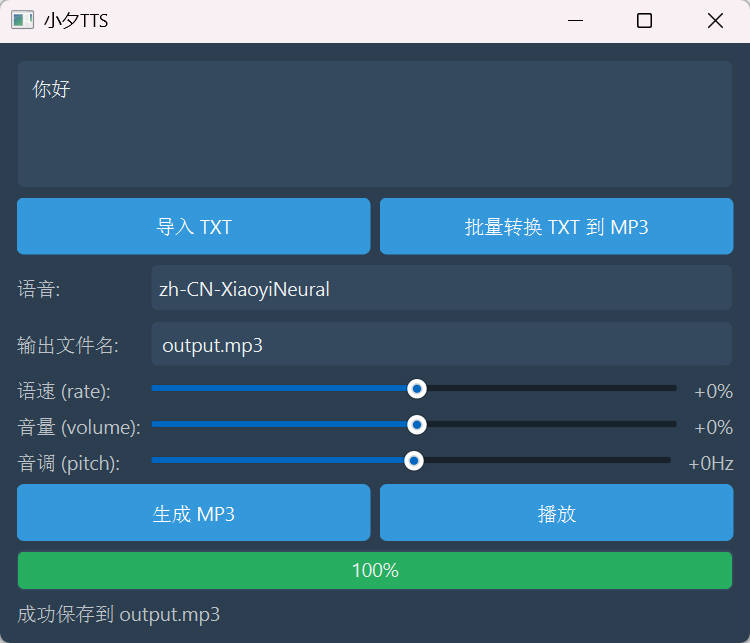 ## ✨ 功能 - **文本转语音**: 将输入的文本转换为 MP3 音频文件。 - **多种声音选择**: 支持多种中文语音模型。 - **音频参数调整**: - **语速**: 调整语音的快慢。 - **音量**: 调整语音的音量大小。 - **音调**: 调整语音的音高。 - **文件导入**: 支持从 TXT 文件导入文本内容。 - **批量转换**: 支持批量将多个 TXT 文件转换为 MP3 音频。 - **内置播放器**:可以直接在软件内播放生成的音频。 - **友好的用户界面**: 简洁美观的界面设计,易于上手。 ## 📋 系统要求 - Python 3.8+ - Windows 10/11 (推荐) ## 📦 依赖包 ```bash pip install PyQt6 pip install edge-tts ``` 或者使用 requirements.txt: ```bash pip install -r requirements.txt ``` ## 📥 下载 **夸克网盘链接**: https://pan.quark.cn/s/d5eda639003e **CSDN**: https://download.csdn.net/download/problc/91395590 ## 🚀 如何使用 1. 在文本框中输入或粘贴需要转换的文字。 2. 或者点击 **导入 TXT** 按钮从本地加载文本文件。 3. 在 **语音** 下拉菜单中选择喜欢的声音。 4. 通过拖动滑块来调整 **语速**、**音量** 和 **音调**。 5. 在 **输出文件名** 处设置生成后音频文件的名字。 6. 点击 **生成 MP3** 按钮开始转换。 7. 转换成功后,可以点击 **播放** 按钮试听。 8. 如果需要一次性转换多个文件,点击 **批量转换 TXT 到 MP3** 按钮,选择多个 TXT 文件即可。
