KO
|
EN
gitlite — search
Search
#javascript
#python
#hacktoberfest
#react
#ai
#typescript
#llm
#go
#golang
#android
#machine-learning
#rust
#deep-learning
#linux
HideText
★ 13
Open GitHub ↗
hide text by random key
Download README (.md)
Explore Similar Repositories
is-bot
:
Detect bots/crawlers/spiders via user-agent string
YADA
:
Yet Another Diffusion Automation
smashing-next
:
Advanced Next.js Masterclass: a workshop by Atila Fassina and Smashing Magazine
cian-protocol
:
No description available.
Vitis_workflow
:
Vitis 部署加速器工作流介绍
// repository documentation
Was this content helpful?
★ 0
(0 ratings)
Select Rating:
★
★
★
★
★
Submit Feedback
Recent Feedback
×
Download README
Do you want to download the
README.md
file for
HideText
?
Download (.md)
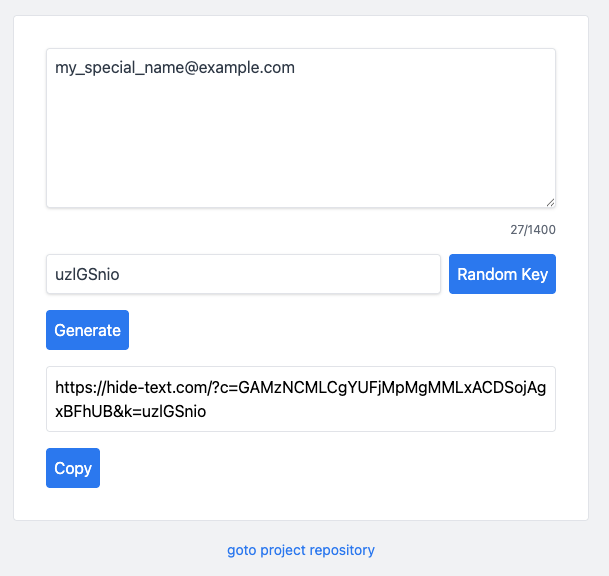
# Hide your text by random key This tool use random numbers to hide your text from search engines finding your internet activity. It has been deployed online: - https://hide-text.com/ (Official Domain) - https://hide-text.vercel.app/ (Original deployment URL, fully compatible) ## Use Case Suppose your email address is "my_special_name@example.com". You can use hide-text.com to generate multiple random addresses: - https://hide-text.com/?c=F0ouRxQuBlwbXy5aBSYAdR9LEFkUJwAbGVwc&k=z3q4dKe5 (Random Address A) - https://hide-text.com/?c=GAMzNCMLCgYUFjMpMgMMLxACDSojAgxBFhUB&k=uzlGSnio (Random Address B) Clicking on any of these distinct random addresses reveals your actual address: "my_special_name@example.com". You can post "Random Address A" on Sub-A and "Random Address B" on Sub-B. ### Scenario 1: The random address cannot be retrieved from your real email address If someone searches for your real email address—"my_special_name@example.com"—on Google, they will not see the "Random Address A" you posted on Sub-A. This is because your real email address was not made public on Sub-A, and Google does not link "Random Address A" to your real email address. ### Scenario 2: A leak of one random address does not expose the other If someone learns of "Random Address A" and searches for it on Google, they will only see the record you left on Sub-A. They will not be able to discover "Random Address B," which you posted on Sub-B. This is because it is impossible to derive "Random Address B" from "Random Address A." ## Technical Implementation 1. Encryption and decryption utilize the self-inverse property of the XOR operation: XORing the plaintext with the key yields the ciphertext, while XORing the ciphertext with the key again recovers the original plaintext. 2. The page displaying the ciphertext uses "noindex" and "canonical" tags to prevent Google from indexing it. 3. All information --- including both the ciphertext and the key --- is contained within the URL. Due to URL length limitations and to ensure reliability, the text string to be encrypted is limited to 1,400 characters. ### Browser Extension We also offer a browser extension as an access point; it is currently available on the Chrome, Edge, and Firefox extension stores—simply search for "Hide Text." Once installed, the extension allows users to generate links containing random strings and decode such links without leaving the current webpage. Here is how to use it: 1. Click on an input field on the webpage; 2. Click the browser extension button; 3. Enter text, click the "Random" button, and then click the "Insert" button; 4. If the inserted link is posted on a forum or blog and is clickable, hovering your mouse over it will reveal the original text; Moving forward, the extension will serve as the primary access point for this project. ## Privacy 1. A client-side only application with no backend, no database, and zero external network calls. 2. No cookies, sessions, or other tracking mechanisms are used. 3. Open source. ### Screenshot