KO
|
EN
gitlite — search
Search
#typescript
#ai-agents
#deepseek-harness
#dsh-plugin
#open-source
#ai
#cli
#dsh
#claude-code
#codex
#developer-tools
#react
cypress-map
★ 61
Open GitHub ↗
Cypress query commands for v12+
Download README (.md)
Explore Similar Repositories
discord-yashinu-guardbot
:
Discord - Yashinu v12 Guard Bot
fallout-limine-theme
:
Fallout Theme for v12 of Limine.
discord.js-v12-tutorial-series
:
tutorial series from https://youtube.com/itzderock
discord-yashinu-statbot
:
V12 Stat Bot
react-flow-skill
:
Claude Code skill for building interactive node-based UIs with React Flow (@xyflow/react v12+)
// repository documentation
Was this content helpful?
★ 0
(0 ratings)
Select Rating:
★
★
★
★
★
Submit Feedback
Recent Feedback
×
Download README
Do you want to download the
README.md
file for
cypress-map
?
Download (.md)
# cypress-map [](https://github.com/bahmutov/cypress-map/actions/workflows/ci.yml)  > Extra Cypress query commands for v12+ - 📺 Watch the videos: - [Cypress v12 Querying Commands Introduction](https://youtu.be/4HpEECek2OE) - [Confirm Table Column](https://youtu.be/UOLQlNmuhY0) - [Use cypress-map Queries To Validate A Row In A Table](https://youtu.be/eVe4ySgW0qw) - [How To Check Visibility Of Many Elements](https://youtu.be/puCZGCeUb5k) - [Pick A Random Menu Link](https://youtu.be/xvvL3GRjXCY) - [Confirm The Same Text In A Couple Of Elements](https://youtu.be/xvImOlCSul4) - [Map Input Elements Values](https://youtu.be/OmVzv6pJN6I) - [Iterate Over DOM Elements Using cy.each, jQuery each and map, and cypress-map Plugin Commands](https://youtu.be/tMeKIIfEhyo) - [Confirm Sorted Attributes](https://youtu.be/sVb5MU2AkqE) - [Query Multiple Elements In Order](https://youtu.be/3BjwoG1dW7o) - [Element's Text Becomes Stable](https://youtu.be/GrRUnQ2r7Wk) - [Cut Cypress Execution In Half By Running Tests In Parallel Using cypress-split And GitHub Actions](https://youtu.be/jvBzNs0pRXU) - [Fix GitHub Actions Node Version Warnings](https://youtu.be/1_jvJ3c8QAY) - [Use cy.second and cy.third Commands](https://youtu.be/gZtTN9LaD7U) - [Remove Class From Sampled Elements](https://youtu.be/zB2LYB0yFwQ) - [Check Multiple Properties At Once Using cy.difference Query](https://youtu.be/WKVaJjst_-8) - [cy.difference Command With Predicates](https://youtu.be/RKgSBN2fk_s) - [The Possess Assertion From cypress-map Plugin](https://youtu.be/HHxkL-BPyjA) - [Custom Should Read Assertion From Cypress-map Plugin](https://youtu.be/AzJx-8VD6yI) - [Introducing The cy.elements Query Command From Cypress-map Plugin](https://youtu.be/4mFZMQpzBIU) - [cy.mapChain Custom Command Examples](https://youtu.be/-WPCbgZr9Uo) - 📝 Read the blog posts - [Cypress V12 Is A Big Deal](https://glebbahmutov.com/blog/cypress-v12/) - [Crawl Weather Using Cypress](https://glebbahmutov.com/blog/crawl-weather/) - [Pass Values Between Cypress Tests](https://glebbahmutov.com/blog/pass-values-between-tests/) - [Do Not Use SHA To Compare HTML During E2E Tests](https://glebbahmutov.com/blog/do-not-use-sha/) - [Cypress Flakiness Examples](https://glebbahmutov.com/blog/flakiness-example/) - [Solve Tough Pagination Cases Using Cypress](https://glebbahmutov.com/blog/solve-tough-pagination-cases-using-cypress/) - [Check Fees And Totals Using Cypress](https://glebbahmutov.com/blog/check-fees-using-cypress/) - [Custom Cypress Should Read Assertion](https://glebbahmutov.com/blog/cypress-map-should-read-assertion/) - [Check Data Using Page Objects And Higher Order Functions](https://glebbahmutov.com/blog/check-data-in-page-objects/) - 🎓 Covered in my course [Cypress Plugins](https://cypress.tips/courses/cypress-plugins) - [Lesson l1: Confirm the attribute of the last item](https://cypress.tips/courses/cypress-plugins/lessons/l1) - [Lesson l2: Confirm the extracted list of texts](https://cypress.tips/courses/cypress-plugins/lessons/l2) - [Lesson l3: Confirm the last two items in the extracted lis](https://cypress.tips/courses/cypress-plugins/lessons/l3) - [Lesson l4: Confirm the list of attributes](https://cypress.tips/courses/cypress-plugins/lessons/l4) - [Lesson l5: Confirm the sum of attributes](https://cypress.tips/courses/cypress-plugins/lessons/l5) - [Lesson l6: Compare the sum of attributes to the total](https://cypress.tips/courses/cypress-plugins/lessons/l6) - [Lesson l7: Debug chained queries using tap](https://cypress.tips/courses/cypress-plugins/lessons/l7) - [Lesson l8: Get the raw DOM element at index k](https://cypress.tips/courses/cypress-plugins/lessons/l8) - [Lesson l9: Confirm the number of elements with the given attribute](https://cypress.tips/courses/cypress-plugins/lessons/l9) - [Lesson l10: Check the parsed attribute value](https://cypress.tips/courses/cypress-plugins/lessons/l10) - [Lesson l11: Extract and convert prices](https://cypress.tips/courses/cypress-plugins/lessons/l11) - [Lesson l12: Find the element with the smallest attribute value](https://cypress.tips/courses/cypress-plugins/lessons/l12) - [Lesson l13: Check each item's text](https://cypress.tips/courses/cypress-plugins/lessons/l13) - [Lesson l14: Flexible logging using cy.print command](https://cypress.tips/courses/cypress-plugins/lessons/l14) - [Lesson l15: Confirm HTML table values](https://cypress.tips/courses/cypress-plugins/lessons/l15) - [Lesson l17: Control the network and confirm the table](https://cypress.tips/courses/cypress-plugins/lessons/l17) - 🎓 Covered in my course [Cypress Network Testing Exercises](https://cypress.tips/courses/network-testing) - [Bonus 92: Map each item from the list using Cy commands](https://cypress.tips/courses/network-testing/lessons/bonus92) - [Bonus 100: Check all network responses at once with auto retries](https://cypress.tips/courses/network-testing/lessons/bonus100) - 🎓 Covered in my course [Testing The Swag Store](https://cypress.tips/courses/swag-store) - [Lesson 23: Simplify getting attribute from a list of elements](https://cypress.tips/courses/swag-store/lessons/lesson23) - [Bonus 36: Manipulate data- attributes using cypress-map methods](https://cypress.tips/courses/swag-store/lessons/bonus36) - [Bonus 41: Pick and confirm a random product](https://cypress.tips/courses/swag-store/lessons/bonus41) - [Bonus 42: Add 3 random items to the cart](https://cypress.tips/courses/swag-store/lessons/bonus42) - [Bonus 127: Parse URLSearchParams with retries](https://cypress.tips/courses/network-testing/lessons/bonus127) ## Install Add this package as a dev dependency: ``` $ npm i -D cypress-map # or using Yarn $ yarn add -D cypress-map ``` Include this package in your spec or support file to use all custom query commands ```js import 'cypress-map' ``` Alternative: import only the query commands you need: ```js import 'cypress-map/commands/map' import 'cypress-map/commands/tap' // and so on, see the /commands folder ``` ## API ### apply ```js const double = (n) => n * 2 cy.wrap(100).apply(double).should('equal', 200) ``` It works like `cy.then` but `cy.apply(fn)` is a query command. Function `fn` should be synchronous, pure function that only uses the subject argument and returns new value The function callback `fn` cannot use any Cypress commands `cy`. You can pass additional _left_ arguments to the callback function. Then it puts the subject as _last argument_ before calling the function: ```js cy.wrap(8).apply(Cypress._.subtract, 4).should('equal', -4) ``` Yields the subject of the same type as the `fn` return. ### applyRight Without arguments, `cy.applyRight` works the same as `cy.apply`. If you pass arguments, then the subject plus the arguments become the arguments to the callback. The subject is at the _left_ (first) position ```js cy.wrap(8).applyRight(Cypress._.subtract, 4).should('equal', 4) // same as cy.wrap(8) .apply((subject) => Cypress._.subtract(subject, 4)) .should('equal', 4) ``` ### partial Sometimes you have the callback to apply, and you know the first argument(s), and just need to put the subject at the last position. This is where you can partially apply the known arguments to the given callback. ```js // the Cypress._.add takes to arguments (a, b) // we know the first argument a = 5 // so we partially apply it and wait for the subject = b argument cy.wrap(100).partial(Cypress._.add, 5).should('equal', 105) // same as cy.wrap(100) .apply((subject) => Cypress._.add(5, subject)) .should('equal', 105) ``` ### applyToFirst If the current subject is an array, or a jQuery object, you can apply the given callback with arguments to the _first_ item or element. The current subject will be the _last_ argument. ```js // cy.applyToFirst(callback, ...args) cy.wrap(Cypress.$('<div>100</div><div>200</div>')) .applyToFirst((base, el) => parseInt(el.innerText, base), 10) .should('equal', 100) ``` ### applyToFirstRight If the current subject is an array, or a jQuery object, you can apply the given callback with arguments to the _first_ item or element. The current subject will be the _first_ argument. ```js // cy.applyToFirstRight(callback, ...args) cy.wrap(Cypress.$('<div>100</div><div>200</div>')) .applyToFirstRight((el, base) => parseInt(el.innerText, base), 10) .should('equal', 100) ``` ### invokeFirst We often just need to call a method on the first element / item in the current subject ```js cy.get(selector).invokeFirst('getBoundingClientRect') // compute the vertical center for example ``` ### map Transforms every object in the given collection by running it through the given callback function. Can also map each object to its property. An object could be an array or a jQuery object. ```js // map elements by invoking a function cy.wrap(['10', '20', '30']).map(Number) // [10, 20, 30] // map elements by a property cy.get('.matching') .map('innerText') .should('deep.equal', ['first', 'third', 'fourth']) ``` You can even map properties of an object by listing callbacks. For example, let's convert the `age` property from a string to a number for a single object: ```js cy.wrap({ age: '42', lucky: true, }) .map({ age: Number, }) .should('deep.equal', { age: 42, lucky: true, }) ``` If the subject is an array, then mapping will go through each item ```js const people = [...] // each item in the "people" array // has "age" property that we want to convert from a string // to a number cy.wrap(people) .map({ age: parseInt }) ``` You can avoid any conversion to simply pick the list of properties from an object ```js const person = { name: 'Joe', age: 21, occupation: 'student', } cy.wrap(person).map(['name', 'age']).should('deep.equal', { name: 'Joe', age: 21, }) ``` You can extract nested paths by using "." in your property path ```js cy.wrap(people) .map('name.first') .should('deep.equal', ['Joe', 'Anna']) // equivalent to cy.wrap(people) .map('name') .map('first') .should('deep.equal', ['Joe', 'Anna']) ``` If you want to pick multiple deep properties, the last segment will be the output property name ```js // each person has nested objects like // { name: { first: '...', last: '...', }, human: { age: xx, ... } } cy.wrap(people).map(['name.first', 'human.age']) // each object will have "first" and "age" properties ``` If the subject is an array of arrays, you can get each element by index ```js cy.wrap([ [1, 2, 3], [4, 5, 6], ]) .map(1) .should('deep.equal', [2, 5]) ``` ### mapInvoke ```js cy.get('#items li') .find('.price') .map('innerText') .mapInvoke('replace', '$', '') .mapInvoke('trim') ``` ### reduce ```js cy.get('#items li') .find('.price') .map('innerText') .mapInvoke('replace', '$', '') .map(parseFloat) .reduce((max, n) => (n > max ? n : max)) // yields the highest price ``` You can provide the initial accumulator value ```js cy.wrap([1, 2, 3]) .reduce((sum, n) => sum + n, 10) .should('equal', 16) ``` See [reduce.cy.js](./cypress/e2e/reduce.cy.js) ### tap ```js cy.get('#items li') .find('.price') .map('innerText') .tap() // console.log by default .mapInvoke('replace', '$', '') .mapInvoke('trim') // console.info with extra label .tap(console.info, 'trimmed strings') ``` **Notice:** if the label is provided, the callback function is called with label and the subject. ### make A retryable query that calls the given constructor function using the `new` keyword and the current subject as argument. ```js cy.wrap('Jan 1, 2019') // same as "new Date('Jan 1, 2019')" .make(Date) .invoke('getFullYear') .should('equal', 2019) ``` ### mapMake If you want to construct multiple items by mapping over the items in the current subject, use the `cy.mapMake(constructorFn)` query. ```js const dates = ['Jan 1, 2019', 'Feb 2, 2020', 'Mar 3, 2021'] cy.wrap(dates) .mapMake(Date) .print() .mapInvoke('getFullYear') .should('deep.equal', [2019, 2020, 2021]) ``` You can pass additional arguments ```js .mapMake(constructorFn, 1, 2, 3) // for each item "x" inside the subject, // the constructor will be called // like "new constructorFn(x, 1, 2, 3) ``` ### print A better `cy.log`: yields the value, intelligently stringifies values using `%` and [string-format](https://github.com/davidchambers/string-format) notation. ```js cy.wrap(42) .print() // "42" // and yields the value .should('equal', 42) // pass formatting string cy.wrap(42).print('the answer is %d') // "the answer is 42" cy.wrap({ name: 'Joe' }).print('person %o') // 'person {"name":"Joe"}' // use {0} with dot notation, supported deep properties // https://github.com/davidchambers/string-format cy.wrap({ name: 'Joe' }).print('person name {0.name}') // "person name Joe" // print the length of an array cy.wrap(arr).print('array length {0.length}') // "array length ..." // pass your own function to return formatted string cy.wrap(arr).print((a) => `array with ${a.length} items`) // if you return a non-string, it will attempt to JSON.stringify it cy.wrap(arr).print((list) => list[2]) // JSON.stringify(arr[2]) ``` See [print.cy.js](./cypress/e2e/print.cy.js) for more examples ### findOne Finds a single item in the subject. Assumes subject is an array or a jQuery object. Uses Lodash `_.find` method. ```js // using predicate function const isThree = n => n === 3 // predicate function receives every item from the array cy.wrap([...]).findOne(isThree).should('equal', 3) // using partial known properties of an object cy.wrap([...]).findOne({ name: 'Anna' }).should('have.property', 'name', 'Anna') ``` You can find one element from the jQuery subject ```js // find one element with exact text cy.get('...') .findOne((el) => el.innerText === 'Item C') .should('have.text', 'Item C') ``` **Note:** if you pass a string predicate, it will be used to find one element with exact inner text match ```js .findOne(el => el.innerText === 'Item C') // is the same as .findOne('Item C') ``` See [find-one.cy.js](./cypress/e2e/find-one.cy.js) ### primo ```js cy.get('.matching') .map('innerText') .primo() .invoke('toUpperCase') .should('equal', 'FIRST') ``` See [primo.cy.js](./cypress/e2e/primo.cy.js) ### prop Works like `cy.its` for objects, but gets the property for jQuery objects, which `cy.its` does not ```js cy.get('#items li.matching') .last() .prop('ariaLabel') .should('equal', 'four') ``` See [prop.cy.js](./cypress/e2e/prop.cy.js) ### update Changes a single property inside the subject by running it through the given callback function. Useful to do type conversions, for example, let's convert the "age" property to a Number ```js cy.wrap({ age: '20' }) .update('age', Number) .should('deep.equal', { age: 20 }) ``` ### at Returns a DOM element from jQuery object at position `k`. Returns an item from array at position `k`. For negative index, counts the items from the end. ```js cy.get('#items li').at(-1).its('innerText').should('equal', 'fifth') ``` See [at.cy.js](./cypress/e2e/at.cy.js) ### sample Returns a randomly picked item or element from the current subject ```js cy.get('#items li').sample().should('have.text', 'four') ``` If you pass a positive number, then it picks multiple elements or items ```js // yields jQuery object with 3 random items cy.get('#items li').sample(3).should('have.length', 3) ``` See [sample.cy.js](./cypress/e2e/sample.cy.js) ### second Yields the second element from the current subject. Could be an element or an array item. ```js cy.get('#items li').second().should('have.text', 'second') ``` See [second.cy.js](./cypress/e2e/second.cy.js) ### third Yields the third element from the current subject. Could be an element or an array item. ```js cy.get('#items li').third().should('have.text', 'third') ``` See [third.cy.js](./cypress/e2e/third.cy.js) ### asEnv Saves current subject in `Cypress.env` object. Note: Cypress.env object is reset before the spec run, but the changed values are passed from test to test. Thus you can easily pass a value from the first test to the second. ```js it('saves value in this test', () => { cy.wrap('hello, world').asEnv('greeting') }) it('saved value is available in this test', () => { expect(Cypress.env('greeting'), 'greeting').to.equal('hello, world') }) ``` Do you really want to make the tests dependent on each other? ### elements Often we need to find a list of elements with some sub-parts. The query `cy.elements` uses the parent selector plus child selectors and returns an array of arrays of strings. Given this HTML ```html <ul id="tasks"> <li><span class="name">Item A</span> <span class="k">1</span></li> <li><span class="name">Item B</span> <span class="k">2</span></li> <li><span class="name">Item C</span> <span class="k">3</span></li> <li><span class="name">Item D</span> <span class="k">4</span></li> </ul> ``` Find all items and the numbers. The parent selector is `#tasks li`, and inside the parts we want to get are `.k` and `.name` (in this order) ```js cy.elements('#tasks li', '.k', '.name').should('deep.equal', [ ['1', 'Item A'], ['2', 'Item B'], ['3', 'Item C'], ['4', 'Item D'], ]) ``` ### getInOrder Queries the page using multiple selectors and returns the found elements _in the specified_ order, no matter how they are ordered in the document. Retries if any of the selectors are not found. ```js cy.getInOrder('selector1', 'selector2', 'selector3', ...) // yields a single jQuery subject with // elements for selector1 // and selector2, // and selector3, etc ``` You can also use a single array of selector strings ```js cy.getInOrder(['h1', 'h2', 'h3']) ``` Supports parent subject ```js cy.get('...').getInOrder('...', '...') ``` ### stable Sometimes you just want to wait until the element is stable. For example, if the element's text content does not change for N milliseconds, then we can consider the element to be `text` stable. ```js cy.get('#message').stable('text') // yields the element ``` Supported types: `text`, `value` (for input elements), `css`, and `element` (compares the element reference) You can control the quiet period (milliseconds), and pass the `log` and the `timeout` options ```js // stable for 500ms // without logging // with maximum retries duration of 6 seconds cy.get('#message').stable('text', 500, { log: false, timeout: 6_000 }) ``` When checking the CSS property to be stable, provide the name of the property: ```js // retries until the CSS animation finishes // and the background color is red cy.get('#message') .stable('css', 'background-color', 100) // yields the element .should('have.css', 'background-color', 'rgb(255, 0, 0)') ``` See [stable.cy.js](./cypress/e2e/stable/stable.cy.js) and [stable-css.cy.js](./cypress/e2e/stable-css/stable-css.cy.js) ### detaches **experimental** Retries until the element with the given selector detaches from DOM. ```js cy.contains('Click to re-render').click() cy.detaches('#list') ``` Sometimes the detachment can happen right with the action and the `cy.detaches(selector)` is _too late_. If you know the detachment might have already happened, you need to prepare for it by using an alias stored in the `Cypress.env` object: ```js cy.get('#name2').asEnv('name') cy.contains('Click to remove Joe').click() cy.detaches('@name') ``` The jQuery object will be stored inside the `Cypress.env` under the `name` property. See [detach.cy.js](./cypress/e2e/detach.cy.js) ### difference Computes an object/arrays of the difference with the current subject object/array. ```js cy.wrap({ name: 'Joe', age: 20 }) .difference({ name: 'Joe', age: 30 }) .should('deep.equal', { age: { actual: 20, expected: 30 } }) ``` You can use synchronous predicate functions to validate properties ```js // confirm the value of the "age" property // is larger than 15 .difference({ name: 'Joe', age: (n) => n > 15 }) ``` Reports missing and extra properties. See [difference.cy.js](./cypress/e2e/difference.cy.js) **Note:** use `have.length` to validate the number of items in an array: ```js // let's check if there are 3 objects in the array // INSTEAD OF THIS .difference([Cypress._.object, Cypress._.object, Cypress._.object]) // USE AN ASSERTION .should('have.length', 3) ``` You can check each item in the array subject using values / predicates from the expected object. ```js // list of people objects cy.wrap(people) .difference({ name: Cypress._.isString, age: (age) => age > 1 && age < 100, }) .should('be.empty') ``` ### table 📝 to learn more about `cy.table` command, read the blog post [Test HTML Tables Using cy.table Query Command](https://glebbahmutov.com/blog/cy-table/). Extracts all cells from the current subject table. Yields a 2D array of strings. ```js cy.get('table').table() ``` You can slice the table to yield just a region `.table(x, y, w, h)` 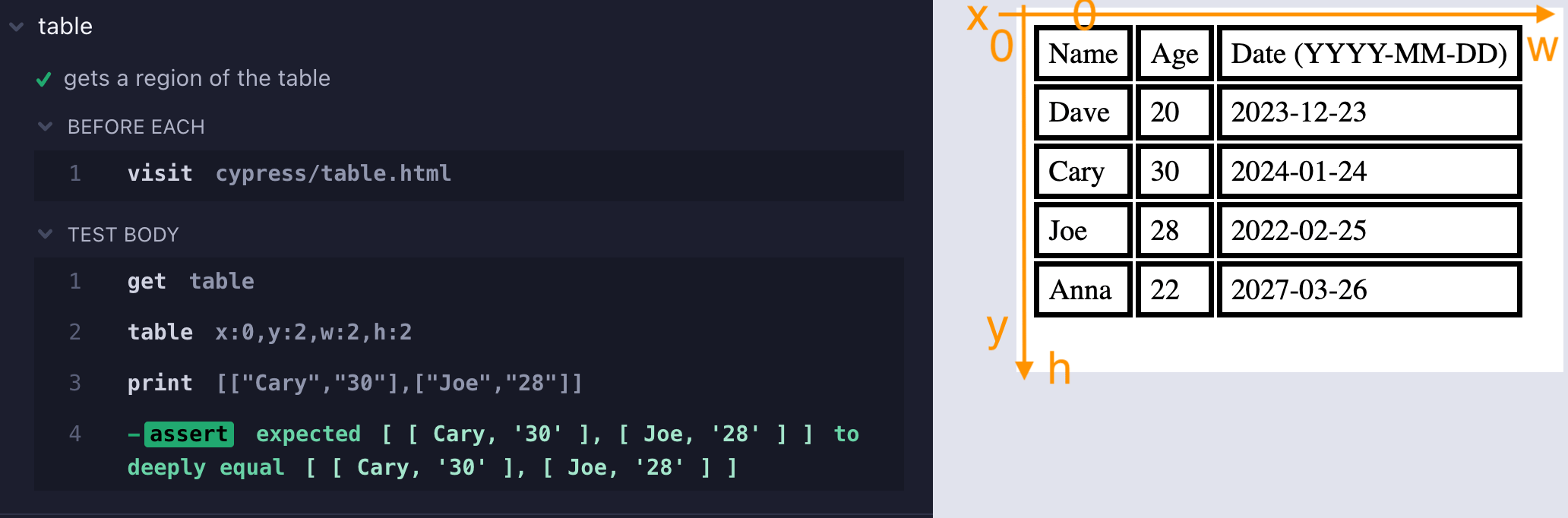 For example, you can get 2 by 2 subregion ```js cy.get('table') .table(0, 2, 2, 2) .should('deep.equal', [ ['Cary', '30'], ['Joe', '28'], ]) ``` See the spec [table.cy.js](./cypress/e2e/table.cy.js) for more examples. **Tip:** you can combine `cy.table` with `cy.map`, `cy.mapInvoke` to get the parts of the table. For example, the same 2x2 part of the table could be extracted with: ```js cy.get('table') .table() .invoke('slice', 2, 4) .mapInvoke('slice', 0, 2) .should('deep.equal', [ ['Cary', '30'], ['Joe', '28'], ]) ``` **Tip 2:** to get just the headings row, combine `.table` and `.its` queries ```js cy.get('table') .table(0, 0, 3, 1) .its(0) .should('deep.equal', ['Name', 'Age', 'Date (YYYY-MM-DD)']) ``` To get the last row, you could do: ```js cy.get('table').table().invoke('slice', -1).its(0) ``` To get the first column joined into a single array (instead of array of 1x1 arrays) ```js cy.get('table') .table(0, 1, 1) // skip the heading "Name" cell // combine 1x1 arrays into one array .invoke('flatMap', Cypress._.identity) .should('deep.equal', ['Dave', 'Cary', 'Joe', 'Anna']) ``` ### toPlainObject A query to convert special DOM objects into plain objects. For example, to convert `DOMStringMap` instance into a plain object compatible with `deep.equal` assertion we can do ```js cy.get('article') .should('have.prop', 'dataset') .toPlainObject() .should('deep.equal', { columns: '3', indexNumber: '12314', parent: 'cars', }) ``` By default uses JSON stringify and parse back. If you want to convert using `entries` and `fromEntries`, add an argument: ```js cy.wrap(new URLSearchParams(searchParams)).toPlainObject('entries') ``` ### invokeOnce In Cypress v12 `cy.invoke` became a query, which made working with asynchronous methods really unwieldy. The `cy.invokeOnce` is a return the old way of calling the method and yielding the resolved value. ```js cy.wrap(app) // app.fetchName is an asynchronous method // that returns a Promise .invokeOnce('fetchName') .should('equal', 'My App') ``` See the spec [invoke-once.cy.js](./cypress/e2e/invoke-once.cy.js) for more examples. ### Assertions This plugin includes a few useful assertions ### read **Assertion** Checks the exact text match or regular expression for a single element or multiple ones ```js cy.get('#name').should('read', 'Joe Smith') cy.get('#ages').should('read', ['20', '35', '15']) // equivalent to cy.get('#name').map('innerText').should('deep.equal', ['Joe Smith']) cy.get('#ages') .map('innerText') .should('deep.equal', ['20', '35', '15']) ``` Using with regular expression or a mix of strings and regular expressions ```js cy.get('#name').should('read', /\sSmith$/) cy.get('#ages').should('read', [/^\d+$/, '35', '15']) ``` The assertion fails if the number of elements does not match the expected number of strings. ### possess **Assertion** Checks if the subject has the given property. Can check the property value. Yields the original subject ```js // check if the subject has the "name" property cy.wrap({ name: 'Joe' }).should('possess', 'name') // yields the { name: 'Joe' } object // check if the subject has the "name" property with the value "Joe" cy.wrap({ name: 'Joe' }).should('possess', 'name', 'Joe') // yields the { name: 'Joe' } object ``` The assertion supports deep object access using the dot notation ```js cy.wrap({ user: { name: 'Joe' } }).should( 'possess', 'user.name', 'Joe', ) ``` The assertion supports arrays using `[ ]` or simple dot notation ```js cy.wrap({ users: [{ name: 'Joe' }, { name: 'Jane' }] }) .should('possess', 'users[0].name', 'Joe') // [] notation .and('possess', 'users.1.name', 'Jane') // simple dot notation ``` You can also pass a predicate function instead of the value to check the property value against it. ```js const isDrinkingAge = (years) => years > 21 cy.wrap({ age: 42 }).should('possess', 'age', isDrinkingAge) // yields the original subject ``` 📺 You can watch this assertion explained in the video [The Possess Assertion From cypress-map Plugin](https://youtu.be/HHxkL-BPyjA) ### unique Confirms the items in the current subject array are unique (using a `Set` to check) ```js cy.wrap([1, 2, 3]).should('be.unique') cy.wrap([1, 2, 2]).should('not.be.unique') ``` ### look Compares trees of HTML elements allowing for partial matches. ```js cy.get('selector').should( 'look', ` <div id="parent"> <div class="child">With some text</div> </div> `, ) ``` The above example parses the expected DOM into the parent element with id "parent" and the child element, then checks if the subject contains top-level "#parent" DIV with at least child element with class "child" and text "With some text". This assertion is useful to confirm the important attributes of the DOM tree in a single shot. ```js cy.get('#items') .should('look', '<ul id="items"><li>second</li></ul>') .and('not.look', '<ul id="items"><li>DOES NOT EXIST</li></ul>') ``` You can check only the "interesting" attributes and classes ```js // the DIV might have lots of other classes, but we are interested in the class "error" only cy.get('#field').should('look', '<div class="error">Missing...</div>') ``` See the spec [look.cy.js](./cypress/e2e/assertions/look.cy.js) for more examples. ## cy.invoke vs cy.map vs cy.mapInvoke Here are a few examples to clarify the different between the `cy.invoke`, `cy.map`, and `cy.mapInvoke` query commands, see [diff.cy.js](./cypress/e2e/diff.cy.js) ```js const list = ['apples', 'plums', 'bananas'] // cy.invoke cy.wrap(list) // calls ".sort()" on the list .invoke('sort') .should('deep.equal', ['apples', 'bananas', 'plums']) // cy.mapInvoke cy.wrap(list) // calls ".toUpperCase()" on every string in the list .mapInvoke('toUpperCase') .should('deep.equal', ['APPLES', 'PLUMS', 'BANANAS']) // cy.map const reverse = (s) => s.split('').reverse().join('') cy.wrap(list) // reverses each string in the list .map(reverse) .should('deep.equal', ['selppa', 'smulp', 'sananab']) // grabs the "length" property from each string .map('length') .should('deep.equal', [6, 5, 7]) ``` ## Misc ### mapChain I have added another useful command (not a query!) to this package. It allows you to process items in the array subject one by one via synchronous, asynchronous, or `cy` command functions. This is because the common solution to fetch items using `cy.each`, for example does not work: ```js // fetch the users from a list of ids // 🚨 DOES NOT WORK cy.get(ids).each(id => cy.request('/users/' + id)).then(users => ...) // Nope, the yielded "users" result is ... still the "ids" subject // ✅ CORRECT SOLUTION cy.get(ids).mapChain(id => cy.request('/users/' + id)).then(users => ...) ``` One example could be checking new usernames by entering each string, then getting back the message text. ```ts const usernames = ['u1', 'very-long-username-12345', 'admin'] cy.wrap(usernames, { log: false }) // check each username and yield the error message text .mapChain((username: string) => { cy.get('input#username').clear().type(username) return cy.get('#result').should('be.visible').invoke('text') }) .should('deep.equal', [ 'Username is too short', 'Username is too long', 'Username is reserved', ]) ``` `cy.mapChain` also can operate on each element ```ts cy.get('button') .should('have.length.above', 3) .mapChain((btn: HTMLButtonElement) => { cy.wrap(btn, { log: false }).click() cy.get('#result') .should('be.visible') .invoke('text') .apply(Number) .should('be.within', 0, 10) }) // we get all the yielded numbers in a single array .should('be.an', 'array') ``` `cy.mapChain` passes the item and the 0-based index to the callback ```js .mapChain((item, k) => ...) ``` You can use a predicate function to stop iteration early ```js cy.wrap([1, 2, 3, 4, 5]) .mapChain( (x) => x * 2, // the predicate function with its arguments object // item: the current item // index: the zero-based item index // result: the value yielded by the chain function ({ item, index, result }) => result >= 6, ) .should('deep.equal', [2, 4, 6]) // stops after producing 6 ``` See 📺 [cy.mapChain Custom Command Examples](https://youtu.be/-WPCbgZr9Uo). ### never This is a command that runs for N milliseconds (the default command timeout, or custom) and checks if the given selector is NOT found on the page. Useful to confirm that an error widget does not flash unexpectedly on the page, for example. ```js // check for default period of time // and if an element with class "error" is found, fail immediately cy.never('.error') // specify custom timeout for checking cy.never('.error', { timeout: 2_000 }) // stop checking once there is the finished message cy.never('.error', { stopSelector: '#message:contains("Finished")' }) ``` You can use jQuery selectors. ## Types This package includes TypeScript command definitions for its custom commands in the file [commands/index.d.ts](./commands/index.d.ts). To use it from your JavaScript specs: ```js /// <reference types="cypress-map" /> ``` If you are using TypeScript, include this module in your types list ```json { "compilerOptions": { "types": ["cypress", "cypress-map"] } } ``` ## The build process The source code is in the [src/commands](./src/commands/) folder. The build command produces ES5 code that goes into the `commands` folder (should not be checked into the source code control). The `package.json` in its NPM distribution includes `commands` plus the types from `src/commands/index.d.ts` file. ## See also - [cypress-should-really](https://github.com/bahmutov/cypress-should-really) has similar functional helpers for constructing the `should(callback)` function on the fly. **Note:** this module does not have `filter` method because Cypress API has query commands [cy.filter](https://on.cypress.io/filter) and [cy.invoke](https://on.cypress.io/invoke) that you can use to filter elements in a jQuery object or items in an array. See the examples in the [filter.cy.js](./cypress/e2e/filter.cy.js) spec. 📺 See video [Filter Elements And Items With Retries](https://youtu.be/70kRnoMuzds). ## Small print Author: Gleb Bahmutov <gleb.bahmutov@gmail.com> © 2022 - [@bahmutov](https://twitter.com/bahmutov) - [glebbahmutov.com](https://glebbahmutov.com) - [blog](https://glebbahmutov.com/blog) - [videos](https://www.youtube.com/glebbahmutov) - [presentations](https://slides.com/bahmutov) - [cypress.tips](https://cypress.tips) - [Cypress Tips & Tricks Newsletter](https://cypresstips.substack.com/) - [my Cypress courses](https://cypress.tips/courses) License: MIT - do anything with the code, but don't blame me if it does not work. Support: if you find any problems with this module, email / tweet / [open issue](https://github.com/bahmutov/cypress-map/issues) on Github
