KO
|
EN
gitlite — search
Search
#python
#rust
#claude
#ai
#typescript
#mcp
#claude-code
#machine-learning
#ai-agents
#cli
#golang
#llm
eth_switch
★ 58
Open GitHub ↗
Verilog Ethernet Switch (layer 2)
Download README (.md)
Explore Similar Repositories
PowerShell
:
PowerShell scripts for ForensiT tools
netpoll
:
Package netpoll implements a network poller based on epoll/kqueue.
ask
:
A Go package that provides a simple way of accessing nested properties in maps and slices.
Leaf-diseases-segmentation
:
Finale project of Deep Learning course
ipfs-pinner
:
A toolkit helps upload files to IPFS pinning services.
// repository documentation
Was this content helpful?
★ 0
(0 ratings)
Select Rating:
★
★
★
★
★
Submit Feedback
Recent Feedback
×
Download README
Do you want to download the
README.md
file for
eth_switch
?
Download (.md)
# Verilog Ethernet Switch (layer 2) ## Features: * Parameterized Number of Ports * Parameterized MAC-Table (based on dual-port CAM, complexity O(1)) * Flooding and Broadcasting * CRC Checking * Static or Dynamic MAC-Table ## Compatible Ethernet Frame  ## Common Ethernet Switch Structure 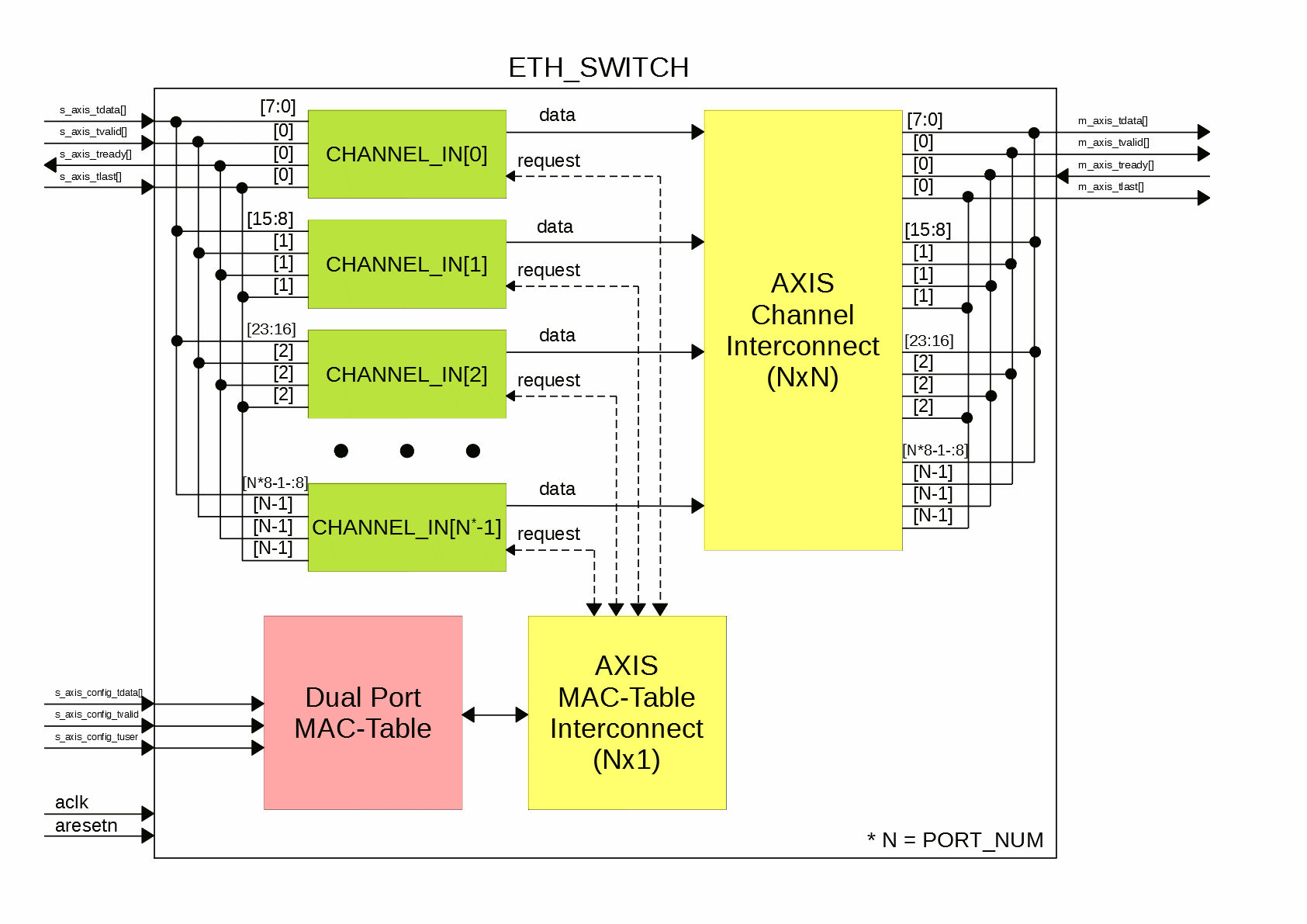 ## Dual-Port CAM ### Structure 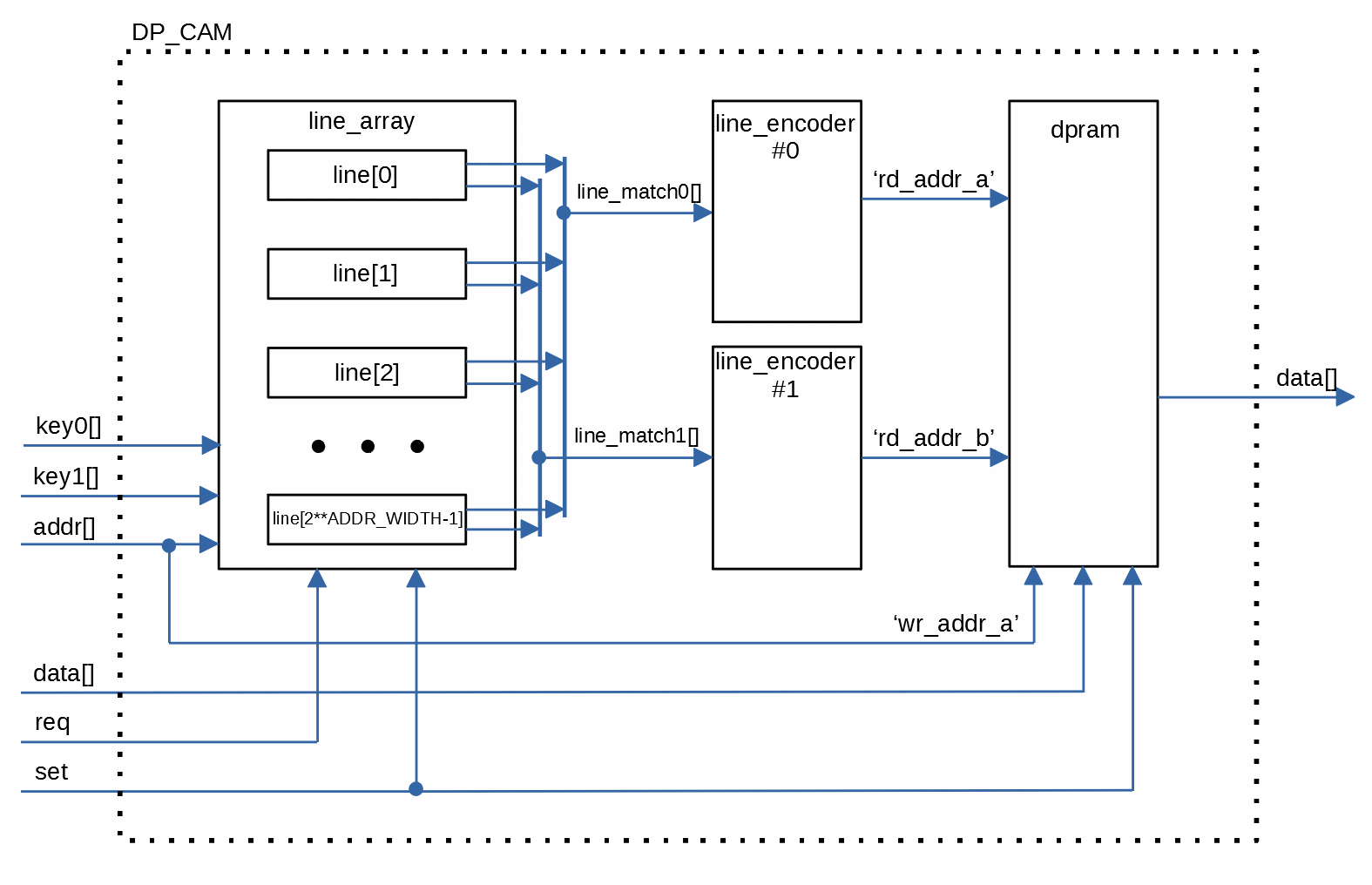 Dual-port scheme allows to execute simultaneous request to MAC-Table for SOURCE and DESTINATION ports respectively. ### Mode #### Static In this mode MAC-Table do not update itself on the fly. For MAC-Table configuration port s_axis_config_* must be used. #### Dynamic In this mode MAC-Table works in 'normal' mode. It dynamically update itself. ## AXIS Interconnect Arbiter scheduling: Round-Robin ## Parameters * PORT_NUM - Number of ports (must be power of '2') * ADDR_WIDTH - Address width of MAC-Table * ETHERNET_MTU - Ethernet Maximum Transmismission Unit * FLOODING_ENABLE - Enables (1) or disables (0) Flooding technique * CRC_CHECK - Enables (1) or disables (0) CRC Checking (last 4 octets, if presented) * RAM_STYLE_DATA - Type of RAM ("block" or "distributed") * MODE - Mode of MAC-Table ("dynamic" or "static") ## Ports * aclk - Clock * aresetn - Synchronous reset (active-LOW) * s_axis_tdata - Input data * s_axis_tvalid - Input 'Valid' signal * s_axis_tready - Output 'Ready' signal * s_axis_tlast - Input 'Last' transfer signal (end of frame) * m_axis_tdata - Output data * m_axis_tvalid - Output 'Valid' signal * m_axis_tready - Input 'Ready' signal * m_axis_tlast - Output 'Last' transfer signal (end of frame) * s_axis_config_tdata - Input MAC-Table Configuration Data (if MODE == "static") * s_axis_config_tuser - Input MAC-Table Configuration 'User' signal (if MODE == "static") * s_axis_config_tvalid - Input MAC-Table Configuration 'Valid' signal (if MODE == "static") ### Data Format * s_axis_tdata[8\*1-1-:8] - Channel #0 Data * s_axis_tdata[8\*2-1-:8] - Channel #1 Data * ... * s_axis_tdata[8\*PORT_NUM-1-:8] - Channel #(PORT_NUM-1) Data ### Configuration Data Format * s_axis_tdata[ADDR_WIDTH-1-:ADDR_WIDTH] - Address of CAM cell * s_axis_tdata[$clog2(PORT_NUM)+ADDR_WIDTH-1-:$clog2(PORT_NUM)] - Port Number (from 0 to PORT_NUM-1) * s_axis_tdata[48+$clog2(PORT_NUM)+ADDR_WIDTH-1-:48] - Destination MAC-address
