KO
|
EN
gitlite — search
Search
#typescript
#ai-agents
#ai
#dsh-plugin
#deepseek-harness
#open-source
#cli
#claude-code
#codex
#developer-tools
#react
#windows
tiles
★ 82
Open GitHub ↗
Programmatic code generation
Download README (.md)
Explore Similar Repositories
angularadmin
:
Free Angular 9 admin template - Demo
app-geocontacts
:
Xamarin + Azure demo contact list feature Azure AD B2C, Functions, & CosmosDB.
NaCl.Core
:
🔑 NaCl.Core, a cryptography library for .NET
ef-bulk-operations
:
Bulk operations for Entity Framework 6
ssh-shell-spring-boot
:
Spring shell in spring boot application over ssh
// repository documentation
Was this content helpful?
★ 0
(0 ratings)
Select Rating:
★
★
★
★
★
Submit Feedback
Recent Feedback
×
Download README
Do you want to download the
README.md
file for
tiles
?
Download (.md)
# Tiles > **Tiles** is a simple Python module meant to help with **code generation**. It provides a way to work with **rectangular areas of text** as atomic units. This is particularly important if proper **indentation** of the generated code is desired. 1. [Import the module](#import-the-module) 2. [Tile literals](#tile-literals) 3. [Tile interpolation](#tile-interpolation) 4. [Combining tiles](#combining-tiles) 5. [Joining many tiles](#joining-many-tiles) 6. [Working with whitespace](#working-with-whitespace) 7. [Worked example 1](#worked-example-1) 8. [Worked example 2](#worked-example-2) 9. [Worked example 3](#worked-example-3) 10. [Notes](#notes) ### Import the module ```python from tiles import t, emptyln ``` ### Tile literals Tile is a rectangular block of text. Tile literal is `t/` followed by a string. For example: ```python tile1 = t/"hello" tile2 = t/'world' tile3 = t/""" Hello, world! """ ``` However, keep in mind that it's just the rectangular area of text that counts. All the surrounding whitespace is of no significance. 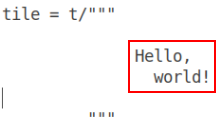 This makes it easy to align tile literals with the rest of the program. Given that the whitespace doesn't count, the literal can be shifted as much to the left or right as needed: ```python if x: for item in lst: tile = t/""" Hello, world! """ ``` ### Tile interpolation Very much like string interpolation (F-strings), tiles allow to insert pieces of text into the template. To do so, use `@{}` syntax: ```python h = "Hello" w = "world" tile = t/""" @{h}, @{w}! """ print(tile) ``` The output: ``` Hello, world! ``` However, unlike with F-strings, the interpolated pieces of text are treated as tiles (rectangular areas of text) rather than as simple strings: ```python h = "Hello" w = t/""" cruel world """ tile = t/""" @{h} @{w} """ print(tile) ``` The output: ``` Hello cruel world ``` See "worked example 1" to get better undestanding of the tiling alorithm. ### Combining tiles While tile interpolation provides the most generic mechanism for combining tiles into larger tiles, sometimes you want just to put one tile besides another as quickly and simply as possible. To achieve that, tiles support two convenience operators. Operator + puts two tiles beside each other: ```python tile1 = t/""" Magenta Green """ tile2 = t/""" Red Blue White """ print(tile1 + tile2) ``` Results in: ``` MagentaRed Green Blue White ``` Operator | (pipe) puts two tiles one on top of the other: ```python tile1 = t/""" Magenta Green """ tile2 = t/""" Red Blue White """ print(tile1 | tile2) ``` Results in: ``` Magenta Green Red Blue White ``` Of course, operators += and |= work as expected: ```python tile = t/""" Magenta Green """ tile += t/""" Red Blue White """ print(tile) ``` Results in: ``` MagentaRed Green Blue White ``` ### Joining many tiles Joining works similarly to joining strings: ```python tile = (t/",").join([t/"square", t/"circle", t/"triangle"]) print(tile) ``` Results in: ``` square,circle,triangle ``` There is also a special function for joining tiles in vertical manner: ```python tile = (t/",").vjoin([t/"square", t/"circle", t/"triangle"]) print(tile) ``` Results in: ``` square, circle, triangle ``` Function `vjoin` has an optional parameter `inline` (true by default) which puts the separator at the same line with the list item. If switched off, the separator will appear on its own line: ```python tile = (t/"---").vjoin([t/"square", t/"circle", t/"triangle"], inline=False) print(tile) ``` Results in: ``` square --- circle --- triangle ``` Finally, both `join` and `vjoin` have `last` argument which acts as a kind of a final separator: ```python tile = (t/",").vjoin([t/"square", t/"circle", t/"triangle"], last=t/";") print(tile) ``` Results in: ``` square, circle, triangle; ``` ### Working with whitespace Given that standard tile literals cut off the surrounding whitespace from the tile we need to use a different construct when we actually want the surrounding whitespace to appear in the tile. The most common use case is when there's a need to add an empty line to a tile. `emptyln` is a tile containing only a single empty line: ```python tile = t/"Hello" | emptyln | t/"world" println(tile) ``` Prints: ``` Hello world ``` `emtyln` is really just a shortcut for `t%""` where `t%` is similar to `t/` except that it doesn't cut off the whitespace. (In the example below ␣ stands for space.) `t/"␣␣␣foo␣␣␣"` produces `foo` tile. `t%"␣␣␣foo␣␣␣"` produces `␣␣␣foo␣␣␣` tile. ```python tile = (t%", ").join([t/"square", t/"circle", t/"triangle"]) print(tile) ``` Results in: ``` square, circle, triangle ``` Note that `t%""` produces a tile with **one** empty line and `t%"\n"` produces a tile containing **two** empty lines. To get a completely empty tile with **zero** lines use `t/""`. ```python tile = t/""" Magenta Green """ tile |= t%"" | t/""" Red Blue White """ ``` Results in: ``` Magenta Green Red Blue White ``` ### Worked example 1 ```python from tiles import tile colors = t/""" White Black Ultramarine Red Green Blue """ shapes = t/""" Triangle Circle """ tile = t/""" Colors: @{colors} Shapes: @{shapes} That's all, folks! """) print(tile) ``` On the picture below you can see how are individual tiles combined to produce the final output. Tiles are shown in red frames. Literal text is in blue frames. Black lines mark boundaries between individual lines. 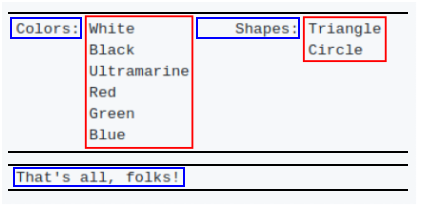 Note how tiles are always aligned to the top of the line. ### Worked example 2 Imagine that we want to generate code that prints out some greetings. ```python def greet(name): return "print('Hello, " + name + "!')\nprint('Welcome!')" ``` Although there is no particular need for manipulating rectangular areas of text in this case tiling can be employed to make the code more readable. ```python def greet(name): return t/""" print('Hello, @{name}!') print('Welcome!') """ ``` Given that whitespace surrounding the tile is ignored anyway we can neatly align the generated code with the generator code instead of writing an abomination like this one: ```python def greet(name): return """print('Hello, """ + name + """!') print('Welcome!')""" ``` Another consequence of using tiles is that the greeting function can be used in different contexts and the indentation will allways fit: ```python code = t/""" import sys @{greet('Alice')} if 'also-greet-bob' in sys.argv: @{greet('Bob')} """ print(code) ``` Here's the output. Note how the greeting code is properly aligned in both cases, forming a valid Python program: ```python import sys print('Hello, Alice!') print('Welcome!') if 'also-greet-bob' in sys.argv: print('Hello, Bob!') print('Welcome!') ``` ### Worked example 3 Tiling can be used to generate code with clean vertical alignment. Consider the case where we have a lists or argument names and types and we want to generate a nicely formatted C function declaration. ```python arglist = [t/"foo", t/"bar", t/"baz"] typelist = [t/"int", t/"char*", t/"struct quux"] argtile = (t/"").vjoin(arglist) typetile = (t/",").vjoin(typelist, last=t/");") signature = t/"void frobnicate(@{argtile} @{typetile}" print(signature) ``` The tile with argument names is put next to the tile with argument types. This is done on tile, not line, level which means that all the argument names stay aligned with each other. ``` void frobnicate(int foo, char* bar, struct quux baz); ``` ### Notes Note 1: If you need sequence `@{` to appear in the output (and not be treated like an embedded expression) it can be done like this: `@{'@'}{` Note 2: With `t/`, the trailing whitespace that is required to keep the rectangular shape of a tile doesn't get into the output. This makes the algorithm friendy to different tools that complain about whitespace at the end of a line. Note 3: To provide a better feeling of how a real-world code using tiles look like, [here's](https://gist.github.com/sustrik/305e9f6a768c582a0189bae5f5d327af) a fairly long program generating some man pages and a C header file.
