KO
|
EN
gitlite — search
Search
#python
#java
#python3
#arduino
#golang
#machine-learning
#rust
#html
#flask
#javascript
#seismology
#nodejs
ephemera
★ 22
Open GitHub ↗
No description available.
Download README (.md)
Explore Similar Repositories
neo4j-mcp-workspace-template
:
A template repo for end to end Neo4j development using MCP
verdantia
:
No description available.
CostNav
:
CostNav: A Navigation Benchmark for Real-World Economic-Cost Evaluation of Physical AI Agents
babylon-mmd-showcase
:
No description available.
PrivacyX
:
Extension Firefox PrivaCyx Open Source
// repository documentation
Was this content helpful?
★ 0
(0 ratings)
Select Rating:
★
★
★
★
★
Submit Feedback
Recent Feedback
×
Download README
Do you want to download the
README.md
file for
ephemera
?
Download (.md)
# Ephemera Book Downloader Search and download books from your girl's favorite archive. Supports auto-move to a [BookLore](https://github.com/booklore-app/booklore) or [Calibre-Web-Automated](https://github.com/crocodilestick/Calibre-Web-Automated) ingest folder or BookLore API upload. <div class="grid" markdown> 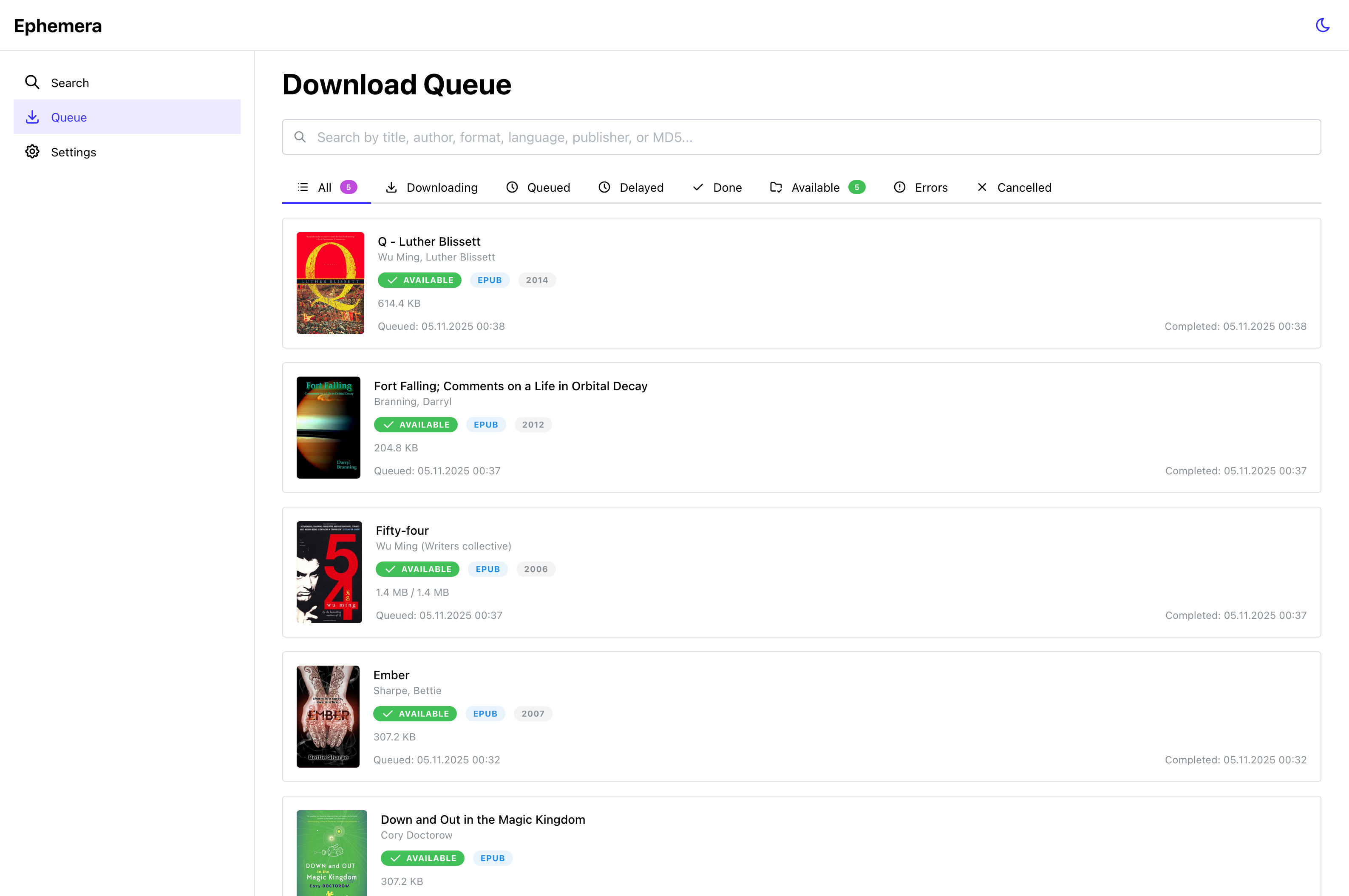 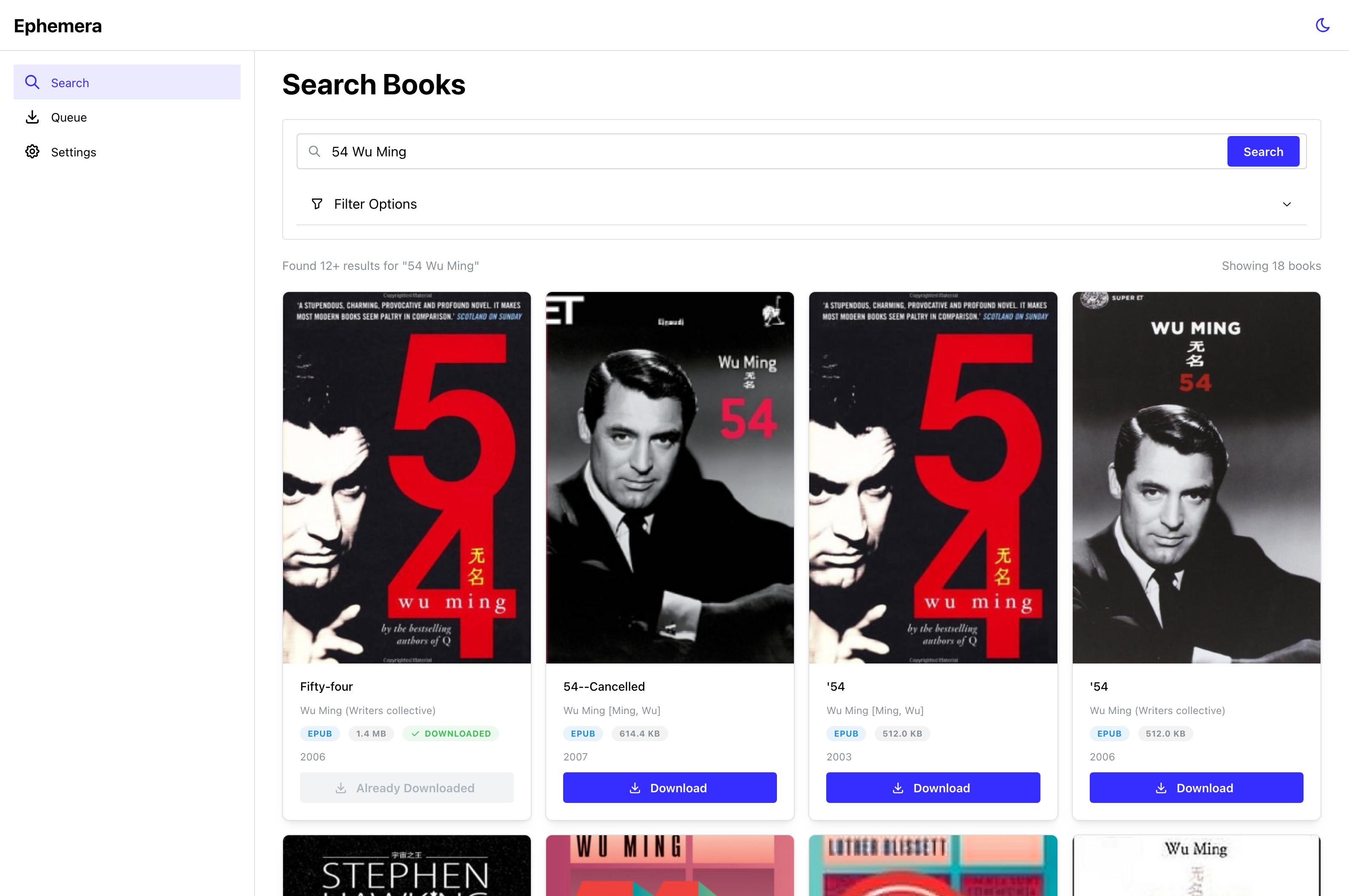 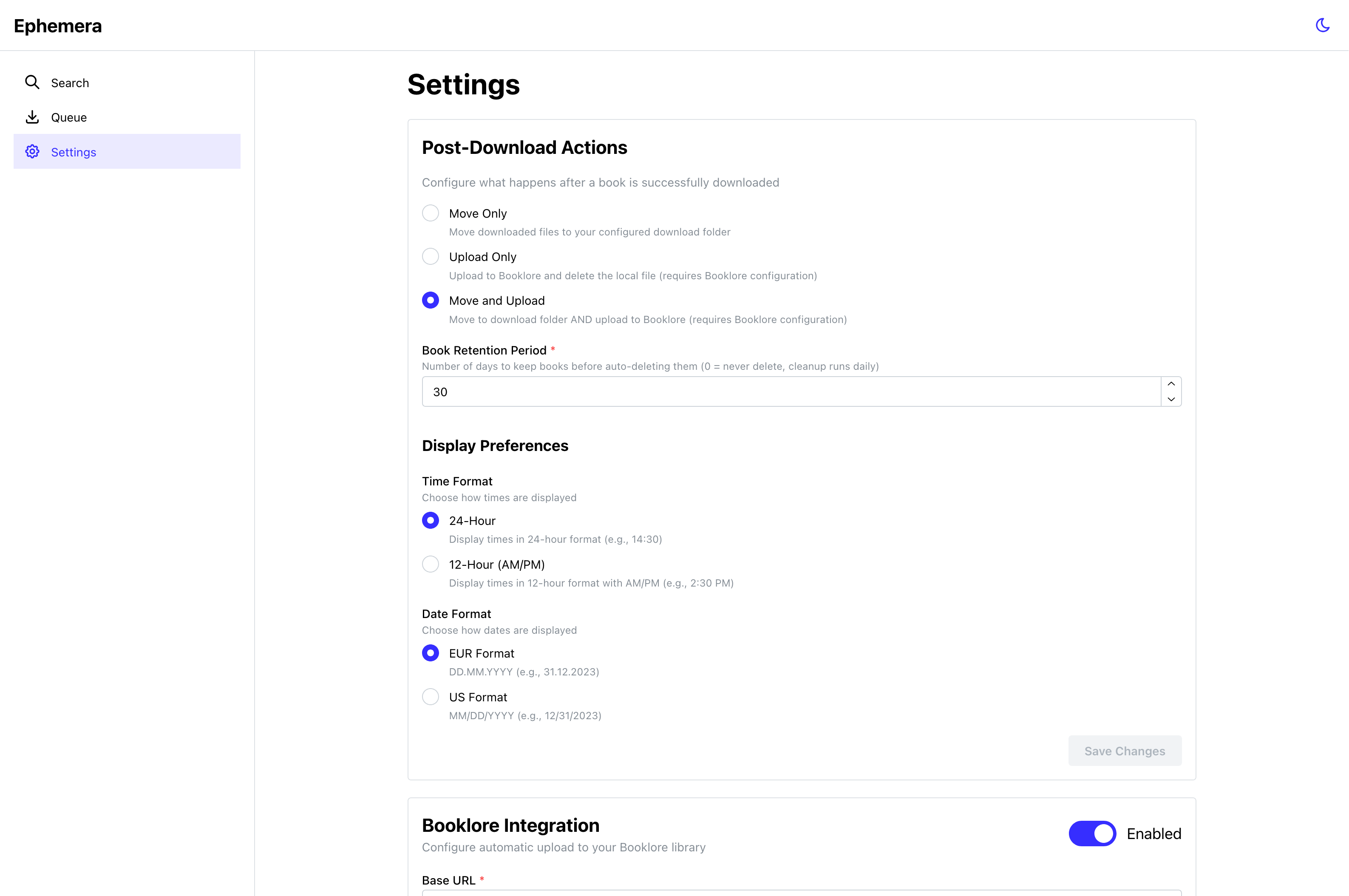 </div> ## Docker setup ### Setup the container using the Docker Compose template below: ```yaml services: ephemera: image: ghcr.io/orwellianepilogue/ephemera:latest container_name: ephemera restart: unless-stopped ports: - '8286:8286' environment: # Required: AA_BASE_URL: FLARESOLVERR_URL: http://flaresolverr:8191 # Optional AA_API_KEY: PUID: 1000 PGID: 100 volumes: - ./data:/app/data - ./downloads:/app/downloads - ./ingest:/app/ingest # Set DNS server to prevent EU blocking #dns: # - 1.1.1.1 # - 1.0.0.1 healthcheck: test: [ 'CMD', 'wget', '--no-verbose', '--tries=1', '--spider', 'http://localhost:8286/health', ] interval: 30s timeout: 10s start_period: 40s retries: 3 flaresolverr: image: ghcr.io/flaresolverr/flaresolverr:latest container_name: flaresolverr restart: unless-stopped environment: - LOG_LEVEL=info - LOG_HTML=false - CAPTCHA_SOLVER=none - TZ=Europe/Berlin # Set DNS server to prevent EU blocking #dns: # - 1.1.1.1 # - 1.0.0.1 healthcheck: test: ['CMD', 'wget', '--spider', '-q', 'http://localhost:8191/health'] interval: 30s timeout: 10s start_period: 30s retries: 3 ``` ### Required Environment Variables Only two variables are required: | Variable | Description | Example | | ------------- | ------------------------------ | ------------------------- | | `AA_API_KEY` | Archive API authentication key | `sk_abc123...` | | `AA_BASE_URL` | Base URL of your archive | `https://yourarchive.org` | ### Optional Environment Variables All other settings have sensible defaults, but you can override them: | Variable | Default | Description | | ------------------ | ----------------------- | ---------------------- | | `PORT` | `8286` | Application port | | `DB_PATH` | `/app/data/database.db` | Database location | | `DOWNLOAD_FOLDER` | `/app/downloads` | Temp download folder | | `INGEST_FOLDER` | `/app/ingest` | Final books folder | | `NODE_ENV` | `production` | Node environment | | `RETRY_ATTEMPTS` | `3` | Download retries | | `REQUEST_TIMEOUT` | `30000` | API timeout (ms) | | `SEARCH_CACHE_TTL` | `300` | Search cache (seconds) | ## Monorepo Structure ``` ephemera/ ├── packages/ │ ├── api/ # Hono API backend with Crawlee scraping │ ├── shared/ # Shared TypeScript types and API client │ └── web/ # React frontend with Vite └── data/ # SQLite database ``` ## Development Quick Start ### Prerequisites - Node.js 22+ - pnpm 9+ ### Installation ```bash # Install all dependencies pnpm install # Approve build scripts for native modules pnpm approve-builds # Select: better-sqlite3, esbuild # Copy environment template cp packages/api/.env.example packages/api/.env # Edit with your AA API key and url nano packages/api/.env # Run migrations cd packages/api && pnpm db:migrate ``` ### Development ```bash # Run everything (API + Frontend) pnpm dev # Or run individually: pnpm dev:api # Backend only (http://localhost:8286) pnpm dev:web # Frontend only (http://localhost:5173) ``` ### Build for Production ```bash # Build all packages pnpm build # Build individually pnpm build:api pnpm build:web ``` ## Architecture ### Tech Stack #### Backend (`packages/api`) - **Framework**: Hono 4.6+ (lightweight, fast, type-safe) - **Database**: SQLite + Drizzle ORM - **Scraping**: Crawlee + Cheerio - **Validation**: Zod schemas - **OpenAPI**: Swagger UI and auto-generated spec at `http://host:8286/api/docs` & `http://host:8286/api/openapi.json` #### Frontend (`packages/web`) - **Framework**: React 18 + TypeScript - **Build Tool**: Vite 6 - **UI Library**: Mantine UI 7 - **Routing**: TanStack Router v1 - **Data Fetching**: TanStack Query v5 - **Icons**: Tabler Icons #### Shared (`packages/shared`) - **Schemas**: Zod validation schemas - **Types**: TypeScript types (exported from Zod) - **API Client**: Typed fetch wrapper using OpenAPI types - **Type Generation**: `openapi-typescript` from live API ### Type Safety Full end-to-end type safety: ``` API (Zod schemas) → OpenAPI spec → TypeScript types → React frontend ``` Changes to the API automatically propagate to the frontend through: 1. Zod schemas in `packages/shared/src/schemas.ts` 2. Generated OpenAPI types via `openapi-typescript` 3. Type-safe client in `packages/shared/src/client.ts` ## Scripts ### Root-Level Scripts ```bash pnpm dev # Run all packages in parallel pnpm build # Build all packages pnpm type-check # Type-check all packages pnpm clean # Clean all build artifacts ``` ### API Scripts ```bash pnpm --filter @ephemera/api dev # Dev mode with watch pnpm --filter @ephemera/api build # Build TypeScript pnpm --filter @ephemera/api db:generate # Generate migrations pnpm --filter @ephemera/api db:migrate # Run migrations pnpm --filter @ephemera/api db:studio # Open Drizzle Studio ``` ### Web Scripts ```bash pnpm --filter @ephemera/web dev # Dev server with HMR pnpm --filter @ephemera/web build # Production build pnpm --filter @ephemera/web preview # Preview prod build ``` ### Shared Scripts ```bash pnpm --filter @ephemera/shared build # Build types pnpm --filter @ephemera/shared generate:client # Generate API types ``` ## Version Management This monorepo uses [Changesets](https://github.com/changesets/changesets) for synchronized versioning. All packages (api, web, shared) always share the same version number. ### Quick Release Workflow 1. **Make your changes** and commit them normally 2. **Create a changeset** describing what changed: ```bash pnpm changeset # Follow prompts: select change type (patch/minor/major) and write summary ``` 3. **When ready to release**, run: ```bash pnpm release # This will: version packages → create git tag → push to trigger Docker build ``` ### Version Management Scripts ```bash # Create a changeset (describes your changes) pnpm changeset # Check status of pending changesets pnpm changeset:status # Apply changesets and update versions + CHANGELOG pnpm version # Full release (version → tag → push) pnpm release # Individual release steps (if you want more control) pnpm release:version # Update package.json + CHANGELOG pnpm release:tag # Commit changes and create git tag pnpm release:push # Push code and tags to trigger Docker build ``` ### How It Works - **Changesets** track what changed between versions - **Synchronized versioning**: All packages version together (currently at v1.0.3) - **Automatic changelog**: Generated from changeset summaries - **Docker automation**: Pushing a git tag (e.g., `v1.0.4`) triggers the GitHub Action to build and publish a new Docker image ### Example Release Flow ```bash # 1. After implementing a new feature git add . git commit -m "feat: add book metadata export" # 2. Create a changeset pnpm changeset # → Select "minor" (new feature) # → Enter summary: "Add book metadata export functionality" # 3. Continue working, create more changesets for other changes pnpm changeset # → Select "patch" (bug fix) # → Enter summary: "Fix download progress bar display" # 4. When ready to release pnpm release # → All changesets consumed # → package.json versions bumped (e.g., 1.0.3 → 1.1.0) # → CHANGELOG.md updated # → Git tag v1.1.0 created # → Changes pushed to GitHub # → Docker build triggered automatically ``` ### Version Types - **patch** (1.0.3 → 1.0.4): Bug fixes, minor tweaks - **minor** (1.0.3 → 1.1.0): New features, backwards-compatible changes - **major** (1.0.3 → 2.0.0): Breaking changes ## Development Workflow ### 1. Update API Schema Edit `packages/shared/src/schemas.ts`: ```typescript export const myNewSchema = z.object({ id: z.string(), name: z.string(), }) ``` ### 2. Use in API ```typescript import { myNewSchema } from '@ephemera/shared' const route = createRoute({ request: { body: myNewSchema }, // ... }) ``` ### 3. Regenerate OpenAPI Types ```bash # Start API first pnpm dev:api # In another terminal, generate types pnpm --filter @ephemera/shared generate:client ``` ### 4. Use in Frontend ```typescript import { client } from '@ephemera/shared' const data = await client.get('/api/new-endpoint') // `data` is fully typed! ``` ## API Documentation - **Swagger UI**: http://localhost:8286/api/docs - **OpenAPI Spec**: http://localhost:8286/api/openapi.json ## Frontend Routes - `/` - Search books - `/queue` - Download queue management - `/settings` - App and Booklore settings ## Proxy Configuration The frontend proxies `/api/*` requests to the backend during development: ```typescript // vite.config.ts proxy: { '/api': { target: 'http://localhost:8286', changeOrigin: true, }, } ``` ## License MIT
