KO
|
EN
gitlite — search
Search
#java
#android
#javascript
#ios
#security
#react
#kotlin
#python
#game
#php
#webpack
#spring-boot
BlurPopupWindow
★ 140
Open GitHub ↗
PopupWindow with blurred background.
Download README (.md)
Explore Similar Repositories
iceberg
:
Iceberg is the main toolset for handling VCS in Pharo.
BBB-BareMetal
:
Works on the beaglebone black (bare metal)
HideShowPasswordTextField
:
An easy to use `UITextField` subclass that adds a visibility toggle and an optional validation checkmark
codeforces-parser
:
Parse sample tests of Codeforces competitions, and generate tests automatically.
poloniex-api-node
:
Poloniex API client for REST and WebSocket API
// repository documentation
Was this content helpful?
★ 0
(0 ratings)
Select Rating:
★
★
★
★
★
Submit Feedback
Recent Feedback
×
Download README
Do you want to download the
README.md
file for
BlurPopupWindow
?
Download (.md)
# BlurPopupWindow **BlurPopupWindow** is not actually a sub-class of PopupWindow. But we did run into some requirements that display a popup in current page with blurred background. Or you may want to display a custom dialog and you are in trouble with the difficulty and diffrent-result through different sdk version and roms. **It is possible to just put a simple custom View in current Window and do not bring that lots of other things in?** **BlurPopupWindow** is more like a pattern to implement these custom popup windows. By default BlurPopupWindow contains nothing but a blurred background. You need to, **and actually this is just you want**, design all the content and maybe custom the animation. 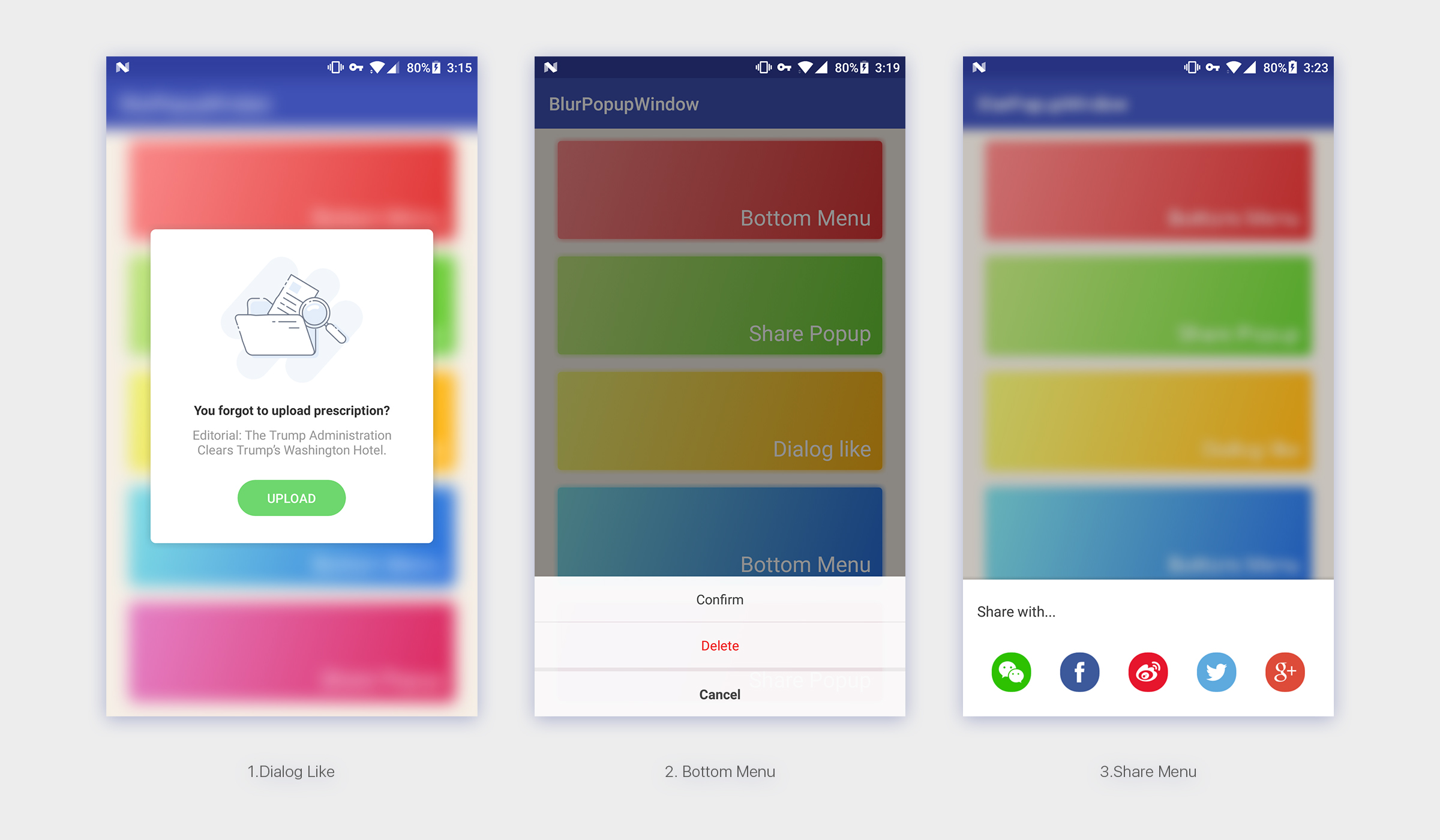 ### Features * Blur/Not blur background. * Support translucent status bar and translucent navigationbar. * Tint color. ### Use with Gradle ```groovy dependencies { compile 'com.kyleduo.blurpopupwindow:blurpopupwindow:1.0.9' } ``` #### Enable support render script ```groovy android { defaultConfig { renderscriptTargetApi 25 renderscriptSupportModeEnabled true } } ``` ### Usage A typically usage would be like this: ```java new BlurPopupWindow.Builder(v.getContext()) .setContentView(R.layout.layout_dialog_like) .bindClickListener(new View.OnClickListener() { @Override public void onClick(View v) { Toast.makeText(v.getContext(), "Click Button", Toast.LENGTH_SHORT).show(); } }, R.id.dialog_like_bt) .setGravity(Gravity.CENTER) .setScaleRatio(0.2f) .setBlurRadius(10) .setTintColor(0x30000000) .build() .show(); ``` And this would display a dialog-like popup window like**(1)**. The content display depends on you layout design. The blur effect is not that necessay and you can disable it by setting the `blurRadius` to `0`. And you got**(2)** Or you can tune the blur effect to what you want, like **(3)**. ### Builder The Builder class has some methods for change the behavior. Most of them are easy to understand by their name. ``` builder .setContentView(resId) .setContentView(view) .setGravity(Gravity.CENTER) .setScaleRatio(0.2f) .setBlurRadius(10) .setAnimationDuration(300) // draw a color over background to dim, lighten, or coloring the background. .setTintColor(0x30000000) .setDismissOnClickBack(true) .setDismissOnTouchBackground(true) .setOnDismissListener(listener) // bind click listener to id1, id2, ... .bindClickListener(listener, id1, id2, ...) // bind click listener to content view .bindContentViewClickListener(listener) ``` ### Customize As I mentioned before, BlurPupupWindow does not contains any content view. so you need to create one. The suggested way to customize a content is to create a class extends from BlurPopupWindow. And there are some methods for you to override. The source code of 3rd demo above would be like this. **There are some points you need to know:** * Create Builder class exten BlurPopupWindow.Builder and set generic type to your class. * In Builder class, override createPopupWindow method and return corrent instance. * You can override `onShow()`/`onDismiss()` to add your own animation. * `createShowAnimator()`/`createDisAnimator()` return alpha animation by default, override them and return null if you do not like that. ```java public class SharePopup extends BlurPopupWindow { public SharePopup(@NonNull Context context) { super(context); } @Override protected View createContentView(ViewGroup parent) { View view = LayoutInflater.from(getContext()).inflate(R.layout.layout_bottom_popup, parent, false); LayoutParams lp = new LayoutParams(ViewGroup.LayoutParams.MATCH_PARENT, ViewGroup.LayoutParams.WRAP_CONTENT); lp.gravity = Gravity.BOTTOM; view.setLayoutParams(lp); view.setVisibility(INVISIBLE); return view; } @Override protected void onShow() { super.onShow(); getContentView().getViewTreeObserver().addOnGlobalLayoutListener(new ViewTreeObserver.OnGlobalLayoutListener() { @Override public void onGlobalLayout() { getViewTreeObserver().removeGlobalOnLayoutListener(this); getContentView().setVisibility(VISIBLE); int height = getContentView().getMeasuredHeight(); ObjectAnimator.ofFloat(getContentView(), "translationY", height, 0).setDuration(getAnimationDuration()).start(); } }); } @Override protected ObjectAnimator createShowAnimator() { return null; } @Override protected ObjectAnimator createDismissAnimator() { int height = getContentView().getMeasuredHeight(); return ObjectAnimator.ofFloat(getContentView(), "translationY", 0, height).setDuration(getAnimationDuration()); } public static class Builder extends BlurPopupWindow.Builder<SharePopup> { public Builder(Context context) { super(context); this.setScaleRatio(0.25f).setBlurRadius(8).setTintColor(0x30000000); } @Override protected SharePopup createPopupWindow() { return new SharePopup(mContext); } } } ``` ### proguard ``` ##---------------Begin: proguard configuration for RenderScript ---------- -keep class android.support.v8.renderscript.** { *; } ##---------------End: proguard configuration for RenderScript ---------- ``` License --- ``` Licensed under the Apache License, Version 2.0 (the "License"); you may not use this file except in compliance with the License. You may obtain a copy of the License at http://www.apache.org/licenses/LICENSE-2.0 Unless required by applicable law or agreed to in writing, software distributed under the License is distributed on an "AS IS" BASIS, WITHOUT WARRANTIES OR CONDITIONS OF ANY KIND, either express or implied. See the License for the specific language governing permissions and limitations under the License. ```
