KO
|
EN
gitlite — search
Search
#python
#java
#python3
#arduino
#golang
#machine-learning
#rust
#html
#flask
#javascript
#seismology
#nodejs
assistant-api
★ 19
Open GitHub ↗
Java Client for OpenAI Assistants API
Download README (.md)
Explore Similar Repositories
SecureAgent
:
No description available.
Swiss-PDGs
:
Synthetic low- and medium-voltage power distribution grids in Switzerland.
LangNav
:
Codebase for LangNav paper
homeassistant-tesy
:
Home Assistant Tesy integration
dauth-sdk
:
dauth java sdk
// repository documentation
Was this content helpful?
★ 0
(0 ratings)
Select Rating:
★
★
★
★
★
Submit Feedback
Recent Feedback
×
Download README
Do you want to download the
README.md
file for
assistant-api
?
Download (.md)
# Java Client for OpenAI Assistants API [](https://search.maven.org/search?q=g:%22com.logaritex.ai%22%20AND%20a:%22assistant-api%22) [](https://github.com/logaritex/assistant-api/actions/workflows/maven-central-publish.yml) The `assistant-api` is a lightweight, Java client implementation of the `Assistants` (Assistants, Threads, Messages, Runs, RunSteps) and the `Files` OpenAI APIs. The [quick start](#2-quick-start) guide shows how to apply the `assistant-api` for building a simple, Assistant [application](src/test/java/com/logaritex/ai/api/samples/AssistantOverview.java). The [Sample Assistant Applications](#3-sample-assistant-applications) section, offers more in-depth examples, exploring important Assistants features, such as: [Knowledge Retrieval](#31-knowledge-retrieval-tool), [Function Calling](#32-function-calling-tool) and [Code Interpreter](#33-code-interpreter-tool). > **Tip:** With the [Playground UI](https://platform.openai.com/playground) you can explore and manage and reuse the Assistant objects & Files created in your `assistant-api` applications. > **Note:** This is still an experimental and rapidly evolving project. > Hopefully, in the future, it will compliment the [Spring-AI](https://docs.spring.io/spring-ai/reference/) capabilities. So for production applications consider th Spring-AI. ## 1. Assistant API Concepts The Assistants API simplifies the development of AI assistants apps. It removes the need to manage conversation history and adds access to OpenAI-hosted tools like `Code Interpreter`, `Retrieval` (aka RAG) and 3rd party `Function-Calling`. Following, annotated, diagram introduces the core API classes and their relationships: > **Tip:** the [AssistantApi-Concepts.pdf](./docs/AssistantApi-Concepts.pdf) version of the diagram offers (clickable) links to the OpenAI reference documentation. 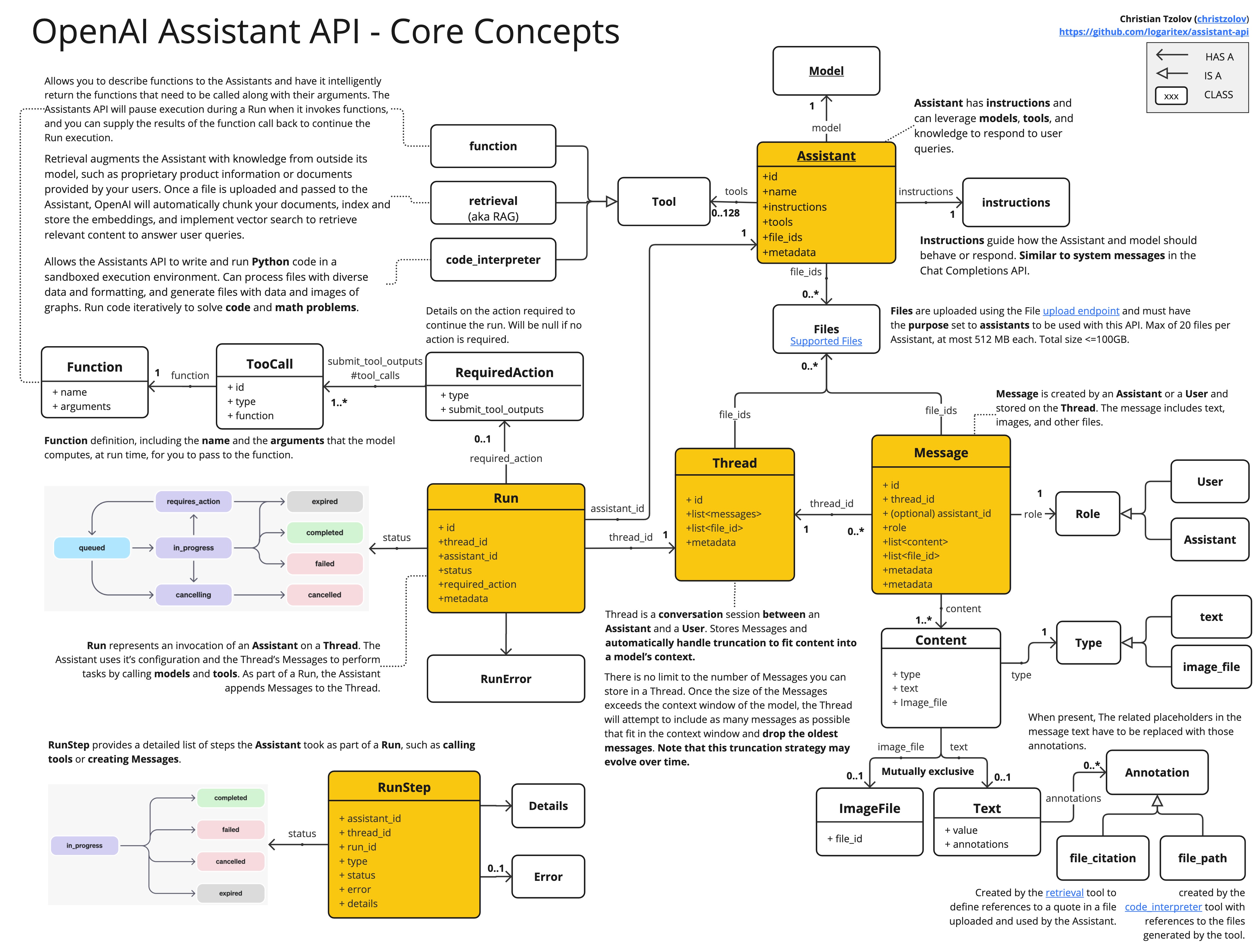 Some of benefits offered by the Assistants API are: - You don't have to store Messages in your own DB. - OpenAI handles truncating Messages to fit the context window for you (e.g. hosted RAG implementation). - The model output is generated even if you're disconnected from the API (e.g. the Run is asynchronous). - You always can retrieve the Messages later as they're persisted in the Thread. ## 2. Quick Start ### Prerequisites OpenAI Account: Create an account at [OpenAI Signup](https://platform.openai.com/signup) and generate the token at [API Keys](https://platform.openai.com/account/api-keys). ### Dependencies Add the maven `assistant-api` dependency: ```xml <dependency> <groupId>com.logaritex.ai</groupId> <artifactId>assistant-api</artifactId> <version>0.3.0</version> </dependency> ``` ### Create the Clients Create new `AssistantApi` and `FileApi` client instances, using your OpenAI API-KEY. ```java // Connect to the assistant-api using your OpenAI api key. AssistantApi assistantApi = new AssistantApi("<YOUR OPENAI API-KEY>"); // Connect to the file-api using your OpenAI api key. FileApi fileApi = new FileApi("<YOUR OPENAI API-KEY>"); ``` ### Create an Assistant The `Assistant` has instructions and can leverage models, tools, and knowledge to respond to user queries. In this example, we're creating an Assistant that is a personal math tutor, with the Code Interpreter tool enabled: ```java // Create a Math Tutor assistant. Data.Assistant assistant = assistantApi.createAssistant(new AssistantRequestBody( "gpt-4-1106-preview", // model "Math Tutor", // name "", // description "You are a personal math tutor. Write and run code to answer math questions.", // instructions List.of(new Tool(Tool.Type.code_interpreter)), // tools List.of(), // file ids Map.of())); // metadata ``` - `Instructions`: instructs how the Assistant and model should behave or respond (Similar to system messages in the Chat Completions API). - `Model`: the LLM model to use. - `Code Interpreter`: one of the supported tools, that allows the Assistants to write and run Python code in a sandboxed execution environment to solve code and math problems. ### Create a Thread `Thread` is a, persistent, conversation session between an `Assistant` and a `User`. It stores `Messages` and automatically handle truncation to fit content into a model’s context. Threads are created per user, after the user initiates the conversation. ```java // Create an empty Thread. Data.Thread thread = assistantApi.createThread(new ThreadRequest<>()); ``` ### Add a Message to a Thread `Message` is created by an `Assistant` or a `User` and stored on the `Thread`. It can include text, images, and other files. Lets add a new user Message to our Thread: ```java assistantApi.createMessage(new MessageRequest( Role.user, // user created message. "I need to solve the equation `3x + 11 = 14`. Can you help me?"), // user question. thread.id()); // thread to add the message to. ``` Threads don’t have a size limit. You can add as many Messages as you want to a Thread. The Assistant will ensure that requests to the model fit within the maximum context window, using relevant optimization techniques. ### Run the Assistant The `Run` represents the execution of a `Thread` with an `Assistant`. For the `Assistant` to respond to the user message, you need to create a `Run`. This makes the Assistant read the `Thread` and decide whether to call tools (if they are enabled) or simply use the model to best answer the query. As the run progresses, the assistant appends `Messages` to the thread with the `"assistant"` role. The Assistant automatically decides what previous Messages to include in the context window for the model. Here is how to create a new Run for a Thread with an Assistant: ```java Data.Run run = assistantApi.createRun( thread.id(), // run this thread, new RunRequest(assistant.id())); // with this assistant. ``` ### Check the Run status By default, a Run goes into the queued state. You can periodically retrieve the Run to check on its status to see if it has moved to completed: ```java while (assistantApi.retrieveRun(thread.id(), run.id()).status() != Run.Status.completed) { java.lang.Thread.sleep(500); } ``` > **Tip:** The [Assistant API Concepts](#1-assistant-api-concepts) diagram shows the supported Run states and state transitions. ### Display the Assistant's Response Once the Run completes, you can list the Messages added to the Thread by the Assistant: ```java DataList<Message> messages = assistantApi.listMessages( new ListRequest(), thread.id()); // Filter out the assistant messages only. List<Message> assistantMessages = messages.data().stream() .filter(msg -> msg.role() == Role.assistant).toList(); ``` During this Run, the Assistant added new Message to the Thread. Here is an example of what that message might look like: ```json { "id" : "msg_Axjj7SfuCdSa3S7Te5UVzCZB", "object" : "thread.message", "created_at" : 1701034742, "thread_id" : "thread_9MLO5QD8TahGFlIe1VNP0UdO", "role" : "assistant", "content" : [ { "type" : "text", "text" : { "value" : "To solve the equation \\(3x + 11 = 14\\), subtract 11 from both sides to get \\(3x = 3\\). Then divide both sides by 3 to solve for \\(x\\), which gives us \\(x = 1\\).", "annotations" : [ ] } } ], "assistant_id" : "asst_tRvOf7E30NIpBdzhMLeKmeaC", "run_id" : "run_BZw1S4ZQ3qyotbipOvtwtbJ7", "file_ids" : [ ], "metadata" : { } } ``` > You can also retrieve the Run Steps of this Run if you'd like to explore or display the inner workings of the Assistant and its tools. Here is the complete [AssistantOverview.java](src/test/java/com/logaritex/ai/api/samples/AssistantOverview.java) code. ## 3. Sample Assistant Applications Following examples demonstrate how to use the `assistant-api` library to leverage the various Assistants API features. ### 3.1 Knowledge Retrieval Tool The [KnowledgeRetrievalAssistant.java](src/test/java/com/logaritex/ai/api/samples/retrieval/KnowledgeRetrievalAssistant.java) demo creates an Assistant instructed to behave as a SpringBoot expert. The `Retrieval Tool` is enabled to augment the Assistant with knowledge from outside its model, such as the latest [spring-boot-reference.pdf](src/test/resources/spring-boot-reference.pdf) documentation. Once the doc files are uploaded and passed to the Assistant, OpenAI automatically chunks the documents, index and store the embeddings, and implement vector search to retrieve relevant content to answer user queries. The KnowledgeRetrievalAssistant creates a Thread and an user message with a question about information available only in the attached reference document. Then it creates a Run to execute the Tread with the configured Assistant. After the execution completes the demo retrieves the Assistant generated message (e.g. the answer) and prints the text content. For further details, follow the inlined logging messages. N.B. The [Retrieval Tool](https://platform.openai.com/docs/assistants/tools/knowledge-retrieval) is a proprietary, hosted, OpenAI [RAG](https://research.ibm.com/blog/retrieval-augmented-generation-RAG) implementation with somewhat limited configuration options at the moment: > Retrieval currently optimizes for quality by adding all relevant content to the context of model calls. > We plan to introduce other retrieval strategies to enable developers to choose a different tradeoff between retrieval quality and model usage cost. > (The KnowledgeRetrievalAssistant was inspired by this [video](https://youtu.be/pq34V_V5j18?t=2014)). ### 3.2 Function Calling Tool The [OpenAiFunctionTool.java](src/test/java/com/logaritex/ai/api/samples/function/OpenAiFunctionTool.java) demo creates an Assistant enabled with the [Function Tool](https://platform.openai.com/docs/assistants/tools/function-calling) to allow the users to define functions, prompting intelligent retrieval of required function calls and their arguments, with the API pausing execution during a Run for function invocation, allowing users to provide function call results to resume the Run. The OpenAiFunctionTool defines two functions: (1) `getCurrentWeather` with a prompt to `Get the weather in location` and (2) `getCityLocalNames` with a prompt `Get the local names of a city`. It also implements the [WeatherFunction.java](src/test/java/com/logaritex/ai/api/samples/function/WeatherFunction.java) and [CityNameFunction.java](src/test/java/com/logaritex/ai/api/samples/function/CityNameFunction.java) to handle the callbacks from the assistant using the defined parameter format. Next the OpenAiFunctionTool creates an empty Thread and an user message that should trigger the Model to invoke the registered functions. Run the thread and subscribe for the `Run.Status.requires_action` status. Later is indication that the run execution is paused and the `Run.required_action().submit_tool_outputs().tool_calls()` contains the function calling arguments as defined in the Assistant. In your code you dispatch the function arguments call the target functions and use the `assistantApi.submitToolOutputsToRun` to submit the results back to the thread run. Using the `assistant-api`, the function call handling would like this: ```java Function<String, String> myDummyFunction = arguments -> "dummy result for " + arguments; while (run.status() != Run.Status.completed || run.status() == Run.Status.cancelled) { run = assistantApi.retrieveRun(thread.id(), run.id()); if (run.status() == Run.Status.requires_action) { List<Data.ToolOutputs.ToolOutput> toolOutputs = new ArrayList<>(); List<ToolCall> toolCalls = run.required_action().submit_tool_outputs().tool_calls(); for (ToolCall toolCall : toolCalls) { if (toolCall.function().name().equals("<YOUR-FUNCTION-NAME>")) { String functionCallArguments = toolCall.function().arguments(); String functionOutput = myDummyFunction.apply(functionCallArguments) toolOutputs.add(new Data.ToolOutputs.ToolOutput(toolCall.id(), functionOutput)); } } if (!CollectionUtils.isEmpty(toolOutputs)) { assistantApi.submitToolOutputsToRun(thread.id(), run.id(), new Data.ToolOutputs(toolOutputs)); } } java.lang.Thread.sleep(1000); } ``` After all function outputs are submitted, the execution resumes and the assistant uses the function responses to generate the answer: ``` The current weather in Amsterdam, Netherlands is approximately 2.24°C. The known local names for Amsterdam are as follows: - אמסטרדם (Hebrew) - Amsterdam (Norwegian, French) ... ``` A dump of the `tool_calls` RunStep would look something like this: ```json { "id" : "step_QkJEXXzOxV9kRSophSYsl8T3", "object" : "thread.run.step", "created_at" : 1701276516, "assistant_id" : "asst_QP7qQv1M5WD5kWjvfC9eN51w", "thread_id" : "thread_ewfh9ix3XIZhFE7UMmkvqWRS", "run_id" : "run_0LH7NSCzcpzrlCpbQB4Ubl9K", "type" : "tool_calls", "status" : "completed", "step_details" : { "type" : "tool_calls", "tool_calls" : [ { "id" : "call_phxNeKJDxiLDkTeCWYSYKJRy", "type" : "function", "function" : { "name" : "getCurrentWeather", "arguments" : "{\"location\": \"Amsterdam, NL\", \"lat\": 52.3676, \"lon\": 4.9041, \"unit\": \"c\"}", "output" : "2.24c" } }, { "id" : "call_HtnP7kjp1m7P5jpFwpuSqr9q", "type" : "function", "function" : { "name" : "getCityLocalNames", "arguments" : "{\"city\": \"Amsterdam\", \"country\": \"NL\"}", "output" : "אמסטרדם (he),Amsterdam (no),Amsterdam (fr),ಆಂಸ್ಟರ್ಡ್ಯಾಮ್ (kn),ஆம்ஸ்டர்டம் (ta),آمستردام (fa),आम्स्टर्डम (ne),I-Amsterdami (zu),Amsterdamo (eo)..." } } ] }, "completed_at" : 1701276534, } ``` For further details, follow the inlined logging messages. ### 3.3 Code Interpreter Tool The [FintechCodeInterpreterTool.java](src/test/java/com/logaritex/ai/api/samples/codeinterpreter/FintechCodeInterpreterTool.java) demo creates an Assistant instructed to behave as a financial expert and `help users with finance and stock exchange questions`. The [Code Interpreter](https://platform.openai.com/docs/assistants/tools/code-interpreter) is enabled to allow the Assistant write and run Python code in a sandboxed execution environment, process diverse data formats, and generate data and images, to solve code and math problems. Also a `MSFT.csv` file, with Microsoft's stock closing values, is upload and assigned to the fintech assistant. Then the demo creates a Thread and user massage asking the assistant to `generate a chart showing the MSFT stock value changing over time`. After the Run execution complete, the final assistance messages (e.g. `messageList.first_id()` ) is retrieved from the thread: ```json { "id": "msg_FbczWI9TjlRzlfo4hSFTzvFe", "object": "thread.message", "created_at": 1701189080, "thread_id": "thread_r2Juw5atbn8PxUY2BShsKdoo", "role": "assistant", "content": [ { "type": "image_file", "image_file": { "file_id": "file-1ebZ3aCUuvaDTlIEeTjWpQeC" } }, { "type": "text", "text": { "value": "Here is the chart showing the MSFT stock closing price changing over time, based on the data from the provided CSV file. You can see the trend of the stock price on this graph. If you need more details or further analysis, feel free to ask!", "annotations": [] } } ], "file_ids": [], "assistant_id": "asst_Sp2SDnJju4seJtuzMhYPmD6B", "run_id": "run_PKSStrIChDGM52NozOgpPTOd", "metadata": {} } ``` Next the FintechCodeInterpreterTool retrieves the content of the Assistant generated `image_file` and stores it as a `msft-chart.png`: 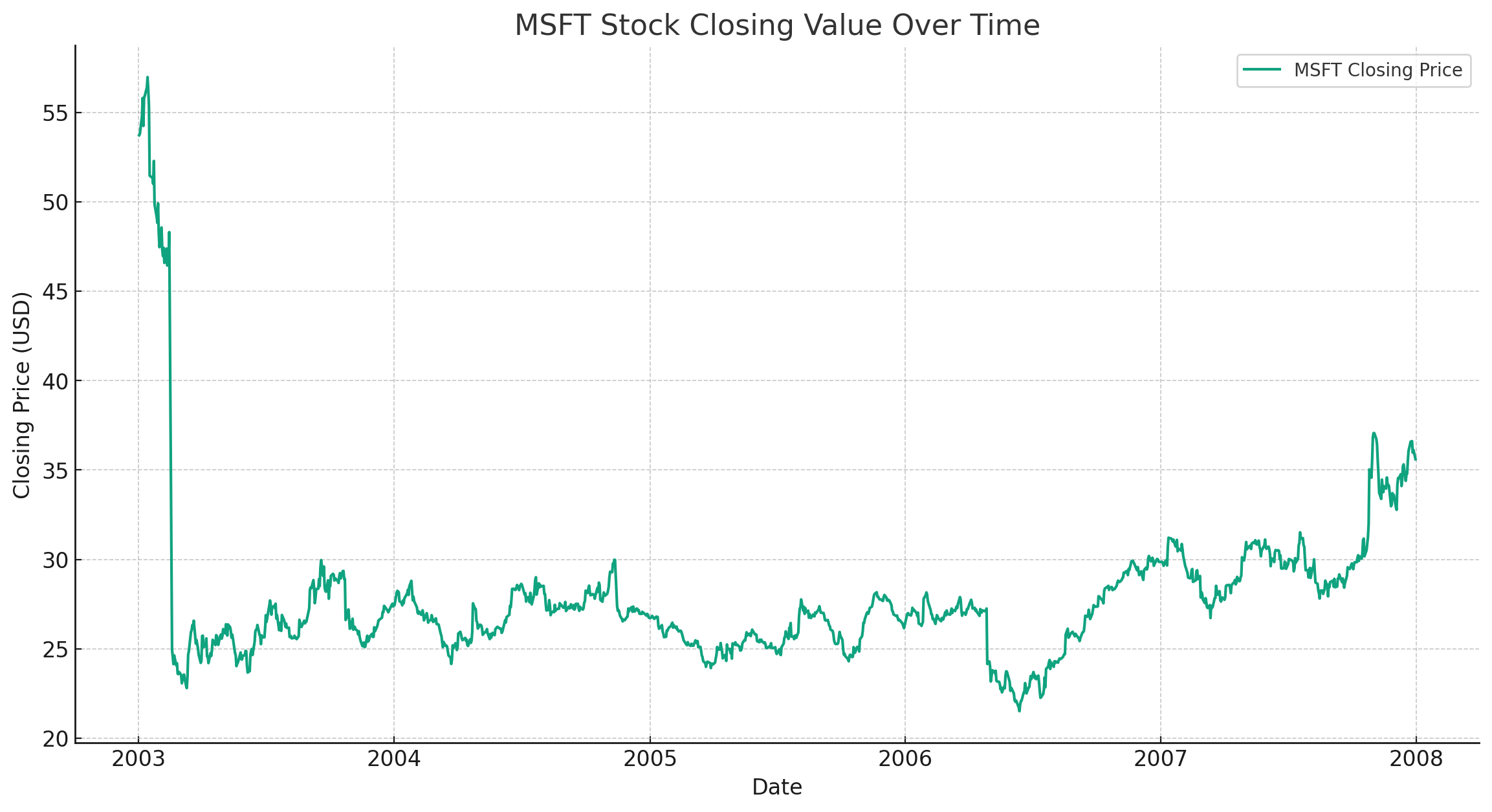 For further details, follow the inlined logging messages. > (The FintechCodeInterpreterTool was inspired by this [video](https://youtu.be/pq34V_V5j18?t=1734)). The [AssistantOverview](src/test/java/com/logaritex/ai/api/samples/AssistantOverview.java) used in the quick start guide provides another, simpler, code-interpreter example. ## 4. How to build ```bash git clone git@github.com:logaritex/assistant-api.git ``` ```bash ./mvnw clean install ``` ## 5. References - [Assistants Overview](https://platform.openai.com/docs/assistants/overview) - [How Assistants work](https://platform.openai.com/docs/assistants/how-it-works) - [Assistants Tools](https://platform.openai.com/docs/assistants/tools) - API References: - [Assistants](https://platform.openai.com/docs/api-reference/assistants) - [Threads](https://platform.openai.com/docs/api-reference/threads) - [Messages](https://platform.openai.com/docs/api-reference/messages) - [Runs](https://platform.openai.com/docs/api-reference/runs) - [Files](https://platform.openai.com/docs/api-reference/files) - [Video demoing the knowledge retrieval tool](https://youtu.be/pq34V_V5j18?t=2014). - [Video demoing the code interpreter tool](https://youtu.be/pq34V_V5j18?t=1734).
