KO
|
EN
gitlite — search
Search
#python
#java
#python3
#arduino
#golang
#machine-learning
#rust
#html
#flask
#javascript
#seismology
#nodejs
Ultraviolence
★ 19
Open GitHub ↗
Wabbajack cyberpunk 2077 mods list
Download README (.md)
Explore Similar Repositories
rknn_backend
:
No description available.
blog-pro-MERN-stack
:
This repository is the client side and the server side of Blog Project built with MERN stack techs for educational purpose
ml_VMK
:
Решение задач по ML 3 курса ВМК МГУ
happio
:
A simple Mood Tracker application designed to monitor and analyze your daily mood fluctuations with a few taps.
srworkshop
:
Scripts and files for the annual Short Read Analysis Workshop
// repository documentation
Was this content helpful?
★ 0
(0 ratings)
Select Rating:
★
★
★
★
★
Submit Feedback
Recent Feedback
×
Download README
Do you want to download the
README.md
file for
Ultraviolence
?
Download (.md)
 <p align="center"> [ Getting Started ] [ <a href="https://github.com/Gallahorn/Ultraviolence/blob/main/Installation.md">Installation</a> ] [ <a href="https://github.com/Gallahorn/Ultraviolence/blob/main/PostInstall.md">After Install</a> ] [ <a href="https://github.com/Gallahorn/Ultraviolence/blob/main/ModSetup.md">Mod Setup</a> ] [ <a href="https://github.com/Gallahorn/Ultraviolence/blob/main/AdvancedFeatures.md">Advanced Features</a> ] [ <a href="https://github.com/Gallahorn/Ultraviolence/blob/main/Gameplay.md">Gameplay</a> ] [ <a href="https://github.com/Gallahorn/Ultraviolence/blob/main/CommonIssues.md">Common Issues</a> ] </p> # Readme Current Version 3.0.4: [Changelog](Changelog.md) Current list of included mods: [Mod List](https://loadorderlibrary.com/lists/ultraviolence) Wabbajack Cyberpunk 2077 modlist that is focused on gameplay and roleplay. > [!CAUTION] > **MALE V PLAYTHROUGHS ARE NOT SUPPORTED!** > > You play male V at your own risk! > This list is entirely built around female V. > Things can and **WILL** break (Quests, Romances, Outfits) if you play as a male. > > So if you insist on playing male V, this is not the list for you. > Please do not ask for support for male V playthroughs in support channels. Use #uv-modify if you encounter problems as male V. # Contents - [Readme](#readme) - [Contents](#contents) - [Need Support?](#need-support) - [Modifying the list](#modifying-the-list) - [Asking for support in Discord](#asking-for-support-in-discord) - [Prerequisites (What you need)](#prerequisites-what-you-need) - [1 Pre-Installation steps](#1-pre-installation-steps) - [1.1 Set up your pagefile](#11-set-up-your-pagefile) - [1.2 Antivirus exclusions](#12-antivirus-exclusions) - [1.3 Nvidia shader cache size](#13-nvidia-shader-cache-size) - [1.4 Install Microsoft Runtime Environments](#14-install-microsoft-runtime-environments) - [Continue](#continue) # Need Support? Please read the provided Readme (the files you are looking at right now) as well as our [Common Issues](CommonIssues.md) section carefully first. Additional Gameplay information can be found in our [Gameplay Section](Gameplay.md) and in [Advanced Features](AdvancedFeatures.md). If the documentation provided does not provide you with an answer, of if you just want to chat and hang out, feel free to join our discord (link below). ## Modifying the list **__What does 'modified list' mean?__** This list is configured exactly as it should be. **__Any change to the list, be that in MO2 or ingame mod settings,__** is considered a modified installation and voids your viability for support. In this case, keep your support requests strictly in #uv-modify in discord. **__Why do you have a modifying-channel then?__** So people who want to add mods or play around with the list can support themselves. I don't give support for modified installs. **__The list is too hard / cumbersome for me__** I have put a lot of time in configuring the list exactly how I like it, if you don't, that's fine. If you don't like the hardcore aspect of the list, you're proabably better off playing another modlist. If you join the discord and the first thing you do is disable mods willy nilly because you're not willing to drive for a bit without a minimap until you can afford the cyberware, you're probably getting yelled at. You have been warned.  **__Helping other poeple__** This said, please don't advise people to disable mods as a first solution to a problem. They might not know that this makes them uneligable for official support. If they have a problem in their playthrough, please guide them to this Readme (especially the [Gameplay Section](Gameplay.md)) instead. Disabling mods should always be the last solution, if nothing else can be done. ## Asking for support in Discord If you want to ask for support in Discord, grab the "UltraViolence" role in onboarding or in "Channels & Roles" at the top of the channel list. Before asking your question, please use the discord search function and check pinned messages in relevant channels. Still haven't found an answer to your problem? Please make sure to ask your question in the appropriate channel. - uv-general -> General discussion about the list or included mods. - uv-modifiy -> Support-Channel for modified installs (if you changed files, added or deleted mods in your install, ask for support here). - uv-support -> Support-Channel for vanilla (unchanged) installs. [](https://discord.gg/iAmModlist) # Prerequisites (What you need) You **__will need__** the following things prior to starting the installation of the modlist. - **__A copy of Cyberpunk 2077 on Steam or GOG__** EPIC games might work, but you are using that platform on your own risk, since nobody of the UV team owns the game on that platform, so we can't give support for EPIC. - **__Phantom Liberty and REDMod__** Yes, both are required. No, you can't install the list without it, Wabbajack won't let you. It is non-negotiable. - **About 360 GB of free space on your SSD** NVME SSD recommended. ~85 GB for the base game ~120 GB for the modlist ~130 GB for the downloaded mod archives (can be on a different drive, even a HDD) ~25 GB for archive extraction during installation - **__The ability and willingness to read.__** This includes the parts of the manual after the installation of the modlist. The Ultraviolence experience is **__totally different__** compared to vanilla Cyberpunk. > [!CAUTION] > You are responsible to follow **__EVERY SINGLE STEP__** in this Readme. None of them are optional. > You are responsible if you break stuff because you didn't want to read. >   # 1 Pre-Installation steps > [!CAUTION] > **__DO NOT SKIP THESE STEPS__**. > They are not optional and you **__WILL__** run into problems if you don't follow these steps. > If you are not on a new Windows install, still verify that required software is installed and required setup steps are done. ## 1.1 Set up your pagefile You should setup a pagefile of at least **20GB** - yes, even if you have a million GB of RAM. To setup your pagefile; 1. Hold down the *LEFT* Windows key and press **R** 2. Type in `systempropertiesadvanced` in the run box and then press ENTER 3. Under the "Performance" option, click the "Settings..." button 4. Switch to the "Advanced" tab 5. Under "Virtual Memory", click the "Change..." button 6. Uncheck `Automatically manage...` if it's checked 7. Select your *fastest* SSD in the list of drives 8. Check "Custom Size" 9. Set `Initial Size` to 20480 10. Set `Maximum Size` to 40000 11. Press the "Set" button 12. Press `OK` 13. Press `APPLY` and then `OK` 14. Restart your PC to apply the pagefile setting ## 1.2 Antivirus exclusions Before you go down the route of "I don't have an antivirus" - you do, it's built into Windows. You need to exclude your Wabbajack folder, your UV installation folder and your Cyberpunk base game folder (inside your steam library) from your antivirus' real-time protection stuff as it will likely interfere with your install and worst case, it can remove files, ruining your install. It can and will interfere whilst you are playing too, causing poor performance and obvious stuttering. > [!TIP] > How do I do this, you ask? [Click here to find out how.](https://support.microsoft.com/en-gb/windows/add-an-exclusion-to-windows-security-811816c0-4dfd-af4a-47e4-c301afe13b26) **Note:** If you're using Webroot or any other free 3rd party antivirus it's likely that adding the folders to exclusions will not be enough and you'll need to disable or uninstall your 3rd party AV as they can incorrectly mark `usvfs_proxy_x86.exe`, among other files, as a virus, a file needed for Mod Organizer 2 to work. We recommend doing so anyway in case it's a free one, as Windows Defender is likely much better at stopping threats than that is (according to data from av-test.org https://www.av-test.org/en/antivirus/home-windows/). ## 1.3 Nvidia shader cache size You must set your Nvidia Shader Cache size to at least 10GB. To do so - Open your nVidia Control Panel - Click "Manage 3D Settings" on the left side - Scroll through the list on the right pane until you see "Shader Cache Size" - Set it to anything bigger or equal 10GB ## 1.4 Install Microsoft Runtime Environments Download and install both [.NET 8](https://dotnet.microsoft.com/en-us/download/dotnet/8.0) and [.NET9](https://dotnet.microsoft.com/en-us/download/dotnet/9.0). You need the ".NET Desktop Runtime" of both versions. 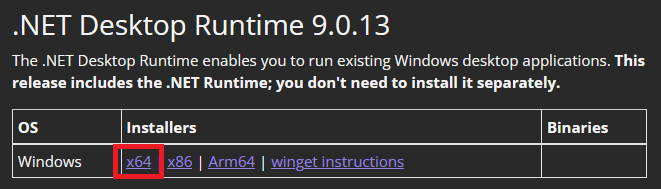 Download and install the [Latest Microsoft Visual C++ Redistributable version](https://learn.microsoft.com/en-us/cpp/windows/latest-supported-vc-redist?view=msvc-170) # Continue When you're finished preparing your system for the installation process continue to the [Installation Page](Installation.md).
