KO
|
EN
gitlite — search
Search
#typescript
#ai-agents
#ai
#dsh-plugin
#deepseek-harness
#open-source
#claude-code
#codex
#cli
#developer-tools
#react
#windows
MultiDocumenter.jl
★ 73
Open GitHub ↗
Aggregating all the docs
Download README (.md)
Explore Similar Repositories
containers
:
Automated privilege escalation of the world's most popular Docker images.
The-Python-Workshop-Second-Edition
:
The Python Workshop - Second Edition, published by Packt
message-exploit
:
:trollface: Collection of text exploits / hacks
CVE-2022-30206
:
Exploit for CVE-2022-30206
polyu
:
PolyU Msc in IT
// repository documentation
Was this content helpful?
★ 0
(0 ratings)
Select Rating:
★
★
★
★
★
Submit Feedback
Recent Feedback
×
Download README
Do you want to download the
README.md
file for
MultiDocumenter.jl
?
Download (.md)
# MultiDocumenter This package aggregates [Documenter.jl](https://github.com/JuliaDocs/Documenter.jl) documentation from multiple sources into one page with a global search bar. ## Example usage ```julia using MultiDocumenter clonedir = mktempdir() docs = [ MultiDocumenter.DropdownNav("Debugging", [ MultiDocumenter.MultiDocRef( upstream = joinpath(clonedir, "Infiltrator"), path = "inf", name = "Infiltrator", giturl = "https://github.com/JuliaDebug/Infiltrator.jl.git", ), MultiDocumenter.MultiDocRef( upstream = joinpath(clonedir, "JuliaInterpreter"), path = "debug", name = "JuliaInterpreter", giturl = "https://github.com/JuliaDebug/JuliaInterpreter.jl.git", ), ]), MultiDocumenter.MegaDropdownNav("Mega Debugger", [ MultiDocumenter.Column("Column 1", [ MultiDocumenter.MultiDocRef( upstream = joinpath(clonedir, "Infiltrator"), path = "inf", name = "Infiltrator", giturl = "https://github.com/JuliaDebug/Infiltrator.jl.git", ), MultiDocumenter.MultiDocRef( upstream = joinpath(clonedir, "JuliaInterpreter"), path = "debug", name = "JuliaInterpreter", giturl = "https://github.com/JuliaDebug/JuliaInterpreter.jl.git", ), ]), MultiDocumenter.Column("Column 2", [ MultiDocumenter.MultiDocRef( upstream = joinpath(clonedir, "Infiltrator"), path = "inf", name = "Infiltrator", giturl = "https://github.com/JuliaDebug/Infiltrator.jl.git", ), MultiDocumenter.MultiDocRef( upstream = joinpath(clonedir, "JuliaInterpreter"), path = "debug", name = "JuliaInterpreter", giturl = "https://github.com/JuliaDebug/JuliaInterpreter.jl.git", ), ]), ]), MultiDocumenter.MultiDocRef( upstream = joinpath(clonedir, "DataSets"), path = "data", name = "DataSets", giturl = "https://github.com/JuliaComputing/DataSets.jl.git", # or use ssh instead for private repos: # giturl = "git@github.com:JuliaComputing/DataSets.jl.git", ), ] outpath = joinpath(@__DIR__, "out") MultiDocumenter.make( outpath, docs; search_engine = MultiDocumenter.SearchConfig( index_versions = ["stable"], engine = MultiDocumenter.FlexSearch ) ) ``` 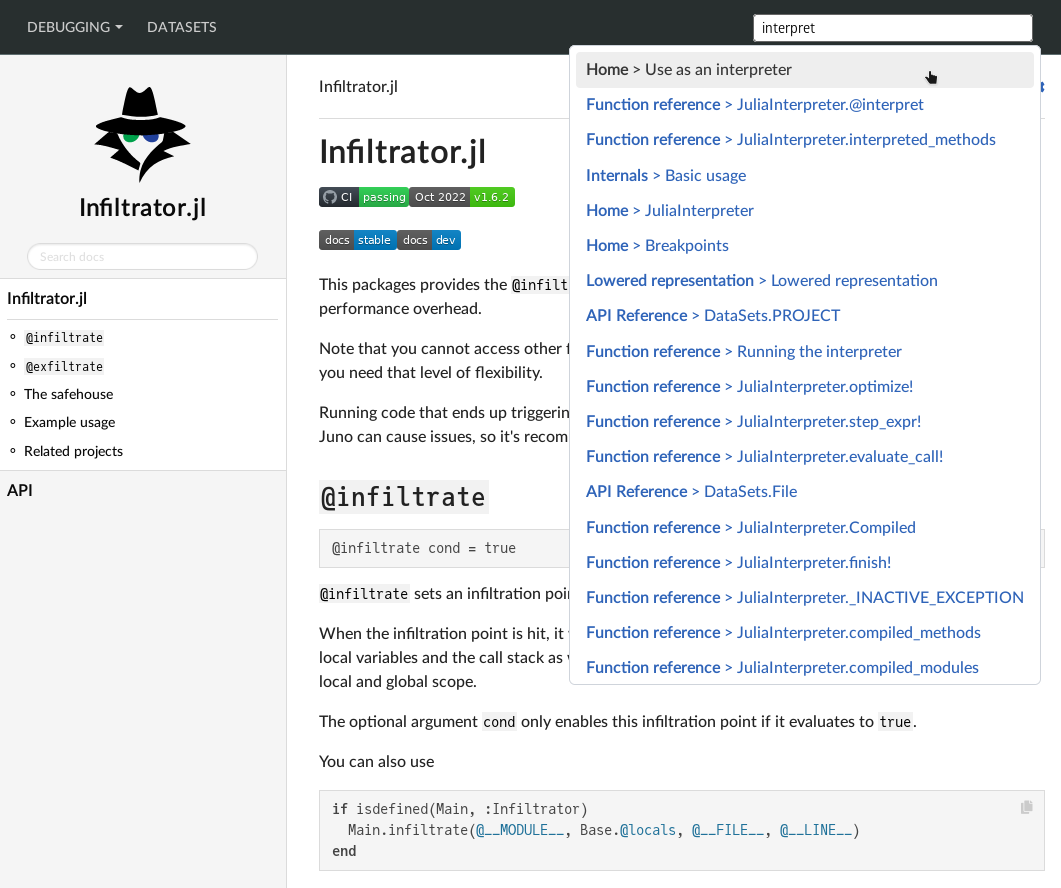 ## Deployment Check [`.github/workflows/deploy.yml`](.github/workflows/deploy.yml) and [`docs/make.jl`](docs/make.jl) for an example on how to deploy MultiDocumenter-generated aggregates to a git branch. The result of that script is available at [https://juliacomputing.github.io/MultiDocumenter.jl/](https://juliacomputing.github.io/MultiDocumenter.jl/). You can of course also just push the output artefact directly to S3 or some other hosting service. > **Warning** > MultiDocumenter sites can not be deployed on Windows right now, and the `make()` function will throw an error. > See [#70](https://github.com/JuliaComputing/MultiDocumenter.jl/issues/70). > > It is still possible to develop and debug MultiDocumenter sites on Windows if the build script is run interactively (e.g. by `include`-ing it into a REPL session).
