KO
|
EN
gitlite — search
Search
#docker
#php
#hacktoberfest
#react
#javascript
#python
#java
#android
#data-science
#machine-learning
#golang
#nodejs
openfaas-cloud
★ 769
Open GitHub ↗
The Multi-user OpenFaaS Platform
Download README (.md)
Explore Similar Repositories
shortlink
:
Shortlink service (Microservice example) ⭐️ Star the repo if you like it!
turnilo
:
Business intelligence, data exploration and visualization web application for Druid, formerly known as Swiv and Pivot
godot_ui_components
:
A collection of UI designs implemented in Godot 4
syno-acme
:
通过acme协议更新群晖HTTPS泛域名证书的自动脚本
eslint-plugin-regexp
:
ESLint plugin for finding regex mistakes and style guide violations.
// repository documentation
Was this content helpful?
★ 0
(0 ratings)
Select Rating:
★
★
★
★
★
Submit Feedback
Recent Feedback
×
Download README
Do you want to download the
README.md
file for
openfaas-cloud
?
Download (.md)
OpenFaaS Cloud ============== The Multi-user OpenFaaS Platform ## Introduction [](https://github.com/openfaas/openfaas-cloud/actions) OpenFaaS Cloud introduces an automated build and management system for your Serverless functions with native integrations into your source-control management system whether that is GitHub or GitLab. With OpenFaaS Cloud functions are managed through typing `git push` which reduces the tooling and learning curve required to operate functions for your team. As soon as OpenFaaS Cloud receives a `push event` from `git` it will run through a build-workflow which clones your repo, builds a Docker image, pushes it to a registry and then deploys your functions to your cluster. Each user can access and monitor their functions through their personal dashboard. Features: * Portable - self-host on any cloud * Multi-user - use your GitHub/GitLab identity to log into your personal dashboard * Automates CI/CD triggered by `git push` (also known as GitOps) * Onboard new git repos with a single click by adding the *GitHub App* or a repository tag in *GitLab* * Immediate feedback on your personal dashboard and through GitHub Checks or GitLab Statuses * Sub-domain per user or organization with HTTPS * Runtime-logs for your functions * Fast, non-root image builds using [buildkit](https://github.com/moby/buildkit/) from Docker The dashboard page for a user: 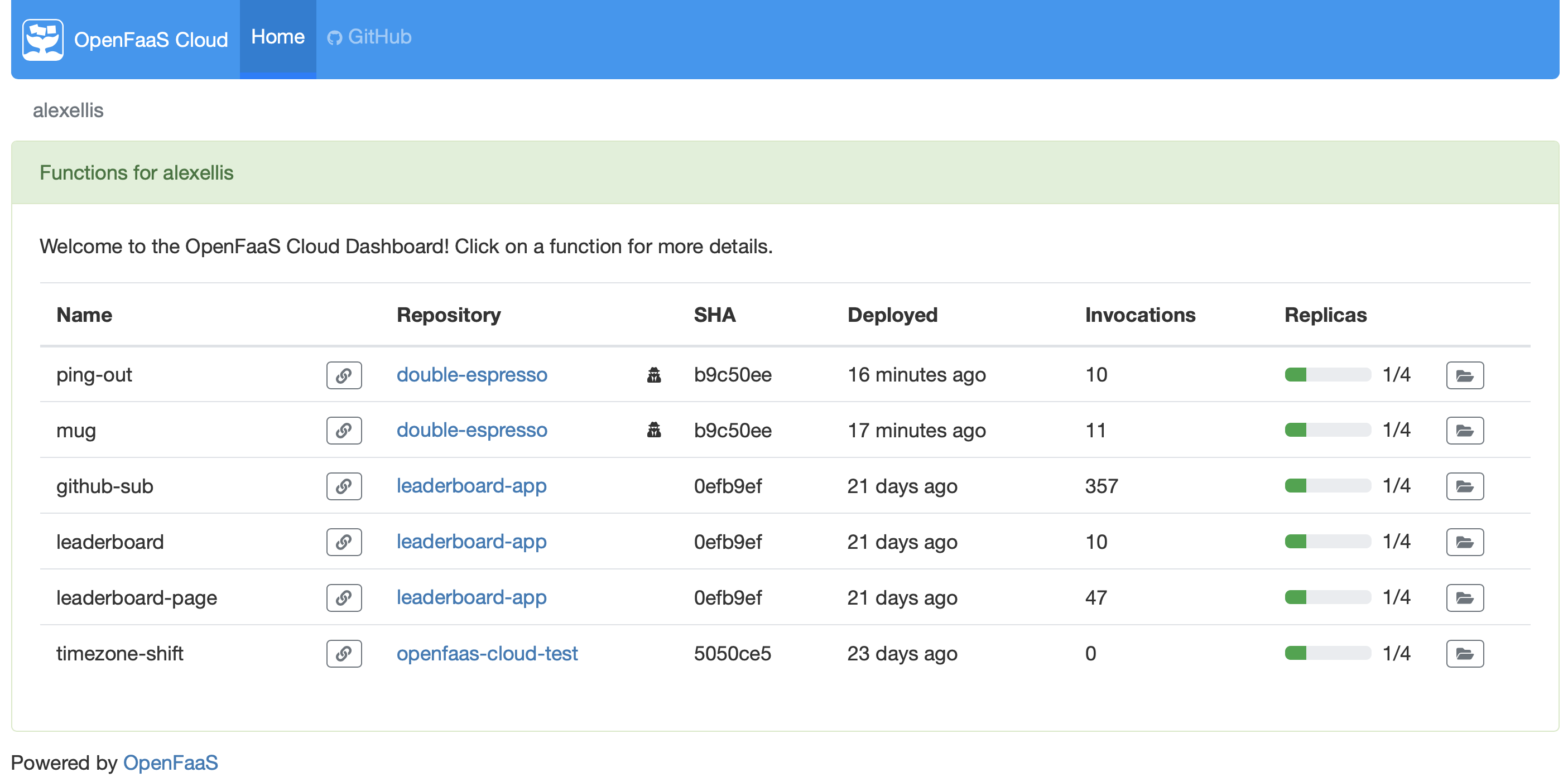 The details page for a function: 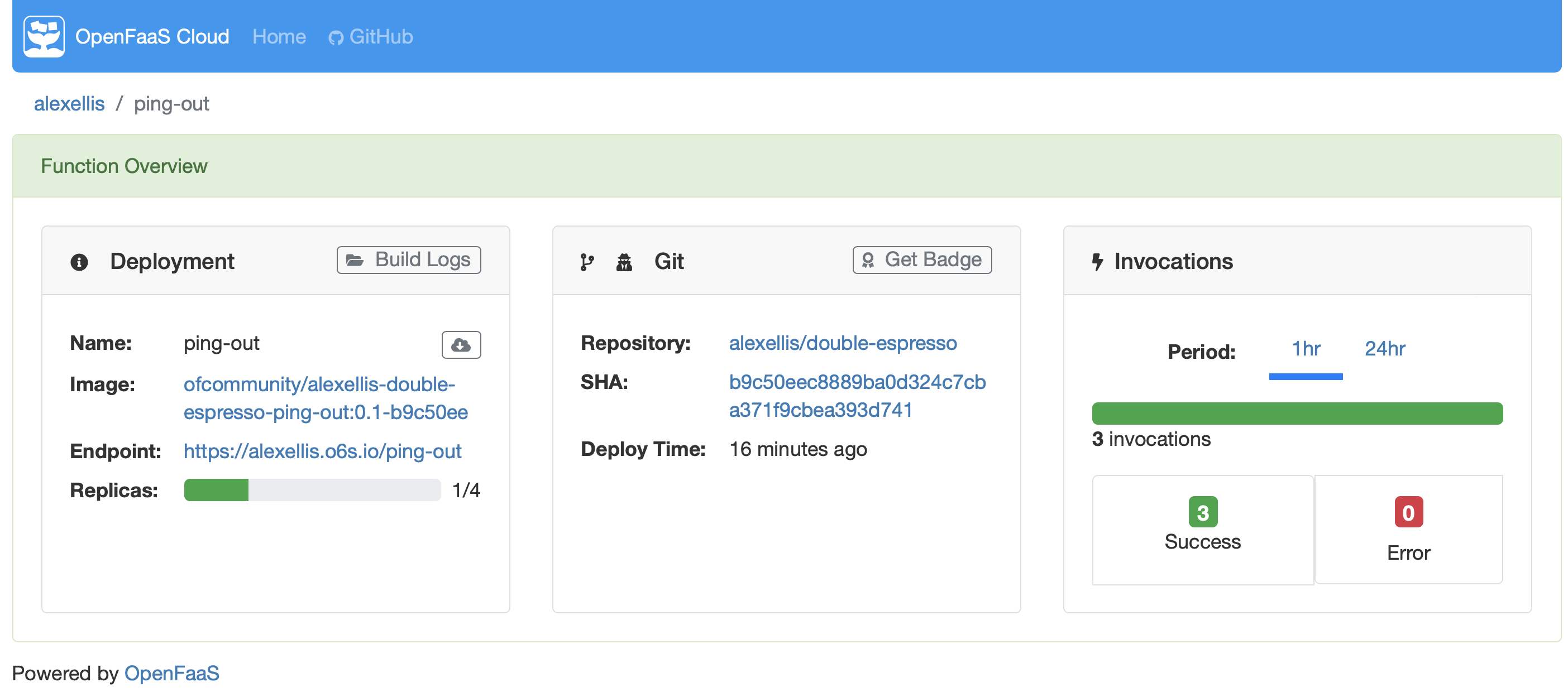 ## Overview 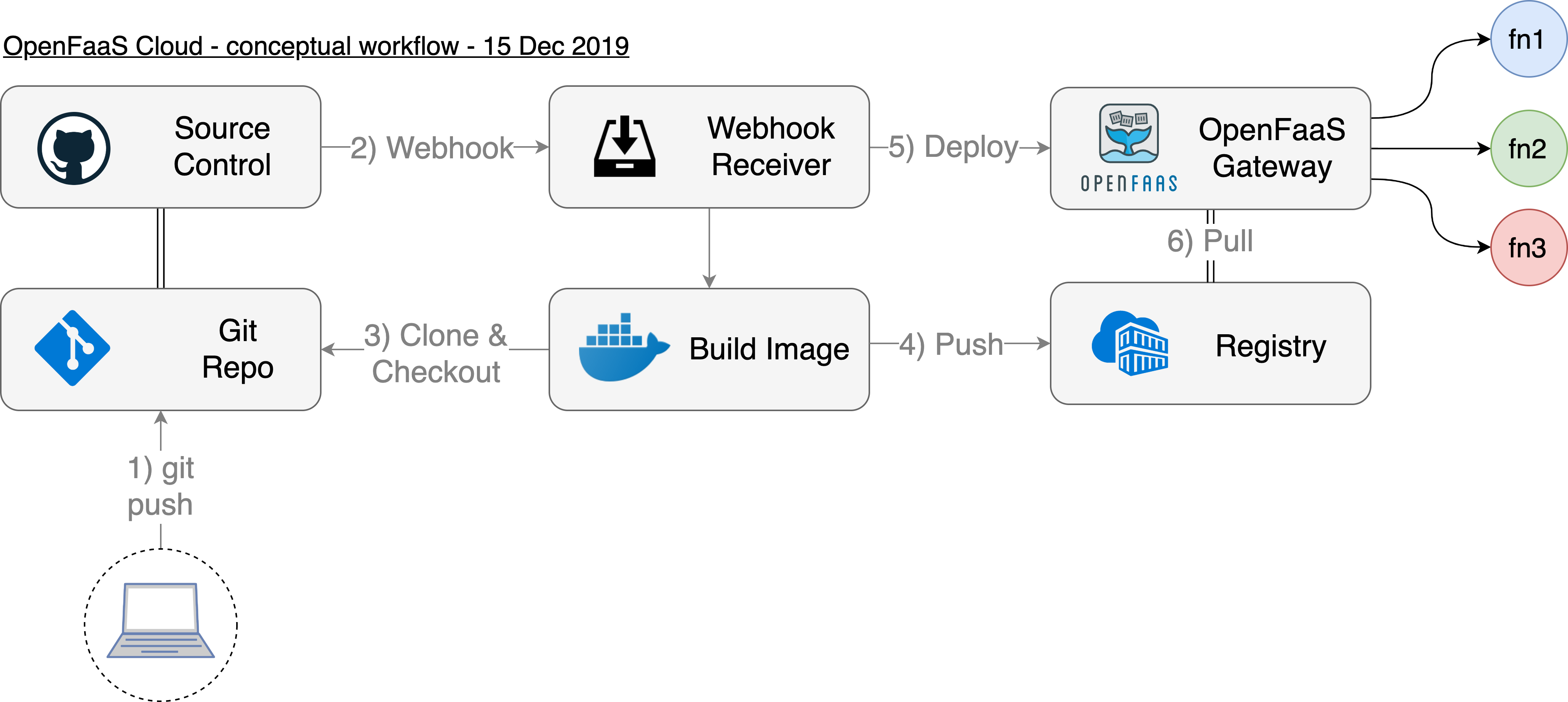 The high-level workflow for the OpenFaaS Cloud CI/CD pipeline. ### KubeCon video [](https://www.youtube.com/watch?v=sD7hCwq3Gw0) [KubeCon: OpenFaaS Cloud + Linkerd: A Secure, Multi-Tenant Serverless Platform - Charles Pretzer & Alex Ellis](https://www.youtube.com/watch?v=sD7hCwq3Gw0&feature=emb_title) ### Blog posts * [Build your own OpenFaaS Cloud with AWS EKS](https://www.openfaas.com/blog/eks-openfaas-cloud-build-guide/) * [Introducing OpenFaaS Cloud with GitLab](https://www.openfaas.com/blog/openfaas-cloud-gitlab/) * [Introducing OpenFaaS Cloud](https://blog.alexellis.io/introducing-openfaas-cloud/) * [Sailing through the Serverless Ocean with Spotinst & OpenFaaS Cloud](https://spotinst.com/blog/sailing-through-the-serverless-ocean-with-openfaas-cloud/) ### Documentation * [Conceptual architecture](https://docs.openfaas.com/openfaas-cloud/architecture). * [Authentication](https://docs.openfaas.com/openfaas-cloud/authentication/) * [Multi-stage environments](https://docs.openfaas.com/openfaas-cloud/multi-stage/) * [Manage secrets](https://docs.openfaas.com/openfaas-cloud/secrets/) * [User guide](https://docs.openfaas.com/openfaas-cloud/user-guide/) ### Roadmap & Features See the [Roadmap & Features](docs/ROADMAP.md) ## Get started You can set up and host your own *OpenFaaS Cloud* or pay an expert to do that for you. OpenFaaS Ltd also offers custom development, if you should have new requirements. ### Option 1: Expert installation OpenFaaS Ltd provides expert installation and support for OpenFaaS Cloud. You can bring your own infrastructure, or we can install and configure OpenFaaS Cloud for your accounts on a managed cloud. [Get started today](https://www.openfaas.com/support/) ### Option 2: Automated deployment (self-hosted) You can set up your own OpenFaaS Cloud with authentication and wildcard certificates using ofc-bootstrap in around 100 seconds using the ofc-bootstrap tool. This method assumes that you are using Kubernetes, have a public IP available or [are using the inlets-operator](https://github.com/inlets/inlets-operator), and have a domain name. Some basic knowledge of how to setup a GitHub App and GitHub OAuth App along with a DNS service account on DigitalOcean, Google Cloud DNS, Cloudflare or AWS Route53. A [developer install is also available via this blog post](https://blog.alexellis.io/openfaas-cloud-for-development/), which disables OAuth and TLS. You will still need an IP address and domain name. Deploy with: [ofc-bootstrap](https://github.com/openfaas-incubator/ofc-bootstrap) ## Getting help For help join #openfaas-cloud on the [OpenFaaS Slack workspace](https://docs.openfaas.com/community). If you need commercial support, contact [sales@openfaas.com](mailto:sales@openfaas.com)
