KO
|
EN
gitlite — search
Search
#javascript
#dotfiles
#ruby
#java
#nodejs
#php
#shell
#python
#hacktoberfest
#c-plus-plus
#unmaintained
#vim
sudoku-solver
★ 596
Open GitHub ↗
Smart solution to solve sudoku in VR
Download README (.md)
Explore Similar Repositories
embedJs
:
A NodeJS RAG framework to easily work with LLMs and embeddings
zeng-rpc-framework
:
手写自己的RPC框架/Handwritten RPC framework
ajax-datatables-rails
:
A wrapper around DataTable's ajax methods that allow synchronization with server-side pagination in a Rails app
reactive-interaction-gateway
:
Create low-latency, interactive user experiences for stateless microservices.
deita
:
Deita: Data-Efficient Instruction Tuning for Alignment [ICLR2024]
// repository documentation
Was this content helpful?
★ 0
(0 ratings)
Select Rating:
★
★
★
★
★
Submit Feedback
Recent Feedback
×
Download README
Do you want to download the
README.md
file for
sudoku-solver
?
Download (.md)
# sudoku-solver Hi, my name is Rémi LUX. Currently engineer at Niryo, I code this sudoku solver during my free time. My algorithm is able to detect and to directly solve sudokus in VR as shown on the video below <p align="center"> <img src="https://user-images.githubusercontent.com/39727257/71028243-3b376900-210d-11ea-9e81-6ba1c7c27528.gif" width="500"/> </p> ## The Application The Application is based on [KivyMD][KivyMD repo]. It currently has 2 screens : - One for Live Solving which allows you to chose between full solving and hint mode - One which Solve image from gallery | Live Solving | Gallery Solving | :-------------------------:|:-------------------------: 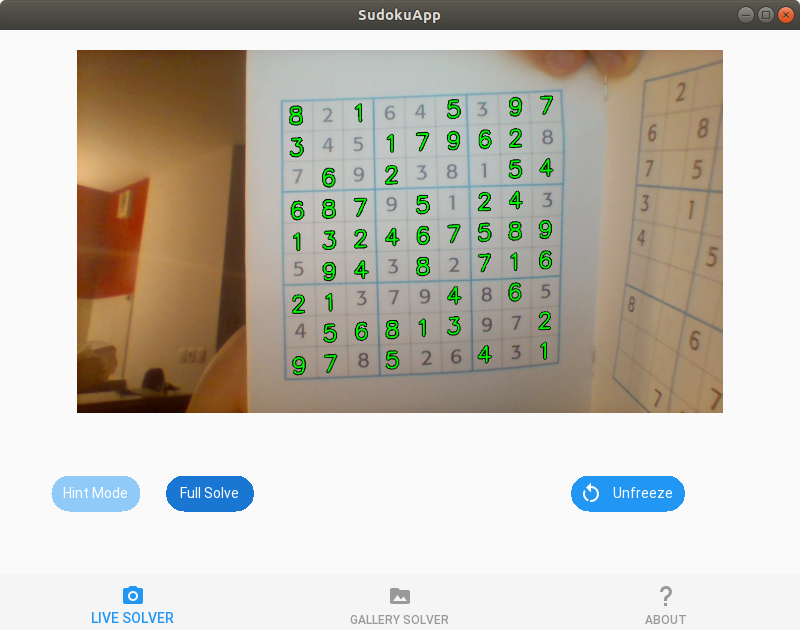 | 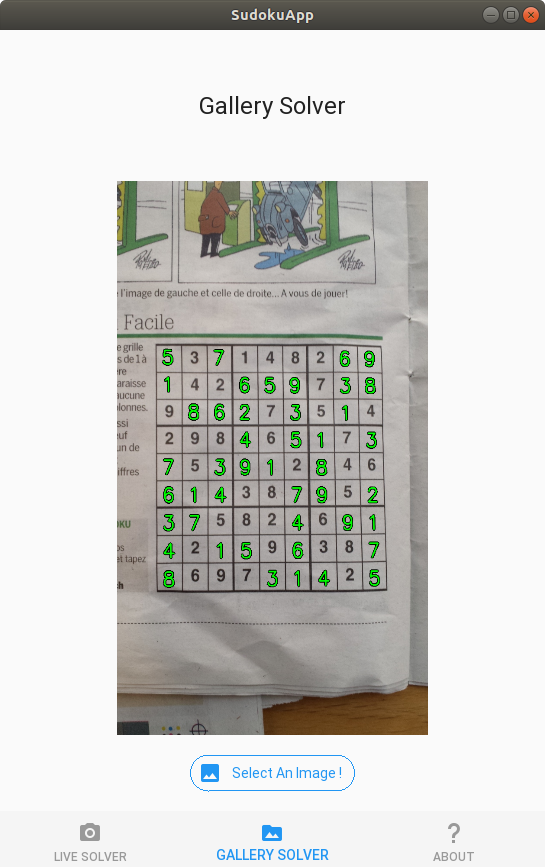 ## How is it working ? For a single image process, my algorithm is using working as following : ### Grids Extraction Firstly, the algorithm have to find where the grids are ! The pipeline is : 1. Preprocess image to enhance high frequencies 2. Find lines thanks to Hough Space 3. Analyse lines to know which can correspond to a grid <p align="center"> <img src="https://user-images.githubusercontent.com/39727257/57723287-9a6d6080-7688-11e9-981c-9265b7e147e0.png" width="640"/> </p> ### Digits Identification & Grids Solving Once grids are extracted, for each grid we do : * Detect shape which can be digits * Use my CNN do identify digits * Create a numeric grid in a table & solve it <p align="center"> <img src="https://user-images.githubusercontent.com/39727257/57726097-fb983280-768e-11e9-9374-065b416a5790.png" width="400"/> </p> ### Grids Reconstruction * Create a virtual image to fill the initial image * Add the 2 images together to create the final result <p align="center"> <img src="https://user-images.githubusercontent.com/39727257/57727741-89c1e800-7692-11e9-8b4d-491b72c62cb0.png" width="500"/> </p> ### Video Case When user chose to use video as input, the algorithm will act quite differently : - For grids extraction, we use position of last grids to deduce if 2 grids in 2 pictures are actually the same - For grids solving, we wait to have meet the same extracted numeric grid twice, to be confident on digits extraction - It do not resolve a grid if it a grid is detected as same as an already solved grid ## How to use ? ### Dependencies You will need some libraries before running it - Numpy - OpenCV - Tensorflow - KivyMD >= 1.11.1 (as this version isn't publish on Pypi yet, you should install it form the [KivyMD repo]) ### Run the program The best way to use my algorithm is to firstly clone the git repo where you want to. Then, open a terminal & go in the repository `cd /path/to/the/repo/` Then, simply use the command `python3 kivy_md.py` ## Evolution, TODO list, Q&A, ... ### Evolution of the Algorithm #### Application | Version | Visu | :-------------------------:|:-------------------------: 2.0 |  #### Python Script | Version | Source | Algorithm Output | :-------------------------:|:-------------------------:|:-------------------------: 1.5 | Video | <img src="https://user-images.githubusercontent.com/39727257/57652501-0213a500-75d0-11e9-9f14-2a3bada71923.gif" width="400"/> 1.3 | <img src="https://user-images.githubusercontent.com/39727257/57191967-b146e100-6f2b-11e9-993d-3f6e8dc8e246.jpg" width="400"/> | <img src="https://user-images.githubusercontent.com/39727257/57191964-aa1fd300-6f2b-11e9-8a3e-9403b851b2dd.jpg" width="400"/> 1.2 | <img src="https://user-images.githubusercontent.com/39727257/57106087-d5889f00-6d2c-11e9-805f-350233fed9bc.jpg" width="400"/> | <img src="https://user-images.githubusercontent.com/39727257/57106093-d91c2600-6d2c-11e9-95da-c739bb21131e.jpg" width="400"/> 1.1 | <img src="https://user-images.githubusercontent.com/39727257/57035511-89692c00-6c52-11e9-852f-34acd3ed28e4.jpg" width="400"/> | <img src="https://user-images.githubusercontent.com/39727257/57035569-abfb4500-6c52-11e9-9dd2-c7ca6e954a3f.jpg" width="400"/> 1.0 | <img src="https://user-images.githubusercontent.com/39727257/56866566-da6eeb00-69da-11e9-80bf-0f5eb124dce4.jpg" width="400"/> | <img src="https://user-images.githubusercontent.com/39727257/56866569-ec508e00-69da-11e9-9949-baaf827d3f6e.jpg" width="400"/> ### Where can I find weights for the CNN :( ? I trained mine personally with on a dataset of 10k numeric digits with data augmentation. It gave me a precision of 99.5+ % ### TODO LIST - [ ] Create App - [ ] Adapt App for phone ! ### VERSION LIST - v2.0 : Creating the first App' version | 13/09/20 - Clean old code - Use of Kivy - v1.7 : Multiple performance improvement | 17/12/19 - New training method - Improve Reconstruction - v1.6 : Multiple performance improvement | 19/05/19 - Optimize method for solving - Optimize method for grid detection - Improve Robustness It is now able do deal with Real-Time - v1.5 : Stabilizing video resolution | 12/05/19 - Multiple checking if the grid is well detect - Jump solving step if seems to be already solved ! - v1.4 : Video Handling | 08/05/19 - v1.3 : More flexible / New training, better CNN ! | 05/05/19 - v1.2 : Multiple grids baby ! | 02/05/19 - v1.1 : Use probabilistic Hough & detect grid better | 01/05/19 - v1.0 : First version | 28/04/19 [KivyMD repo]: https://github.com/kivymd/KivyMD
