KO
|
EN
gitlite — search
Search
#react
#javascript
#python
#typescript
#finance
#discord
#nodejs
#tailwindcss
#html
#github
#mongodb
#reactjs
LazySlideCaptcha
★ 45
Open GitHub ↗
No description available.
Download README (.md)
Explore Similar Repositories
Cyberpunk-Modding-Docs
:
Modding tutorials and documentation for Cyberpunk 2077
ALPHA-MD-WA-BOT
:
🎭🇱🇰𝙰𝙻𝙿𝙷𝙰🇱🇰🎭 v5 World best English WhatsApp Button Bot Developer Achi Fernando Enjoy Our Bot
gitflow4idea-plus
:
No description available.
dflow
:
No description available.
MIXCNN
:
A fault diagnosis method for rotating machinery based on CNN with mixed information
// repository documentation
Was this content helpful?
★ 0
(0 ratings)
Select Rating:
★
★
★
★
★
Submit Feedback
Recent Feedback
×
Download README
Do you want to download the
README.md
file for
LazySlideCaptcha
?
Download (.md)
# LazySlideCaptcha (基于SkiaSharp) #### 介绍 LazySlideCaptcha是基于.Net Standard 2.1的滑动验证码模块。项目同时提供一个基于vue2的演示[前端组件](https://gitee.com/pojianbing/lazy-slide-captcha/tree/master/Components/vue2)和[背景图裁剪工具](http://www.sunseeyou.com/cropper/index.html)。从2.0.0起绘图模块由ImageSharp调整为SkiaSharp。 **[【码云地址】](https://gitee.com/pojianbing/lazy-slide-captcha)|[【Github地址】](https://github.com/pojianbing/LazySlideCaptcha)** **图形验证码请移步[lazy-captcha](https://gitee.com/pojianbing/lazy-captcha)。** [ **在线体验点这里** ](http://www.sunseeyou.com/) [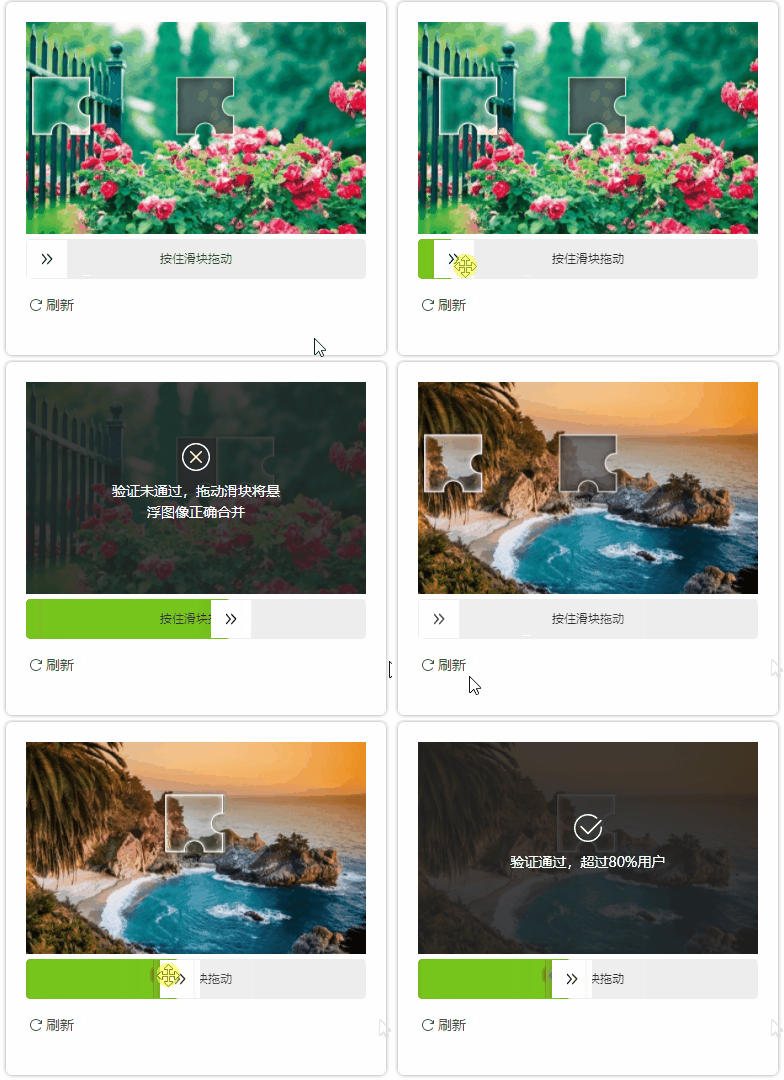 ](http://www.sunseeyou.com/) #### 快速开始 1. 安装 - [Package Manager](https://www.nuget.org/packages/Lazy.SlideCaptcha.Core) ```powershell Install-Package Lazy.SlideCaptcha.Core ``` - [.NET CLI](https://www.nuget.org/packages/Lazy.SlideCaptcha.Core) ```powershell dotnet add package Lazy.SlideCaptcha.Core ``` 2. 注册并配置服务 ``` c# builder.Services.AddDistributedMemoryCache(); builder.Services.AddSlideCaptcha(builder.Configuration); // 如果使用redis分布式缓存 //builder.Services.AddStackExchangeRedisCache(options => //{ // options.Configuration = builder.Configuration.GetConnectionString("RedisCache"); // options.InstanceName = "captcha:"; //}); ``` ``` json "SlideCaptcha": { "Backgrounds": [ { "Type": "file", "Data": "wwwroot/images/background/1.jpg" }, { "Type": "file", "Data": "wwwroot/images/background/2.jpg" } ] } ``` > 背景图片要求尺寸要求为 **_552 X 344_** , 快速开始可在 **_Demo_** 项目 **_wwwroot/images/background_** 下挑选。(仅用作演示,生产请自行制作。)也可以通过[裁剪工具](http://www.sunseeyou.com/cropper/index.html)制作,非常简单,上传图片,拖动范围后保存自动生成 _**552 X 344**_ 图片。 3. 接口定义 ``` c# [Route("api/[controller]")] [ApiController] public class CaptchaController : ControllerBase { private readonly ICaptcha _captcha; public CaptchaController(ICaptcha captcha) { _captcha = captcha; } /// <summary> /// id /// </summary> /// <param name="id"></param> /// <returns></returns> [Route("gen")] [HttpGet] public CaptchaData Generate() { return _captcha.Generate(); } /// <summary> /// id /// </summary> /// <param name="id"></param> /// <returns></returns> [Route("check")] [HttpPost] public ValidateResult Validate([FromQuery]string id, SlideTrack track) { return _captcha.Validate(id, track); } } ``` 至此后端Api服务已搭建完成。 4. 前端 前端提供演示组件[lazy-slide-captcha](https://gitee.com/pojianbing/lazy-slide-captcha/tree/master/Components/vue2),可通过npm安装。Demo项目为了演示方便直接采用script直接引入方式。 ``` html @{ ViewData["Title"] = "滑动验证码"; } <link rel="stylesheet" href="~/lib/lazy-slide-captcha/dist/lazy-slide-captcha.css" asp-append-version="true" /> <style> #app { display: flex; align-items: center; justify-content: center; } .panel { padding: 20px; box-shadow: inherit; border-radius: 6px; box-shadow: 0 0 4px 0 #999999; margin-top: 100px; } </style> <div id="app"> <div class="panel"> <lazy-slide-captcha ref="captcha" :width="width" :height="height" :show-refresh="true" :fail-tip="failTip" :success-tip="successTip" @@finish="handleFinish" @@refresh="generate"></lazy-slide-captcha> </div> </div> @section Scripts{ <script src="~/lib/vue/vue.min.js"></script> <script src="~/lib/vue/axios.min.js"></script> <script src="~/lib/lazy-slide-captcha/dist/lazy-slide-captcha.umd.js"></script> <script> var app = new Vue({ el: '#app', data(){ return { requestId: undefined, failTip: '', successTip: '', // width,height保持与552 * 344同比例即可 width: 340, height: 212 } }, mounted(){ this.generate() }, methods:{ generate(){ // 改变内部状态,标识生成请求开始 this.$refs.captcha.startRequestGenerate() axios.get('/api/captcha/gen') .then((response) => { this.requestId = response.data.id // 改变内部状态,标识生成请求结束,同时设定background,slider图像 this.$refs.captcha.endRequestGenerate(response.data.backgroundImage, response.data.sliderImage) }) .catch((error) => { console.log(error); // 标识生成请求结束 this.$refs.captcha.endRequestGenerate(null, null) }); }, handleFinish(data){ // 改变内部状态,标识验证请求开始 this.$refs.captcha.startRequestVerify() axios.post(`/api/captcha/check?id=${this.requestId}`, data) .then((response) => { let success = response.data.result === 0 // 验证失败时显示信息 this.failTip = response.data.result == 1 ? '验证未通过,拖动滑块将悬浮图像正确合并' : '验证超时, 请重新操作' // 验证通过时显示信息 this.successTip = '验证通过,超过80%用户' // 改变内部状态,标识验证请求结束,同时设定是否成功状态 this.$refs.captcha.endRequestVerify(success) if(!success){ setTimeout(() => { this.generate() }, 1000) } }) .catch((error) => { console.log(error); this.failTip = '服务异常,请稍后重试' // 标识验证请求结束 this.$refs.captcha.endRequestVerify(false) }); } } }); </script> } ``` #### 配置说明 支持配置文件和代码配置,同时配置则代码配置覆盖配置文件。 - 配置文件 ``` c# "SlideCaptcha": { "ExpirySeconds": 60, // 缓存过期时长 "StoreageKeyPrefix": "", // 缓存前缀 "Tolerant": 0.02, // 容错值(校验时用,缺口位置与实际滑动位置匹配容错范围) "Backgrounds": [ // 背景图配置 { "Type": "file", "Data": "wwwroot/images/background/1.jpg" } ], // Templates不配置,则使用默认模板 "Templates": [ { "Slider": { "Type": "file", "Data": "wwwroot/images/template/1/slider.png" }, "Hole": { "Type": "file", "Data": "wwwroot/images/template/1/hole.png" } } ] } ``` - 代码配置 ``` c# builder.Services.AddSlideCaptcha(builder.Configuration, options => { options.Tolerant = 0.02f; options.StoreageKeyPrefix = "slider-captcha"; options.Backgrounds.Add(new Resource(FileResourceHandler.TYPE, @"wwwroot/images/background/1.jpg")); options.Templates.Add ( TemplatePair.Create ( new Resource(FileResourceHandler.TYPE, @"wwwroot/images/template/1/slider.png"), new Resource(FileResourceHandler.TYPE, @"wwwroot/images/template/1/hole.png") ) ); }); ``` #### 扩展 1. Template自定义 _**Template**_ 是指用于生成凹槽和拖块的图片,可通过Templates配置节点设置设置自定义Template。 默认五个 _**Template**_ (不要配置,已经包含在类库内部)如下: | slider | hole | slider | hole | |----------------------------------------------------|-------------------------------------------------|----------------------------------------------------|-------------------------------------------------| |  | |  | | |  | |  | | |  | | 禁用默认 _**Template**_调用DisableDefaultTemplates即可: ``` c# builder.Services.AddSlideCaptcha(builder.Configuration) .DisableDefaultTemplates(); ``` 2. Validator自定义 类库提供 _**SimpleValidator**_ , _**BasicValidator**_ 两个实现。 _**SimpleValidator**_ 仅位置验证,_**BasicValidator**_除位置验证外,同时对轨迹做验证。_**BasicValidator**由于算法的原因,容易误判,因此类库默认用_**SimpleValidator**_ 做为默认 _**Validator**_ 。 自定义 _**Validator**_ 继承 **_BaseValidator_** , _**BaseValidator**_ 提供了基本的位置验证。 举一个栗子: ``` c# public class CustomValidator: BaseValidator { public override bool ValidateCore(SlideTrack slideTrack, CaptchaValidateData captchaValidateData) { // BaseValidator已做了基本滑块与凹槽的对齐验证,这里做其他验证 return true; } } ``` 替换默认的Validator ``` c# builder.Services.AddSlideCaptcha(builder.Configuration); .ReplaceValidator<CustomValidator>(); ``` 3. ResourceProvider自定义 除了通过Options配置Background和Template外,你也可以通过自定义ResourceProvider的形式提供Background和Template。 ```csharp public class CustomResourceProvider : IResourceProvider { public List<Resource> Backgrounds() { return Enumerable.Range(1, 10) .ToList() .Select(e => new Resource(Core.Resources.Handler.FileResourceHandler.TYPE, $"wwwroot/images/background/{e}.jpg")) .ToList(); } // 这里返回自定义的Template public List<TemplatePair> Templates() { return new List<TemplatePair>(); } } ``` 注册ResourceProvider ``` csharp builder.Services.AddSlideCaptcha(builder.Configuration) .AddResourceProvider<CustomResourceProvider>(); ``` 4. 自定义ResourceHandler ```csharp public class UrlResourceHandler : IResourceHandler { public const string Type = "url"; public bool CanHandle(string handlerType) { return handlerType == Type; } /// <summary> /// 这里仅演示,仍然从本地读取。实际需要通过Http读取 /// </summary> /// <param name="resource"></param> /// <returns></returns> /// <exception cref="ArgumentNullException"></exception> public byte[] Handle(Resource resource) { if (resource == null) throw new ArgumentNullException(nameof(resource)); return File.ReadAllBytes(resource.Data); } } ``` 注册ResourceHandler ```csharp builder.Services.AddSlideCaptcha(builder.Configuration) .AddResourceHandler<UrlResourceHandler>(); ``` #### 项目参考 项目参考了[tianai-captcha](https://gitee.com/tianai/tianai-captcha?_from=gitee_search),[vue-drag-verify](https://github.com/yimijianfang/vue-drag-verify)非常优秀的项目,非常感谢。
