KO
|
EN
gitlite — search
Search
#javascript
#python
#hacktoberfest
#react
#ai
#typescript
#llm
#go
#golang
#android
#machine-learning
#rust
#deep-learning
#linux
ssh-mcp
★ 9
Open GitHub ↗
No description available.
Download README (.md)
Explore Similar Repositories
TensorLLM
:
[IJCNN 2025] This is the repo for paper "TensorLLM: Tensorising Multi-Head Attention for Enhanced Reasoning and Compression in LLMs" (https://arxiv.org/abs/2501.15674)
Excel_dashboard
:
No description available.
CalcPicker
:
Calculator Picker for iOS using SwiftUI
mcp-sandbox
:
No description available.
linkedin-games
:
Solvers for LinkedIn's non-semantic puzzle games of Queens, Zip, Tango, and Mini-Sudoku.
// repository documentation
Was this content helpful?
★ 0
(0 ratings)
Select Rating:
★
★
★
★
★
Submit Feedback
Recent Feedback
×
Download README
Do you want to download the
README.md
file for
ssh-mcp
?
Download (.md)
# ssh-mcp: Simple, Secure, Structured AI Tool Execution over SSH    `ssh-mcp` is a **simple, secure, and structured** CLI tool that enables AI agents and developers to execute JSON-based commands over SSH using the Model Context Protocol (MCP). **The missing bridge between AI and ops.** It acts as a bridge between AI systems (like Claude, LLaMA, GPT) and real-world system operations, allowing tools, prompts, and resource-based interactions through a structured protocol. <details> <summary>📚 Table of Contents</summary> - [Current Status](#-current-status) - [The Problem](#-the-problem) - [The Solution](#-the-solution) - [Key Benefits](#-key-benefits) - [Who Should Use This](#-who-should-use-this) - [Use Cases](#-use-cases) - [Comparison to Alternatives](#-comparison-to-alternatives) - [Protocol Design](#-protocol-design) - [Quick Start](#-quick-start) - [Prerequisites](#-prerequisites) - [Features](#-features) - [Tool Categories](#-tool-categories) - [AI Integration Example](#-ai-integration-example-python) - [Chat / REPL Support](#-chat--repl-support) - [Roadmap](#-roadmap) - [License](#-license) - [Architecture Diagram](#-architecture-diagram) - [References & Related Projects](#-references--related-projects) - [Get Involved](#-get-involved) </details> --- ## 📌 Current Status > **🚧 Under active development** – MVP Bash implementation available. Go version and package manager support coming soon. --- ## ❓ The Problem SSH works great for people. But for AI agents and automated devtools? - There's no structure — just raw text output - No arguments, schemas, or results - No streaming, prompting, or metadata **Result:** AI agents can't reliably automate remote tasks. Devtools can't reason with responses. And humans must glue everything together. --- ## ✅ The Solution **`ssh-mcp` makes SSH structured, predictable, and AI-friendly.** - Wrap any remote tool as a JSON-based callable - Interact with remote machines using structured requests - Return consistent results with explanations and suggestions - Secure-by-default using existing SSH keys --- ## ✨ Key Benefits | Feature | Description | | ------------------ | --------------------------------------------- | | ✅ **Simple** | One binary or bash script, zero dependencies | | 🔐 **Secure** | Uses existing SSH auth (no daemon, no socket) | | 📦 **Structured** | MCP protocol for inputs, outputs, context | | 🤖 **AI-Ready** | Built for agents, LLMs, auto-devtools | | ⚙️ **Extensible** | Add your own tools, prompts, resources | --- ## 👥 Who Should Use This If you're building: - AI tools that talk to real infrastructure - Developer copilots that touch live servers - Secure automations that need structured control ...then `ssh-mcp` helps you move fast *without sacrificing control or safety.* --- ## 💡 Use Cases - 💻 Developers: Structured command execution over SSH - 🤖 AI Agents (Claude, GPT, LLaMA): Natural language → structured tool invocation - 🛠️ Automation: Run predefined tools, long-running ops, and observability - 👨💻 Replit / Cursor / AutoGPT: Drop-in remote tool layer --- ## ⚖️ Comparison to Alternatives | Feature | Raw SSH | REST APIs | ssh-mcp | | ----------------- | ------- | --------- | ------- | | Structured Output | ❌ | ✅ | ✅ | | Schema-based Args | ❌ | ✅ | ✅ | | Streaming Support | ❌ | Limited | ✅ | | Requires Daemon | ❌ | Usually | ❌ | | Secure by SSH | ✅ | ❌ | ✅ | | AI Prompt Support | ❌ | ❌ | ✅ | --- ## ⚙️ Protocol Design ### Request Format ```json { "tool": "string", "args": { "property1": "value1" }, "conversation_id": "uuid", "context": { "user_intent": "string", "reasoning": "string" } } ``` ### Response Format ```json { "conversation_id": "uuid", "status": { "code": 0, "message": "Success" }, "result": { "property1": "value1" }, "explanation": "string", "suggestions": [ { "tool": "string", "description": "string" } ], "error": { "code": "string", "message": "string", "details": {} } } ``` --- ## ⚡ Quick Start ```bash # 1. Install git clone https://github.com/sameehj/ssh-mcp.git cd ssh-mcp chmod +x install.sh ./install.sh # 2. Run a tool echo '{"tool":"system.info"}' | ssh-mcp user@host ``` > Note: Package manager support (`brew`, `apt`, `scoop`) is planned for future releases. --- ## 🔐 Prerequisites - SSH access to the target system - Bash and `jq` installed on remote machine - Key-based auth recommended --- ## 🚀 Features - Full MCP Protocol support - Tools, prompts, and resource handling - Conversation tracking and AI context embedding - Structured error handling, suggestions, explanations - Shell completions, self-discovery, tool schemas --- ## 📊 Tool Categories ### Meta Tools - `meta.discover`: List tools - `meta.describe`: Tool descriptions - `meta.schema`: Tool input schema ### System Tools - `system.info`: OS, CPU, memory - `system.health`: Disk, load, uptime ### File Tools - `file.read`, `file.write`, `file.list`, `file.find` ### Process Tools - `process.list`, `process.info` ### Network Tools - `network.status`, `network.route` ### Resources - `resource.get`, `resource.list`, `resource.create` ### Long-Running - `longRunning.backup`, `longRunning.scan`, `longRunning.download` --- ## 🤖 AI Integration Example (Python) ```python import json, subprocess, uuid class McpClient: def __init__(self, server): self.server = server self.conversation_id = str(uuid.uuid4()) def execute_tool(self, tool_name, args=None, user_intent=None): payload = { "tool": tool_name, "args": args or {}, "conversation_id": self.conversation_id, } if user_intent: payload["context"] = {"user_intent": user_intent} result = subprocess.run([ "ssh", self.server, "./mcp.sh" ], input=json.dumps(payload).encode(), stdout=subprocess.PIPE) return json.loads(result.stdout) ``` --- ## 💬 Chat / REPL Support Use `ssh-mcp` in conversational loops or LLaMA-based shells: ```bash while true; do echo -n "mcp > " read CMD echo $CMD | ssh-mcp user@host done ``` Pair this with a local LLM (e.g. LLaMA) to enable: > "Check CPU usage" → `{ "tool": "system.monitor" }` --- ## 🔮 Roadmap - ✅ Bash-based MVP (`mcp.sh`) - 🚧 Go binary version (`ssh-mcp`) - 🚧 Streaming support for long-running tools - 🚧 Resource references: inline or URI-based - 🚧 Prompt + tool hybrid execution - 🚧 Plugin architecture for third-party tools - 🚧 Package manager support (`brew`, `apt`, `scoop`) - 🚧 Shell completions and `--discover`/`--describe` - 🚧 Integration with Claude, Cursor, Replit AI agents --- ## 🪧 License MIT License — see `LICENSE` file for details. --- ## 🎯 Architecture Diagram 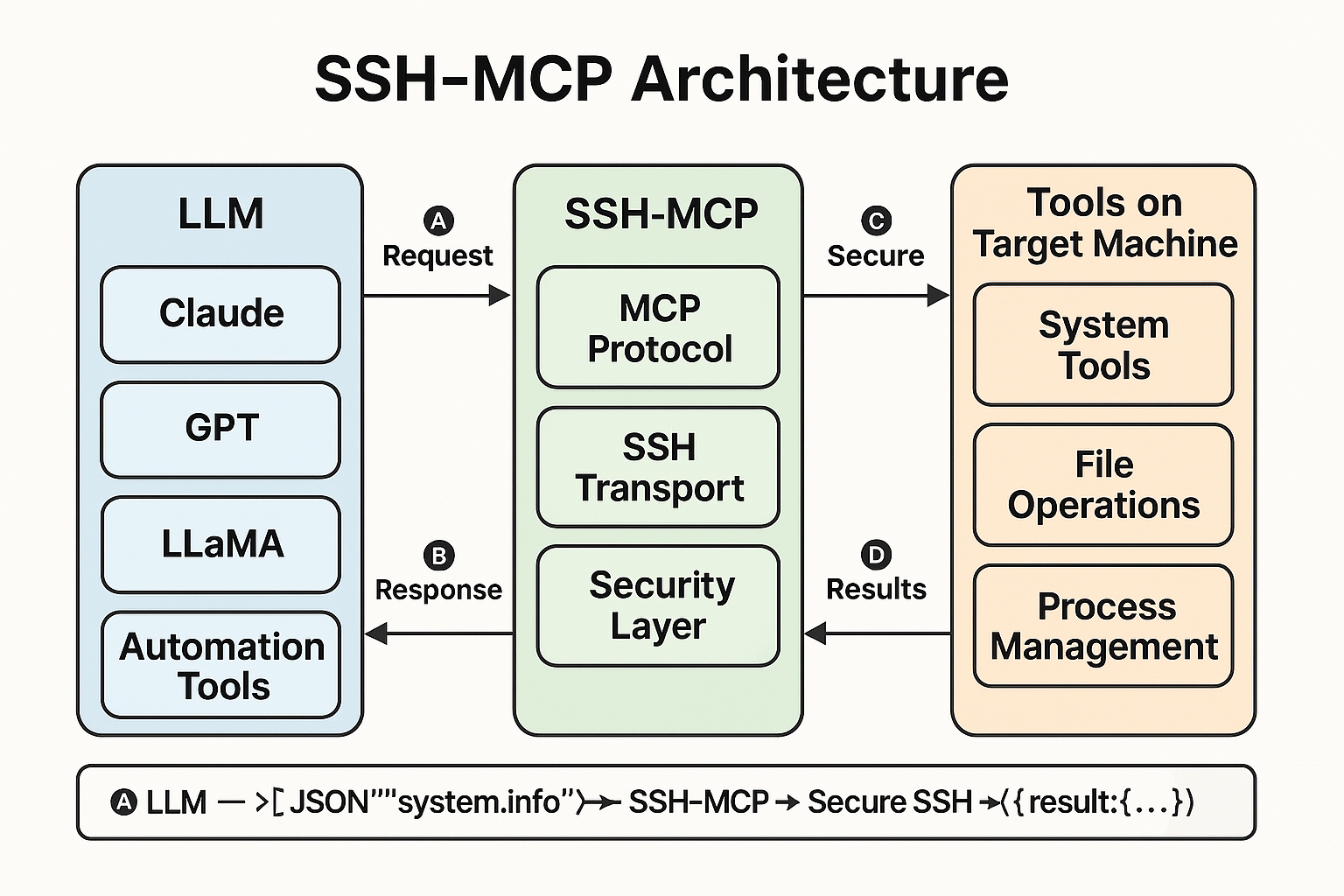 --- ## 🔎 References & Related Projects - MCP Protocol *(early-stage spec)* - MCP Specification *(draft)* - ClaudeMCP *(conceptual integration)* - [KernelFaaS (eBPF backend)](https://github.com/Kiinitix/KernelFaaS) --- ## 🎉 Get Involved Want to contribute tools, prompts, or ideas? Want to use `ssh-mcp` with your AI shell, devtool, or infra layer? Let's build it together. Star the repo, fork it, or open an issue. --- ### 🚀 Let's Build the AI Shell of the Future > `ssh-mcp` is more than a CLI — it's a protocol for building intelligent, secure interfaces between humans, AI, and machines. - ⭐ Star the repo - 🛠️ Contribute a tool or prompt - 💬 Tell us what you're building This is the terminal AI deserves.
