KO
|
EN
gitlite — search
Search
#typescript
#ai-agents
#ai
#dsh-plugin
#deepseek-harness
#open-source
#claude-code
#codex
#cli
#developer-tools
#react
#windows
fpexif
★ 10
Open GitHub ↗
file photo exif lib
Download README (.md)
Explore Similar Repositories
Gaussian-fPEPS
:
Code for the paper "Projected d-wave superconducting state: a fermionic projected entangled pair state study"
FpEnhancer
:
A simple baseline for fingerprint enhancement
FPEM
:
[ICCV 2025] FPEM: Face Prior Enhanced Facial Attractiveness Prediction for Live Videos with Face Retouching
// repository documentation
Was this content helpful?
★ 0
(0 ratings)
Select Rating:
★
★
★
★
★
Submit Feedback
Recent Feedback
×
Download README
Do you want to download the
README.md
file for
fpexif
?
Download (.md)
> **Warning** > This is an experiment and exercise in fully AI-built Rust with Claude, using high input data and high valid output data. # fpexif: A Pure Rust EXIF Metadata Library [](https://github.com/pgray/fpexif/actions/workflows/ci.yml) fpexif is a pure Rust library for parsing, manipulating, and writing EXIF metadata in image files. It aims to be a complete alternative to libraries like libexiv2 and ExifTool, with a focus on safety, performance, and ease of use. It only exists because of the exiv2 and exiftool authors/maintainers ## Features - Pure Rust implementation with no unsafe code - Zero dependencies for the core functionality - Fast and memory-efficient parsing - Support for all standard EXIF tags - **WebAssembly support** for browser and Node.js - Support for 23+ image formats including: - **Web formats**: JPEG, PNG, WebP, AVIF, HEIC/HEIF, JPEG XL - **RAW formats**: CR2, CR3, CRW, NEF, NRW, DNG, ARW, PEF, RWL, ORF, SRW, RW2, RAF, MRW, X3F - **Standard formats**: TIFF - Simple and intuitive API - Comprehensive documentation and examples ## Usage Add fpexif to your `Cargo.toml`: ```toml [dependencies] fpexif = "0.1.0" ``` ### Basic Example ```rust use fpexif::ExifParser; use std::path::Path; fn main() -> Result<(), Box<dyn std::error::Error>> { // Create a parser with default configuration let parser = ExifParser::new(); // Parse EXIF data from a file let exif_data = parser.parse_file(Path::new("path/to/image.jpg"))?; // Access specific tags by name if let Some(date_time) = exif_data.get_tag_by_name("DateTimeOriginal") { println!("Photo taken: {}", date_time); } // Iterate through all tags for (tag_id, value) in exif_data.iter() { if let Some(tag_name) = tag_id.name() { println!("{}: {}", tag_name, value); } else { println!("Tag 0x{:04X}: {}", tag_id.id, value); } } Ok(()) } ``` ### Command Line Interface fpexif also includes a command line interface for quickly viewing EXIF metadata: ```bash # List all EXIF tags in a file fpexif list path/to/image.jpg # Extract a specific tag fpexif extract path/to/image.jpg DateTimeOriginal ``` ### WebAssembly Support Use fpexif directly in the browser with WebAssembly: #### Installation Install from a [GitHub release](https://github.com/pgray/fpexif/releases): ```bash npm install https://github.com/pgray/fpexif/releases/download/v0.0.1/fpexif-wasm.tgz ``` Or build from source: ```bash cargo install wasm-pack wasm-pack build --target web ``` This creates a `pkg/` directory with the WASM module and JavaScript bindings. #### Quick Example ```javascript import { initWasm, extractEssentialTags } from "./pkg/fpexif.js"; // Initialize WASM module await initWasm(); // Extract essential tags from an image file const file = document.querySelector('input[type="file"]').files[0]; const arrayBuffer = await file.arrayBuffer(); const bytes = new Uint8Array(arrayBuffer); const tags = await extractEssentialTags(bytes); console.log(tags); // { // make: "Canon", // model: "Canon EOS 5D Mark IV", // iso: 100, // aperture: 5.6, // shutter_speed: "1/800", // focal_length: "50.0 mm", // create_date: "2024:01:15 14:30:22", // file_size: "34 MB" // } ``` 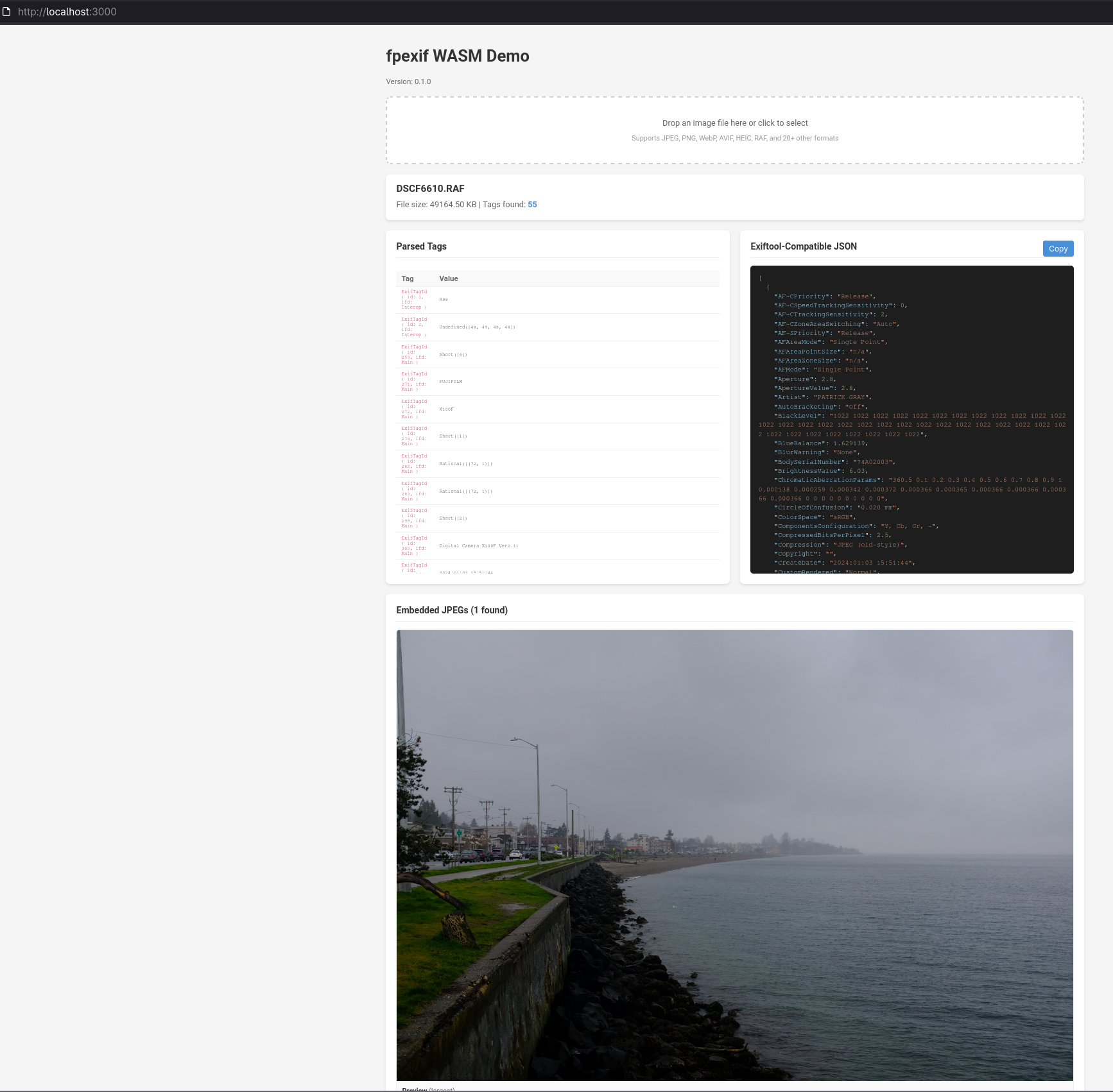 See the [examples/](examples/) directory for comprehensive usage examples including React integration, batch processing, and Node.js support. ## Building from Source 1. Clone the repository: ```bash git clone https://github.com/pgray/fpexif.git cd fpexif ``` 2. Build the library: ```bash cargo build ``` 3. Build with CLI support: ```bash cargo build --release --features cli ``` 4. Run tests: ```bash cargo test ``` ## Setting Up Test Data (Optional) For developers working on MakerNote parsing or testing against reference implementations (ExifTool/exiv2), you can download test RAW files: ```bash # Download both small and large datasets (default) ./bin/setup-fpexif-dir # Or download only the small curated set for quick testing ./bin/setup-fpexif-dir --small # Or download only the large comprehensive dataset ./bin/setup-fpexif-dir --large ``` This script will: - Download RAW files from [raw.pixls.us](https://raw.pixls.us) (git LFS repository) - Download RAW samples from [rawsamples.ch](https://rawsamples.ch) (7z archive) - Set up two directories: - `/fpexif/raws` - Small curated set for quick testing - `/fpexif/data.lfs` - Large comprehensive dataset with all manufacturers - Optionally generate ExifTool reference JSON files for comparison **Requirements:** - `git` with LFS support - `wget` for downloading archives - `p7zip` (7z) for extracting archives - `exiftool` (optional, for generating reference JSON) - `jq` (optional, for cleaning binary data from JSON) **Testing MakerNote parsing:** ```bash # Test against small dataset ./bin/mfr-test canon # Test against large dataset ./bin/mfr-test canon --data-lfs # Save baseline before making changes ./bin/mfr-test canon --save-baseline # Check for regressions after changes ./bin/mfr-test canon --check ``` See [CLAUDE.md](CLAUDE.md) for detailed developer documentation. ## Supported Image Formats ### Modern Web Formats - **JPEG** (.jpg, .jpeg) - Joint Photographic Experts Group - **PNG** (.png) - Portable Network Graphics (with eXIf chunk) - **WebP** (.webp) - Google WebP format - **AVIF** (.avif) - AV1 Image File Format - **HEIC/HEIF** (.heic, .heif) - High Efficiency Image Format - **JPEG XL** (.jxl) - Next-generation JPEG format ### RAW Camera Formats - **CR2** (.cr2) - Canon RAW 2 - **CR3** (.cr3) - Canon RAW 3 - **CRW** (.crw) - Canon RAW v1 (CIFF format) - **NEF** (.nef) - Nikon Electronic Format (DSLR) - **NRW** (.nrw) - Nikon RAW (Coolpix) - **ARW** (.arw) - Sony Alpha RAW - **DNG** (.dng) - Adobe Digital Negative - **RAF** (.raf) - Fujifilm RAW - **MRW** (.mrw) - Minolta RAW - **X3F** (.x3f) - Sigma/Foveon RAW - **ORF** (.orf) - Olympus RAW Format - **PEF** (.pef) - Pentax Electronic File - **RWL** (.rwl) - Leica RAW - **SRW** (.srw) - Samsung RAW Format - **RW2** (.rw2) - Panasonic RAW Format ### Standard Formats - **TIFF** (.tif, .tiff) - Tagged Image File Format ## Architecture fpexif is organized into several modules: - **parser**: Responsible for binary parsing of EXIF data blocks - **data_types**: Definitions for EXIF value types like SHORT, LONG, RATIONAL, etc. - **tags**: Definitions and mappings for standard EXIF tags - **formats**: Format-specific handlers for different image types - **io**: Utilities for reading and writing EXIF data to files - **errors**: Error types and handling This modular design makes the library easy to maintain and extend. ## Comparison with Other Libraries ### vs. libexiv2 - **Advantages**: Pure Rust (no C++ bindings), memory safety guarantees, easier integration in Rust projects - **Disadvantages**: Currently fewer features, less mature ### vs. ExifTool - **Advantages**: Better performance, no external dependencies, native Rust API - **Disadvantages**: Smaller tag database, less file format support (currently) ## Contributing Contributions are welcome! Here are some ways you can contribute: - Report bugs and request features by opening an issue - Improve documentation and examples - Add support for more file formats - Implement missing features - Submit pull requests with bug fixes or improvements Please see [CONTRIBUTING.md](CONTRIBUTING.md) for more details. ## Roadmap - [x] Support for modern web formats (PNG, HEIC, WebP, AVIF, JPEG XL) ✅ - [x] Support for major RAW formats (ARW, PEF, NRW, RWL, etc.) ✅ - [x] Support for legacy RAW formats (CRW, MRW, X3F) ✅ - [ ] Support for non-standard maker notes (Canon, Nikon, etc.) - [ ] Support for XMP and IPTC metadata - [ ] Performance optimizations - [ ] Support for medium format RAW (3FR, FFF, DCR, KDC, MEF, MOS) - [ ] Integration with popular Rust image processing libraries ## TODO: Manufacturer MakerNotes Support The following manufacturers have test images available and need MakerNote parsing implementation: ### Implemented - [x] Canon (CR2, CR3, CRW) - [x] Nikon (NEF, NRW) - [x] Sony (ARW, SRF, SR2) - [x] Fujifilm (RAF) - [x] Panasonic (RW2) - [x] Olympus (ORF) ### TODO - [ ] Pentax (PEF) - 17 test images - [ ] Samsung (SRW) - 7 test images - [ ] Sigma/Foveon (X3F) - 8 test images - [ ] Minolta (MRW) - 9 test images - [ ] Kodak (KDC, DCR) - 6 test images - [ ] Hasselblad (3FR) - 3 test images - [ ] Leaf/Mamiya (MOS, MEF) - 3 test images - [ ] Epson (ERF) - 1 test image ## License This project is licensed under either of: - Apache License, Version 2.0, ([LICENSE-APACHE](LICENSE-APACHE) or http://www.apache.org/licenses/LICENSE-2.0) - MIT license ([LICENSE-MIT](LICENSE-MIT) or http://opensource.org/licenses/MIT) at your option. ## Acknowledgments This project draws inspiration from: - [ExifTool](https://exiftool.org/) by Phil Harvey - [libexiv2](https://www.exiv2.org/) - The EXIF specification and documentation ## Authors - pgray (@pgray) - Initial work and maintenance - claude.ai
