KO
|
EN
gitlite — search
Search
#python
#java
#python3
#arduino
#golang
#machine-learning
#rust
#html
#flask
#javascript
#seismology
#nodejs
nin
★ 27
Open GitHub ↗
A simple, full-featured command line todo app
Download README (.md)
Explore Similar Repositories
CS224N
:
Random stuff related to CS224N that I'm making public. Not the main repository.
EasySplash
:
A easy practice of a splash screen
aic18_rc
:
codes for ai challenger 2018 machine reading comprehension
dazhongdianping-chengdu-hotpot
:
No description available.
tythe
:
1% of Global R&D to Open Source Maintenance
// repository documentation
Was this content helpful?
★ 0
(0 ratings)
Select Rating:
★
★
★
★
★
Submit Feedback
Recent Feedback
×
Download README
Do you want to download the
README.md
file for
nin
?
Download (.md)
<div align="center"> <h1> nin </h1> A simple, full-featured command line todo app 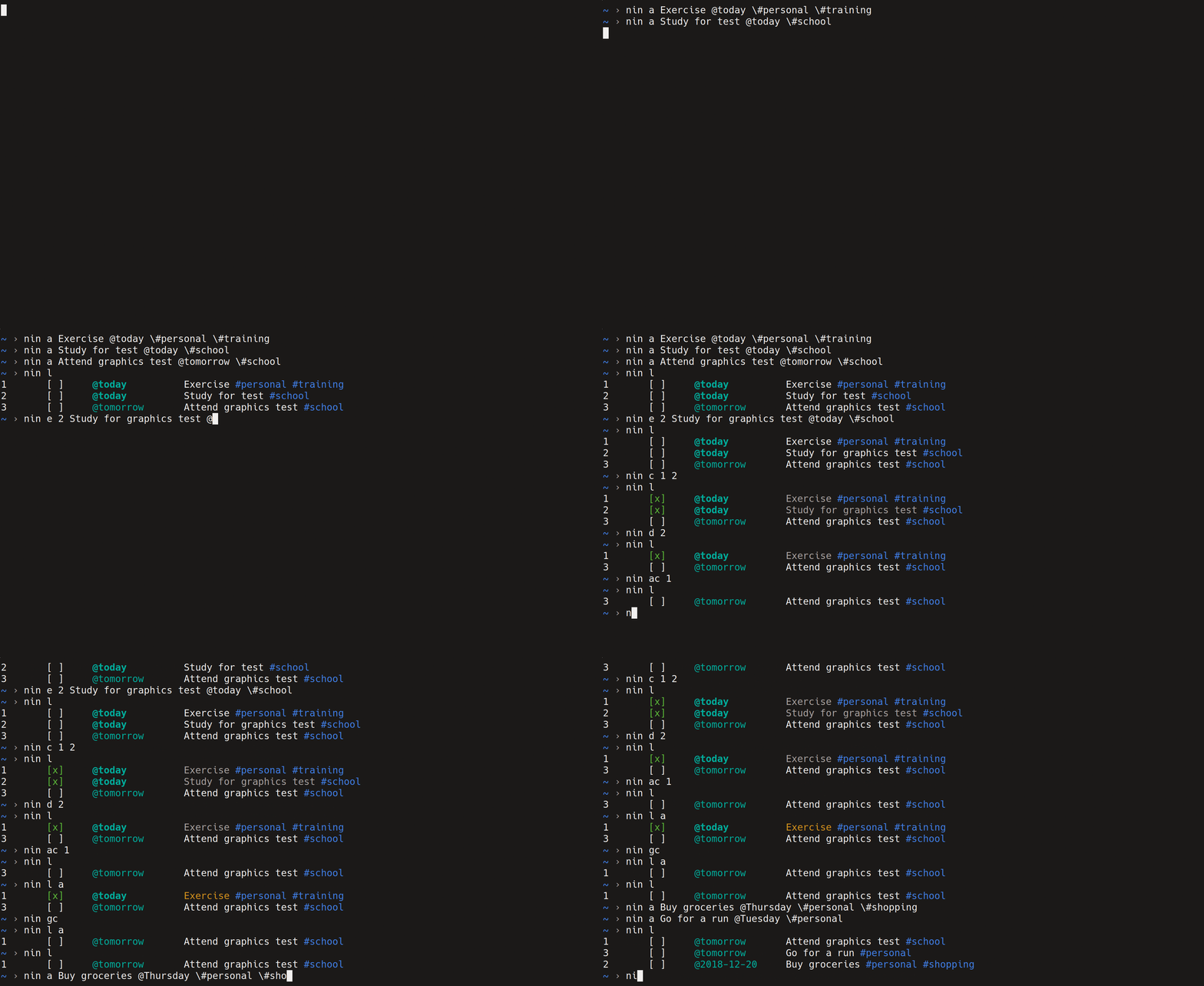 </div> [](https://badge.fury.io/rb/nin) [](https://travis-ci.com/aonemd/nin) ## Features - Simple, intuitive, and easy-to-use CLI - Currently supports: listing, adding, editing, deleting, completing, archiving, prioritizing, and analyzing todo items - Integration and synchronization with [Todoist](https://todoist.com/) (With potential integration with more platforms) - Smart colored output - Uses YAML for storage by default (There's the option to add other stores but no configuration for it, yet) - Modular code covered by unit tests ## Installation ```bash gem install nin ``` ## Usage ```console NAME: nin - a simple, full-featured command line todo app USAGE: nin COMMAND [arguments...] COMMANDS: l | list [a|l] List all unarchived todos. Pass optional argument `a` to list all todos or `l` to list local todos only a | add desc Add a todo. Prepend due date by a @. Prepend each tag by a \# e | edit id desc Edit a todo. Prepend due date by a @. Prepend each tag by a \# p | prioritize id step Prioritize a todo by either a positive or negative step within its date group c | complete id(s) Un/complete todo(s) ac | archive id(s)|c Un/archive todo(s) or pass `c` to archive all completed items d | delete id(s) Delete todo(s) gc | garbage Delete all archived todos. Resets item ids as a side effect s | analyze Analyze tasks and print statistics i | repl Open nin in REPL mode o | open Open todo file in $EDITOR v | version Print current version of nin ``` - Print the usage instructions by calling `nin` without commands or arguments - Each command has a short and a long name, for example, `l` and `list` - You can utilize the power of the CLI by using shell commands and tools to help you do various tasks. For example, run `nin list | grep school` to filter items tagged as school - For adding a due date to an item, prefix the date by an `@`. If no date is passed, the default is always the date of the current day - For adding tags, you need to prefix a `#` by a `\` (e.g., `\#`) in order for the shell to interpret it as an actual `#`. Please note that you don't need to do this in the REPL mode - The `edit` command edits the description of an item. If a date is passed, its date will be updated. If one or more tags are passed, they will be added to that item's tag list - Commands `complete`, `archive`, and `delete` can update multiple items at once by passing multiple id's as arguments - The `prioritize` command can take a positive or a negative weight as a step to either prioritize the item up or down, respectively. The step is always bound to the smallest and largest id in the current items date group. For example, passing a 1 as as step prioritizes the item by one item up and passing -2 prioritizes the item by 2 items down - REPL (interactive) mode is where you can pass commands and arguments without the need to call `nin` every time and can be triggered by calling `nin i` or `nin repl` ## Integration ### Todoist For Todoist integration, two environment variables must be set: - `NIN_INTEGRATION_CLIENT=todoist` - `NIN_INTEGRATION_CLIENT_TOKEN=token`. Token can be found in your [integration settings page](https://todoist.com/prefs/integrations) - `NIN_INTEGRATION_TIMEOUT=interval_in_seconds`. A timeout interval for when the synchronization times out. Defaults to 60 seconds ## Development - Install a recent version of `Ruby` and `Bundler` - Run `bundle install` to install the dependencies - Run `bundle exec rake` to run the test suite - Run `gem build nin.gemspec` to build a new version - To push a new version to RubyGems, run `gem push nin-VERSION-NUMBER.gem` ## Why Why write another todo app? I like to use the terminal for everything and I've been using a markdown file to manage my todo list. I looked for something simple and I found [Todo.rb](https://gist.github.com/mattsears/1259080) which `nin` started as a spinoff from. However, I needed to add some more features. I then found [Todolist](http://todolist.site/) which I took some inspiration from but kept the CLI as simple as it is in Todo.rb. I also didn't like that todolist uses JSON to store the todo items because I wanted to view the file on my phone and I needed something more readable. ## Contribution Contributions are welcome. If you find a bug or want to add a new feature, please open an issue or send a pull request. ## License See [LICENSE](https://github.com/aonemd/nin/blob/master/LICENSE).
