KO
|
EN
gitlite — search
Search
#python
#java
#python3
#arduino
#golang
#machine-learning
#rust
#html
#flask
#javascript
#seismology
#nodejs
mask_camera
★ 13
Open GitHub ↗
No description available.
Download README (.md)
Explore Similar Repositories
chronicondb-client
:
Chronicon (ARPG) item and skills database (React 17)
autojs-11-11
:
京东金币淘宝喵币苏宁易购领人气(在hyue418项目基础上增加苏宁易购双十一活动自动化功能
Profiles
:
No description available.
WindowsTerminalRightClick
:
Windows Terminal RightClick setup English\Spanish.
pseudolidar-tree-detection
:
No description available.
// repository documentation
Was this content helpful?
★ 0
(0 ratings)
Select Rating:
★
★
★
★
★
Submit Feedback
Recent Feedback
×
Download README
Do you want to download the
README.md
file for
mask_camera
?
Download (.md)
# DEMO [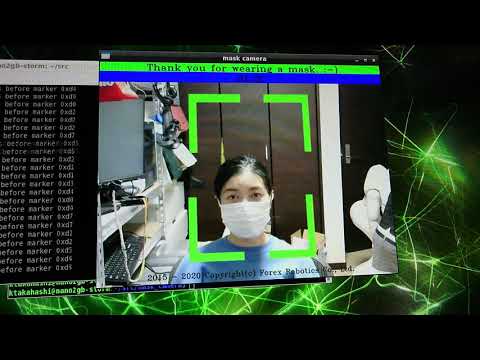](https://www.youtube.com/watch?v=-TeoG2FZcuA) ## Youtube Link https://youtu.be/-TeoG2FZcuA # Features The mask_camera project uses the NVIDIA Jetson Development Kit series and WebCam to determine whether a mask can be worn. In addition, by connecting an IR array sensor device called AMG8833 as an option, the surface temperature of the human body can be measured at the same time. 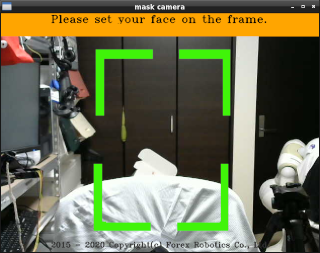 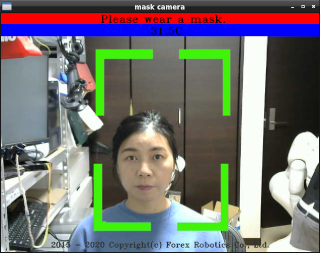 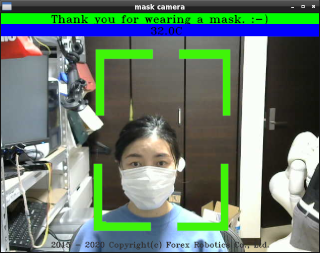 The operating environment can be operated on the docker container with TensorFlow2 and Keras installed, and the learning model can be replaced with the one created independently on the TeachableMachine site. # Story Since COVID-19, the importance of wearing masks and measuring temperature has increased worldwide. However, the current situation is that dedicated camera devices are expensive and do not reach the people who need them. The purpose of this project is to contribute to the "democratization of AI" by providing open source solutions using inexpensive and high-speed AI edge devices such as NVIDIA Jetson Nano. # Requirement - NVIDIA Jetson device (veirfied on Jetson Nano 2GB Development Kit and Jetson Xavier NX Development Kit) - Logcool 270 (USB Camera) https://www.amazon.com/Logitech-C270-720pixels-Black-webcam/dp/B01BGBJ8Y0/ref=sr_1_3?dchild=1&keywords=C270&qid=1605453031&sr=8-3 - Optional: AMG8833 (IR array sensor) https://www.sparkfun.com/products/14607 # Setup hardware AMG8833 is an optional sensor device for this project. When you connect AMG8833 to Jetson, you will see the tempreture in the video frame. ## Connection AMG8833 - Jetson The connection between AMG8833 and Jetson is as follows. ``` AMG8833(3.3V) ⇔ GPIO1(3.3V) AMG8833(GND) ⇔ GPIO6(Ground) AMG8833(SDA) ⇔ GPIO3(SDA) AMG8833(SCL) ⇔ GPIO5(SCL) ``` 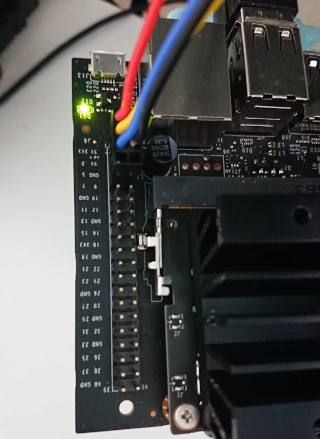 ## Veirfy sensor connction how to verify i2c device on docker container use i2cdetect command then response as below should be fine. ``` \# i2cdetect -r -y 1 0 1 2 3 4 5 6 7 8 9 a b c d e f 00: -- -- -- -- -- -- -- -- -- -- -- -- -- 10: -- -- -- -- -- -- -- -- -- -- -- -- -- -- -- -- 20: -- -- -- -- -- -- -- -- -- -- -- -- -- -- -- -- 30: -- -- -- -- -- -- -- -- -- -- -- -- -- -- -- -- 40: -- -- -- -- -- -- -- -- -- -- -- -- -- -- -- -- 50: -- -- -- -- -- -- -- -- -- -- -- -- -- -- -- -- 60: -- -- -- -- -- -- -- -- 68 -- -- -- -- -- -- -- 70: -- -- -- -- -- -- -- -- ``` ## Pin to WebCam Fix AMG8833 so that the field of view is about the same as WebCam. 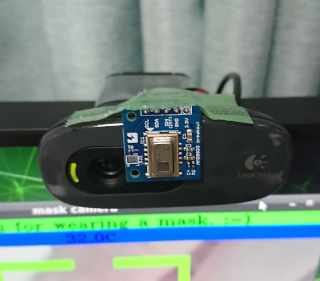 # Installation ## Clone gituhub and build docker container ``` $ git clone https://github.com/ForexRobotics/mask_camera.git $ cd mask_camera/docker $ sudo docker build -t fr/l4t-ml:1.0 . ``` ## Run docker container and program About "-v ~/mask_camera/src/" part, please replace local git cloned path. ``` $ cd docker $ xhost local: $ sudo docker run -it --rm --net=host --runtime nvidia --privileged --device /dev/video0 --device /dev/i2c-1 -e DISPLAY=$DISPLAY -v ~/mask_camera/src/:/root/src -v /tmp/.X11-unix/:/tmp/.X11-unix fr/l4t-ml:1.0 # cd /root/src # python3 mask_camera.py ``` ## Exit program enter [q] key on video frame window or ctrl + [c] key then exit program. ``` # exit $ xhost -local: ``` # Issues & FAQ ## Issues - IR thermal sensor measures just surface temperature. You can change TEMP_CARIBRATION and TEMP_THRESHOLD caribration value and threshold in mask_camera.py. ## FAQ - [Q] Poped up Low memory resource alert. - [A] Please close another window and reduce other memory usage especially Jetson Nano 2GB is low main memory resource. - [Q] Show warning about "cannot open display: :0" from docker container. - [A] You may need to set access privilege of X window port. Please do below command before running docker container. ``` $ xhost local: ``` When you finish to use docker container, close access privilege like a below: ``` $ xhost -local: ``` # Author Kazuyuki TAKAHASHI Forex Robotics CO., Ltd. <ktakahashi@forexrobotics.jp>
