KO
|
EN
gitlite — search
Search
#typescript
#ai-agents
#ai
#dsh-plugin
#deepseek-harness
#open-source
#cli
#claude-code
#codex
#developer-tools
#react
#windows
lakeFS-samples
★ 97
Open GitHub ↗
lakefs-samples repository
Download README (.md)
Explore Similar Repositories
age-plugin-fido2-hmac
:
Age plugin to encrypt files with fido2 tokens using the hmac-secret extension and non-discoverable credentials.
casdoor-old
:
An open-source Identity and Access Management (IAM) / Single-Sign-On (SSO) platform with web UI supporting OAuth 2.0, OIDC, SAML, CAS, LDAP, WebAuthn, TOTP and MFA
delta-sharing-rs
:
A Minimalistic Rust Implementation of Delta Sharing Server.
Orleans.Multitenant
:
Secure, flexible tenant separation for Microsoft Orleans
semantic-segmentation-ml-pipeline
:
Machine Learning Pipeline for Semantic Segmentation with TensorFlow Extended (TFX) and various GCP products
// repository documentation
Was this content helpful?
★ 0
(0 ratings)
Select Rating:
★
★
★
★
★
Submit Feedback
Recent Feedback
×
Download README
Do you want to download the
README.md
file for
lakeFS-samples
?
Download (.md)
# lakefs-samples [](https://github.com/treeverse/lakeFS-samples/actions/workflows/check-notebooks.yml?query=branch:main) _Incorporating the Docker Compose formally known as **Everything Bagel**._  **This sample repository captures a collection of notebooks, dockerized applications and code snippets that demonstrate how to use lakeFS.** _lakeFS is a popular open-source solution for managing data. It provides a consistent and scalable data management layer on top of cloud storage, such as Amazon S3, Azure Blob Storage, or Google Cloud Storage. It allows users to create and manage data in a version-controlled and immutable manner, and offers features such as data governance, data lineage, and data access controls. lakeFS is compatible with a wide range of data processing frameworks and tools._ ### **Go to [lakefs_enterprise](./02_lakefs_enterprise/) folder if you want to use [lakeFS Enterprise](https://docs.lakefs.io/understand/enterprise/) instead of lakeFS open source** ## Let's Get Started 👩🏻💻 Clone this repository ```bash git clone https://github.com/treeverse/lakeFS-samples.git cd lakeFS-samples ``` You now have two options: ### **Run a Notebook server with your existing lakeFS Server** If you have already [installed lakeFS](https://docs.lakefs.io/deploy/) or are utilizing [lakeFS cloud](https://lakefs.cloud/), all you need to run is the Jupyter notebook server: ```bash docker compose up ``` Once the stack's up and running, open the Jupyter Notebook (http://localhost:8888) and check out the [catalog of sample notebooks](./00_notebooks/00_index.ipynb) to explore lakeFS. Once you've finished, run the following to remove all the containers: ```bash docker compose down ``` ### **Don't have a lakeFS Server or Object Store?** If you want to provision a lakeFS server as well as MinIO for your object store, plus Jupyter then bring up the full stack: ```bash docker compose --profile local-lakefs up ``` As above, open the Jupyter Notebook (http://localhost:8888) peruse the [catalog of sample notebooks](./00_notebooks/00_index.ipynb) to explore lakeFS. ## Environment Details * **Jupyter Notebook** is based on the [Jupyter PySpark notebook](https://hub.docker.com/r/jupyter/pyspark-notebook/) and provides an interactive environment in which to explore lakeFS using Python and PySpark. * **lakeFS** can be provisioned as part of this environment, or provided by [lakeFS cloud](http://https://lakefs.cloud/) or your [own installation](https://docs.lakefs.io/deploy/). * If you run lakeFS as part of this environment, **MinIO** is provided as an S3-compatible object store. If you run lakeFS yourself you can use other S3-compatible object stores include S3, GCS, as well as MinIO ### Containers 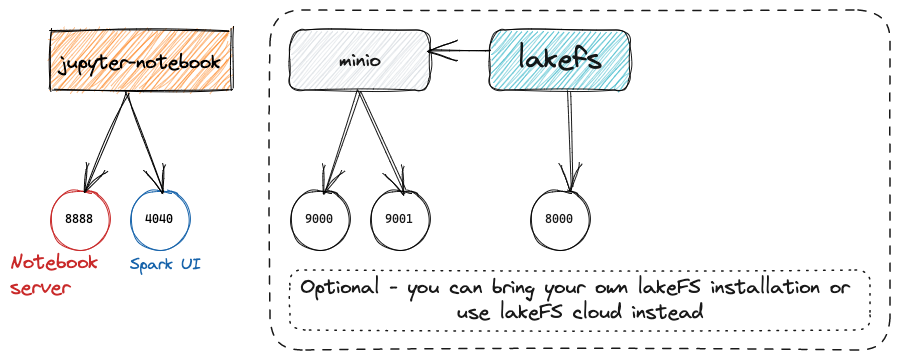 ### URLs and login details * Jupyter http://localhost:8888/ If you've brought up the full stack you'll also have: * LakeFS http://localhost:8000/ (`AKIAIOSFOLKFSSAMPLES` / `wJalrXUtnFEMI/K7MDENG/bPxRfiCYEXAMPLEKEY`) * MinIO http://localhost:9001/ (`minioadmin`/`minioadmin`) * Spark UI http://localhost:4040/ ## Other Examples Under the [standalone_examples](./01_standalone_examples/) folder are a set of examples that need to be run on their own. Some use the repository's Docker Compose file and extend it, and others are self-contained and use their own Dockerfile. * [Airflow (1)](./01_standalone_examples/airflow-01/) - Four examples of using lakeFS with Airflow: * Versioning DAGs and running pipeline from hooks using a configurable version of DAGs * Isolating Airflow job run and atomic promotion to production * Integration of lakeFS with Airflow via Hooks * Troubleshooting production issues * Integration of lakeFS with Airflow and Databricks * Integration of lakeFS with Airflow and Iceberg * [Airflow (2)](./01_standalone_examples/airflow-02/) - lakeFS + Airflow * [Azure Databricks](./01_standalone_examples/azure-databricks/) * [AWS Databricks](./01_standalone_examples/aws-databricks/) * [Databricks CI/CD](./01_standalone_examples/databricks-ci-cd/) * [AWS Glue and Athena](./01_standalone_examples/aws-glue-athena/) * [AWS Glue and Trino](./01_standalone_examples/aws-glue-trino/) * [lakeFS Iceberg REST Catalog with Trino client](./01_standalone_examples/trino/) * [lakeFS + Dagster](./01_standalone_examples/dagster-integration/) * [lakeFS + Prefect](./01_standalone_examples/prefect-integration/) * [lakeFS Mount Demo: Fast Data Loading and Reproducibility for Deep Learning Workloads with lakeFS Mount](./01_standalone_examples/lakefs-mount-demo/) * [Reproducibility and Building an AI Agent by using lakeFS, **LangChain** and **LLM/OpenAI** Models](./01_standalone_examples/llm-openai-langchain-integration/)<br/>_See also the [accompanying blog](https://lakefs.io/blog/lakefs-langchain-loader/)_ * [Image Segmentation Demo: ML Data Version Control and Reproducibility at Scale](./01_standalone_examples/image-segmentation/) * [Multimodal Data Demo: ML Data Version Control and Reproducibility of Multimodal Data](./01_standalone_examples/multimodal-data-demo-local/) * [Labelbox integration](./01_standalone_examples/labelbox-integration/) * [Kafka integration](./01_standalone_examples/kafka/) * [Flink integration](./01_standalone_examples/flink/) * [Red Hat OpenShift AI integration](./01_standalone_examples/red-hat-openshift-ai/) * [How to backup, migrate or clone a repo](./01_standalone_examples/backup-migrate-or-clone-repo/) * [Running lakeFS with PostgreSQL as K/V store](./01_standalone_examples/docker-compose-with-postgres/) * [Running lakeFS with NetApp ONTAP storage](./01_standalone_examples/netapp-ontap/) ## Got Questions or Want to Chat? 👉🏻 Join the lakeFS Slack group - https://lakefs.io/slack
