KO
|
EN
gitlite — search
Search
#python
#java
#python3
#arduino
#golang
#machine-learning
#rust
#html
#flask
#javascript
#seismology
#nodejs
loguru
★ 24,070
Open GitHub ↗
Python 로깅을 (바보처럼) 단순하게 만들기
Download README (.md)
Explore Similar Repositories
cli
:
Command-line tool to customize Spotify client. Supports Windows, macOS, and Linux.
llm-council
:
LLM Council works together to answer your hardest questions
awesome-flipperzero
:
🐬 A collection of awesome resources for the Flipper Zero device.
dockge
:
A fancy, easy-to-use and reactive self-hosted docker compose.yaml stack-oriented manager
ramda
:
:ram: Practical functional Javascript
// repository documentation
원문보기 (View Original)
// original (English)
Was this content helpful?
★ 0
(0 ratings)
Select Rating:
★
★
★
★
★
Submit Feedback
Recent Feedback
×
Download README
Do you want to download the
README.md
file for
loguru
?
원문 다운로드 (English .md)
한글 번역본 다운로드 (Korean .md)
[](#readme) [](https://pypi.python.org/pypi/loguru) [](https://pypi.python.org/pypi/loguru) [](https://loguru.readthedocs.io/en/stable/index.html) [](https://github.com/Delgan/loguru/actions/workflows/tests.yml?query=branch:master) [](https://codecov.io/gh/delgan/loguru/branch/master) [](https://app.codacy.com/gh/Delgan/loguru/dashboard) [](https://github.com/Delgan/loguru/blob/master/LICENSE) [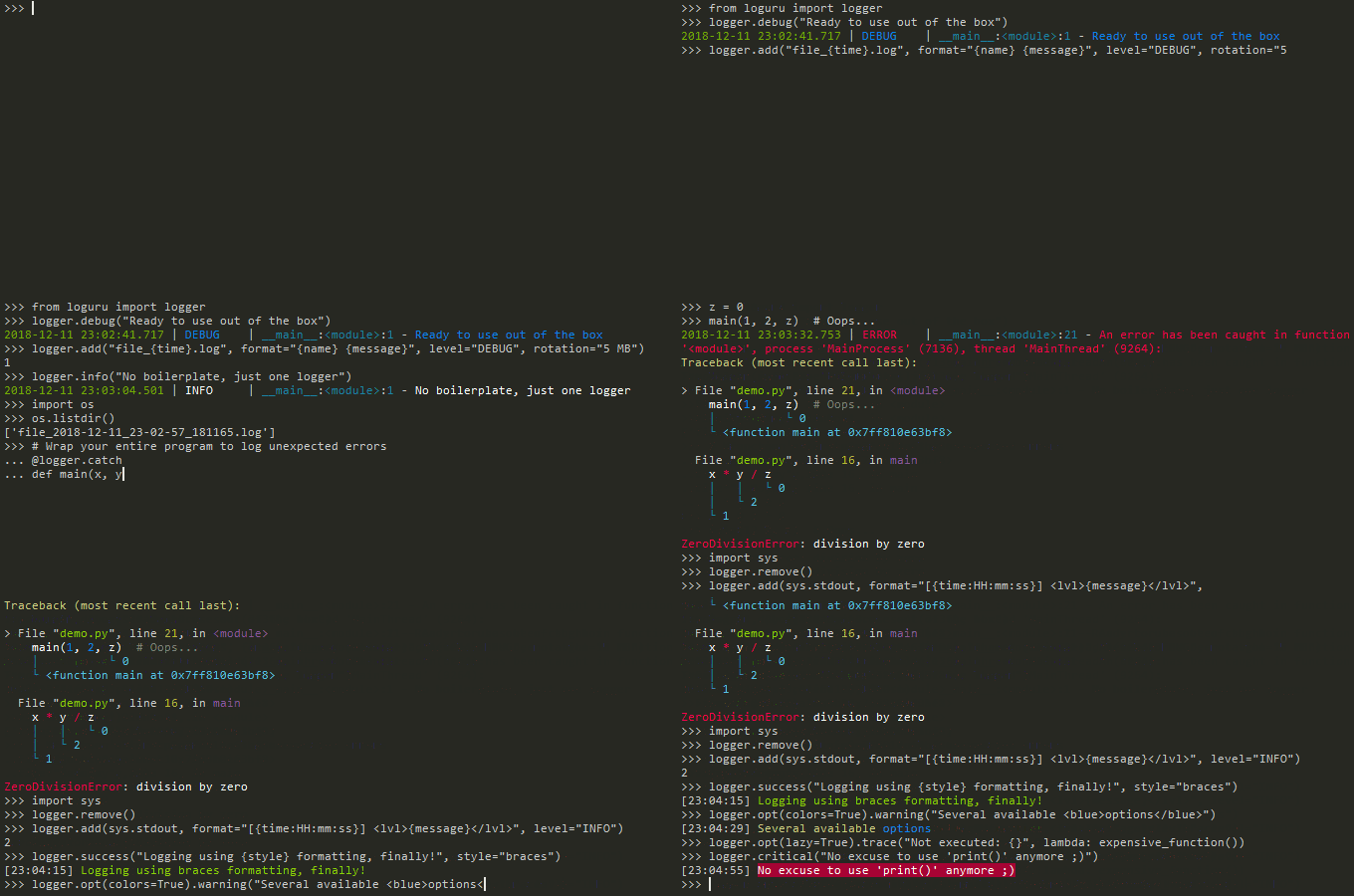](#readme) ____________________________________________________________________________________ \*\*Loguru\*\*는 Python에서 즐거운 로깅을 제공하는 것을 목표로 하는 라이브러리입니다. 로거를 설정하는 것이 귀찮아서 대신 `print()`를 사용한 적이 있으신가요?... 저도 그랬습니다. 하지만 로깅은 모든 애플리케이션의 기본이며 디버깅 과정을 쉽게 만들어 줍니다. \*\*Loguru\*\*를 사용하면 처음부터 로깅을 사용하지 않을 핑계가 없어집니다. `from loguru import logger`처럼 아주 간단합니다. 또한, 이 라이브러리는 표준 로거의 단점을 해결하는 유용한 기능들을 대거 추가하여 Python 로깅을 덜 번거롭게 만들고자 합니다. 애플리케이션에서 로그를 사용하는 것은 자동화되어야 하며, \*\*Loguru\*\*는 이를 유쾌하고 강력하게 만들고자 합니다. ## Installation ``` pip install loguru ``` ## Features - [보일러플레이트 없이 바로 사용 가능](#ready-to-use-out-of-the-box-without-boilerplate) - [Handler도, Formatter도, Filter도 없음: 모든 것을 지배하는 단 하나의 함수](#no-handler-no-formatter-no-filter-one-function-to-rule-them-all) - [로테이션 / 보존 / 압축을 지원하는 더 쉬운 파일 로깅](#easier-file-logging-with-rotation--retention--compression) - [중괄호 스타일을 사용하는 모던 문자열 포매팅](#modern-string-formatting-using-braces-style) - [스레드 또는 메인 내부의 예외 포착](#exceptions-catching-within-threads-or-main) - [컬러를 지원하는 예쁜 로깅](#pretty-logging-with-colors) - [비동기, 스레드 안전, 멀티프로세스 안전](#asynchronous-thread-safe-multiprocess-safe) - [완벽하게 설명해 주는 예외 처리](#fully-descriptive-exceptions) - [필요에 따른 구조화된 로깅](#structured-logging-as-needed) - [비싼 함수의 지연 평가(Lazy evaluation)](#lazy-evaluation-of-expensive-functions) - [사용자 정의 가능한 레벨](#customizable-levels) - [더 나은 날짜 및 시간 처리](#better-datetime-handling) - [스크립트와 라이브러리 모두에 적합](#suitable-for-scripts-and-libraries) - [표준 logging과 완벽 호환](#entirely-compatible-with-standard-logging) - [환경 변수를 통한 개인화 가능한 기본값](#personalizable-defaults-through-environment-variables) - [편리한 파서](#convenient-parser) - [ exhaustive notifier](#exhaustive-notifier) - ~~[내장 logging보다 10배 빠른 속도](#10x-faster-than-built-in-logging)~~ ## Take the tour ### Ready to use out of the box without boilerplate Loguru의 핵심 개념은 \*\*단 하나뿐인\*\* [`logger`](https://loguru.readthedocs.io/en/stable/api/logger.html#loguru.\_logger.Logger)가 존재한다는 것입니다. 편의를 위해 사전에 설정되어 있으며 기본적으로 `stderr`로 출력됩니다(물론 이는 완전히 설정 가능합니다). ```python from loguru import logger logger.debug("That's it, beautiful and simple logging!") ``` [`logger`](https://loguru.readthedocs.io/en/stable/api/logger.html#loguru.\_logger.Logger)는 설정된 핸들러로 로그 메시지를 전달하는 인터페이스일 뿐입니다. 간단하죠? ### No Handler, no Formatter, no Filter: one function to rule them all 핸들러는 어떻게 추가하나요? 로그 포맷은 어떻게 설정하나요? 메시지는 어떻게 필터링하나요? 레벨은 어떻게 설정하나요? 단 하나의 대답: [`add()`](https://loguru.readthedocs.io/en/stable/api/logger.html#loguru.\_logger.Logger.add) 함수입니다. ```python logger.add(sys.stderr, format="{time} {level} {message}", filter="my\_module", level="INFO") ``` 이 함수는 [record dict](https://loguru.readthedocs.io/en/stable/api/logger.html#record)로 문맥화된 [로그 메시지](https://loguru.readthedocs.io/en/stable/api/logger.html#message)를 관리하는 역할을 하는 [sinks](https://loguru.readthedocs.io/en/stable/api/logger.html#sink)를 등록하는 데 사용해야 합니다. sink는 단순한 함수, 문자열 경로, 파일 유사(file-like) 객체, 코루틴 함수 또는 내장 Handler 등 다양한 형태를 취할 수 있습니다. 추가할 때 반환되는 식별자를 사용하여 이전에 추가한 핸들러를 [`remove()`](https://loguru.readthedocs.io/en/stable/api/logger.html#loguru.\_logger.Logger.remove)할 수도 있다는 점을 참고하세요. 이는 특히 다음과 같은 경우에 유용합니다. 기본 `stderr` 핸들러를 대체하고 싶다면: `logger.remove()`를 호출하여 새로 시작하면 됩니다. ### 로테이션 / 보관 / 압축 기능이 포함된 더 쉬운 파일 로깅 로그 메시지를 파일로 보내려면, 싱크(sink)로 문자열 경로를 사용하기만 하면 됩니다. 편의를 위해 자동으로 시간 설정도 할 수 있습니다: ```python logger.add("file\_{time}.log") ``` 또한 로테이션 로거가 필요하거나, 오래된 로그를 제거하고 싶거나, 종료 시점에 파일을 압축하고 싶다면 [쉽게 설정](https://loguru.readthedocs.io/en/stable/api/logger.html#file)할 수 있습니다. ```python logger.add("file\_1.log", rotation="500 MB") # 너무 큰 파일은 자동으로 로테이션 logger.add("file\_2.log", rotation="12:00") # 매일 정오에 새 파일 생성 logger.add("file\_3.log", rotation="1 week") # 파일이 너무 오래되면 로테이션 logger.add("file\_X.log", retention="10 days") # 일정 시간이 지난 후 정리 logger.add("file\_Y.log", compression="zip") # 소중한 공간 절약 ``` ### 중괄호 스타일을 사용하는 모던한 문자열 포맷팅 Loguru는 `%` 방식보다 훨씬 우수하고 강력한 `{}` 포맷팅을 선호하며, 로깅 함수는 실제로는 `str.format()`과 동일합니다. ```python logger.info("We discovered {} is the answer to {question}", 42, question="everything") ``` 최신 Python 버전에서는 [템플릿 문자열](https://docs.python.org/3/library/string.templatelib.html#template-strings)을 전달할 수도 있으며, 이는 지연 평가(lazily evaluated)되므로 f-string보다 선호됩니다: ```python version, feature = 3.14, "t-strings" logger.debug(t"If you're using Python {version:f}, prefer {feature} of course!") ``` ### 스레드 또는 메인에서의 예외 포착 로그 파일에 아무것도 남지 않은 채 프로그램이 예기치 않게 종료되는 것을 본 적이 있으신가요? 스레드 내에서 발생한 예외가 로깅되지 않는다는 것을 눈치채신 적이 있나요? 이는 [`catch()`](https://loguru.readthedocs.io/en/stable/api/logger.html#loguru.\_logger.Logger.catch) 데코레이터 / 컨텍스트 매니저를 사용하여 해결할 수 있으며, 이를 통해 모든 에러가 [`logger`](https://loguru.readthedocs.io/en/stable/api/logger.html#loguru.\_logger.Logger)에 올바르게 전달되도록 보장합니다. ```python @logger.catch def my\_function(x, y, z): # 에러인가요? 어떤 경우든 포착됩니다! return 1 / (x + y + z) ``` ### 색상을 지원하는 예쁜 로깅 터미널이 호환되는 경우 Loguru는 로그에 자동으로 색상을 추가합니다. 싱크 포맷에서 [마크업 태그](https://loguru.readthedocs.io/en/stable/api/logger.html#color)를 사용하여 선호하는 스타일을 정의할 수 있습니다. ```python logger.add(sys.stdout, colorize=True, format="{time} {message}") ``` ### 비동기, 스레드 안전, 멀티프로세스 안전 [`logger`](https://loguru.readthedocs.io/en/stable/api/logger.html#loguru.\_logger.Logger)에 추가된 모든 싱크는 기본적으로 스레드 안전(thread-safe)합니다. 멀티프로세스 안전하지는 않지만, 로그 무결성을 보장하기 위해 메시지를 `enqueue`할 수 있습니다. 이 동일한 인자는 비동기 로깅을 원할 때도 사용할 수 있습니다. ```python logger.add("somefile.log", enqueue=True) ``` 싱크로 사용되는 코루틴 함수도 지원되며 [`complete()`](https://loguru.readthedocs.io/en/stable/api/logger.html#loguru.\_logger.Logger.complete)를 통해 대기(await)해야 합니다. ### 완전히 설명적인 예외 코드에서 발생하는 예외를 로깅하는 것은 버그를 추적하는 데 중요하지만, 실패 원인을 모른다면 거의 소용이 없습니다. Loguru는 변수 값을 포함한 전체 스택 트레이스를 표시할 수 있도록 하여 문제를 식별하는 데 도움을 줍니다 (이 기능은 [`better\_exceptions`](https://github.com/Qix-/better-exceptions) 덕분입니다!). 코드: ```python # 주의, "diagnose=True"가 기본값이므로 운영 환경(prod)에서 민감한 데이터가 유출될 수 있습니다 logger.add("out.log", backtrace=True, diagnose=True) def func(a, b): return a / b def nested(c): try: func(5, c) except ZeroDivisionError: logger.exception("What?!") nested(0) ``` 결과: ```none 2018-07-17 01:38:43.975 | ERROR | \_\_main\_\_:nested:10 - What?! Traceback (most recent call last): File "test.py", line 12, in nested(0) └ > File "test.py", line 8, in nested func( ``` 5, c) │ └ 0 └ File "test.py", line 4, in func return a / b │ └ 0 └ 5 ZeroDivisionError: division by zero ``` 프레임 데이터를 사용할 수 없으므로 기본 Python REPL에서는 이 기능이 작동하지 않습니다. 참고: [Security considerations when using Loguru](https://loguru.readthedocs.io/en/stable/resources/recipes.html#security-considerations-when-using-loguru). ### 필요에 따른 구조화된 로깅 로그를 쉽게 파싱하거나 전달하기 위해 직렬화하고 싶으신가요? `serialize` 인수를 사용하면, 설정된 싱크(sink)로 전송되기 전에 각 로그 메시지가 JSON 문자열로 변환됩니다. ```python logger.add(custom\_sink\_function, serialize=True) ``` [`bind()`](https://loguru.readthedocs.io/en/stable/api/logger.html#loguru.\_logger.Logger.bind)를 사용하여 `extra` 레코드 속성을 수정하면 로거 메시지에 컨텍스트를 부여할 수 있습니다. ```python logger.add("file.log", format="{extra[ip]} {extra[user]} {message}") context\_logger = logger.bind(ip="192.168.0.1", user="someone") context\_logger.info("Contextualize your logger easily") context\_logger.bind(user="someone\_else").info("Inline binding of extra attribute") context\_logger.info("Use kwargs to add context during formatting: {user}", user="anybody") ``` [`contextualize()`](https://loguru.readthedocs.io/en/stable/api/logger.html#loguru.\_logger.Logger.contextualize)를 사용하여 컨텍스트 로컬 상태를 일시적으로 수정할 수도 있습니다: ```python with logger.contextualize(task=task\_id): do\_something() logger.info("End of task") ``` 또한 [`bind()`](https://loguru.readthedocs.io/en/stable/api/logger.html#loguru.\_logger.Logger.bind)와 `filter`를 조합하여 로그를 더욱 세밀하게 제어할 수 있습니다: ```python logger.add("special.log", filter=lambda record: "special" in record["extra"]) logger.debug("This message is not logged to the file") logger.bind(special=True).info("This message, though, is logged to the file!") ``` 마지막으로, [`patch()`](https://loguru.readthedocs.io/en/stable/api/logger.html#loguru.\_logger.Logger.patch) 메서드를 사용하면 새로 생성되는 각 메시지의 레코드 딕셔너리에 동적 값을 첨부할 수 있습니다: ```python logger.add(sys.stderr, format="{extra[utc]} {message}") logger = logger.patch(lambda record: record["extra"].update(utc=datetime.utcnow())) ``` ### 비용이 많이 드는 함수의 지연 평가 (Lazy evaluation) 때로는 프로덕션 환경에서 성능 저하 없이 상세한 정보를 로깅하고 싶을 수 있습니다. 이때 [`opt()`](https://loguru.readthedocs.io/en/stable/api/logger.html#loguru.\_logger.Logger.opt) 메서드를 사용하여 이를 달성할 수 있습니다. ```python logger.opt(lazy=True).debug("If sink level <= DEBUG: {x}", x=lambda: expensive\_function(2\*\*64)) # 참고로 "opt()"는 다양한 용도로 사용됩니다 logger.opt(exception=True).info("Error stacktrace added to the log message (tuple accepted too)") logger.opt(colors=True).info("Per message colors") logger.opt(record=True).info("Display values from the record (eg. {record[thread]})") logger.opt(raw=True).info("Bypass sink formatting\n") logger.opt(depth=1).info("Use parent stack context (useful within wrapped functions)") logger.opt(capture=False).info("Keyword arguments not added to {dest} dict", dest="extra") ``` ### 사용자 정의 가능한 레벨 Loguru는 모든 표준 [logging levels](https://loguru.readthedocs.io/en/stable/api/logger.html#levels)를 기본으로 제공하며, 여기에 [`trace()`](https://loguru.readthedocs.io/en/stable/api/logger.html#loguru.\_logger.Logger.trace)와 [`success()`](https://loguru.readthedocs.io/en/stable/api/logger.html#loguru.\_logger.Logger.success)가 추가되어 있습니다. 더 많은 레벨이 필요하신가요? 그렇다면 [`level()`](https://loguru.readthedocs.io/en/stable/api/logger.html#loguru.\_logger.Logger.level) 함수를 사용하여 직접 생성하면 됩니다. ```python new\_level = logger.level("SNAKY", no=38, color="", icon="🐍") logger.log("SNAKY", "Here we go!") ``` ### 더 나은 날짜 및 시간 처리 표준 로깅은 `datefmt` 또는 `msecs`, `%(asctime)s`, `%(created)s`와 같은 인수들, 시간대 정보가 없는 naive datetime, 직관적이지 않은 포맷팅 등으로 비대해져 있습니다. Lo guru가 [해결합니다](https://loguru.readthedocs.io/en/stable/api/logger.html#time): ```python logger.add("file.log", format="{time:YYYY-MM-DD at HH:mm:ss} | {level} | {message}") ``` ### 스크립트와 라이브러리에 적합 스크립트에서 로거를 사용하는 것은 간단하며, 시작할 때 [`configure()`](https://loguru.readthedocs.io/en/stable/api/logger.html#loguru.\_logger.Logger.configure)를 사용할 수 있습니다. 라이브러리 내부에서 Loguru를 사용할 때는 절대 [`add()`](https://loguru.readthedocs.io/en/stable/api/logger.html#loguru.\_logger.Logger.add)를 호출하지 말고 대신 [`disable()`](https://loguru.readthedocs.io/en/stable/api/logger.html#loguru.\_logger.Logger.disable)을 사용하여 로깅 함수가 아무 동작도 하지 않도록(no-op) 해야 합니다. 개발자가 라이브러리의 로그를 확인하고 싶다면 [`enable()`](https://loguru.readthedocs.io/en/stable/api/logger.html#loguru.\_logger.Logger.enable)을 다시 호출하여 활성화할 수 있습니다. ```python # For scripts config = { "handlers": [ {"sink": sys.stdout, "format": "{time} - {message}"}, {"sink": "file.log", "serialize": True}, ], "extra": {"user": "someone"} } logger.configure(\*\*config) # For libraries, should be your library's `\_\_name\_\_` logger.disable("my\_library") logger.info("No matter added sinks, this message is not displayed") # In your application, enable the logger in the library logger.enable("my\_library") logger.info("This message however is propagated to the sinks") ``` 추가적인 편의를 위해 [`loguru-config`](https://github.com/erezinman/loguru-config) 라이브러리를 사용하여 설정 파일에서 직접 `logger`를 설정할 수도 있습니다. ### 표준 로깅과 완전한 호환성 내장된 로깅 `Handler`를 Loguru 싱크(sink)로 사용하고 싶으신가요? ```python handler = logging.handlers.SysLogHandler(address=('localhost', 514)) logger.add(handler) ``` Loguru 메시지를 표준 `logging`으로 전파해야 하나요? ```python class PropagateHandler(logging.Handler): def emit(self, record: logging.LogRecord) -> None: logging.getLogger(record.name).handle(record) logger.add(PropagateHandler(), format="{message}") ``` 표준 `logging` 메시지를 가로채어 Loguru 싱크로 보내고 싶으신가요? ```python class InterceptHandler(logging.Handler): def emit(self, record: logging.LogRecord) -> None: # Get corresponding Loguru level if it exists. try: level: str | int = logger.level(record.levelname).name except ValueError: level = record.levelno # Find caller from where originated the logged message. frame, depth = inspect.currentframe(), 0 while frame: filename = frame.f\_code.co\_filename is\_logging = filename == logging.\_\_file\_\_ is\_frozen = "importlib" in filename and "\_bootstrap" in filename if depth > 0 and not (is\_logging or is\_frozen): break frame = frame.f\_back depth += 1 logger.opt(depth=depth, exception=record.exc\_info).log(level, record.getMessage()) logging.basicConfig(handlers=[InterceptHandler()], level=0, force=True) ``` ### 환경 변수를 통한 개인화된 기본값 설정 기본 로거 형식이 마음에 들지 않으시나요? 다른 `DEBUG` 색상을 선호하시나요? [문제없습니다](https://loguru.readthedocs.io/en/stable/api/logger.html#env): ```bash # Linux / OSX export LOGURU\_FORMAT="{time} | {message}" # Windows setx LOGURU\_DEBUG\_COLOR "" ``` 환경 변수는 [`logger.add()`](https://loguru.readthedocs.io/en/stable/api/logger.html#loguru.\_logger.Logger.add)의 인자와 일치하며, 특히 `LOGURU\_LEVEL`을 사용하면 싱크의 기본 레벨을 설정할 수 있습니다. `NO\_COLOR` 및 `FORCE\_COLOR`와 같은 공통 플래그도 지원됩니다. ### 편리한 파서 생성된 로그에서 특정 정보를 추출해야 하는 경우가 많으므로, Loguru는 로그와 정규식을 처리하는 데 도움이 되는 [`parse()`](https://loguru.readthedocs.io/en/stable/api/logger.html#loguru.\_logger.Logger.parse) 메서드를 제공합니다. ```python pattern = r"(?P.\*) - (?P[0-9]+) - (?P.\*)" # Regex with named groups caster\_dict = dict(time=dateutil.parser.parse, level=int) # Transform matching groups for groups in logger.parse("file.log", pattern, cast=caster\_dict): print("Parsed:", groups) ``` # {"level": 30, "message": "Log example", "time": datetime(2018, 12, 09, 11, 23, 55)} ``` ### 포괄적인 알림 도구 Loguru는 훌륭한 [`apprise`](https://github.com/caronc/apprise) 라이브러리(별도 설치 필요)와 쉽게 결합하여 프로그램이 예기치 않게 실패했을 때 이메일을 받거나 다양한 기타 알림을 보낼 수 있습니다. ```python import apprise # Define the configuration constants. WEBHOOK\_ID = "123456790" WEBHOOK\_TOKEN = "abc123def456" # Prepare the object to send Discord notifications. notifier = apprise.Apprise() notifier.add(f"discord://{WEBHOOK\_ID}/{WEBHOOK\_TOKEN}") # Install a handler to be alerted on each error. # You can filter out logs from "apprise" itself to avoid recursive calls. logger.add(notifier.notify, level="ERROR", filter={"apprise": False}) ``` 이는 [`logprise`](https://github.com/svaningelgem/logprise) 라이브러리를 사용하여 원활하게 통합할 수 있습니다. ~~### 내장 로깅보다 10배 빠른 속도~~ 로깅이 성능에 미치는 영향은 대부분의 경우 미미하지만, 비용이 전혀 들지 않는 로거를 사용하면 큰 걱정 없이 어디서나 사용할 수 있습니다. 다가오는 릴리스에서는 최대 속도를 위해 Loguru의 핵심 기능이 C로 구현될 예정입니다. ## 문서 - [API Reference](https://loguru.readthedocs.io/en/stable/api/logger.html) - [Help & Guides](https://loguru.readthedocs.io/en/stable/resources.html) - [Type hints](https://loguru.readthedocs.io/en/stable/api/type\_hints.html) - [Contributing](https://loguru.readthedocs.io/en/stable/project/contributing.html) - [License](https://loguru.readthedocs.io/en/stable/project/license.html) - [Changelog](https://loguru.readthedocs.io/en/stable/project/changelog.html)
