KO
|
EN
gitlite — search
Search
#python
#deep-learning
#kotlin
#java
#react
#android
#flutter
#javascript
#swift
#typescript
#game
#machine-learning
sdmap
★ 98
Open GitHub ↗
A template engine for writing dynamic sql.
Download README (.md)
Explore Similar Repositories
php-abac
:
Attributes Based Access Control library
express-jwt-authz
:
Validate the JWT scope to authorize access to an endpoint
CMake-codecov
:
CMake module for code coverage
graphql-dotnetcore
:
GraphQL for .NET core based on https://github.com/graphql/graphql-js
qpage
:
👨💻 Free Project For Creating Academic Homepage Without Any Code In 3min
// repository documentation
Was this content helpful?
★ 0
(0 ratings)
Select Rating:
★
★
★
★
★
Submit Feedback
Recent Feedback
×
Download README
Do you want to download the
README.md
file for
sdmap
?
Download (.md)
# sdmap [](https://nuget.org/packages/sdmap.mkl) A template engine for writing dynamic sql: 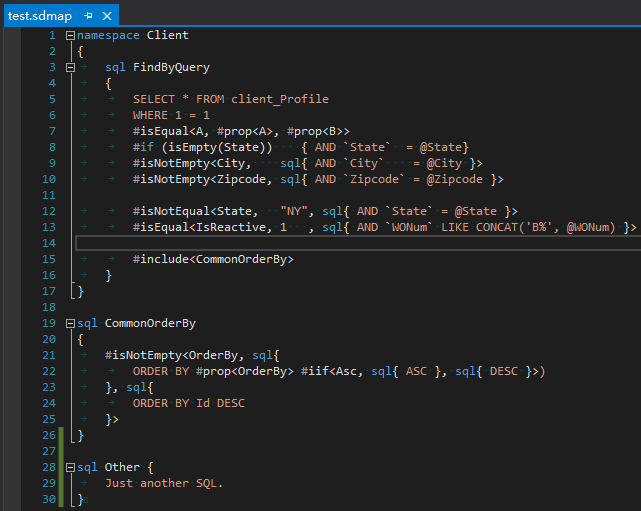 sdmap has it's own benifics over other dynamic SQL package/framework (like iBatis.NET): * Very simple Domain-Specific-Language(or DSL) to enhance the dynamic SQL expression * Implemented by Common-Intermediate-Language(or CIL) to ensure the performance * Visual Studio integrated, with code-highlight, code-folding and navigate-to features supported * Support all majoy databases like MySQL, SQL Server, SQLite (whenever Dapper supports :)) * Even is able to extend to databases that is not relational, like Neo4j * Fully unit test covered. ## NuGet Package: * https://www.nuget.org/packages/sdmap * https://www.nuget.org/packages/sdmap.ext * https://www.nuget.org/packages/sdmap.ext.Dapper ## How to use? (with Dapper) 1. Install package: `sdmap.ext.Dapper` You can just only install `sdmap.ext.Dapper` since it will automatically install all dependencies including `sdmap` and `sdmap.ext`. 2. Create a empty text file, and renames it into .sdmap 3. Set the file "Build operation" from "None" to "Embedded Resource" in item Property Window. 4. Write some SQL statements into sdmap file, a minimum sdmap file may looks as following: ``` sql GetUserById { SELECT * FROM [User] WHERE Id = @Id } ``` Note: the `namespace NS { ... }` is not required. 5. Initialize sdmap by this code(the `Program` means the assembly where sdmap be located): ``` DbConnectionExtensions.SetEmbeddedSqlAssembly(typeof(Program).Assembly); ``` Note: * This code MUST be running before any database operations. * This code ONLY need to execute ONCE per process. * There are many other ways to initialize sdmap, you SHOULD pick up one of those depending on what you need: * `SetSqlDirectory` - initialize from a physical on-disk folder * `SetSqlDirectoryAndWatch` - initialize from a physical on-disk folder, and watch changes when edit those folder sdmap files * `SetEmbeddedSqlAssembly` - initialize from a single assembly, and sdmap automatically parse all the resource file that ends with `.sdmap` * `SetEmbeddedSqlAssemblies` - initialize from multiple assemblies, and sdmap automatically parse all the resource file that ends with `.sdmap` * `SetSqlEmiter` - advanced, you can write your own `ISdmapEmiter`. 6. And you're good to go! 7. If you want to emit the SQL statement manully, you may want to call: ``` string finalSqlToExecute = DbConnectionExtensions.EmitSql(sqlMapId, parameterObject); ``` ## Visual Studio 2022 extension: https://marketplace.visualstudio.com/items?itemName=sdmapvstool.sdmapvstool ## How to Compile 1. Install .NET Core SDK(https://www.microsoft.com/net/download/core) 2. Download code(`git clone https://github.com/sdcb/sdmap.git`) 3. JRE 1.6+ is preferred for building performance purpose but not required 4. dotnet restore 5. dotnet build ## Release notes: https://github.com/sdcb/sdmap/blob/master/ReleaseNotes.md ## Document/Wiki https://github.com/sdcb/sdmap/wiki
