KO
|
EN
gitlite — search
Search
#python
#java
#python3
#arduino
#golang
#machine-learning
#rust
#html
#flask
#javascript
#seismology
#nodejs
kubefork-controller
★ 15
Open GitHub ↗
No description available.
Download README (.md)
Explore Similar Repositories
gat
:
A tool to write your GitHub Actions workflows using TypeScript
XLUIDragButton
:
iOS 全局悬浮球,悬浮按钮,拖拽拖动,贴边吸附,隐藏和显示,旋转屏幕适配,坐标转换
node-craiyon
:
Node.js API client for the Craiyon AI image generator.
agent
:
bolt-agent enables you to automate your node management through our bolt.observer platform
telegram-bot-python
:
This library provides a pure Python, asynchronous interface for the Telegram Bot API. It's compatible with Python versions 3.7+
// repository documentation
Was this content helpful?
★ 0
(0 ratings)
Select Rating:
★
★
★
★
★
Submit Feedback
Recent Feedback
×
Download README
Do you want to download the
README.md
file for
kubefork-controller
?
Download (.md)
# kubefork-controller Development experience like copying your own kubernetes cluster from shared kubernetes cluster. kubefork documentation ([en](./docs/kubefork-doc-en.md), [ja](./docs/kubefork-doc-ja.md)) kubefork installation ([en](./docs/kubefork-installation-en.md), [ja](./docs/kubefork-installation-ja.md)) ## Description It introduces the concept of virtual clusters as opposed to actual clusters. Virtual clusters allow development such as replacing only arbitrary deployments by routing requests with specific headers to specific services. 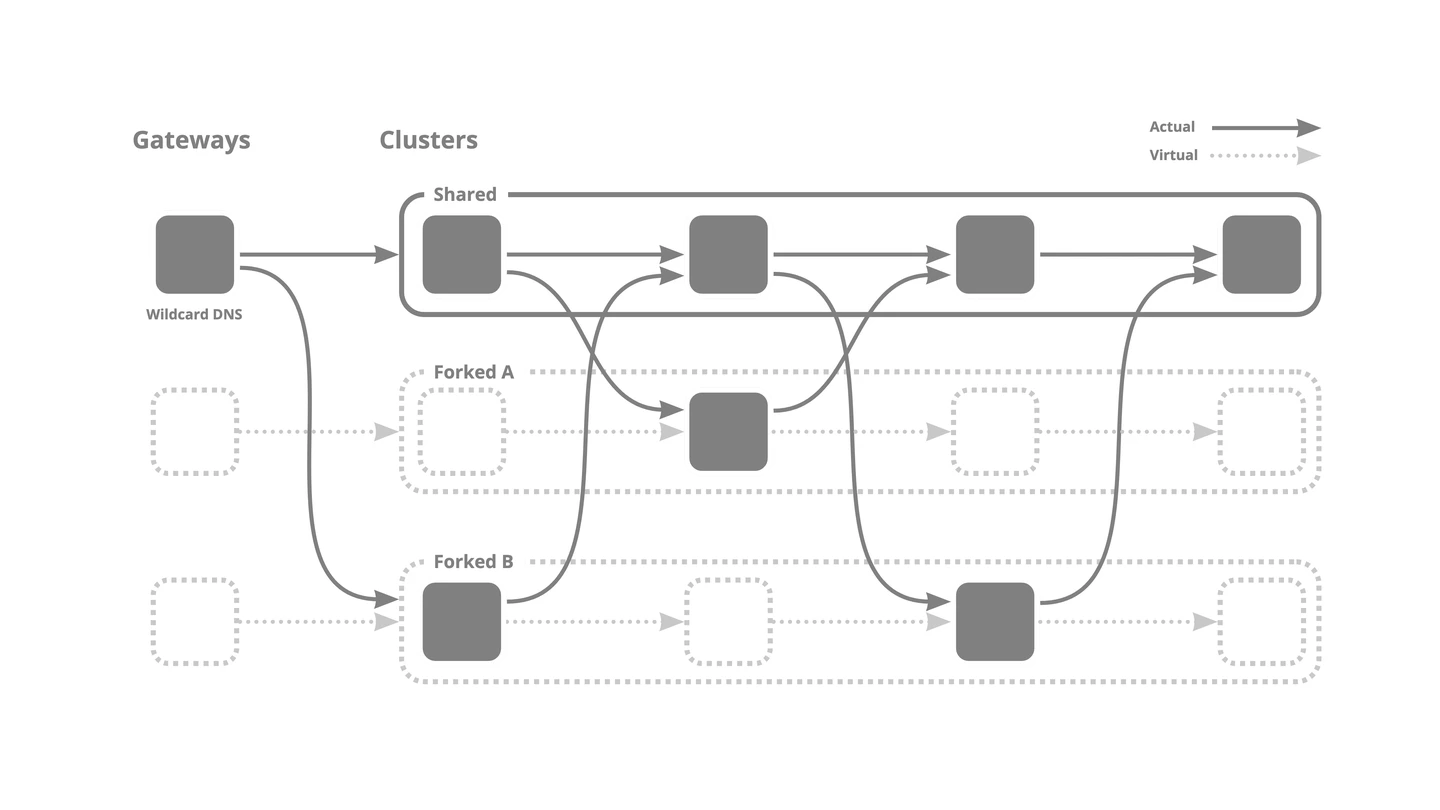 For more details: https://docs.wantedly.dev/fields/dev-tools/fork (Japanese) ## Getting Started You’ll need a Kubernetes cluster to run against. You can use [KIND](https://sigs.k8s.io/kind) to get a local cluster for testing, or run against a remote cluster. **Note:** Your controller will automatically use the current context in your kubeconfig file (i.e. whatever cluster `kubectl cluster-info` shows). ### Running on the cluster 1. Install Instances of Custom Resources: ```sh kubectl apply -f config/samples/ ``` 2. Build and push your image to the location specified by `IMG`: ```sh make docker-build docker-push IMG=<some-registry>/kubefork-controller:tag ``` 3. Deploy the controller to the cluster with the image specified by `IMG`: ```sh make deploy IMG=<some-registry>/kubefork-controller:tag ``` ### Uninstall CRDs To delete the CRDs from the cluster: ```sh make uninstall ``` ### Undeploy controller UnDeploy the controller to the cluster: ```sh make undeploy ``` ## Contributing // TODO(user): Add detailed information on how you would like others to contribute to this project ### How it works This project aims to follow the Kubernetes [Operator pattern](https://kubernetes.io/docs/concepts/extend-kubernetes/operator/) It uses [Controllers](https://kubernetes.io/docs/concepts/architecture/controller/) which provides a reconcile function responsible for synchronizing resources untile the desired state is reached on the cluster ### Test It Out 1. Install the CRDs into the cluster: ```sh make install ``` 2. Run your controller (this will run in the foreground, so switch to a new terminal if you want to leave it running): ```sh make run ``` 3. Try kubefork TBW **NOTE:** You can also run this in one step by running: `make install run` ### Modifying the API definitions If you are editing the API definitions, generate the manifests such as CRs or CRDs using: ```sh make manifests ``` **NOTE:** Run `make --help` for more information on all potential `make` targets More information can be found via the [Kubebuilder Documentation](https://book.kubebuilder.io/introduction.html) ## License Copyright 2022 Wantedly, Inc. Licensed under the Apache License, Version 2.0 (the "License"); you may not use this file except in compliance with the License. You may obtain a copy of the License at http://www.apache.org/licenses/LICENSE-2.0 Unless required by applicable law or agreed to in writing, software distributed under the License is distributed on an "AS IS" BASIS, WITHOUT WARRANTIES OR CONDITIONS OF ANY KIND, either express or implied. See the License for the specific language governing permissions and limitations under the License.
