KO
|
EN
gitlite — search
Search
#python
#java
#python3
#arduino
#golang
#machine-learning
#rust
#html
#flask
#javascript
#seismology
#nodejs
.vim
★ 11
Open GitHub ↗
vim environment
Download README (.md)
Explore Similar Repositories
DnsByTcp
:
Run local, redirect UDP DNS requery to TCP format. For avoiding DNS poisoning.
UniversalPhotoStudio
:
UniversalPhotoStudio
webmachine-nodejs
:
Webmachine HTTP Toolkit for NodeJS
Screen-Framework
:
JavaFX Framework for managing multiple application screens
NodeCloudPT
:
NodeJS SDK for the CloudPT
// repository documentation
Was this content helpful?
★ 0
(0 ratings)
Select Rating:
★
★
★
★
★
Submit Feedback
Recent Feedback
×
Download README
Do you want to download the
README.md
file for
.vim
?
Download (.md)
Yaotian's Vim config ================== ## Installation if you are using Ubuntu: curl -L https://raw.github.com/yaotian/.vim/master/install_ubuntu.sh|bash Otherwise: curl -L https://raw.github.com/yaotian/.vim/master/install.sh|bash ## hot tips * `<tab>` # It will trigger UltiSnips to code automatic `<ctrl>j` to switch to next * F12 # to switch mouse mode * ,ee # to open vimrc file * ,zz # to open markdown document folder * ,n # to open file list * ,t # to open function list * ,q # to quickly quite * ,a # to search * ,j # to check javascript using jshint * F # format the python codes * ,, # omni to show function menu list * gd # golang go to the definition of a method * F11 # show Ultisnips list * <leader>l # show Ultisnips list * snip # start to write snip * ,w -> Beginning of the word. * ,f + `{char}` -> Find {char} to the right. * `%` -> Jump between brackets and html/xml tags * `<leader>` + `c` + `<space>` -> Toggle comment * gs # to git status * ga # to git add * gc # to git commit * gp # to git push origin master * zM zR 打开, 关闭所有folder ### golang * gd #鼠标指定一个函数,gd打开一个新窗口并跳到定义这个函数的位置 ### Shortcuts * `Tab` -> Rotate across the completion list * `Tab` -> Expand snippets or jump to the next placeholder of snippet * `shift + Tab` -> This is really the Tab * `Ctrl` + `j` -> Call zen-coding expansion on html tags * `Ctrl` + `tab` -> Call ultimate snippets list * `Ctrl` + `j` -> Call zen-coding expansion on html tags * `F3` -> Toggle Gundo viewer * `F4` -> Toggle Indent Guides * `F6` -> Format code * `Ctrl` + `p` -> Toggle ctrlp * `Alt` + `1~9` -> Switch between multiple buffers * `Ctrl` + `h/j/k/l` -> Moving between spilt windows * `:Ack` or `<leader>` + `a` -> Toggle Ack searching * `F12` -> Toggle Mouse [Movie teaching zencoding.vim](http://mattn.github.com/zencoding-vim/) ### Screenshots 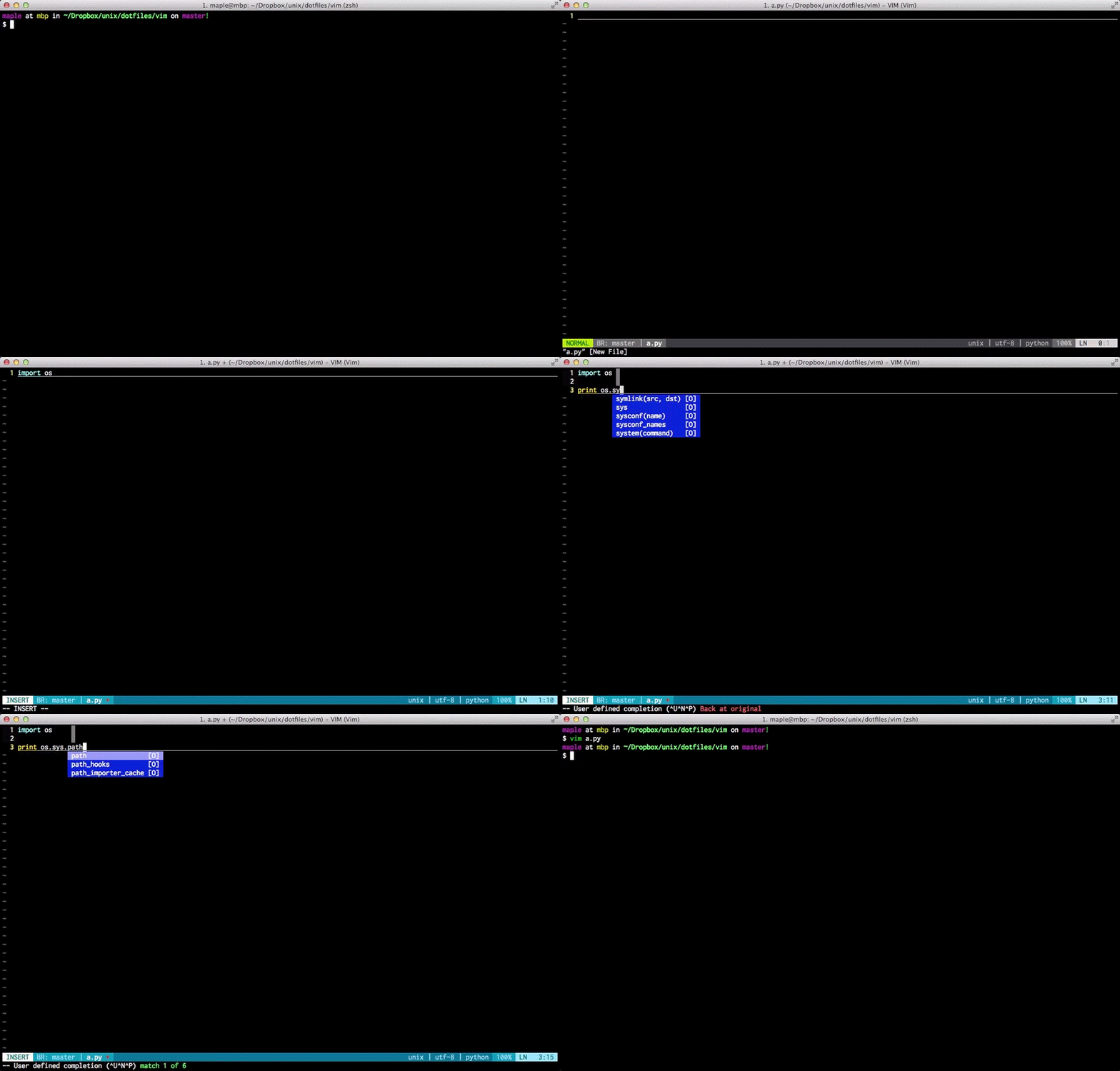  ## Known issues * Compeletions are not well supported for statically typed languages(c/c++) * Snippets are not shown in completions popups * May has some conflicts with GVIM ## Work aroud 用git操作文件如果commit没有输入comment后出现这个问题 fatal: index file corrupt 解决办法: rm -rf .git/index git reset :Gcommit 有bug. 需要先:Gwrite 将文件加入其中, 然后才可以Gcommit写comment, 然后再push 即: ga -> gc -> gp ## 如果你终端有乱码比如xshell 可以尝试 property-> Terminal ->Translation -> encoding-> Unicode(UTF-8) ## If git has network problem, you may need set the git proxy git config --global http.proxy <you proxy>
