KO
|
EN
gitlite — search
Search
#javascript
#python
#game
#android
#hacktoberfest
#machine-learning
#kotlin
#graphql
#boilerplate
#nodejs
#react
#c
AKImageCropperView
★ 173
Open GitHub ↗
Responsive image cropper
Download README (.md)
Explore Similar Repositories
kafka-connect-spooldir
:
Kafka Connect connector for reading CSV files into Kafka.
react-boilerplate
:
A slightly opinionated yet dead simple boilerplate for React 17.x, Webpack 5 and React Router v5
ng2-signalr
:
angular2 - asp.net signalr library
SwiftR
:
Swift client for SignalR (iOS and Mac)
react-image-cropper
:
react image crop
// repository documentation
Was this content helpful?
★ 0
(0 ratings)
Select Rating:
★
★
★
★
★
Submit Feedback
Recent Feedback
×
Download README
Do you want to download the
README.md
file for
AKImageCropperView
?
Download (.md)
# AKImageCropper > Responsive image cropper [![Carthage compatible][carthage-bage]][carthage-bage] [![CocoaPods Compatible][pods-bage]][pods-bage] [![Platform][platform-bage]][platform-bage] [![Swift Version][swift-bage]][swift-url] [![Build Status][travis-bage]][travis-url] [![License][license-bage]][license-url] [pods-bage]: https://img.shields.io/badge/COCOAPODS-compatible-fb0006.svg [pods-url]: https://cocoapods.org/ [carthage-bage]: https://img.shields.io/badge/Carthage-compatible-brightgreen.svg [carthage-url]: https://github.com/Carthage/Carthage [platform-bage]: https://img.shields.io/cocoapods/p/LFAlertController.svg [platform-url]: http://cocoapods.org/pods/LFAlertController [swift-bage]:https://img.shields.io/badge/swift-3.0-orange.svg [swift-url]: https://swift.org/ [license-bage]: https://img.shields.io/badge/License-MIT-blue.svg [license-url]: LICENSE [travis-bage]: https://img.shields.io/travis/dbader/node-datadog-metrics/master.svg [travis-url]: https://travis-ci.org/dbader/node-datadog-metrics Image cropping plugin which supported different devices orientation. Easy to set up and configure. Has many settings for flexible integration into your project. Behavior is similar to native iOS photo cropper. 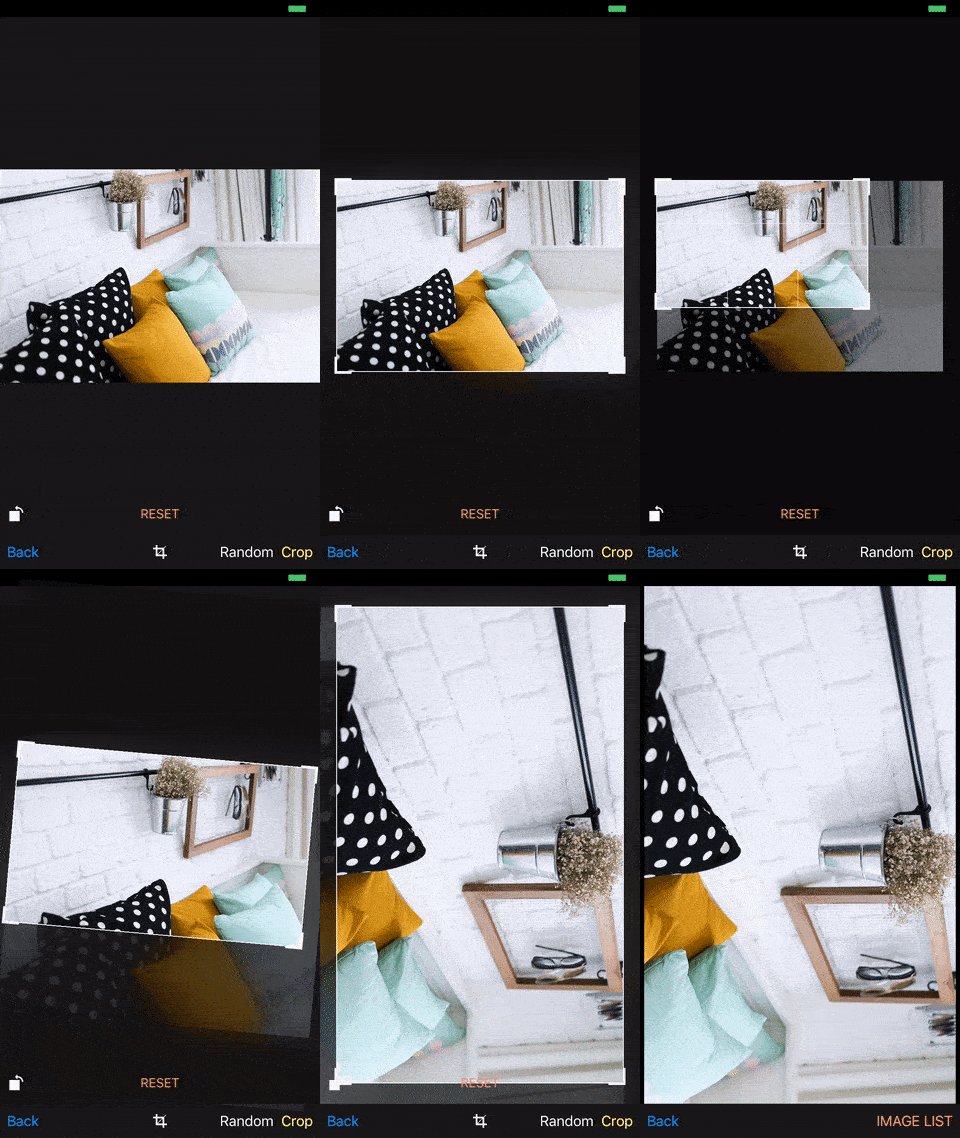 ## Features - [x] Overlay view & Crop rectangle full customization - [x] Flexible settings - [x] Image rotation - [x] Infinite "Zoom To Fit" - [x] Full image resolution - [x] Ability to draw custom crop rectangle ## Requirements - iOS 8.0+ - Xcode 7.3 ## Installation ### CocoaPods [CocoaPods][] is a dependency manager for Cocoa projects. To install **AKImageCropperView** with CocoaPods: 1. Make sure CocoaPods is [installed][CocoaPods Installation]. 2. Update your Podfile to include the following: ``` ruby use_frameworks! pod 'AKImageCropperView' ``` 3. Run `pod install`. [CocoaPods]: https://cocoapods.org [CocoaPods Installation]: https://guides.cocoapods.org/using/getting-started.html#getting-started 4. In your code import **AKImageCropperView** like so: `import AKImageCropperView` ### Carthage [Carthage][] is a decentralized dependency manager that builds your dependencies and provides you with binary frameworks. To install **AKImageCropperView** with Carthage: 1. Install Carthage via [Homebrew][] ```bash $ brew update $ brew install carthage ``` 2. Add `github "artemkrachulov/AKImageCropperView"` to your Cartfile. 3. Run `carthage update`. 4. Drag `AKMaskField.framework ` from the `Carthage/Build/iOS/` directory to the `Linked Frameworks and Libraries` section of your Xcode project’s `General` settings. 5. Add `$(SRCROOT)/Carthage/Build/iOS/AKImageCropperView.framework ` to `Input Files` of Run Script Phase for Carthage. [Carthage]: https://github.com/Carthage/Carthage [Homebrew]: http://brew.sh ### Manual If you prefer not to use either of the aforementioned dependency managers, you can integrate **AKImageCropperView** into your project manually. 1. Download and drop **AKImageCropperView** folder in your project. 2. Done! ## Usage example ### Storyboard ```swift @IBOutlet weak var cropView: AKImageCropperView! override func viewDidLoad() { super.viewDidLoad() cropView.image = UIImage(named: "yourImage") } ``` ### Programmatically ```swift var cropView: AKImageCropperView! override func viewDidLoad() { super.viewDidLoad() cropView = AKImageCropperView(frame: CGRect(x: 0, y: 20.0, width: 375.0, height: 607.0)) cropView.image = UIImage(named: "yourImage") view.addSubview(cropViewProgrammatically) } ``` > Full examples with constraint, delegates and Overlay view configuration check in demo project. > > **NOTE**: If after cropper view initialization your image has top inset. Go to storyboard with your scene and in the attributes inspector, uncheck 'Adjust Scrollview Insets'. ## Initializing an Image Cropper View ```swift func init(image: UIImage?) ``` Returns an image cropper view initialized with the specified image. **Parameters** - `image` : The initial image to display in the image cropper view. ## Accessing the Displayed Images ```swift var image: UIImage? { get set } ``` The image displayed in the image cropper view. Default value of this property is `nil`. ```swift var croppedImage: UIImage? { get } ``` Cropperd image in the specified crop rectangle. ## Instance Properties ```swift var isEdited: UIImage? { get } ``` Returns the image edited state flag. ## Managing the Delegate ```swift weak var delegate: AKImageCropperViewDelegate? { get set } ``` The delegate of the cropper view object. ### Delegate methods ```swift optional func imageCropperViewDidChangeCropRect(view: AKImageCropperView, cropRect rect: CGRect) ``` Tells the delegate that crop frame was changed. Parameters: - **`view`**: The image cropper view. - **`rect`**: New crop rectangle origin and size. ## Customizing an Overlay View ```swift var overlayView: AKImageCropperOverlayView? { get set } ``` Overlay view represented as AKImageCropperOverlayView open class. Base configuration and behavior can be set or changed with **AKImageCropperOverlayConfiguration** structure. For deep visual changes create the children class and make the necessary configuration in the overrided methods. ### Initializing an Overlay View ```swift init(configuraiton: AKImageCropperOverlayConfiguration? = default) ``` Returns an overlay view initialized with the specified configuraiton. ### Base configuration ```swift var configuraiton: AKImageCropperOverlayConfiguration { get set } ``` Configuration structure for the Overlay View appearance and behavior. #### AKImageCropperOverlayConfiguration ```swift var zoomingToFitDelay: TimeInterval { get set } ``` Delay before the crop rectangle will scale to fit cropper view frame. Default value of this property is `2`. ```swift var animation: (duration: TimeInterval, options: UIViewAnimationOptions) { get set } ``` Animation options for layout transitions. Values: - **`duration`** : The duration of the transition animation, measured in seconds. The default value is `300`. - **`options`** : Specifies the supported animation curves. The default value is `.curveEaseInOut`. ```swift var cropRectInsets: UIEdgeInsets { get set } ``` Edges insets for crop rectangle. Static values for programmatically rotation. Default value of this property is `20` px for each edge. ```swift var minCropRectSize: CGSize { get set } ``` The smallest value for the crop rectangle size. Default value of this property is `60` pixels width and `60` pixels height. ```swift var cornerTouchSize: CGSize { get set } ``` Touch view where will be drawn the corner. Default value of this property is `30` pixels width and `30` pixels height. ```swift var edgeThickness: (vertical: CGFloat, horizontal: CGFloat) { get set } ``` Thickness for edges touch area. This touch view is centered on the edge line. - **`vertical`** : Thickness for vertical edges: Left, Right. The default value is `20`. - **`horizontal`** : Thickness for horizontal edges: Top, Bottom. The default value is `.curveEaseInOut`. ```swift var edge: AKImageCropperCropViewConfigurationOverlay { get set } ``` Overlay visual configuration. ```swift var edge: AKImageCropperCropViewConfigurationEdge { get set } ``` Edges visual configuration. Check this struct below. ```swift var corner: AKImageCropperCropViewConfigurationCorner { get set } ``` Corners visual configuration. Check this struct below. ```swift var grid: AKImageCropperCropViewConfigurationGrid { get set } ``` Grid visual configuration. Check this struct below. #### AKImageCropperCropViewConfigurationOverlay ```swift var backgroundColor: UIColor { get set } ``` The view’s background color. Default value is `. black` with alpha `0.5`. ```swift var isBlurEnabled: Bool { get set } ``` A Boolean value that determines whether the blur effect is enable. The blur effect added over overlay view. The effect will disappear before user interaction will start. After manipulations, the effect will revert to the initial state. Default value is `true`. ```swift var blurStyle: Bool { get set } ``` The intensity of the blur effect. Default value is `.dark`. ```swift var blurAlpha: Bool { get set } ``` The blur effect alpha value. Default value is `0.6`. #### AKImageCropperCropViewConfigurationEdge ```swift var isHidden: Bool { get set } ``` A Boolean value that determines whether the edge view is hidden. Default value is `false`. ```swift var normalLineWidth: CGFloat { get set } ``` Line width for normal edge state. Default value is `1.0`. ```swift var highlightedLineWidth: CGFloat { get set } ``` Line width for highlighted edge state. Default value is `3.0`. ```swift var normalLineColor: UIColor { get set } ``` Line color for normal edge state. Default value is `.white`. ```swift var highlightedLineColor: UIColor { get set } ``` Line color for highlighted edge state. Default value is `white`. #### AKImageCropperCropViewConfigurationCorner ```swift var isHidden: Bool { get set } ``` A Boolean value that determines whether the corner view is hidden. Default value is `false`. ```swift var normalLineWidth: CGFloat { get set } ``` Line width for normal corner state. Default value is `3.0`. ```swift var highlightedLineWidth: CGFloat { get set } ``` Line width for highlighted corner state. Default value is `3.0`. ```swift var normaSize: CGSize { get set } ``` Size for normal corner state. Default value is `20` pixels width and `20` pixels height. ```swift var highlightedSize: CGSize { get set } ``` Size for highlighted corner state. Default value is `30` pixels width and `30` pixels height. ```swift var normalLineColor: UIColor { get set } ``` Line color for normal corner state. Default value is `.white`. ```swift var highlightedLineColor: UIColor { get set } ``` Line color for highlighted corner state. Default value is `.white`. #### AKImageCropperCropViewConfigurationGrid ```swift var isHidden: Bool { get set } ``` A Boolean value that determines whether the grid views is hidden. Default value is `false`. ```swift var autoHideGrid: Bool { get set } ``` Hide grid after user interaction. Default value is `true`. ```swift var linesCount: (vertical: Int, horizontal: Int) { get set } ``` The number of vertical and horizontal lines inside the crop rectangle. - **`vertical`** : Vertical lines count. The default value is `2`. - **`horizontal`** : Horizontal lines count. The default value is `2`. ```swift var linesWidth: CGFloat { get set } ``` Vertical and horizontal lines width. Default value is `1.0`. ```swift var linesColor: UIColor { get set } ``` Vertical and horizontal lines color. Default value is `white` with alpha `0.5`. #### Visual Appearance ```swift func layoutTopEdgeView(_ view: UIView, inTouchView touchView: UIView, forState state: AKCropAreaPartState) ``` Visual representation for top edge view in current user interaction state. Parameters: - **`view`**: Top edge view. - **`touchView`**: Touch area view where added top edge view. - **`state`**: User interaction state. ```swift func layoutRightEdgeView(_ view: UIView, inTouchView touchView: UIView, forState state: AKCropAreaPartState) ``` Visual representation for right edge view in current user interaction state. Parameters: - **`view`**: Right edge view. - **`touchView`**: Touch area view where added right edge view. - **`state`**: User interaction state. ```swift func layoutBottomEdgeView(_ view: UIView, inTouchView touchView: UIView, forState state: AKCropAreaPartState) ``` Visual representation for bottom edge view in current user interaction state. Parameters: - **`view`**: Bottom edge view. - **`touchView`**: Touch area view where added bottom edge view. - **`state`**: User interaction state. ```swift func layoutLeftEdgeView(_ view: UIView, inTouchView touchView: UIView, forState state: AKCropAreaPartState) ``` Visual representation for left edge view in current user interaction state. Parameters: - **`view`**: Left edge view. - **`touchView`**: Touch area view where added left edge view. - **`state`**: User interaction state. ```swift func layoutTopLeftCornerView(_ view: UIView, inTouchView touchView: UIView, forState state: AKCropAreaPartState) ``` Visual representation for top left corner view in current user interaction state. Drawing going with added shape layer. Parameters: - **`view`**: Top left corner view. - **`touchView`**: Touch area view where added top left edge view. - **`state `**: User interaction state. ```swift func layoutTopRightCornerView(_ view: UIView, inTouchView touchView: UIView, forState state: AKCropAreaPartState) ``` Visual representation for top right corner view in current user interaction state. Drawing going with added shape layer. Parameters: - **`view`**: Top right corner view. - **`touchView`**: Touch area view where added top right edge view. - **`state `**: User interaction state. ```swift func layoutBottomRightCornerView(_ view: UIView, inTouchView touchView: UIView, forState state: AKCropAreaPartState) ``` Visual representation for bottom right corner view in current user interaction state. Drawing going with added shape layer. Parameters: - **`view`**: Bottom right corner view. - **`touchView`**: Touch area view where added bottom right edge view. - **`state `**: User interaction state. ```swift func layoutBottomLeftCornerView(_ view: UIView, inTouchView touchView: UIView, forState state: AKCropAreaPartState) ``` Visual representation for bottom left corner view in current user interaction state. Drawing going with added shape layer. Parameters: - **`view`**: Bottom left corner view. - **`touchView`**: Touch area view where added bottom left edge view. - **`state `**: User interaction state. ```swift func layoutGridView(_ view: UIView, gridViewHorizontalLines: [UIView], gridViewVerticalLines: [UIView]) ``` Visual representation for grid view. Parameters: - **`view`**: Grid view. - **`gridViewHorizontalLines`**: Horizontal line view`s array. - **`gridViewVerticalLines `**: Vertical line view`s array. ## Contribute Please do not forget to ★ this repository to increases its visibility and encourages others to contribute. Got a bug fix, or a new feature? Create a pull request and go for it! ## Meta Artem Krachulov – [www.artemkrachulov.com](http://www.artemkrachulov.com/) - [artem.krachulov@gmail.com](mailto:artem.krachulov@gmail.com) Released under the [MIT license](http://www.opensource.org/licenses/MIT) [https://github.com/artemkrachulov](https://github.com/dbader/)
