KO
|
EN
gitlite — search
Search
#javascript
#python
#hacktoberfest
#react
#ai
#typescript
#llm
#go
#golang
#android
#machine-learning
#rust
#deep-learning
#linux
GitStatusBar
★ 13
Open GitHub ↗
A more compact Git StatusBar
Download README (.md)
Explore Similar Repositories
bug-reporting-guide
:
A client-friendly guide for bug reporting
SpectrumAnalyzerStrip
:
Spectrum analyzer using a Teensy 3.1 and an APA102 RGB LED strip.
TickDynamic
:
Public Issues repository for the Minecraft mod Tick Dynamic.
jdbc-ssh
:
JDBC driver over SSH tunnel
programming-fundamentals
:
D-Lab training
// repository documentation
Was this content helpful?
★ 0
(0 ratings)
Select Rating:
★
★
★
★
★
Submit Feedback
Recent Feedback
×
Download README
Do you want to download the
README.md
file for
GitStatusBar
?
Download (.md)
Git-StatusBar: A more compact Git StatusBar ==== [sublime-text-git](https://github.com/kemayo/sublime-text-git) does an amazing job in integrating `git` commands into Sublime Text. However, it is showing too much text in the status bar. This plugin minimizes the amount of text by only showing important information. Less is more! ### Screenshot 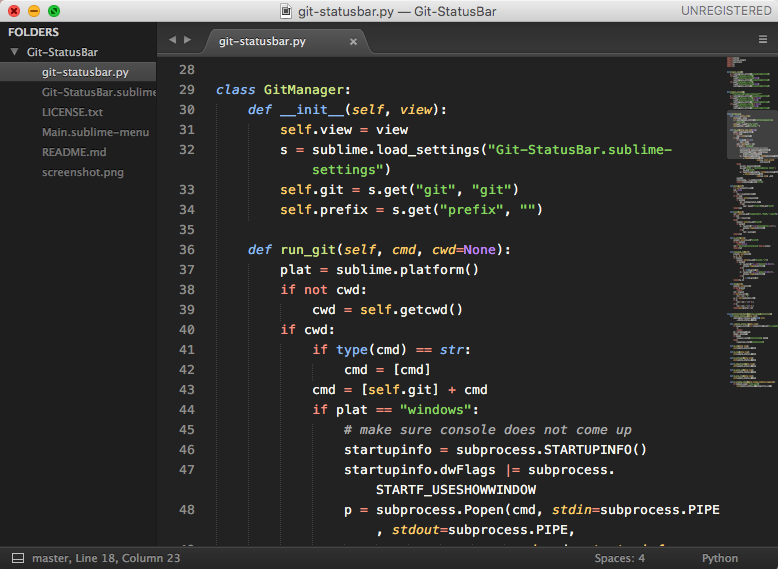 ### Explain the badge | symbol | | | ---- | ---- | | * | the current branch is dirty | | +n | the current branch is n commits ahead the remote branch | | -n | the current branch is n commits behind the remote branch | ### Note The `sublime-text-git` status bar will be disabled automatically by this plugin.
