KO
|
EN
gitlite — search
Search
#python
#java
#python3
#arduino
#golang
#machine-learning
#rust
#html
#flask
#javascript
#seismology
#nodejs
X220-OpenCore
★ 15
Open GitHub ↗
EFI Partition for X220 Hackintosh
Download README (.md)
Explore Similar Repositories
WinEFIMounter
:
Mount EFI partitions from Windows
UEFI-GPT-image-creator
:
GPT Disk Image Creator for UEFI Development, with EFI System Partition and FAT32 Filesystem
MountEFI
:
Some shell scripts for quickly searching and mounting EFI / ESP partitions on Mac OS 10.9 - 26.0
Un-MountEFI
:
Status Bar apps Mount / Unmount EFI partitions
CloverExtractor
:
Small py script to extract CLOVERX64.efi from an install package and copy it to a target drive's EFI partition.
// repository documentation
Was this content helpful?
★ 0
(0 ratings)
Select Rating:
★
★
★
★
★
Submit Feedback
Recent Feedback
×
Download README
Do you want to download the
README.md
file for
X220-OpenCore
?
Download (.md)
# Lenovo Thinkpad X220 OpenCore Adoption Guide 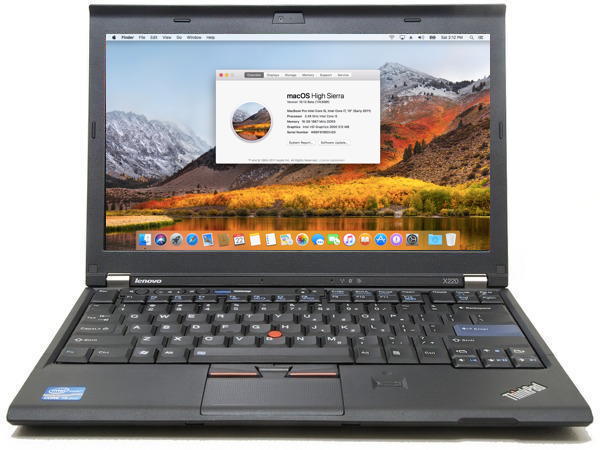 ## Who is this repo for Those who want to install ONLY `macOS` on their machine. If you intend to install other OSes as well, head to the [X220-Opencore-Dualboot](https://github.com/w43322/X220-OpenCore-Dualboot) repo. ## TLDR #### Flashing BIOS 1. Flash the modified BIOS under Windows. Instructions are provided in the zip file. #### Installing macOS 1. Make a Installation USB Drive per [Dortania's guide](https://dortania.github.io/OpenCore-Install-Guide/). Install `macOS High Sierra` on the X220. #### Optimizing macOS 1. [Generate your own](https://dortania.github.io/OpenCore-Post-Install/universal/iservices.html) `Serial Number`, `MLB` and `UUID`, and populate `ROM` with the mac address of your Ethernet port. 2. The `SSDT-PM.aml` is generated using an `X220i` with an `i3-2310M` processor. If you have a different processor, please [generate this file after install](https://dortania.github.io/OpenCore-Post-Install/universal/pm.html#sandy-and-ivy-bridge-power-management) and replace it. 3. If your `X220` has a `USB3.0` port, please [map the port](https://dortania.github.io/OpenCore-Post-Install/usb/) or it might not run at `USB3.0` speed. ## Additional Information #### Why can't one simply follow Dortania's Guide? Well, I actually followed [Dortania's guide](https://dortania.github.io/OpenCore-Install-Guide/) to make this repo, but some modifications had to be made to make audio and battery readouts work. 1. `Misc -> Security -> SecureBootModel` is set to `Disabled`. 2. `UEFI -> APFS -> MinDate & MinVersion` are set to `-1` to allow `High Sierra` installation with `APFS`. 2. NVRAM emulation is `Enabled` by adjusting `config.plist` according to the following steps ([source](https://www.reddit.com/r/hackintosh/comments/wdugxf/how_to_opencore_082_083_differences/)): ``` * OpenRuntime.efi specified after OpenVariableRuntimeDxe.efi in the Drivers list * OpenVariableRuntimeDxe.efi loaded using LoadEarly=true * OpenRuntime.efi also loaded using LoadEarly=true for correct operation of * RequestBootVarRouting * LegacySchema populated * LegacyOverwrite enabled to be able to overwrite any existing variable * ExposeSensitiveData with at least bit 0x1 set * This driver requires working FAT write support in firmware, and sufficient free space on the OpenCore EFI partition for up to three saved NVRAM files * NVRAM values are loaded from NVRAM/nvram.plist * Reset NVRAM option installed by the ResetNvramEntry driver removes NVRAM/nvram.plist instead of affecting underlying NVRAM * CTRL+Enter in the OpenCore bootpicker updates or creates NVRAM/nvram.plist. ``` 4. Using `DSDT.aml` from [mcdonnelltech](httpshttps://x220.mcdonnelltech.com//) to fix audio and battery readouts, instead of custom `SSDT`s. I know this is not a good practice, but currently I can't spare the time and energy to reverse engineer every patch done to the `DSDT` and make seperate `SSDT` patches. If the custom `SSDT`s are made, we can ditch `rEFInd` and use `OpenCore` to boot all OSes, which is a lot cleaner. If anyone is interested in doing this, you're welcomed to fork this repo or create PRs. 5. This guide assumes you have swapped the WiFi card for a natively supported one (like the DW1510). No Bluetooth / Wifi kext is present in this repo. If you need it, please add it on your own. #### Binary Versions | Binary | Version / Source | | -------------------- | ---------------- | | Modified 1.46 BIOS | from [mcdonnelltech](https://x220.mcdonnelltech.com/) | | OpenCore | 0.8.4 | | Lilu | 1.6.2 | | AppleALC | 1.7.5 | | WhateverGreen | 1.6.1 | | VirtualSMC & modules | 1.3.0 | | VoodooPS2Controller | Modded from [mcdonnelltech](https://x220.mcdonnelltech.com/) | | DSDT.aml | from [mcdonnelltech](https://x220.mcdonnelltech.com/) | | SSDT-PM.aml | Generated using [ssdtPRGen](https://github.com/Piker-Alpha/ssdtPRGen.sh) on X220i / i3-2310M |
