KO
|
EN
gitlite — search
Search
#javascript
#python
#hacktoberfest
#react
#ai
#typescript
#llm
#go
#golang
#android
#machine-learning
#rust
#deep-learning
#linux
taskplanner
★ 16
Open GitHub ↗
No description available.
Download README (.md)
Explore Similar Repositories
ai-engineering-from-scratch
:
Build AI engineering skills from scratch with 260+ lessons, 20 phases, and hands-on tools for practical learning
COSMOS
:
No description available.
ilmari
:
Minimal tmux popup/tabs radar for Codex, Amp, Claude Code, OpenCode, Pi, Antigravity, Kiro, Copilot, Auggie and Grok.
modal-nz
:
Modal 容器扎针
winbuf.nvim
:
Per-window buffer tabs for Neovim (VS Code-style editor groups)
// repository documentation
Was this content helpful?
★ 0
(0 ratings)
Select Rating:
★
★
★
★
★
Submit Feedback
Recent Feedback
×
Download README
Do you want to download the
README.md
file for
taskplanner
?
Download (.md)
<p align="center"> <img src="resources/icons/taskplanner-color.png" alt="Task Plan AI logo" width="112" height="112" /> </p> <h1 align="center">Task Plan AI</h1> <p align="center"> Git-tracked markdown task planning for developers and AI agents. </p> <p align="center"> <a href="https://github.com/smekai/taskplanner/actions/workflows/ci.yml"><img src="https://github.com/smekai/taskplanner/actions/workflows/ci.yml/badge.svg" alt="CI status" /></a> <a href="https://marketplace.visualstudio.com/items?itemName=refined.taskplanner"><img src="https://vsmarketplacebadges.dev/version-short/refined.taskplanner.svg" alt="VS Code Marketplace version" /></a> <a href="https://open-vsx.org/extension/refined/taskplanner"><img src="https://img.shields.io/open-vsx/v/refined/taskplanner?label=Open%20VSX" alt="Open VSX version" /></a> <a href="LICENSE"><img src="https://img.shields.io/badge/license-MIT-blue.svg" alt="MIT license" /></a> </p> Task Plan AI brings AI-directed markdown task tracking into your repository. Tasks stay readable by humans, actionable by AI agents, and backed by generated `AGENTS.md`, `CLAUDE.md`, and `.cursorrules` workflows. ## Why? - **AI-native workflow** — agents read `NEXT.md`, pick a task, plan, build, and move it to `DONE.md` - **Agent-ready workflow artifacts** — initialize generates `AGENTS.md`, `CLAUDE.md`, and `.cursorrules` so different AI tools follow the same task state machine - **Tasks next to code** — no context switching to Jira/Linear/Asana - **Git-tracked** — full history of every task change in your commits - **Human-readable** — plain markdown, works without the extension installed - **Zero config** — run "Initialize Project" and start creating tasks > **Help shape AI workflows** — if you use Claude Code, upvote [anthropics/claude-code#42000](https://github.com/anthropics/claude-code/issues/42000) to enable direct prompt-to-sidebar integration. ## Overview 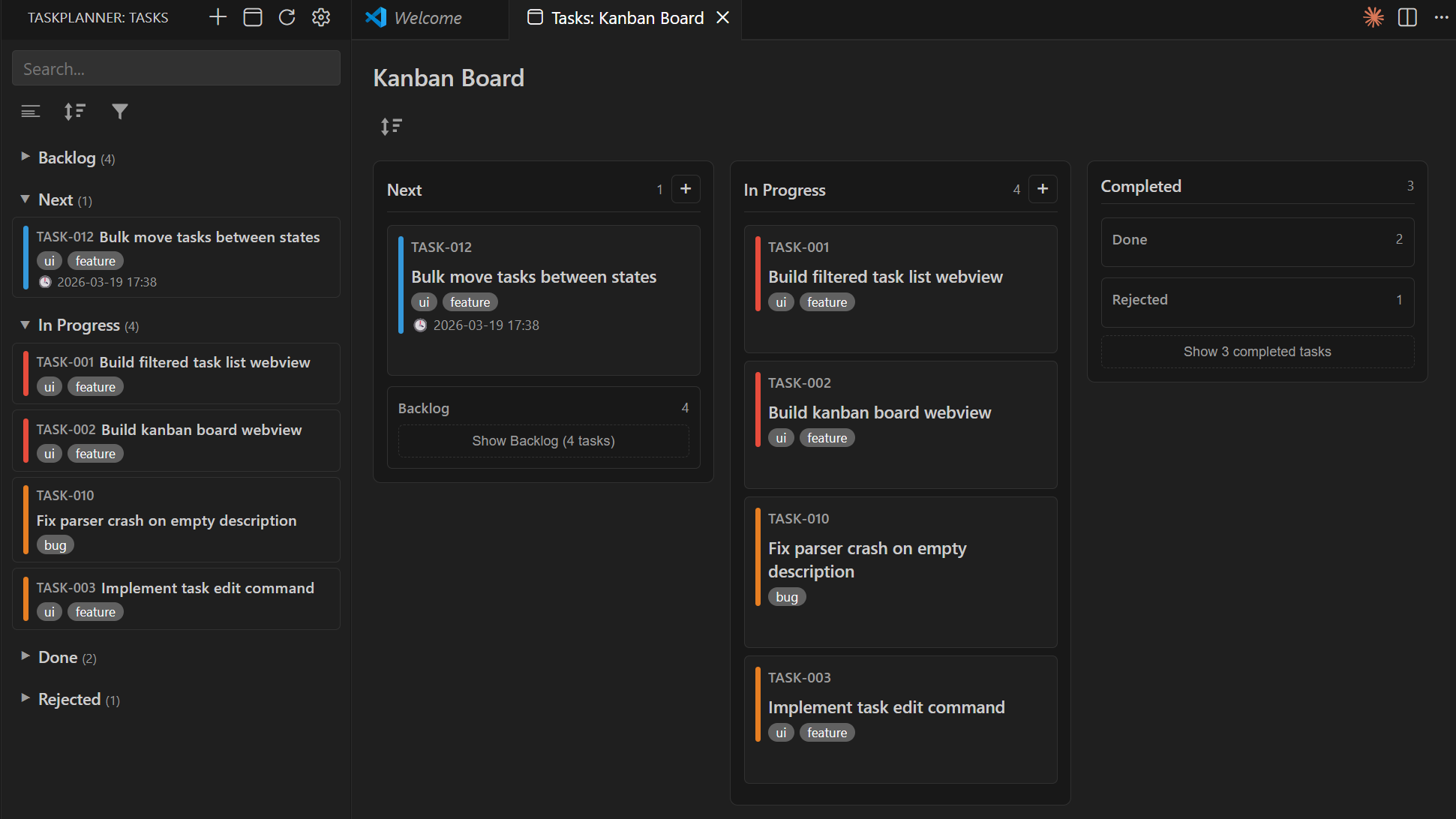 ## Features - **Filtered task list** — main view with grouping by status, assignee, date, or no grouping; search across all fields; Backlog/Done/Rejected hidden by default - **Kanban board** — drag-and-drop cards between columns, visual priority indicators - **Cursor and Codex plugin** **(Beta)** — the shared plugin exposes TaskPlanner MCP tools and workflow skills; the interactive board renders on MCP Apps hosts with JSON/text fallback elsewhere - **Sidebar tree view** — tasks grouped by state (Backlog → Next → In Progress → Done) - **Drag-and-drop** — move tasks between states in tree view and Kanban board - **Assignee & timestamps** — track who owns each task and when it was last updated - **AI instruction generation** — auto-generates `AGENTS.md`, `CLAUDE.md`, and `.cursorrules` while preserving user-authored content outside the TaskPlanner marker block - **AI planning mode** — agents write a `### Plan` inside the task before coding; the plan is preserved when moving to Done - **Implement with AI** **(Beta)** — opens a composed prompt in Codex, Cursor, Claude Code, VS Code Chat, the Claude CLI, or the clipboard; configure via Settings (`taskplanner.aiTool`) or **TaskPlanner: Configure AI Provider** - **Parse warnings** — malformed task markdown triggers a dismissible banner with jump-to-file; errors log to the **TaskPlanner** output channel - **Live file watcher** — edit `.tasks/*.md` by hand and all views update instantly - **Configurable** — custom states, priorities (P0–P4), tags, ID prefix, sort order ## Why TaskPlanner (Task → Plan → AI) Is Better Than Other Solutions Competitors often focus on UI and manual task editing. TaskPlanner is built for AI execution: it keeps tasks as plain markdown artifacts next to your code, and it generates agent instruction files that teach Codex, Cursor, Claude Code, and compatible tools how to follow the workflow. - Agent workflow contract (generated `AGENTS.md`, `CLAUDE.md`, and `.cursorrules`) - Git-tracked audit trail for every move and edit - Optional planning gate to reduce implementation churn - Works as plain markdown even without the extension ## Install - [**VS Code Marketplace**](https://marketplace.visualstudio.com/items?itemName=refined.taskplanner) — VS Code - [**Open VSX**](https://open-vsx.org/extension/refined/taskplanner) — Cursor IDE and other compatible editors - [**Cursor Marketplace (Plugin)**](https://cursor.com/marketplace) — search for `taskplanner` - **Codex app/CLI plugin** — install from this repository's local marketplace; see [`plugins/taskplanner/README.md`](plugins/taskplanner/README.md) - **JetBrains IDEs** — planned ## Distribution Model TaskPlanner ships as two coordinated artifacts: - **VS Code extension** (`refined.taskplanner`) for editor-native UI/runtime features (activity bar view, webviews, command contributions). - **Shared agent plugin** (`plugins/taskplanner/`) for Cursor and Codex (MCP tools, workflow skills, Cursor rule, and Cursor slash commands). Source code lives at [github.com/smekai/taskplanner](https://github.com/smekai/taskplanner); the Marketplace publisher remains **refined**. The extension can auto-register the bundled plugin when running inside Cursor. Codex discovers it through the repository marketplace at `.agents/plugins/marketplace.json`. ## Quick Start 1. Install the extension from the marketplace links above 2. Open a project folder 3. Click the Task → Plan → AI icon in the activity bar — a welcome view with **Initialize Project** appears 4. Run **Initialize AI Instructions** to generate workflow files for your AI tools 5. Start creating tasks! You can also run `TaskPlanner: Initialize Project` from the command palette (`Ctrl+Shift+P`). ## Task Format Tasks are stored in `.tasks/` as plain markdown: ``` .tasks/ ├── config.json ├── BACKLOG.md ├── NEXT.md ├── IN_PROGRESS.md ├── DONE.md └── REJECTED.md ``` Each task is a `##` heading section: ```markdown ## TASK-001: Set up OAuth2 authentication **Priority:** P0 | **Tags:** auth, backend | **Assignee:** Alice **Updated:** 2026-03-19 14:30 Implement OAuth2 flow with Google and GitHub providers. Add token refresh logic and session management. --- ## TASK-002: Add rate limiting to API endpoints **Priority:** P1 | **Tags:** api, security | **Assignee:** Bob **Updated:** 2026-03-18 09:15 Apply rate limiting middleware to all public endpoints. Use sliding window algorithm, 100 req/min per API key. --- ``` ### Priorities | Level | Meaning | Color | |-------|---------|-------| | P0 | Blocker | Purple | | P1 | Critical | Red | | P2 | High | Orange | | P3 | Medium | Blue | | P4 | Low | Grey | ### Assignee & Updated Each task can have an optional **Assignee** (who owns the task) and an **Updated** timestamp (auto-set when tasks are created, moved, or edited). Both fields are searchable in the filtered task list. ## AI Agent Workflow TaskPlanner is designed as a task interface between you and AI coding agents. Supported instruction targets include **Codex** (via `AGENTS.md` and the plugin), **Claude Code** (via `CLAUDE.md`), and **Cursor** (via `.cursorrules` and the plugin). Run **Initialize AI Instructions** (Setup menu or command palette) to generate instruction files. The generated workflow teaches agents to: 1. Read `.tasks/NEXT.md` and pick the highest-priority task 2. Move it to `.tasks/IN_PROGRESS.md` 3. Write a `### Plan` subsection under the task (if AI Planning is enabled) 4. Implement the task 5. Move it to `.tasks/DONE.md` ### AI Planning When enabled (default), agents must write a plan before coding. The plan lives inside the task: ```markdown ## TASK-003: Migrate database to PostgreSQL **Priority:** P1 | **Tags:** database, migration | **Assignee:** Claude **Updated:** 2026-03-19 10:00 Replace SQLite with PostgreSQL for production readiness. ### Plan - Add pg driver and connection pool configuration - Create migration scripts for all existing tables - Update repository layer to use parameterized queries - Add integration tests against test database --- ``` When a task is moved to Done, the `### Plan` section is kept as a condensed summary of what was implemented — preserving implementation history for future reference. Toggle via the Setup menu or set `aiPlanRequired` in `.tasks/config.json`. ### Auto-init When `autoInitAiFiles` is enabled (default), AI instruction files are automatically created or updated during project initialization — so agents get the workflow from the first commit. ### Version-aware updates and attribution TaskPlanner records the last synchronized product version in `.tasks/config.json` as `taskplannerVersion`. On activation, a newer installed version refreshes only TaskPlanner marker blocks in `AGENTS.md`, `CLAUDE.md`, and `.cursorrules`, applies safe config defaults, and retries later if any write fails. An older installed version never downgrades project files. Initialization also adds a small managed TaskPlanner attribution block to an existing root `README.md` by default. The attribution is voluntary, removable, and is not an MIT license requirement. Disable future insertion with **Setup → README Attribution** or set `readmeAttribution` to `false`; disabling it does not delete an existing block. ## Views ### Filtered Task List (Main View) The primary view opens automatically when you click the TaskPlanner sidebar icon. Features: - **Grouping** — group tasks by Status (default), Assignee, Date, or no grouping - **Collapsible groups** — Backlog, Done, and Rejected are collapsed by default to focus on active work - **Search** — search across task ID, title, assignee, and date - **Status filter** — filter to a specific state - **Task actions** — move between states, delete, open in editor ### Kanban Board Open via command palette → `TaskPlanner: Open Kanban Board`. Three columns: **Backlog**, **Active** (Next + In Progress), and **Completed** (Done + Rejected). Drag cards between columns or sub-zones to change state. Task cards show assignee and last update time. ### Agent Chat Board (MCP UI) On hosts that render MCP Apps, the bundled plugin can display a board inline through `taskplanner_board_visual`. This is supported by Cursor and experimental in Codex. It is separate from the extension Kanban panel and uses the same task files. When the host does not render the UI, use `taskplanner_board_data` or the standard task tools. ### Sidebar Tree Always visible in the activity bar. Tasks grouped under collapsible state nodes with task counts. Drag-and-drop between states. Priority shown as colored icons. ## Setup Menu Click the **gear icon** in the TaskPlanner sidebar title bar: - **Initialize Project** — create `.tasks/` folder and state files - **Initialize AI Instructions** — generate/update `AGENTS.md`, `CLAUDE.md`, and `.cursorrules` - **AI Planning: Enable/Disable** — toggle whether agents must plan before coding - **README Attribution: Enable/Disable** — control future insertion of the voluntary managed README block - **Sort By** — change task sort order (Priority / Name / ID / File order) - **Open Settings** — open VS Code extension settings ## Settings Extension settings (accessible via VS Code Settings UI): | Setting | Default | Description | |---------|---------|-------------| | `taskplanner.taskDirectory` | `.tasks` | Directory for task files relative to workspace root | | `taskplanner.autoInitAiFiles` | `true` | Auto-create/update AI instruction files on init | | `taskplanner.sortBy` | `priority` | Sort order for tasks: `priority`, `name`, `id`, or `file` (markdown order) | | `taskplanner.groupBy` | `status` | Group tasks by: `status`, `assignee`, `date`, or `none` | | `taskplanner.aiTool` **(Beta)** | `auto` | AI tool for "Implement with AI": `auto`, `codex-app`, `cursor`, `claude-code`, `vscode-chat`, `claude-cli`, `clipboard` | | `taskplanner.cursorPlanAndSubmitAfterOpen` **(Beta)** | `true` | Cursor: when AI Planning is enabled, best-effort Plan mode and submit after opening the task | | `taskplanner.claudeCliCommand` **(Beta)** | `claude {{file}}` | claude-cli: shell command; `{{file}}` is replaced with temp prompt path | Project config is stored in `.tasks/config.json`. See [CONTRIBUTING.md](CONTRIBUTING.md) for the full config reference. ## Contributing Contributions are welcome! See [CONTRIBUTING.md](CONTRIBUTING.md) for setup instructions, project structure, architecture decisions, and PR guidelines. Before creating a release, run: ```bash npm run release:check ``` This builds the extension and shared plugin, runs tests and lint, validates both Cursor and Codex manifests/marketplaces, and smoke-tests the MCP server. ## License MIT TaskPlanner is licensed under the [MIT License](LICENSE). README attribution is appreciated but voluntary and is not a condition of the license. <!-- TASKPLANNER:ATTRIBUTION:START --> This project uses [TaskPlanner](https://github.com/smekai/taskplanner) for task planning. <!-- TASKPLANNER:ATTRIBUTION:END -->
