KO
|
EN
gitlite — search
Search
#javascript
#php
#python
#ruby
#hacktoberfest
#nodejs
#linux
#blog
#gulp
#css
#r
#angularjs
fejkon
★ 40
Open GitHub ↗
Fibre Channel / FICON HBA implemented on FPGA
Download README (.md)
Explore Similar Repositories
TerrainBlending
:
Shader-based solution to blend arbitrary meshes with Unity terrain
spring-gateway-example
:
Spring Cloud Gateway Example
DNBelab_C_Series_scRNA-analysis-software
:
An open source and flexible pipeline to analyze DNBelab C Series single-cell RNA datasets.
AccidentPredictor
:
An accurate traffic accident predictor can potentially save lives. I hereby described the creation and deployment of such a model using scikit-learn, Google Maps API, Flask and PythonAnywhere.
Book_The_Hitchhiker_Guide_to_LDA
:
《LDA漫游指南》排版最清晰 pdf和word版本
// repository documentation
Was this content helpful?
★ 0
(0 ratings)
Select Rating:
★
★
★
★
★
Submit Feedback
Recent Feedback
×
Download README
Do you want to download the
README.md
file for
fejkon
?
Download (.md)
# fejkon **Status: Sleeping ([#72](https://github.com/bluecmd/fejkon/issues/72)).** fejkon is a basic host bus adapter (HBA) for Fibre Channel (and thus, FICON) implemented on the DE5-Net board. The aim is to provide easy access to add or consume Fibre Channel services, such as FCP or FICON from an ordinary server. 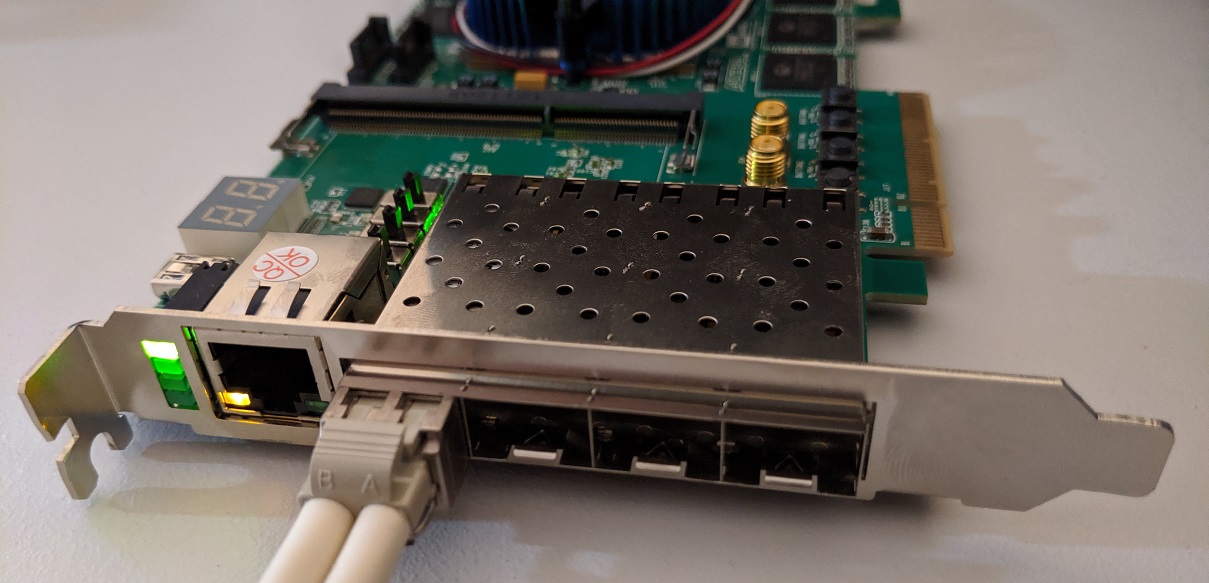 Fejkon, which was born out of the need for a fake FICON HBA, is a Swedish pun playing on the word "fejk" which translates "fake". It is pronounced similarly to the "FIC" in "FICON". It is meant to be one of the possible access ports to [fikonfarm](https://github.com/bluecmd/fikonfarm) enabling IBM mainframes to e.g. use [Hercules](https://en.wikipedia.org/wiki/Hercules_(emulator)) disks natively. In the past there existed a commerical product called FLEXCUB that seems to have done something similar for ESCON. ## Design The overall system design is as shown below. Using quad SFP+ ports Fejkon is configured to communicate using 8GFC (no speed negotiation will be implemented). ``` 8G Fibre Channel +-----------+ | FC Port 0 +<-------------------------------+ +-----+-----+ | ^ | | (Optional) Traffic Bridging | v | +-----+-----+ | | FC Port 1 +<--------+ v +-----------+ | +-------------+--------------+ +------->+ | +----------------+ +-----------+ | | | | | FC Port 2 +<---------------->+ Packet Stream +<------>+ PCIe 3.0 x8 | +-----------+ | Input/Output Mux/Demux | | | +------->+ | +----------------+ +-----------+ | | | | FC Port 3 +<--------+ +----------------------------+ +-----------+ ``` ## Board Target board right now is the DE5-Net from Terasic. They are available for $300 - $600 on eBay as of this writing and are capable of implementing 4x 8 Gbit/s Fibre Channel ports on a PCIe Gen 3 x8 port. There are a few modifications to the board that are recommended. * Remove DDR3 SODIMMs, they are not needed and contribute to power drain * Add a [heatsink](https://www.mouser.ch/ProductDetail/532-375424B00034G) onto of the LTM4601V 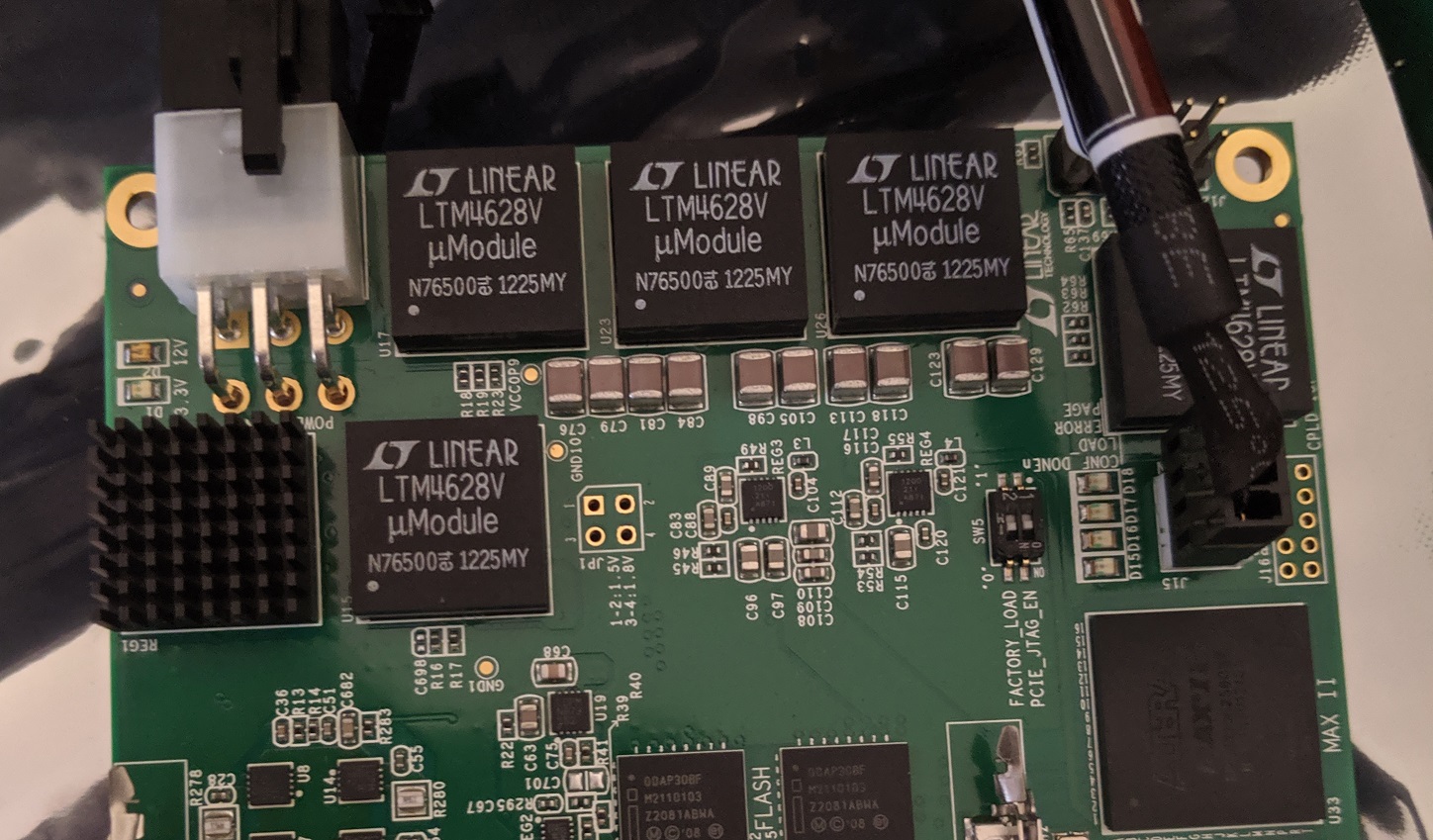 ## Configuring and Building FPGA tooling can be a bit stuborn to work with, and if you do not have an FPGA background you might not want to use them. Fejkon uses Kconfig menu configuration for configuring the board features, and can be configured and built like this: ``` $ pip3 install kconfiglib # Required build dependency $ make menuconfig # Optional: Change configuration $ make ``` The configuration interface looks like this: 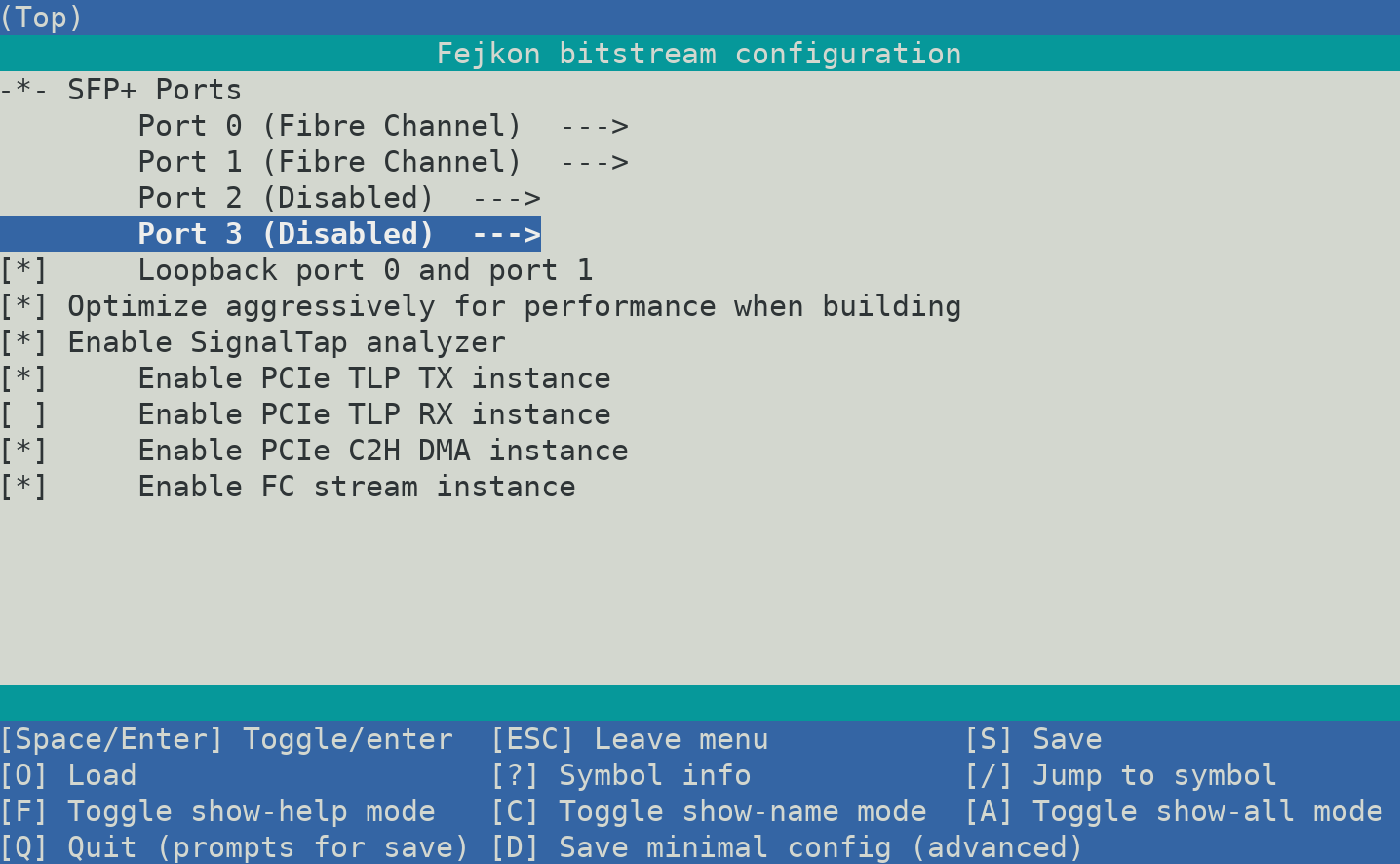 ## Usage Notes Hopefully the card is straight forward to use, but every product needs a manual. This is it. ### Port Status The leds on the front of the card next to the RJ45 port signals when the port is considered active. This means for FC that the port state machine has entered the ACTIVE state. The leds next to the four switches on the board indicate if the transmit laser is activated. The leds next to the SFP cages indicate whether or not an SFP module is detected in that slot. ### Cooling The fan is configured to only turn on when the temperature reaches 60°C. If that happens the fan will remain on until the board has been reset. ### Wireshark / tcpdump libpcap defaults to DLT_FC2 which does not account for SOF/EOF which are included in fejkon - so you need to tell it that those are included. Example: ``` tshark -i fc0 -y FC_2_WITH_FRAME_DELIMS ``` ### MSI Interrupts Currently fejkon is using multiple MSI interrupts, not MSI-X. MSI-X is a bit more complicated to implement, and the benefits of MSI-X over MSI isn't very documented when you don't need the thousands interrupts that MSI-X offers. During development it was discovered that e.g. QEMU does not do multiple MSI interrupts by default, and some kernel options are needed as well. The symptom of the platform not being setup correctly is that `pci_alloc_irq_vectors(pcidev, 1, irqs, PCI_IRQ_ALL_TYPES);` only returns one available vector instead of the requested number. There appears to be other people that have ran into the [same issue](https://stackoverflow.com/questions/34406632/is-multi-message-msi-implemented-on-linux-x86). In the kernel this support for multiple MSI interrupts seems to be gated by `MSI_FLAG_MULTI_PCI_MSI`. To enable the kernel support, enable `CONFIG_IRQ_REMAP`. On Intel, you should see mentions of `DMAR` in your dmesg. This is usually enabled by enabling VT-d. The equivalent on AMD seems to be just IOMMU support, but that has not been verified. PCIe hotplug has been known to cause issues, so you might want to disable that. The configuration for QEMU is something like: ``` -machine q35,kernel-irqchip=split \ -device intel-iommu,intremap=on,device-iotlb=on \ ``` Since the card only uses MSI interrupts, legacy interrupts are disabled. So if you are designing something from scratch and have the option to use MSI or MSI-X, this information above should tell you that maybe using MSI-X will be easier. However, it is quite likely MSI-X has its own pitfalls. ### SFP Diagnostics Data Fejkon exposes the I2C interfaces through the Linux kernel's [native I2C interface](https://www.kernel.org/doc/Documentation/i2c/dev-interface). This means that accessing the SFP diagnostics data is possible using any standard I2C library. The recommended way to browse SFP data is using [Safaripark](https://github.com/bluecmd/safaripark), but there is also a simple CLI tool located in `driver/cmd/fejkon-sfp`. 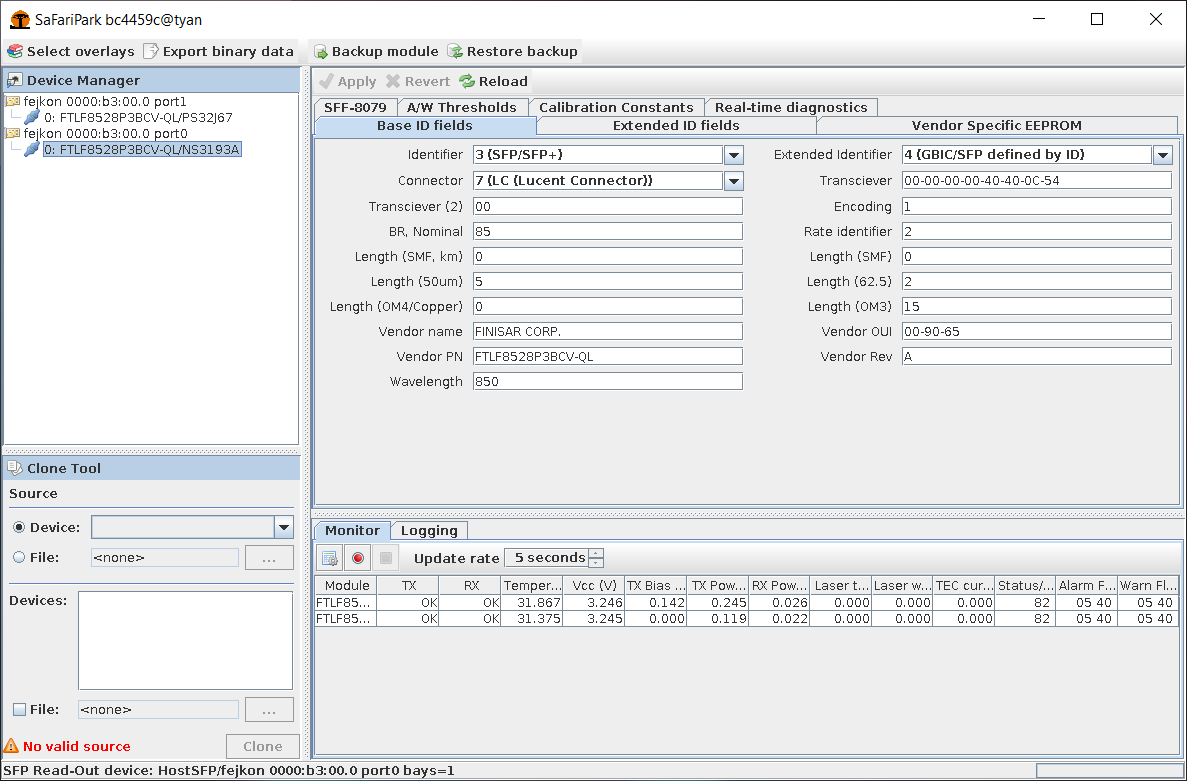 ## Developing The recommended flow is using Quartus Platform Designer to make changes. To build the qsys files needed simply execute `make QPATH=/path/to/quartus` in the root directory. Then use platform designer to edit `fejkon.qsys` using `make edit-clean`. When you are done, export the system using "Export System as Platform Designer script (.tcl)" under the "File" menu. If you have updated any subsystems you need to this for those systems as well. Finally review any changes to the \*.tcl files and commit them if they look reasonable. To run the tests first install the dependencies: ``` # NOTE: You need Icarus Verilog 11.0 or newer, or always_* constructs will # not be accepted. $ sudo apt install iverilog gtkwave verilator $ sudo apt install python3-pip $ pip3 install cocotb ``` Then to execute all tests run: ``` $ make -j test ``` NOTE: The driver tests are located under `driver` and are not automatically run. ## PCIe specification The board uses vendor/device ID `f1c0:0de5`. Mnemonic is **FICO**n **DE5**-net. The PCIe endpoint has one Base Address Register (BAR). ``` Avalon-St Avalon-MM +-------------------+ +----------------> BAR 0 | | | | v | | +-------+------+--------+ | | | | | Fejkon PCIe Data +<------+ Packet Data DMA +--+--+ | Facility +-------> TX/RX Avalon-St | | | | | A | +---+-------+-------+---+ | | | | | | D | v v v +----------------------+ | | +--+--+-+--+--+-+--+--+ | | | A | | | | | | | | +------->+ | | F | | F | | F | 3 TLP streams: | Intel PCIe Core | | P | | I | | I | | I | * Packet Data (DMA) | +<-------+ | | F | | F | | F | * Failed Completions | | | T | | O | | O | | O | * Successful Completions +----------+-----------+ | | | | | | | | ^ | E | +--+--+ +--+--+ +--+--+ | | | | | | v | R | v v v | | +--+-------+-------+--+ PCIe 3.0 x8 +--+--+ | | ^ | Stream Mux | | | | | +----------+----------+ | | | Avalon-St | +-----------------------+ ``` The design uses components from Quartus Platform Design to minimize development and debug time. All FPGA platforms offer some sort of FIFOs and streaming interface that allows merging, so there is little value re-inventing those. The PCIe adapter is a bug-fix for the V-Series Intel PCIe core where the streaming interface is not correctly defined to be Avalon-ST compliant. See the section about Intel PCIe TLP adapter below for details. ### BAR 0 Accesses need to be 4 byte wide. | Addr | Width | Part | Name | Description | |--------|-------|--------|---------------|------------------------------| | 0x0000 | 2 | Card | Version | The constant 0x0DE5 | | 0x0002 | 1 | Card | Version | Version of the Fejkon card | | 0x0003 | 1 | Card | Port options | Number of ports | | 0x0004 | 4 | Card | Git hash | Git hash of HDL built | | 0x0010 | 1 | Card | Temprature | FPGA Core Temperature (1) | | 0x0020 | 4 | Card | Freq. Gauge | PHY effective clock gauge | | 0x0024 | 4 | Card | Freq. Gauge | PCIe effective clock gauge | | 0x0040 | 64 | Card | FC Dbg & Gen | Inspect / Inject point | | 0x0100 | 1 | Port 0 | SFP Status | SFP Status Word (3) | | 0x0140 | 64 | Port 0 | SFP Port I2C | SFP I2C core (4) | | 0x02x0 | ... | Port 1 | SFP Port | | | 0x03x0 | ... | Port 2 | SFP Port | | | 0x04x0 | ... | Port 3 | SFP Port | | | 0x0800 | 1024 | Card | PCIe Facility | PCIe counters and status (2) | | 0x8000 | 2048 | Port 0 | FC XCVR IP | Fejkon FC XCVR Core (5) | | 0x8800 | 2048 | Port 0 | TX XCVR Mgmt | V-Series Transceiver PHY (6) | | 0x9000 | 64 | Port 0 | FC Framer | Fibre Channel Framer (7) | | 0x9100 | 8 | Port 0 | PCIe CDC FIFO | (Undoc.) fc0\_rx\_cdc | | 0xAxxx | ... | Port 1 | ... | | | 0xCxxx | ... | Port 2 | ... | | | 0xExxx | ... | Port 3 | ... | | | 0xFE00 | 512 | Card | XCVR Reconfig | (Undoc.) xcvr\_reconfig | 1) Details in section below 2) Details in section below 3) Details in section below 4) See "Intel FPGA Avalon I2C (Master) Core" in [Embedded Peripherals IP User Guide](https://www.intel.com/content/dam/www/programmable/us/en/pdfs/literature/ug/ug_embedded_ip.pdf) 5) Details in section below 6) See "Custom PHY" in [V-Series Transceiver PHY IP Core User Guide](https://www.intel.com/content/dam/www/programmable/us/en/pdfs/literature/ug/xcvr_user_guide.pdf) 7) Details in section below #### PCIe Facility | Addr | Width | Name | |-------|-------|-----------------------------------| | 0x000 | 2 | Endpoint address | | 0x002 | 2 | Internal status | | 0x004 | 4 | RX TLP counter | | 0x008 | 4 | RX Unsupported TLP counter | | 0x00C | 4 | TX Data TLP counter | | 0x010 | 4 | TX Instant TLP counter | | 0x014 | 4 | TX Response TLP counter | | 0x018 | 4 | C2H Staging Packets counter | | 0x020 | 32 | Last RX TLP (8 DWs) | | 0x040 | 32 | Last TX Data TLP (8 DWs) | | 0x060 | 32 | Last TX Instant TLP (8 DWs) | | 0x080 | 32 | Last TX Response TLP (8 DWs) | | 0x0A0 | 4 | C2H DMA buffer start address | | 0x0A4 | 4 | C2H DMA buffer end address | | 0x0A8 | 4 | C2H DMA host read pointer | | 0x0AC | 4 | C2H DMA card write pointer | | 0x0C0 | 4 | H2C DMA buffer start address | | 0x0C4 | 4 | H2C DMA buffer end address | | 0x0C8 | 4 | H2C DMA card read pointer | | 0x0CC | 4 | H2C DMA host write pointer | | 0x100 | 4 | Data TX TLP Fill Level | | 0x110 | 4 | Instant TX TLP Fill Level | | 0x120 | 4 | Response TX TLP Fill Level | | 0x180 | 4 | LTSSM and lane active mode | #### Temperature See Temperature decoding details in [FPGA Temperature Sensor IP Core User Guide](https://www.intel.com/content/dam/www/programmable/us/en/pdfs/literature/ug/ug_alttemp_sense.pdf) | Bit(s) | Direction | Description | |--------|-------------|------------------| | 7:0 | Read only | A/D conv. value | | 8 | Read only | A/D complete | #### SFP Port Status | Bit(s) | Direction | Description | |--------|-------------|------------------| | 0 | Read only | Present | | 1 | Read only | Loss of Signal | | 2 | Read only | TX Fault | | 3 | Read/Write | TX Disable | | 4:5 | Read/Write | Rate Select | | 6 | Read/Write | I2C Reset | #### Fejkon FC XCVR Core | Addr | Width | Name | |---------|-------|------------------------| | 0x00000 | 4 | Port Status | | 0x00004 | 4 | Last Unknown Coded Set | | 0x00080 | 128 | RX Primitive Counters | | 0x00100 | 128 | TX Primitive Counters | The primitive counters logged are in order: * IDLE * R\_RDY * VC\_RDY * BB\_SCS * BB\_SCR * SOFi2 * SOFn2 * SOFi3 * SOFn3 * SOFf * EOFt * EOFa * EOFn * EOFni * NOS * OLS * LR * LRR * ARBff * Unknown The data type is unsigned 32 bit integer for the primitive counters. ##### Port Status | Bit(s) | Description | Values | |--------|------------------|------------------------| | 0:3 | Sync Status | 0xf = fully synced | | 4:7 | Pattern detect | 0x1 = detected | | 8:11 | Error detect | >0 = error(s) detected | | 12:15 | Disparity error | >0 = error(s) detected | | 16 | PLL Locked | 1 = PLL locked | A fully operational port has status `0x1001f`. #### FC Framer Note that internally the address space is split up so that the lower half contains registers related to receive and upper half is related to transmit. | Addr | Width | Name | |-------|-------|-------------------------------| | 0x000 | 4 | State | | 0x004 | 4 | # of ACTIVE state transitions | | 0x008 | 4 | # of FC frames received | States: | Value | Code | Name | |-------|------|------------------------| | 0 | AC | Active | | 1 | LR1 | LR Transmit | | 2 | LR2 | LR Receive | | 3 | LR3 | LRR Receive | | 4 | LF1 | NOS Receive | | 5 | LF2 | NOS Transmit | | 6 | OL1 | OLS Transmit | | 7 | OL2 | OLS Receive | | 8 | OL3 | Wait for OLS | Note: Only ACTIVE is guaranted to be stable at numeric 0 over time. #### FC Debug & Generator This component is used to generate traffic for debug and development. It generates traffic interleaved with the output of the FC subsystem, and its output is read by both the PCIe and the future Ethernet module. | Addr | Width | Name | |-------|-------|-------------------------------| | 0x000 | 4 | Packet inject counter | #### Interrupts | Vector | Description | |--------|----------------------| | 0 | Card status | | 1 | RX Data available | | 2 | RX Packet dropped | | 3-6 | Port 0/1/2/3 SFP I2C | ## Debugging Use `make syscon` to launch Intel's System Console. It will guide you through the debug commands, but here is an example of reading the SFP data from port 1: ``` => Fejkon system console initialized Master is available at $m E.g: - master_write_32 $m 0x000e0000 5 - jtag_debug_reset_system $m - sfp 1 % sfp 1 SFP status: 0x02 SFP identifier: 0x03 SFP ext. identifier: 0x04 SFP connector: 0x07 SFP vendor: 'JDS UNIPHASE ' SFP vendor PN: 'JSM-21S0AA1 ' SFP vendor SN: 'F44939581059 ' ``` The design has been compiled with instrumentation of some key data buses which you can inspect using `make syscon` by loading the `fejkon.sof` and using "Bus Analyzer (Beta)". If you need to debug a particular component, then using Signal Tap is recommended. ### PCIe Look at the `pcie` syscon command to get more information. If the `My ID` row reads all zeroes that means the host PC has rejected the card for whatever reason. ## Known Issues / Notes ### Si570 The Si570 on board appears to have the following specs: ``` Part Number: 570FAB000433DG Product: Si570 Description: Differential/single-ended; I2C programmable XO; 10-1417 MHz Frequency A: 100 MHz I2C Address (Hex Format): 0 Format: LVDS Supply Voltage: 2.5 V OE Polarity: OE active high Temperature Stability / Total Stability: 50 ppm / 61.5 ppm Frequency Range: 10 - 810 MHz Operating Temp Range (°C): -40 to +85 ``` ### Usage under WSL and ChromeOS Crostini There are some known issues for running under Windows Subsystem for Linux (WSL) and ChromeOS Crostini (external reports). #### realloc(): invalid pointer This seems to happen on Ubuntu 18.04 and newer, including 20.04 LTS. When starting Quartus or some other tools they will crash with the following error message: ``` $ ~/intelFPGA/20.1/quartus/bin/quartus realloc(): invalid pointer zsh: abort (core dumped) ~/intelFPGA/20.1/quartus/bin/quartus ``` This can be worked around by pre-loading the system's udev version. Exact reason why this workaround works is not known. ``` $ export LD_PRELOAD=/lib/x86_64-linux-gnu/libudev.so.1 ``` This has been [reported](https://community.intel.com/t5/Intel-FPGA-Software-Installation/Running-Quartus-Prime-Standard-on-WSL-crashes-in-libudev-so/m-p/1189032#M2129) to Intel. #### Macro \<protected\> is undefined This is known to happen if you apply the above `LD_PRELOAD` fix and then launch ModelSim compilation. The bug can be triggered on normal machines as well if you accidentally applied the `LD_PRELOAD` hack to them. For some reason ModelSim then fails to decrypt the encrypted device libraries when told to preload a library. Note: It does not have to be udev, this has been known to fail for other preloades e.g. in /etc/ld.so.preload. ``` # ** Error: ../intelFPGA/20.1/quartus/eda/sim_lib/mentor/stratixv_atoms_ncrypt.v(38): (vlog-2163) Macro `<protected> is undefined. # ** Error: ../intelFPGA/20.1/quartus/eda/sim_lib/mentor/stratixv_atoms_ncrypt.v(38): (vlog-2163) Macro `<protected> is undefined. # ** Error: (vlog-13069) ../intelFPGA/20.1/quartus/eda/sim_lib/mentor/stratixv_atoms_ncrypt.v(38): syntax error in protected region. # # ** Error: ../intelFPGA/20.1/quartus/eda/sim_lib/mentor/stratixv_atoms_ncrypt.v(38): (vlog-13205) Syntax error found in the scope following '<protected>'. Is there a missing '::'? # End time: 23:08:09 on Aug 20,2020, Elapsed time: 0:00:00 # Errors: 5, Warnings: 0 ``` This can be worked around by making sure you **do not** set `LD_PRELOAD` before running `vsim` (or `unset LD_PRELOAD`) and making sure `/etc/ld.so.preload` does not exist. ### Intel PCIe TLP adapter The Avalon-ST interface from the PCIe IP is not standard compliant. Avalon-ST has a property called `firstSymbolInHighOrderBits` which is supposed to be set to `true` when the first symbol is present in e.g. `data[255:224]`. The PCIe IP for Qsys uses the lower bits for first symbol, but unfortunately chose to set `firstSymbolInHighOrderBits` to `true`. Furthermore, the `empty` signal is not compliant either. These issues are managed by the `intel_pcie_tlp_adapter` to make the design and testbenches being able to use Avalon-ST correctly. ## Possible future work * Integrate the MAX1619 sensor The MAX1619 is an SMBus temperature sensor supported by the Linux kernel. It would allow for more temperature data. However, SMBus seems to be incompatible with the Intel I2C core, and no replacement core seems to be easily avaiable. This means writing an SMBus controller, QEMU model, Linux and driver for it. An alternative is to re-use Terasic's NIOS drivers and create an enviromental processor that controls not only the temperature sensor but also the fan. However, this breaks the "keep it simple" methodology currently in use. * Over-temperature auto-shutdown The Intel FPGAs do not feature a protective auto-shutdown as Xilinx FPGAs do. It would be useful to enter some kind of low-power mode if an over-temperature condition is detected. Possibly integrated with the above work. * Replace Si570 with soft core CPU Although writing the Si570 controller was useful, in the end it is less reliable and much more expensive, than using a soft core to implement the equivalent logic. Using a soft core like NIOS, RISC-V, or OpenRISC would make it possible to control clock and reset networks from the firmware of the card instead of wiring it up in Verilog. In the beginning I thought this would end up being simpler, and while it ended up being a very good learning experience if I had to do it again I would stick a soft core CPU on there and let it do temperature, fan, reset, and clock control.
