KO
|
EN
gitlite — search
Search
#javascript
#java
#php
#android
#discord
#docker
#cli
#perl
#atom
#machine-learning
#css
#firefox
DOCS-pytorch
★ 56
Open GitHub ↗
Deep Object Co-Segmentation
Download README (.md)
Explore Similar Repositories
pungen
:
A pun generator based on the surprisal principle
calling-extensions-sdk
:
A JavaScript SDK for integrating calling apps into HubSpot.
tools
:
No description available.
OEP_v2.1
:
Online Exam Portal
imagepipe
:
Image processing pipeline
// repository documentation
Was this content helpful?
★ 0
(0 ratings)
Select Rating:
★
★
★
★
★
Submit Feedback
Recent Feedback
×
Download README
Do you want to download the
README.md
file for
DOCS-pytorch
?
Download (.md)
# Deep Object Co-Segmentation (DOCS) - PyTorch This is the **Pytorch** implementation of our paper **Deep Object Co-Segmentation** published at ACCV18. For more information, you can visit the [project page](https://ohosseini.github.io/projects/DOCS/). You can also find our **caffe** version [here](https://github.com/ohosseini/DOCS-caffe). 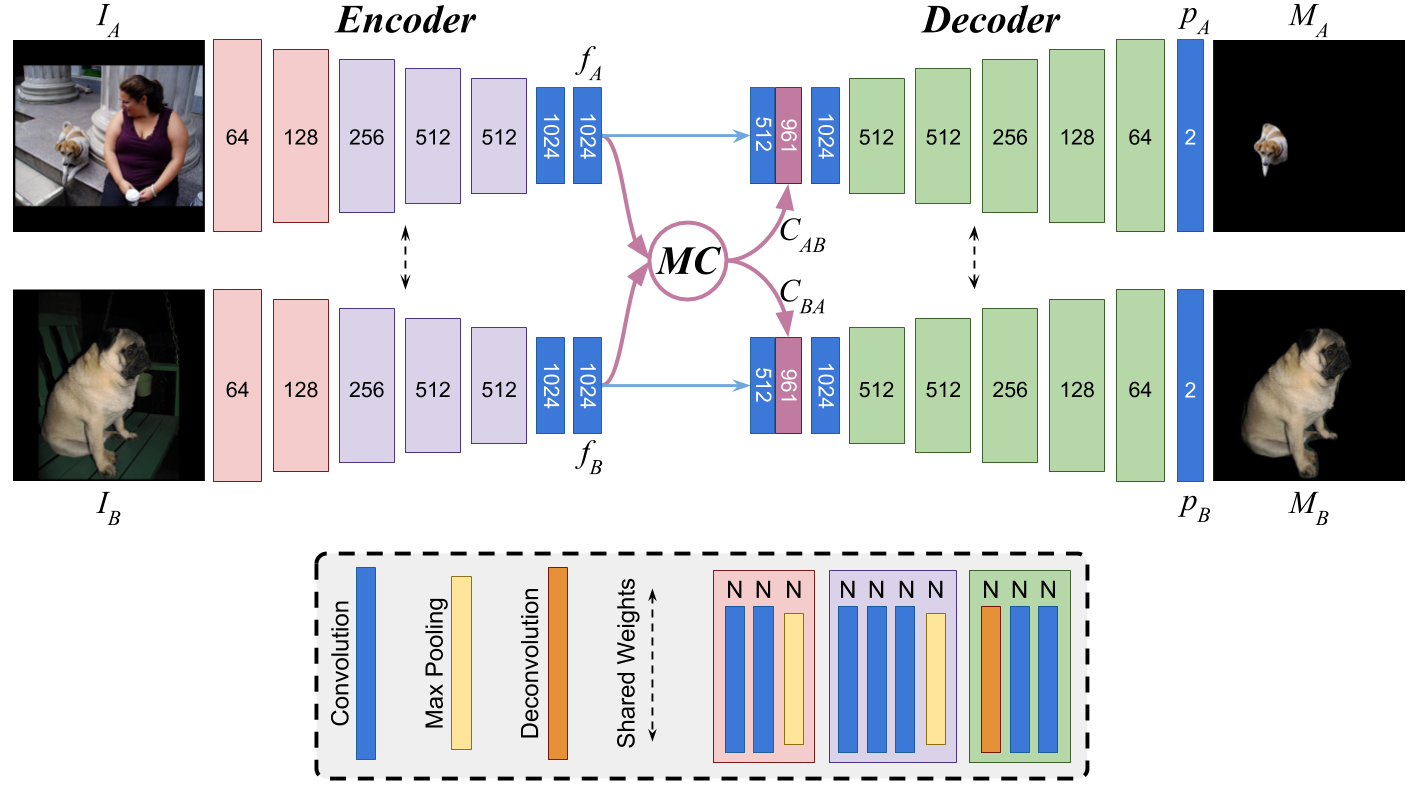 ## Requirements - Python 3 - Pytorch >= 1.0 - gcc (tested with gcc 8) Tested on *Ubuntu 20.04* with *pytorch 1.5*, *CUDA 10.2* and *gcc 8.0* . NOTE: for using it with older version of pytorch (0.4.1) please check [v1.0](https://github.com/ohosseini/DOCS-pytorch/tree/v1.0) . ## Installation ```console git clone https://github.com/ohosseini/DOCS-pytorch.git cd DOCS-pytorch bash install.sh ``` ## Demo First download the model from [here](https://drive.google.com/file/d/190CYTeTm9HABE59F75QCUG-OLWi_T6VH/view?usp=sharing) and put it in ```DOCS-pytorch``` directory. Then you can run the demo with ```console bash demo.sh ``` 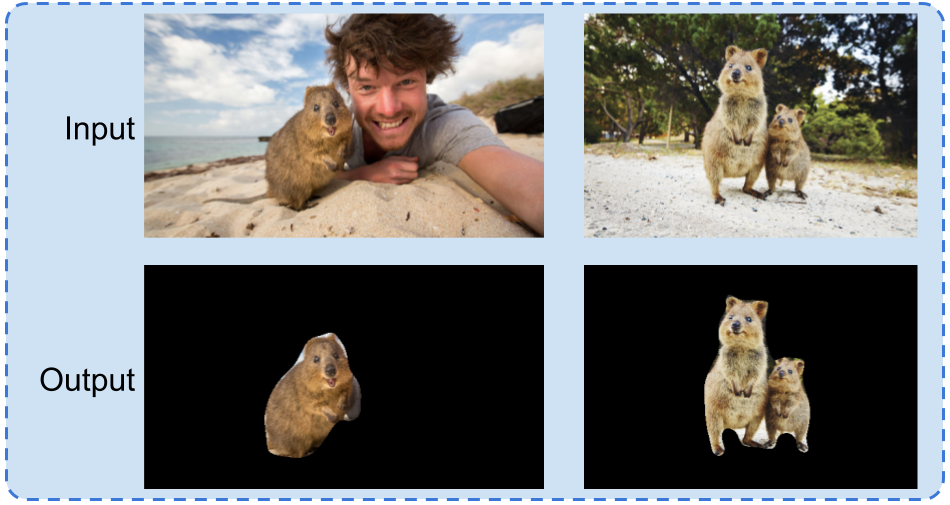 For more information on how to apply the demo on other images you can check ```console python demo.py --help ``` ## Comparision with Caffe version The numbers are compareable to the original ones in the paper which are generated using our main code ([DOCS-caffe](https://github.com/ohosseini/DOCS-caffe)). <center> <table style="text-align:center;"> <tr> <th></th> <th></th> <th>DOCS-caffe</th> <th>DOCS-pytorch</th> </tr> <tr> <td rowspan="2">MSRC</td> <td>P</td> <td>95.4</td> <td>92.0</td> </tr> <tr> <td>J</td> <td>82.9</td> <td>82.3</td> </tr> <tr> <td rowspan="2">Internet</td> <td>P</td> <td>93.5</td> <td>92.9</td> </tr> <tr> <td>J</td> <td>72.6</td> <td>72.0</td> </tr> <tr> <td rowspan="2">iCoseg</td> <td>P</td> <td>95.1</td> <td>94.1</td> </tr> <tr> <td>J</td> <td>84.2</td> <td>84.0</td> </tr> </table> </center> ## Citation If you use this code, please cite our publication: **Deep Object Co-Segmentation**, Weihao Li*, Omid Hosseini Jafari*, Carsten Rother, *ACCV 2018*. ``` @InProceedings{DOCS_ACCV18, title={Deep Object Co-Segmentation}, author={Li, Weihao and Hosseini Jafari, Omid and Rother, Carsten}, booktitle={ACCV}, year={2018} } ``` ## Acknowledgments We used the Pytorch implementation of correlation layer from "Pytorch implementation of FlowNet 2.0" [https://github.com/NVIDIA/flownet2-pytorch](https://github.com/NVIDIA/flownet2-pytorch).
