KO
|
EN
gitlite — search
Search
#typescript
#ai-agents
#ai
#dsh-plugin
#deepseek-harness
#open-source
#cli
#claude-code
#codex
#developer-tools
#react
#windows
easyexcel-plus
★ 81
Open GitHub ↗
扩展easyexcel
Download README (.md)
Explore Similar Repositories
siren
:
Siren provides an easy-to-use universal alert, notification, channels management framework for the entire observability infrastructure.
commitlog
:
Generate Changelogs from Commits (CLI)
mathiu.cpp
:
mathiu : a simple computer algebra system in C++.
quarkus-jooq
:
Quarkus Jooq Extension
6-DOF-DLR-robot-simulation-in-Matlab-Simulink
:
This is the full analysis of the forward, inverse kinematics, trajectory planning, path planning, and controlling the end effector.
// repository documentation
Was this content helpful?
★ 0
(0 ratings)
Select Rating:
★
★
★
★
★
Submit Feedback
Recent Feedback
×
Download README
Do you want to download the
README.md
file for
easyexcel-plus
?
Download (.md)
# EasyExcelPlus <p align="center">为简化开发工作、提高生产率而生</p> <p align="center"> <a href="https://search.maven.org/search?q=g:io.github.gongbox%20AND%20a:easyexcel-plus*"> <img alt="maven-central" src="https://img.shields.io/maven-central/v/io.github.gongbox/easyexcel-plus-boot-starter.svg?style=flat-square"> </a> <a href="https://www.apache.org/licenses/LICENSE-2.0"> <img alt="license" src="https://img.shields.io/badge/license-Apache%202-4EB1BA.svg?style=flat-square"> </a> </p> ## 项目简介 EasyExcelPlus 是一个**导入/导出通用工具包**,用于简化 Web 场景下的 Excel 导入与导出开发: - **导出**:在原有查询接口上增加 `@Export` 注解,即可让同一接口同时支持“正常查询返回 JSON”和“导出 Excel”(通过请求参数切换) - **导入**:在原有批量新增接口上增加 `@Import` 注解,即可支持“模板下载”和“Excel 导入” > 注意:本项目与阿里 `easyexcel` 不是同一个作者;`easyexcel` 作者的最新项目为 `fastexcel`。 ## 社区交流 - **技术讨论 QQ 群**:`779290098` ## 优点(为什么用它) - **易使用**:只需极少的配置即可接入 - **更简洁**:复用原查询/批量新增接口,无需为导入/导出单独再写一套 Controller - **更规范**:查询与导出(批量新增与导入)使用同一请求地址,只需记住业务接口地址即可 - **损耗小**:对原接口性能影响极小(仅在触发导入/导出时生效) - **可扩展**:默认适配阿里 EasyExcel,也可通过 Adapter 接入其他实现 ## 目录 - [快速开始](#快速开始) - [最小示例:给查询接口加导出能力](#最小示例给查询接口加导出能力) - [功能介绍](#功能介绍) - [配置说明](#配置说明) - [模块说明](#模块说明) - [期望 | Futures](#期望--futures) - [License](#license) - [About Me](#about-me) ## 快速开始 ### Maven `easyexcel-plus-boot-starter` 最新版本(Maven Central): [](https://search.maven.org/search?q=g:io.github.gongbox%20AND%20a:easyexcel-plus*) ```xml <dependency> <groupId>io.github.gongbox</groupId> <artifactId>easyexcel-plus-boot-starter</artifactId> <version>Latest Version</version> </dependency> ``` ### 示例工程 - **示例源码**:`https://github.com/gongbox/easyexcel-plus-example` ## 最小示例:给查询接口加导出能力 下面是一个普通查询接口: ```java @GetMapping(value = "test-normal") public Result<List<ExportDemoView>> testNormal() { return Result.success(ExportDemoView.data()); } ``` 返回数据如下: > 演示地址:`http://8.129.7.25/export/test-normal` 若要实现导出excel,只需要在接口上增加注解@Export即可,如下所示: ```java @GetMapping(value = "test-normal") @Export public Result<List<ExportDemoView>> testNormal() { return Result.success(ExportDemoView.data()); } ``` 添加该注解后,接口便同时支持查询、导出,不影响原有的查询。若要导出,则只需要添加请求参数export=excel即可,此时导出数据与查询结果一致,如下所示: > 演示地址:`http://8.129.7.25/export/test-normal?export=excel` ## 功能介绍 <details> <summary><strong>环境说明(模型类 / 配置类 / 配置文件)</strong></summary> ### 环境说明 - 模型类: ```java @Data @ColumnWidth(12) @ContentRowHeight(18) public class ExportDemoView { @ExcelProperty("文本") private String text = RandomUtil.randomString(8); @ExcelProperty("整数") private Integer integerValue = RandomUtil.randomInt(10000); @ExcelProperty("浮点数") private Float floatValue = (float) RandomUtil.randomDouble(-10000, 10000); @ExcelProperty("长浮点数") private Double doubleValue = RandomUtil.randomDouble(-10000, 10000); @ExcelProperty("定点数") private BigDecimal bigDecimal = RandomUtil.randomBigDecimal(BigDecimal.valueOf(10_000)); @ExcelProperty("日期") private LocalDate localDate = LocalDate.now(); @ExcelProperty("日期时间") @ColumnWidth(20) private LocalDateTime localDateTime = LocalDateTime.now(); @ExcelProperty("时间") @ColumnWidth(20) private Date date = new Date(); @ExcelProperty(value = "性别", converter = DefaultEnumConvert.class) private GenderEnum gender = GenderEnum.valueOf(RandomUtil.randomInt(3)); public static List<ExportDemoView> data() { return Stream.generate(ExportDemoView::new) .limit(RandomUtil.randomInt(1, 20)) .collect(Collectors.toList()); } } ``` - 配置类: ```java @Configuration public class EasyExcelPlusConfig { @Bean public ResultHandler resultBuilder() { return new DefaultResultHandler() { @Override public Class<?> resultClass() { return Result.class; } @Override public Object getResultData(Object result) { if (result instanceof Result) { return ((Result<?>) result).getData(); } return super.getResultData(result); } }; } } ``` - 配置文件: ```yaml spring: application: name: export_demo server: port: 80 #以下配置项可根据需要配置,或者不配置使用默认值即可 easyexcel-plus: export: #默认导出Sheet名称,不配则取默认值:Sheet1 default-sheet-name: Sheet1 #模板文件路径,不配则取默认值:空 template-dir: classpath:templates #默认导出文件格式,不配则取默认值:xlsx default-excel-type: xlsx #默认导出方式,不配则取默认值:easy_excel default-export-by: easy_excel import: #默认导入读取的Sheet名称,不配则取默认值:Sheet1 default-sheet-name: Sheet1 #模板文件路径,不配则取默认值:空 template-dir: classpath:templates #默认导入方式,不配则取默认值:easy_excel default-import-by: easy_excel #读取excel超时时间(单位ms),不设置或设置为0时无读取时间限制 read-timeout: 60000 ``` </details> <details> <summary><strong>导出:功能介绍与示例</strong></summary> ### 导出 导出模块用于把**已有查询接口**升级为“查询 + 导出”二合一接口: - **不导出**:正常调用接口,返回 JSON - **导出**:同一路径追加参数 `export=excel`,返回 Excel 文件 > 多导出方案:当同一接口存在多个 `@Export` 时,可追加 `export_tag=...` 选择具体方案。 #### 导出文件名称设置 - **作用**:设置导出文件下载时的文件名(避免默认文件名,提升可读性)。 ##### (1)注解方式指定 - **使用方式**:在接口上添加 `@Export(fileName = "...")`。 ```java @GetMapping(value = "test-fileName") @Export(fileName = "文件名称") public Result<List<ExportDemoView>> testFilename() { return Result.success(ExportDemoView.data()); } ``` > 演示地址:`http://8.129.7.25/export/test-fileName?export=excel` ##### (2)转化器指定 - **作用**:根据日期、用户、业务场景等动态生成文件名。 - **使用方式**:实现 `FileNameConvert`,并在 `@Export(fileNameConvert = ...)` 指定转换器。 ```java @GetMapping(value = "test-fileName-convert") @Export(fileNameConvert = CustomFileNameConvert.class) public Result<List<ExportDemoView>> testFileNameConvert() { return Result.success(ExportDemoView.data()); } public static class CustomFileNameConvert implements FileNameConvert { @Override public String apply(String fileName) { return LocalDate.now().format(DateTimeFormatter.BASIC_ISO_DATE); } } ``` > 演示地址:`http://8.129.7.25/export/test-fileName-convert?export=excel` 或者 ##### (3)业务代码中指定 - **作用**:在业务代码中动态决定文件名(不依赖转换器)。 - **使用方式**:导出场景下通过 `ExportContextHolder.getContext().setFileName(...)` 设置。 ```java @GetMapping(value = "test-fileName-business") @Export public Result<List<ExportDemoView>> testFileNameBusiness() { if (ExportContextHolder.isExportExcel()) { ExportContextHolder.getContext().setFileName("动态文件名称"); } return Result.success(ExportDemoView.data()); } ``` > 演示地址:`http://8.129.7.25/export/test-fileName-business?export=excel` #### Sheet 名称 ##### 固定 Sheet 名称 - **作用**:设置导出 Excel 的 Sheet 名称(便于业务识别)。 - **使用方式**:`@Export(sheetName = "...")`。 ```java @GetMapping(value = "test-sheetName") @Export(sheetName = "Sheet0") public Result<List<ExportDemoView>> testSheetName() { return Result.success(ExportDemoView.data()); } ``` > 演示地址:`http://8.129.7.25/export/test-sheetName?export=excel` ##### 动态设置 Sheet 名称(业务代码) - **作用**:在业务代码中按条件动态决定 Sheet 名称。 - **使用方式**:导出场景下通过 `ExportContextHolder.getContext().setSheetName(...)` 设置。 ```java @GetMapping(value = "test-sheetName-business") @Export public Result<List<ExportDemoView>> testSheetNameBusiness() { if (ExportContextHolder.isExportExcel()) { ExportContextHolder.getContext().setSheetName("业务中修改Sheet名称"); } return Result.success(ExportDemoView.data()); } ``` > 演示地址:`http://8.129.7.25/export/test-sheetName-business?export=excel` #### 输出位置 ##### 导出到固定文件夹 - **作用**:将导出文件写入指定目录(适合归档/离线导出等场景)。 - **使用方式**:`@Export(outputPath = "D:\\\\...")` 指定输出路径。 ```java @GetMapping(value = "test-out-path") @Export(outputPath = "D:\\WorkDir\\temp\\file") public Result<List<ExportDemoView>> testOutPath() { return Result.success(ExportDemoView.data()); } ``` > 演示地址:`http://8.129.7.25/export/test-out-path?export=excel` #### 字段过滤 ##### 字段过滤 - **作用**:按条件决定哪些字段参与导出(例如按权限/配置动态隐藏字段)。 - **使用方式**:实现 `FieldFilter`,并在 `@Export(fieldFilter = ...)` 指定过滤器。 ```java @GetMapping(value = "test-filter") @Export(fieldFilter = CustomFieldFilter.class) public Result<List<ExportDemoView>> testFilter() { return Result.success(ExportDemoView.data()); } public static class CustomFieldFilter implements FieldFilter { @Override public boolean predict(Field field) { return RandomUtil.randomBoolean(); } } ``` > 演示地址:`http://8.129.7.25/export/test-filter?export=excel` #### 文件格式 ##### 设置导出文件格式(xls/xlsx) - **作用**:指定导出文件格式(例如导出为 `xls`)。 - **使用方式**:在 `@Export` 中指定 `excelType`(如 `ExcelType.XLS` / `ExcelType.XLSX`)。 ```java @GetMapping(value = "test-excelType") @Export(excelType = ExcelType.XLS) public Result<List<ExportDemoView>> testExcelType() { return Result.success(ExportDemoView.data()); } ``` > 演示地址:`http://8.129.7.25/export/test-excelType?export=excel` #### 数据转换 ##### 导出数据转换 - **作用**:导出前对查询结果进行二次加工(例如补充数据、转换字段、拼装填充数据等)。 - **使用方式**:实现 `ExportDataConvert`,并在 `@Export(dataConvert = ...)` 指定转换器。 ```java @GetMapping(value = "test-dataConvert") @Export(dataConvert = CustomExportDataConvert.class) public Result<List<ExportDemoView>> testDataConvert() { return Result.success(ExportDemoView.data()); } public static class CustomExportDataConvert implements ExportDataConvert { @Override public List<?> convert(ExportContext exportContext, Object data) { Result<?> responseEntity = (Result<?>) data; List<ExportDemoView> list = (List<ExportDemoView>) responseEntity.getData(); for (int i = 0; i < 20; i++) { list.add(new ExportDemoView()); } return list; } } ``` > 演示地址:`http://8.129.7.25/export/test-dataConvert?export=excel` #### 同一接口多种导出方式(tag) ##### 同一接口多种导出方式(tag) - **作用**:同一接口支持多套导出方案(例如导出 `xls` / `xlsx`,或不同字段/模板的导出)。 - **使用方式**:在同一方法上添加多个 `@Export`,并设置不同的 `tag`;导出时通过 `export_tag=...` 指定使用哪套方案。 ```java @GetMapping(value = "test-tag") @Export(tag = "xls", excelType = ExcelType.XLS) @Export(tag = "xlsx", excelType = ExcelType.XLSX) public Result<List<ExportDemoView>> testTag() { return Result.success(ExportDemoView.data()); } ``` 同一接口可以添加多个注解,以实现支持多种导出,通过注解 tag 属性设置标签,导出时使用参数 `export_tag` 指定标签。 > 演示地址(XLS):`http://8.129.7.25/export/test-tag?export=excel&export_tag=xls` > 演示地址(XLSX):`http://8.129.7.25/export/test-tag?export=excel&export_tag=xlsx` #### 模板导出 ##### 简单模板导出 - **作用**:基于指定模板文件导出,保持模板样式与结构。 - **使用方式**:在 `@Export` 中指定 `template = "xxx.xlsx"`。 ```java /** * 简单模板导出 */ @GetMapping(value = "test-template-simple") @Export(template = "template-simply.xlsx") public Result<List<ExportDemoView>> testTemplateSimple() { return Result.success(ExportDemoView.data()); } ``` > 演示地址:`http://8.129.7.25/export/test-template-simple?export=excel` ##### 模板导出(单个 Sheet) - **作用**:模板填充导出(单 Sheet),可通过 `ExportDataConvert` 组织填充数据(包含列表填充、常量填充等)。 - **使用方式**:`@Export(template = "...", dataConvert = ...)`。 ```java @GetMapping(value = "test-template-single-sheet") @Export(template = "template-single-sheet.xlsx", dataConvert = TemplateSingleSheetDataConvert.class) public Result<List<ExportDemoView>> testTemplateSingleSheet() { return Result.success(ExportDemoView.data()); } public static class TemplateSingleSheetDataConvert implements ExportDataConvert { @Override public List<?> convert(ExportContext exportContext, Object data) { Result<?> responseEntity = (Result<?>) data; ExportFillData exportFillData1 = ExportFillData.builder() .data(responseEntity.getData()) .build(); Map<String, String> map = new HashMap<>(); map.put("name", "名称"); map.put("date", LocalDate.now().format(Times.Formatter.DEFAULT_DATE)); ExportFillData exportFillData2 = ExportFillData.builder() .data(map) .build(); return Lists.newArrayList(exportFillData1, exportFillData2); } } ``` > 演示地址:`http://8.129.7.25/export/test-template-single-sheet?export=excel` ##### 模板导出(多个 Sheet) - **作用**:模板填充导出(多 Sheet),可为不同 Sheet 指定不同数据源。 - **使用方式**:在 `ExportFillData` 中指定 `sheetName`,并返回多组填充数据。 ```java @GetMapping(value = "test-template-much-sheet") @Export(template = "template-much-sheet.xlsx", dataConvert = TemplateMuchSheetDataConvert.class) public Result<List<ExportDemoView>> testTemplateMuchSheet() { return Result.success(ExportDemoView.data()); } public static class TemplateMuchSheetDataConvert implements ExportDataConvert { @Override public List<?> convert(ExportContext exportContext, Object data) { Result<?> responseEntity = (Result<?>) data; Map<String, String> map = new HashMap<>(); map.put("name", "名称"); map.put("date", LocalDate.now().format(Times.Formatter.DEFAULT_DATE)); ExportFillData exportFillData2 = ExportFillData.builder() .sheetName("Sheet1") .data(map) .build(); ExportFillData exportFillData1 = ExportFillData.builder() .sheetName("Sheet2") .data(responseEntity.getData()) .build(); return Lists.newArrayList(exportFillData1, exportFillData2); } } ``` > 演示地址:`http://8.129.7.25/export/test-template-much-sheet?export=excel` ##### 模板导出(公式) - **作用**:模板中包含公式时导出,可通过填充常量(如数据行范围)让公式自动生效。 - **使用方式**:通过 `ExportDataConvert` 返回列表数据 + 常量 Map(示例中 `data_end`)。 ```java @GetMapping(value = "test-template-formula") @Export(template = "template-formula.xls", dataConvert = TemplateFormulaDataConvert.class) public Result<List<ExportDemoView>> testTemplateFormula() { return Result.success(ExportDemoView.data()); } public static class TemplateFormulaDataConvert implements ExportDataConvert { @Override public List<?> convert(ExportContext exportContext, Object data) { Result<?> responseEntity = (Result<?>) data; Collection<?> list = (Collection<?>) responseEntity.getData(); ExportFillData exportFillData1 = ExportFillData.builder() .fillConfig(FillConfig.builder().forceNewRow(true).build()) .data(new FillWrapper("data", list)) .build(); int start = 1; int end = start + (CollUtil.isEmpty(list) ? 0 : list.size() - 1); Map<String, Object> constantMap2 = new HashMap<>(); constantMap2.put("data_end", end); ExportFillData exportFillData2 = ExportFillData.builder() .data(constantMap2) .build(); return Lists.newArrayList(exportFillData1, exportFillData2); } } ``` > 演示地址:`http://8.129.7.25/export/test-template-formula?export=excel` #### 返回类型兼容 ##### 返回类型兼容(数组 / List / Iterable) - **作用**:不依赖统一的包装返回类(如 `Result`),直接返回数组、集合、可迭代对象也可导出。 - **使用方式**:在接口上添加 `@Export`,返回类型可为数组 / `List` / `Iterable`。 ```java /** * 简单导出(直接返回数组) */ @GetMapping(value = "test-normal-array") @Export public ExportDemoView[] testNormalData() { return ExportDemoView.data().toArray(new ExportDemoView[0]); } /** * 简单导出(直接返回集合) */ @GetMapping(value = "test-normal-list") @Export public List<ExportDemoView> testNormalList() { return ExportDemoView.data(); } /** * 简单导出(直接返回迭代器) */ @GetMapping(value = "test-normal-iterable") @Export public Iterable<ExportDemoView> testNormalIterable() { return ExportDemoView.data(); } ``` > 演示地址:`http://8.129.7.25/export/test-normal-array?export=excel` > 演示地址:`http://8.129.7.25/export/test-normal-list?export=excel` > 演示地址:`http://8.129.7.25/export/test-normal-iterable?export=excel` </details> <details> <summary><strong>导入模块:功能介绍与示例</strong></summary> ### 导入模块 导入模块用于把**已有批量新增接口**升级为“批量新增 + 模板下载 + 数据导入”能力: - **模板下载**:同一路径追加参数 `import=template`,返回导入模板 - **数据导入**:同一路径追加参数 `import=excel`,读取 Excel 并把解析结果按你的接口入参类型传入(示例为数组参数) #### 模板下载 ##### 模板下载(默认模板) - **作用**:生成并下载导入模板,便于业务方按模板填数据。 - **使用方式**:在接口上添加 `@Import(modelClass = ...)`,并使用参数 `import=template` 触发模板下载。 ```java @GetMapping(value = "test-template") @Import(modelClass = ExportDemoView.class) public void testTemplate() { } ``` >演示地址: > 演示地址:`http://8.129.7.25/import/test-template?import=template` ##### 模板下载(自定义模板文件/文件名) - **作用**:使用自定义模板文件,并指定下载时的模板文件名。 - **使用方式**:在 `@Import` 中指定 `template` 与 `templateFilename`;用 `import=template` 触发下载。 ```java @GetMapping(value = "test-custom-template") @Import(modelClass = ExportDemoView.class, template = "template-import.xlsx", templateFilename = "自定义模板") public void testCustomTemplate() { } ``` >演示地址: > 演示地址:`http://8.129.7.25/import/test-custom-template?import=template` #### 数据导入 ##### 数据导入(读取 Excel 并注入为入参) - **作用**:读取上传/提交的 Excel,将解析后的数据转换为你的接口入参类型(示例:数组),交给业务逻辑处理。 - **使用方式**:在接口上添加 `@Import`,并使用参数 `import=excel` 触发导入。 ```java @PostMapping(value = "test-import") @Import public Result<ExportDemoView[]> testImport(@RequestBody(required = false) ExportDemoView[] param) { return Result.success(param); } ``` 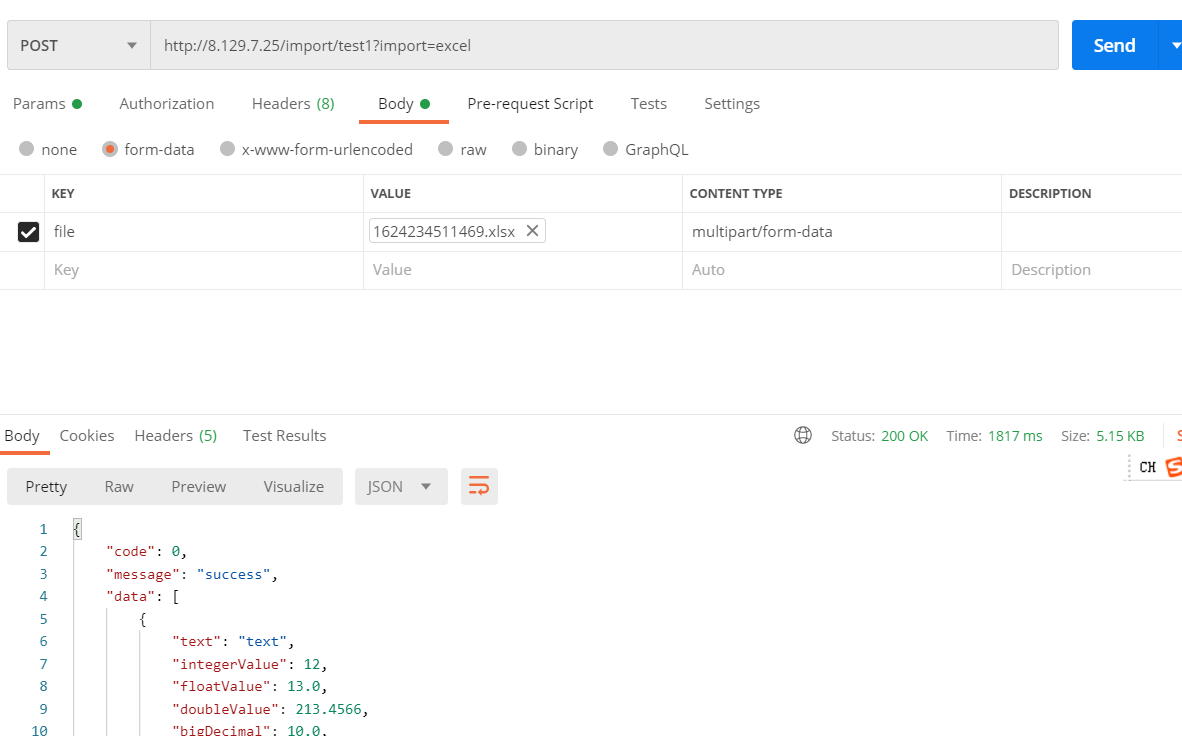 > 演示地址:`http://8.129.7.25/import/test-import?import=excel` #### 同一路径支持模板下载 + 导入(GET/POST) ##### 同一路径支持模板下载 + 数据导入(GET/POST) - **作用**:一个地址同时支持模板下载(GET)与数据导入(POST),对接方只需记住一个 URL。 - **使用方式**:同一路径同时支持 GET/POST,并添加 `@Import`;通过 `import=template` / `import=excel` 切换行为。 ```java @RequestMapping(value = "test-import-template", method = {RequestMethod.GET, RequestMethod.POST}) @Import public Result<ExportDemoView[]> testImportTemplate(@RequestBody(required = false) ExportDemoView[] param) { return Result.success(param); } ```  > 演示地址(模板下载):`http://8.129.7.25/import/test-import?import=template` > 演示地址(导入):`http://8.129.7.25/import/test-import?import=excel` </details> ## 模块说明 项目按职责拆分为多个模块(以仓库目录为准): - `easyexcel-plus-boot-starter`:Spring Boot Starter(业务项目通常只需要引入这一项) - `easyexcel-plus-export`:导出核心能力 - `easyexcel-plus-import`:导入核心能力 - `easyexcel-plus-common`:通用组件与基础能力 - `easyexcel-plus-adapter`:适配层(默认适配 EasyExcel,可扩展) ## 期望 | Futures > 欢迎提出更好的意见,帮助完善 EasyExcelPlus ## License [Apache License 2.0](https://www.apache.org/licenses/LICENSE-2.0) ## About Me [简书](https://www.jianshu.com/u/9d2985772d9a)
