KO
|
EN
gitlite — search
Search
#ai-agents
#ai
#claude-code
#developer-tools
#python
#react
#automation
#devops
#rust
#docker
#windows
#macos
SharpCaster
★ 334
Open GitHub ↗
Chromecast C# CLI + SDK
Download README (.md)
Explore Similar Repositories
ngx-meta
:
Dynamic page title & meta tags utility for Angular (w/server-side rendering)
rocketmq-operator
:
Apache RocketMQ Operator
clawshell
:
The local runtime control layer for OpenClaw/Hermes-agent, PII & sensitive credentials protection.
Hierarchical-Actor-Critic-HAC-PyTorch
:
PyTorch implementation of Hierarchical Actor Critic (HAC) for OpenAI gym environments
binance-connector-go
:
Simple GO connector to Binance API
// repository documentation
Was this content helpful?
★ 0
(0 ratings)
Select Rating:
★
★
★
★
★
Submit Feedback
Recent Feedback
×
Download README
Do you want to download the
README.md
file for
SharpCaster
?
Download (.md)
 # SharpCaster [](https://github.com/Tapanila/SharpCaster/actions/workflows/dotnet.yml) [](https://www.nuget.org/packages/SharpCaster/) [](https://community.chocolatey.org/packages/sharpcaster) [](https://github.com/Tapanila/homebrew-sharpcaster) SharpCaster is a cross-platform toolkit for communicating with Google Chromecast devices. It includes: - C# SDK (NuGet): A library for .NET apps to discover, connect, launch apps, and control media on Chromecast devices. - Sharpcaster Console (CLI): A cross‑platform command-line app for controlling Chromecast from your terminal, distributed via Chocolatey and Homebrew. C# SDK supports .NET Standard 2.0 and .NET 9 (including Native AOT). Sharpcaster console is built with Native AOT for fast startup, low memory usage and doesn't require .NET installed, works on Windows, macOS, and Linux. ## Table of Contents - [Features](#features) - [Installation](#installation) - [C# SDK (NuGet)](#c-sdk-nuget) - [Sharpcaster Console (CLI)](#sharpcaster-console-cli) - [Quick Start](#quick-start) - [Comprehensive Examples](#comprehensive-examples) - [Media Queue Management](#media-queue-management) - [Volume Control](#volume-control) - [Event Handling](#event-handling) - [Custom Chromecast Channels](#custom-chromecast-channels) - [Troubleshooting](#troubleshooting) - [Contributing](#contributing) - [License](#license) ## Features ✅ **Device Discovery**: Automatic discovery of Chromecast devices on your local network using mDNS ✅ **Media Control**: Complete media playback control (play, pause, stop, seek, volume) ✅ **Queue Management**: Support for media queues with navigation (next, previous, shuffle, repeat) ✅ **Application Management**: Launch and manage Chromecast applications ✅ **Custom Channels**: Extensible architecture for custom Chromecast channels ✅ **Cross-Platform**: Compatible with .NET Standard 2.0 and .NET 9 ✅ **AOT Ready**: Full support for Native AOT compilation in .NET 9 ✅ **Async/Await**: Modern async programming model throughout ✅ **Event-Driven**: Rich event system for real-time status updates ## Installation ### C# SDK (NuGet) Install via NuGet Package Manager: ```bash Install-Package SharpCaster ``` Or via .NET CLI: ```bash dotnet add package SharpCaster ``` ### Sharpcaster Console (CLI) Control Chromecast devices from your terminal. - Homebrew (macOS/Linux): ```bash brew tap Tapanila/sharpcaster brew install sharpcaster ``` - Chocolatey (Windows): ```powershell choco install sharpcaster --pre ``` After installation, run `sharpcaster` for interactive mode, or use direct commands like: ```bash sharpcaster list sharpcaster "Living Room TV" play "https://example.com/video.mp4" --title "Sample" ``` For full CLI usage and examples, see `SharpCaster.Console/README.md`. ## Quick Start ### 1. Discover and Connect to Chromecast ```csharp using Sharpcaster; using Sharpcaster.Models; using Sharpcaster.Models.Media; // Discover Chromecast devices var locator = new ChromecastLocator(); var cancellationToken = new CancellationTokenSource(TimeSpan.FromSeconds(5)).Token; var chromecasts = await locator.FindReceiversAsync(cancellationToken); if (!chromecasts.Any()) { Console.WriteLine("No Chromecast devices found"); return; } // Connect to first found device var chromecast = chromecasts.First(); var client = new ChromecastClient(); await client.ConnectChromecast(chromecast); Console.WriteLine($"Connected to {chromecast.Name}"); ``` ### 2. Launch Application and Play Media ```csharp // Launch the default media receiver app await client.LaunchApplicationAsync("CC1AD845"); // Default Media Receiver // Create and load media var media = new Media { ContentUrl = "https://commondatastorage.googleapis.com/gtv-videos-bucket/CastVideos/mp4/DesigningForGoogleCast.mp4", ContentType = "video/mp4", Metadata = new MediaMetadata { Title = "Sample Video", SubTitle = "A demonstration video" } }; var mediaStatus = await client.MediaChannel.LoadAsync(media); Console.WriteLine($"Media loaded: {mediaStatus.PlayerState}"); ``` ## Comprehensive Examples ### Complete Media Player Example ```csharp public class ChromecastMediaPlayer { private ChromecastClient _client; private ChromecastReceiver _device; public async Task<bool> ConnectAsync(string deviceName = null) { try { var locator = new ChromecastLocator(); var devices = await locator.FindReceiversAsync(CancellationToken.None); _device = deviceName != null ? devices.FirstOrDefault(d => d.Name.Contains(deviceName)) : devices.FirstOrDefault(); if (_device == null) return false; _client = new ChromecastClient(); await _client.ConnectChromecast(_device); // Subscribe to events _client.MediaChannel.StatusChanged += OnMediaStatusChanged; _client.Disconnected += OnDisconnected; return true; } catch (Exception ex) { Console.WriteLine($"Connection failed: {ex.Message}"); return false; } } public async Task PlayVideoAsync(string url, string title = null) { await _client.LaunchApplicationAsync("CC1AD845"); // Default Media Receiver var media = new Media { ContentUrl = url, ContentType = GetContentType(url), Metadata = new MediaMetadata { Title = title ?? Path.GetFileNameWithoutExtension(url), MetadataType = MetadataType.Movie } }; await _client.MediaChannel.LoadAsync(media); } public async Task PlayAudioAsync(string url, string title = null, string artist = null) { await _client.LaunchApplicationAsync("CC1AD845"); var media = new Media { ContentUrl = url, ContentType = GetContentType(url), Metadata = new MusicTrackMetadata { Title = title ?? Path.GetFileNameWithoutExtension(url), Artist = artist, MetadataType = MetadataType.MusicTrack } }; await _client.MediaChannel.LoadAsync(media); } private void OnMediaStatusChanged(object sender, MediaStatus status) { Console.WriteLine($"Media Status: {status.PlayerState} - {status.CurrentTime:F1}s"); } private void OnDisconnected(object sender, EventArgs e) { Console.WriteLine("Disconnected from Chromecast"); } private static string GetContentType(string url) { var extension = Path.GetExtension(url).ToLower(); return extension switch { ".mp4" => "video/mp4", ".mp3" => "audio/mpeg", ".wav" => "audio/wav", ".webm" => "video/webm", _ => "video/mp4" }; } } ``` ## Media Queue Management SharpCaster supports advanced queue operations for playlist-style media playback: ```csharp // Create a media queue var queueItems = new[] { new QueueItem { Media = new Media { ContentUrl = "https://example.com/song1.mp3", ContentType = "audio/mpeg", Metadata = new MusicTrackMetadata { Title = "Song 1", Artist = "Artist 1" } } }, new QueueItem { Media = new Media { ContentUrl = "https://example.com/song2.mp3", ContentType = "audio/mpeg", Metadata = new MusicTrackMetadata { Title = "Song 2", Artist = "Artist 2" } } } }; // Load queue with repeat mode await client.MediaChannel.QueueLoadAsync(queueItems, 0, RepeatModeType.ALL); // Navigate through queue await client.MediaChannel.QueueNextAsync(); // Next track await client.MediaChannel.QueuePrevAsync(); // Previous track // Get queue information var itemIds = await client.MediaChannel.QueueGetItemIdsAsync(); var items = await client.MediaChannel.QueueGetItemsAsync(itemIds); ``` ## Volume Control ```csharp // Get current volume var status = await client.ReceiverChannel.GetChromecastStatusAsync(); Console.WriteLine($"Current volume: {status.Volume.Level:P0}"); // Set volume (0.0 to 1.0) await client.ReceiverChannel.SetVolumeAsync(0.5f); // Mute/unmute await client.ReceiverChannel.SetMutedAsync(true); await client.ReceiverChannel.SetMutedAsync(false); ``` ## Event Handling SharpCaster provides rich event support for real-time updates: ```csharp // Media events client.MediaChannel.StatusChanged += (sender, status) => { Console.WriteLine($"Player State: {status.PlayerState}"); Console.WriteLine($"Current Time: {status.CurrentTime}s"); Console.WriteLine($"Duration: {status.Media?.Duration}s"); }; // Connection events client.Disconnected += (sender, args) => { Console.WriteLine("Connection lost to Chromecast"); }; // Application events client.ReceiverChannel.StatusChanged += (sender, status) => { foreach (var app in status.Applications ?? []) { Console.WriteLine($"Running app: {app.DisplayName} ({app.AppId})"); } }; ``` ## Custom Chromecast Channels Create custom channels for specialized applications: ```csharp public class CustomGameChannel : ChromecastChannel { public CustomGameChannel(ILogger<CustomGameChannel> logger) : base("custom.game", logger) { } public async Task SendGameCommandAsync(string command, object data) { var message = new { type = command, data = data }; await SendAsync(JsonSerializer.Serialize(message)); } protected override async Task OnMessageReceivedAsync(string message, string messageType) { // Handle custom game messages var gameMessage = JsonSerializer.Deserialize<GameMessage>(message); // Process game-specific logic } } // Register and use custom channel var gameChannel = new CustomGameChannel(logger); client.RegisterChannel(gameChannel); ``` You can also reverse engineer existing channels: 1. In Chrome, go to `chrome://net-export/` 2. Select 'Include raw bytes (will include cookies and credentials)' 3. Click 'Start Logging to Disk' 4. Cast from your favorite web app 5. Stop logging and open the log in [netlog-viewer](https://netlog-viewer.appspot.com/) 6. Search for `type:SOCKET` and find familiar JSON data 7. Collect the exchanged JSON 8. Create a new class inheriting from `ChromecastChannel` and implement your logic ## Troubleshooting ### Common Issues and Solutions **Device Discovery Issues:** ```csharp // Increase discovery timeout for slow networks var cancellationToken = new CancellationTokenSource(TimeSpan.FromSeconds(10)).Token; var devices = await locator.FindReceiversAsync(cancellationToken); // Manually specify device if discovery fails var manualDevice = new ChromecastReceiver { Name = "My Chromecast", DeviceUri = new Uri("http://192.168.1.100"), Port = 8009 }; ``` **Connection Timeouts:** ```csharp // Enable logging for debugging var loggerFactory = LoggerFactory.Create(builder => builder.AddConsole().SetMinimumLevel(LogLevel.Debug)); var client = new ChromecastClient(loggerFactory); ``` **Media Loading Failures:** - Ensure media URLs are publicly accessible - Verify correct `ContentType` is specified - Check that the Chromecast supports the media format - Use HTTPS URLs when possible **Network Issues:** - Ensure device is on the same network as Chromecast - Check firewall settings (port 8009 must be accessible) - Verify mDNS/Bonjour is enabled on the network ### Error Handling Best Practices ```csharp try { await client.MediaChannel.LoadAsync(media); } catch (TimeoutException) { Console.WriteLine("Request timed out - check network connection"); } catch (InvalidOperationException ex) { Console.WriteLine($"Invalid operation: {ex.Message}"); } catch (Exception ex) { Console.WriteLine($"Unexpected error: {ex.Message}"); } ``` ## Demo 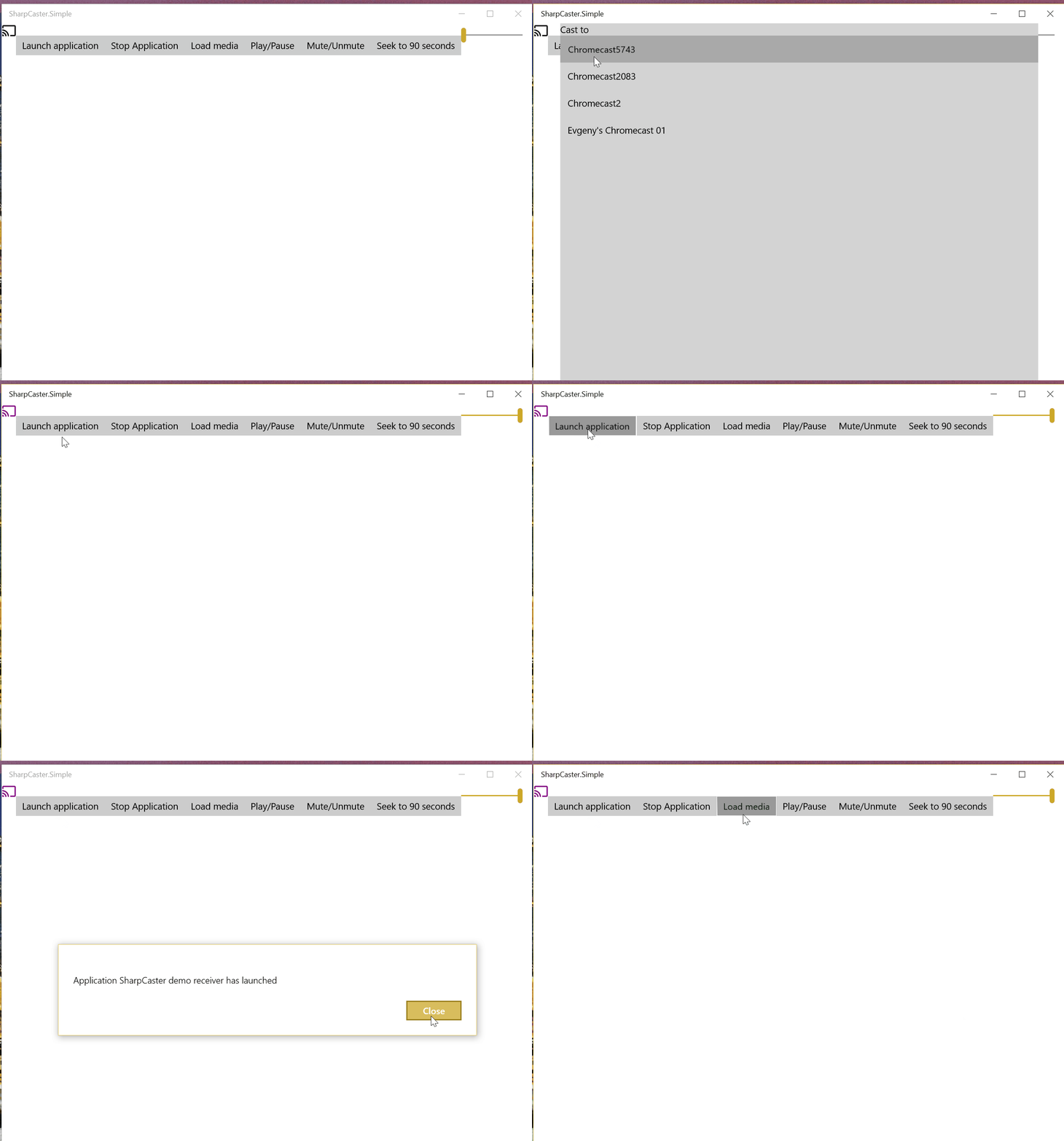 ## Supported Platforms - **.NET Standard 2.0** - Maximum compatibility across .NET implementations - **.NET 9** - Latest features including Native AOT support - **Compatible with**: .NET Framework 4.6.1+, .NET Core 2.0+, .NET 5+, Xamarin, Unity ## Contributing We welcome contributions! Here's how you can help: 1. **Fork** the repository 2. **Create** a feature branch (`git checkout -b feature/AmazingFeature`) 3. **Commit** your changes (`git commit -m 'Add some AmazingFeature'`) 4. **Push** to the branch (`git push origin feature/AmazingFeature`) 5. **Open** a Pull Request ### Development Setup ```bash git clone https://github.com/Tapanila/SharpCaster.git cd SharpCaster dotnet restore dotnet build dotnet test ``` ### Testing Tests require a physical Chromecast device on the network: ```bash dotnet test ``` Some of the tests may require few tries to pass due to network conditions. ## License This project is licensed under the MIT License - see the [LICENSE](LICENSE.txt) file for details.
