KO
|
EN
gitlite — search
Search
#javascript
#python
#hacktoberfest
#react
#ai
#typescript
#llm
#go
#golang
#android
#machine-learning
#rust
#deep-learning
#linux
vulkan_radix_sort
★ 51
Open GitHub ↗
Vulkan Radix Sort
Download README (.md)
Explore Similar Repositories
splatter
:
Splatter is a WebGPU based gaussian splatting engine written in Rust
voracious_sort
:
Voracious radix sort
ShaderOneSweep
:
A compute shader implementation of the OneSweep sorting algorithm.
gpu-radix-sort
:
CUDA implementation of parallel radix sort using Blelloch scan
zermelo
:
A radix sorting library for Go (golang)
// repository documentation
Was this content helpful?
★ 0
(0 ratings)
Select Rating:
★
★
★
★
★
Submit Feedback
Recent Feedback
×
Download README
Do you want to download the
README.md
file for
vulkan_radix_sort
?
Download (.md)
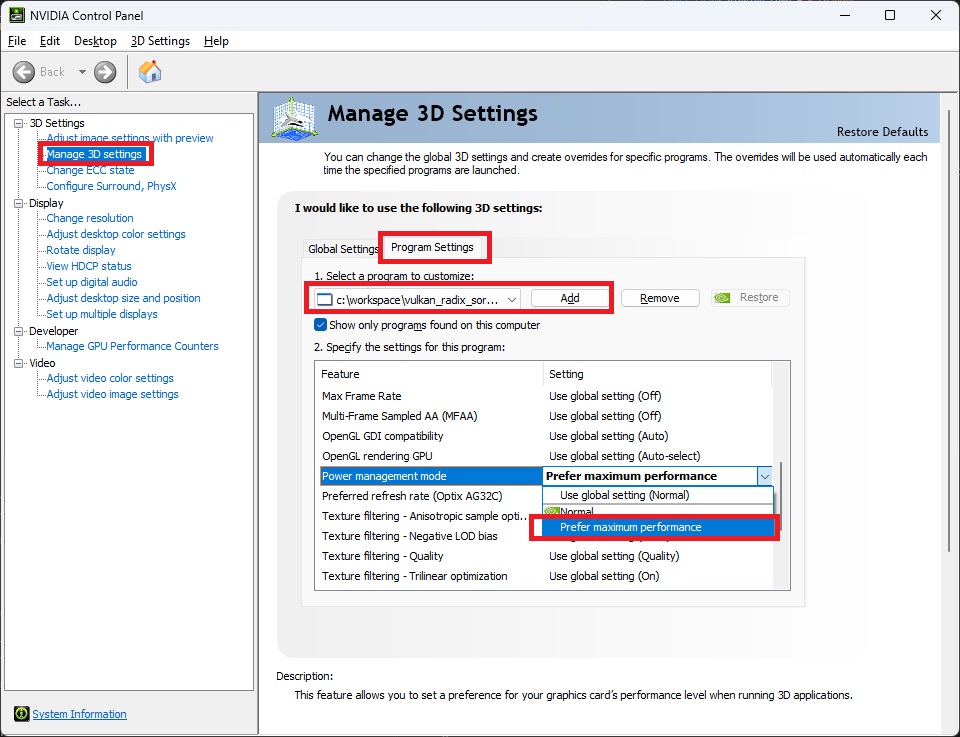
# vulkan_radix_sort Reduce-then-scan GPU radix sort, implemented as a single-file header-only Vulkan library. No additional dependencies. > **Note:** As of July 2026 (CUDA 13.2, CUB v3.2.0 Onesweep), CUB is faster by 1.39× on keys-only and 1.19× on key-value at N = 2^25. Still a practical choice for Vulkan-based workflows. ## Requirements - `VulkanSDK >= 1.4.328.1` with `pushDescriptor` and `synchronization2` enabled - download from https://vulkan.lunarg.com/ (push descriptor requires >= 1.4; >= 1.4.328.1 for macOS) - `cmake >= 3.24` - Subgroup size of 32 or 64 lanes, and >= 20 KB of workgroup (`groupshared`) memory Performance is tuned for NVIDIA GPUs with a subgroup size of 32. Subgroup size 64 devices should still work, just not necessarily as fast, and mobile GPUs with a subgroup size of 16 or smaller aren't supported. ## Build `slangc` v2026.11 is downloaded automatically at configure time; to use the Vulkan SDK's instead, add `-DVRDX_SLANGC_FROM_SDK=ON`, e.g. `cmake -B build -DVRDX_SLANGC_FROM_SDK=ON`. **Linux/macOS** ```bash $ cmake -B build -DCMAKE_BUILD_TYPE=Release $ cmake --build build -j ``` **Windows** ```bash $ cmake -B build $ cmake --build build --config Release -j ``` ## Run Benchmark **Linux/macOS** ```bash $ ./build/bench <type> [-n N]... [-o output.csv] [--validation] [--timestamps] [--no-verify] ``` **Windows** ```bash $ ./build/Release/bench.exe <type> [-n N]... [-o output.csv] [--validation] [--timestamps] [--no-verify] ``` - `type`: `cpu`, `vulkan`, `cuda`, `fuchsia` - `-n N`: run only given N (repeatable); default sweeps 2^18–2^25 (128 steps, 1 warmup + 10 timed runs) - `-o output.csv`: write median GPU/CPU throughput to CSV; omit for no CSV - `--validation`: enable Vulkan validation layers (off by default) - `--timestamps`: per-stage GPU timing (upsweep/spine/downsweep) via Vulkan query pool; adds overhead, Vulkan only - `--no-verify`: skip the correctness check For example: ```bash $ ./build/bench vulkan -n 1048576 --validation --timestamps # debug: validation layers + per-stage timing $ ./build/bench vulkan -n 1048576 # quick throughput check ``` Run every available backend and plot in one command: ```bash $ python tools/bench_all.py ``` Saves each backend's CSV and a `results.png` plot to `benchmarks/<timestamp>/`. Or save each backend's CSV manually, then plot: ```bash $ ./build/bench vulkan -o vulkan.csv $ ./build/bench cuda -o cuda.csv $ ./build/bench fuchsia -o fuchsia.csv $ python tools/plot.py vulkan.csv cuda.csv fuchsia.csv --output results.png ``` ### Results Test environment: Windows, NVIDIA GeForce RTX 5080, CUDA 13.2, CUB v3.2.0 (Onesweep default). Median GPU and CPU throughput at N = 2^25. Ratios are GPU throughput relative to this library (> 1× means the competitor is faster). | Sort type | Backend | GPU (GItems/s) | CPU (GItems/s) | Ratio | |---|---|---|---|---| | 32-bit keys only | VRDX | 16.26 | 15.73 | – | | 32-bit keys only | Fuchsia | 15.56 | 14.92 | 0.96× | | 32-bit keys only | CUB | 22.54 | 20.55 | 1.39× | | 32-bit key-value | VRDX | 9.89 | 9.67 | – | | 32-bit key-value | Fuchsia | 5.19 | 5.08 | 0.52× | | 32-bit key-value | CUB | 11.73 | 11.13 | 1.19× | Keys-only now edges out [Fuchsia radix sort](https://github.com/juliusikkala/fuchsia_radix_sort) by about 5%, after transposing the partition-histogram layout for coalesced spine access and skipping padding partitions in indirect sorts. Fuchsia is 1.91× slower on key-value — it packs pairs into a single 64-bit key, doubling memory traffic, while this library sorts the two buffers independently. Key-value still trails CUB by 1.19×, with room for a similar optimization. 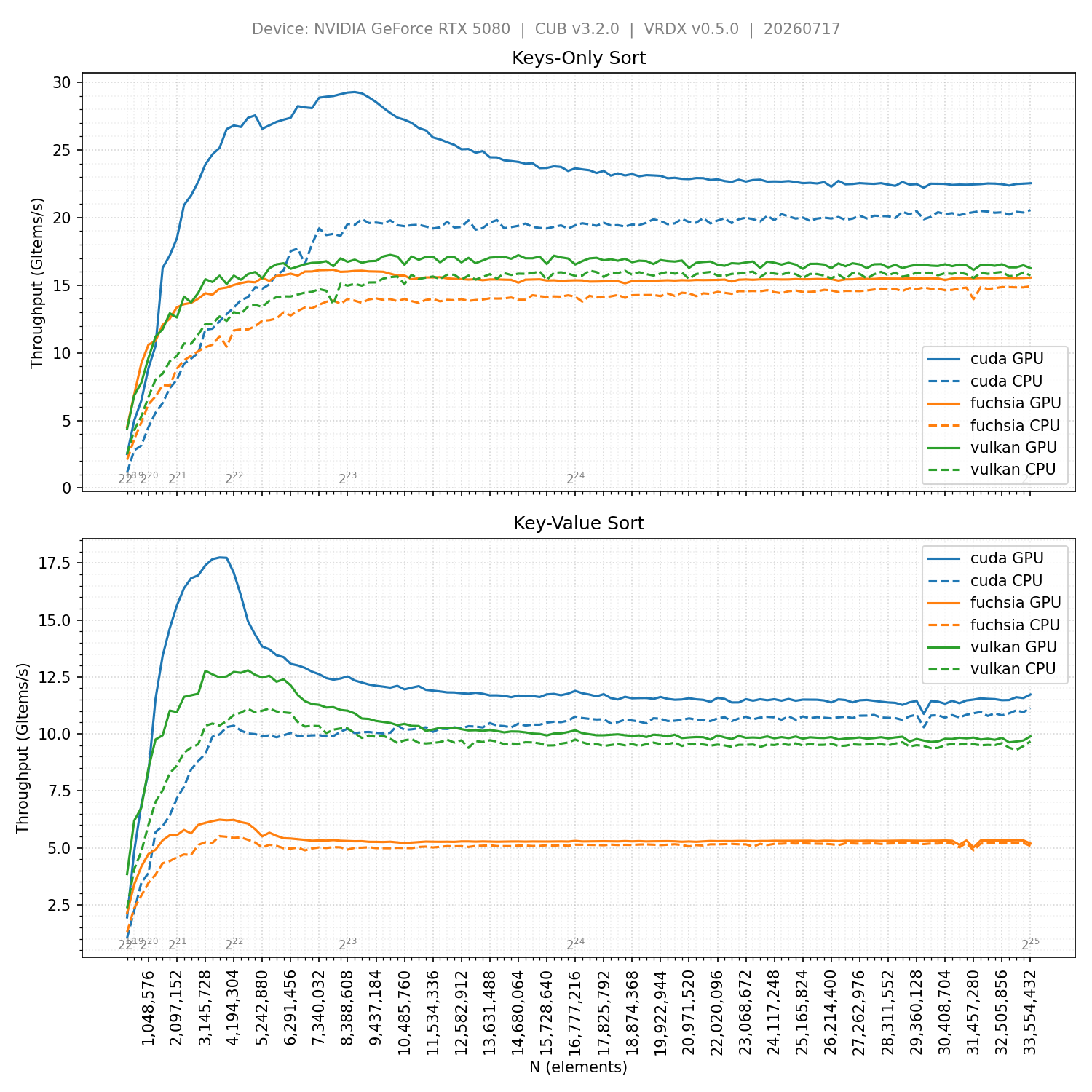 ## Integration Integrate via CMake or by copying `include/vk_radix_sort.h` into your project. ### CMake 1. Add as a subdirectory: ```cmake add_subdirectory(path/to/vulkan_radix_sort) ``` or via `FetchContent`: ```cmake include(FetchContent) FetchContent_Declare( vulkan_radix_sort GIT_REPOSITORY https://github.com/jaesung-cs/vulkan_radix_sort.git GIT_TAG ... # pin to a commit ) FetchContent_MakeAvailable(vulkan_radix_sort) ``` 1. Link to `vk_radix_sort`: ```cmake # With Volk target_link_libraries(my_project PRIVATE volk::volk_headers vk_radix_sort) # With standard Vulkan loader target_link_libraries(my_project PRIVATE Vulkan::Vulkan vk_radix_sort) ``` ### Copy header Copy `include/vk_radix_sort.h` into your project and include it directly. ## Usage 1. In exactly one source file, define `VRDX_IMPLEMENTATION` before including `vk_radix_sort.h`. Include `volk.h` first if using Volk. ```c++ // With Volk #include "volk.h" #define VRDX_IMPLEMENTATION #include "vk_radix_sort.h" // With standard Vulkan headers #define VRDX_IMPLEMENTATION #include "vk_radix_sort.h" ``` 1. Enable the required features when creating the `VkDevice`: ```c++ VkPhysicalDeviceVulkan13Features features13 = { .sType = VK_STRUCTURE_TYPE_PHYSICAL_DEVICE_VULKAN_1_3_FEATURES, .synchronization2 = VK_TRUE, }; VkPhysicalDeviceVulkan14Features features14 = { .sType = VK_STRUCTURE_TYPE_PHYSICAL_DEVICE_VULKAN_1_4_FEATURES, .pNext = &features13, .pushDescriptor = VK_TRUE, }; VkDeviceCreateInfo deviceInfo = { .sType = VK_STRUCTURE_TYPE_DEVICE_CREATE_INFO, .pNext = &features14, ... }; vkCreateDevice(physicalDevice, &deviceInfo, nullptr, &device); ``` 1. Create `VkBuffer` for keys and values with `VK_BUFFER_USAGE_STORAGE_BUFFER_BIT`. 1. Create `VrdxSorter` (`vrdxCreateSorter`): ```c++ VrdxSorter sorter = VK_NULL_HANDLE; VrdxSorterCreateInfo sorterInfo = { .physicalDevice = physicalDevice, .device = device, .pipelineCache = pipelineCache, // optional, VK_NULL_HANDLE is valid }; VkResult result = vrdxCreateSorter(&sorterInfo, &sorter); if (result != VK_SUCCESS) { /* handle error */ } ``` 1. Allocate a temporary storage buffer: ```c++ VrdxSorterStorageRequirements requirements; vrdxGetSorterStorageRequirements(sorter, elementCount, VRDX_SORT_MODE_KEYS_ONLY, &requirements); // keys only vrdxGetSorterStorageRequirements(sorter, elementCount, VRDX_SORT_MODE_KEY_VALUE, &requirements); // key-value VkBufferCreateInfo bufferInfo = { .sType = VK_STRUCTURE_TYPE_BUFFER_CREATE_INFO, .size = requirements.size, .usage = requirements.usage, ... }; ``` 1. Record sort commands (`vrdxCmdSort`). Buffer offsets must be multiples of `minStorageBufferOffsetAlignment` (usually `16`). The sort rebinds pipeline, layout, and push constants — previously bound state is lost. Add **execution barriers** around the sort. Use global memory barriers rather than per-resource barriers ([Vulkan synchronization examples](https://github.com/KhronosGroup/Vulkan-Docs/wiki/Synchronization-Examples#three-dispatches-first-dispatch-writes-to-one-storage-buffer-second-dispatch-writes-to-a-different-storage-buffer-third-dispatch-reads-both)): - **Before** the sort: `COMPUTE_SHADER` stage (+ `TRANSFER` for indirect), `SHADER_READ` access (+ `TRANSFER_READ` for indirect). - **After** the sort: `COMPUTE_SHADER` stage, `SHADER_WRITE` access. ```c++ // Barrier before the sort VkMemoryBarrier2 memoryBarrier = { .sType = VK_STRUCTURE_TYPE_MEMORY_BARRIER_2, .srcStageMask = ..., .srcAccessMask = ..., .dstStageMask = VK_PIPELINE_STAGE_2_COMPUTE_SHADER_BIT, // | VK_PIPELINE_STAGE_2_TRANSFER_BIT for indirect .dstAccessMask = VK_ACCESS_2_SHADER_READ_BIT, // | VK_ACCESS_2_TRANSFER_READ_BIT for indirect }; VkDependencyInfo dependencyInfo = { .sType = VK_STRUCTURE_TYPE_DEPENDENCY_INFO, .memoryBarrierCount = 1, .pMemoryBarriers = &memoryBarrier, }; vkCmdPipelineBarrier2(commandBuffer, &dependencyInfo); // Sort. elementCount is exact for a direct sort, or an upper bound if elementCountBuffer is set // (actual count read from GPU, must not exceed elementCount). VrdxSortInfo info = { .elementCount = elementCount, .elementCountBuffer = elementCountBuffer, // omit for a direct sort .keysBuffer = keysBuffer, .valuesBuffer = valuesBuffer, // omit for a keys-only sort .storageBuffer = storageBuffer, ... // offsets, queryPool, etc.; set explicitly if needed }; vrdxCmdSort(commandBuffer, sorter, &info); // Barrier after the sort memoryBarrier = { .sType = VK_STRUCTURE_TYPE_MEMORY_BARRIER_2, .srcStageMask = VK_PIPELINE_STAGE_2_COMPUTE_SHADER_BIT, .srcAccessMask = VK_ACCESS_2_SHADER_WRITE_BIT, .dstStageMask = ..., .dstAccessMask = ..., }; vkCmdPipelineBarrier2(commandBuffer, &dependencyInfo); ``` 1. Destroy the `VrdxSorter` (`vrdxDestroySorter`) once no longer needed, e.g. before destroying the `VkDevice`. Ensure the device is idle (no in-flight command buffers referencing the sorter) first; `VK_NULL_HANDLE` is a safe no-op. ```c++ vrdxDestroySorter(sorter); ``` ## Development Guide After modifying shaders or `src/vk_radix_sort.h.in`, run the cmake build — it compiles shaders with `slangc` into `src/generated/*.h`, then assembles `include/vk_radix_sort.h` from the template — and commit the regenerated header. Use the default build (without `-DVRDX_SLANGC_FROM_SDK=ON`) for reproducible output. Each generated file notes its `slangc` version: ```c // Generated by slangc 2026.11 ``` Bump `slangc` via `SLANG_VERSION` in `cmake/Slangc.cmake`; bump the library version via `VERSION` in `CMakeLists.txt`'s `project()` call. Rebuild and commit the regenerated header either way. ## Troubleshooting **NVIDIA GPU (Windows): slow performance after a few seconds.** - Cause: NVIDIA driver downgrades GPU/memory clock under sustained load. Check with the Performance Overlay (Alt+R). - Fix: set performance mode to maximum in NVIDIA Control Panel.