KO
|
EN
gitlite — search
Search
#javascript
#python
#hacktoberfest
#react
#ai
#typescript
#llm
#go
#golang
#android
#machine-learning
#rust
#deep-learning
#linux
flask-vue
★ 8
Open GitHub ↗
Sample project using flask and vue.js
Download README (.md)
Explore Similar Repositories
newtetris
:
微信小游戏俄罗斯方块
corebox
:
Combination of some common desktop apps
VexIQMotor
:
Vex IQ motor controls for Arduino usage.
awesome-cv-fixed
:
Awesome CV - Fixed Skills Section
just_debounce_it
:
A simple debounce library for Dart.
// repository documentation
Was this content helpful?
★ 0
(0 ratings)
Select Rating:
★
★
★
★
★
Submit Feedback
Recent Feedback
×
Download README
Do you want to download the
README.md
file for
flask-vue
?
Download (.md)
# flask-vue Sample project using flask and vue.js ecosystem. It aims to solve a business problem regarding the definition of customizable risk types within the context of an insurance. ## Live demo It is available a version deployed with Heroku [flask-vue](https://flask-vue-risk-types.herokuapp.com/) . ## Getting Started These instructions will get you a copy of the project up and running on your local machine for development and testing purposes. See deployment for notes on how to deploy the project on a live system. ### Prerequisites What things you need to install the software. ``` git python ``` ### Installing A step by step series of examples that tell you have to get a development env running 1. Clone the repo: ``` git clone https://github.com/antomor/flask-vue.git ``` 2. Go into the directory which just cloned the repository in: ``` cd flask-vue ``` 3. Install the back-end dependencies ``` pip install -r requirements.txt ``` 4. Move into the client app directory ``` cd app/client/app ``` 3. Install the front-end dependencies ``` npm install ``` 4. Build the front-end app 1. in development-mode ``` npm run dev ``` 2. in production mode ``` npm run build ``` **Important: In order to let the client app to point to the right backend API, check the URL set in the `backend.js` file.** 5. Move back to the root project directory ``` cd ../../../ ``` 6. Database: it has to be generated ``` python manage.py db upgrade ``` It can be also filled with an initial set of data: ``` python manage.py seed ``` For any change it can be upgraded with: ``` python manage.py db migrate ``` and ``` python manage.py db upgrade ``` The default location of the database is `/tmp/flask-vue.db`, but it can be easily changed by setting the environment variable `SQLALCHEMY_DATABASE_URI` Here an ER diagram of the data model. 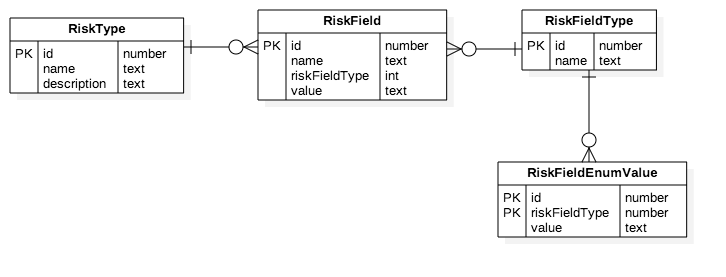 7. Run the application ``` python run.py (or flask run) ``` 8. See the application in the browser ``` 127.0.0.1:5000 ``` ## Running the tests Explain how to run the automated tests for this system. ### Break down into end to end tests The repository contains test for the api and for the front-end part. 1. API tests ``` python test_api.py ``` 2. Front-end Unit tests ``` No unit test configured at the moment. ``` 3. E2E tests ``` No e2e tests configured at the moment. ``` ## Deployment Add additional notes about how to deploy this on a live system ## Built With * [flask](http://flask.pocoo.org/) - The web framework used * [vue.js](https://vuejs.org/) - Dependency Management * [flask-SQLAlchemy](http://flask-sqlalchemy.pocoo.org/2.3/) - flask extension to add support for SQLAlchemy (ORM) ## Authors * **Antonio Morrone** - [Antomor](https://github.com/antomor) ## License This project is licensed under the MIT License - see the [LICENSE.md](LICENSE.md) file for details ## Acknowledgments * BriteCore
